minekube/gate and the Minecraft proxy that absorbs Bedrock and Via
Build efficient Bedrock & Java Minecraft networks with multi-version support. Powers global Connect network at production scale. Runs with 10MB.
At a glance
- What is it?
- Gate is an extensible, parallelised Minecraft proxy written in Go, with built-in Bedrock support through managed Geyser and managed version translation through a vialite subprocess, so a network can serve Java and Bedrock players on one port. The deployment is a single 10 MB binary or a distroless container, and the documentation lives on a website rather than in the repository.
- Who is it for?
- Adopt Gate if you run a Minecraft network and want Bedrock players and mixed client versions to work without a pile of sidecar processes, and if you are willing to accept a proxy that sits in the path of every connection. Do not adopt it for a single vanilla server, where a plain server is simpler, and do not expect embedded translation to cover API-registered backends, since the documentation limits embedded mode to configured servers.
- Can I use it commercially?
- Yes. Apache-2.0 is a permissive licence: you can use, modify and sell software built on it, as long as you keep its copyright and licence notices.
- Is it still maintained?
- Yes. The repository last received commits 1 day ago.
- What is it written in?
- Mainly Go, according to GitHub's language statistics.
Answers come from the project's GitHub data, last synced on November 6, 2026, and from our analysis. They are not legal advice.
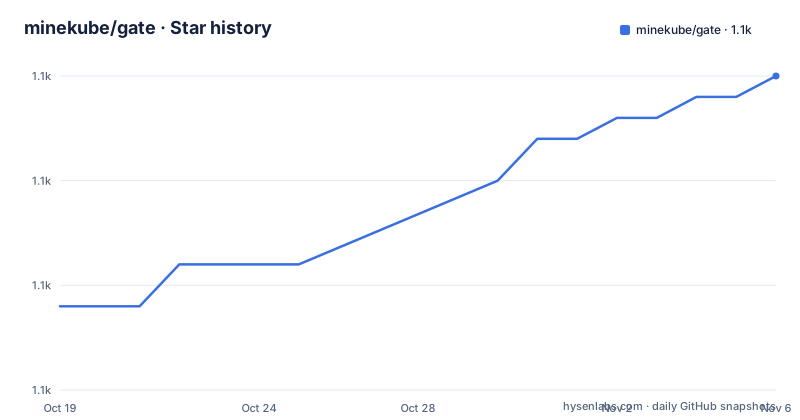
Star history
- minekube/gate1,090 ★ · +11
| Repository | 2026-10-19 | 2026-11-06 |
|---|---|---|
| minekube/gate | 1.1k | 1.1k |
11 Stars in the last 18 days, measured from the daily GitHub snapshot. Compare with other projects
Editorial analysis
One proxy in front of Java and Bedrock
Gate is described as an extensible, high performance and parallelised Minecraft proxy with scalability, flexibility, cross-platform compatibility and server version support, written in Go. The repository description is blunter about the target, building efficient Bedrock and Java Minecraft networks with multi-version support, powering the global Connect network at production scale, and running with 10MB.
The headline feature is Bedrock cross-play, and it is integrated rather than bolted on. Gate includes built-in Bedrock Edition support through Geyser, enabling cross-play between Java Edition players on PC and Bedrock Edition players on mobile, console and Windows, through integrated Geyser and Floodgate technology, with zero plugins required. The README is explicit that the Java and Bedrock clients speak different protocols, and the diagram shows why a translation layer is unavoidable: Bedrock players arrive on port 19132, reach Geyser, and Geyser then speaks to the proxy on 25567, while Java players arrive on 25565 and go to the proxy directly. The proxy speaks the Java protocol to the backend server, which can be Paper, Spigot or Vanilla.
Turning it on is one line of configuration:
bedrock: trueFor a team whose players are split across PC, console and mobile, that is the whole problem solved, and the cost is an extra process in the path and one more thing to configure.
The project also offers a Go API, since the repository has an api/ directory and the module path is go.minekube.com/gate, and a plugin template repository, minekube/gate-plugin-template, for people who want to build on top of it.
Lite mode routes by the hostname a player joins
Gate Lite Mode is a lightweight version of Gate that exposes multiple Minecraft servers through a single port and IP address, and reverse proxies players to backend servers based on the hostname or subdomain they join with.
The diagram makes the mechanism clear. One player joins example.com and another joins my.example.com, and both land on the same Gate Lite instance, which then forwards the first to 10.0.0.1, the second to 10.0.0.2, and can forward to another proxy at 10.0.0.3. From the player's point of view there is one address and one port; from the operator's point of view there is a routing table based on the name they typed.
This is a different use of a proxy from the usual one, and it is the case where the Lite variant earns its name. A network with a handful of servers, a lobby, a survival world and a creative world does not need a full proxy with per-server configuration; it needs a name based front door. The alternative is a DNS round robin or a load balancer plus per-server ports, both of which mean the player has to know which address goes with which world.
The repository carries the configurations for this at the root, with config-lite.yml as one of four shipped configuration files alongside config.yml, config-simple.yml and config-bedrock.yml. The Makefile copies those root files into pkg/configs/ during the build, which is a detail that appears in the next section about building.
For an adopter, Lite Mode is the feature to read about first, because it is the one that changes what a player has to type.
Managed Via, and why the subprocess is the default
The second hard problem is version compatibility. Gate can start Via-powered backend protocol translation through managed vialite, so Java clients can join configured or API-registered backend servers running different Minecraft versions without running a separate Via sidecar. The configuration is a nested block:
config:
  via:
    enabled: true
What happens when that is enabled is spelled out in detail, and the detail matters. Gate starts the native vialite subprocess, resolves the latest stable vialite release automatically, downloads the checksummed artifact into the local cache, and routes backend connections through it. Dynamic backends registered through Gate's Go API are added to vialite at runtime, which lets Connect-style session backends use the same version compatibility path as static configuration servers.
The controls are there too. Exact release pins, offline mode and local artifact paths remain available for controlled deployments, but no manual version setting is required for the default path. That last sentence is the design statement: the common case is that you say yes and the version management happens for you.
There is one limitation stated plainly, and it is the kind of thing that bites in production. Dynamic API-registered backend translation uses the default subprocess mode, and embedded mode is limited to configured servers. So a backend that exists only in the API, for example a session backend that appears and disappears, cannot use the embedded path.
The dependency list shows the shape of the implementation. Alongside the proxy's own libraries, go-mc for the Minecraft protocol, brigodier for command parsing, gophertunnel and go-raknet for Bedrock, and Minekube's geyserlite and vialite behind managed Bedrock and managed Via, there is a full observability stack, OpenTelemetry for traces and metrics, Prometheus for metrics, and connectrpc for the RPC layer.
Three one-line installs, and a website as the manual
The quick start is a table of one command per platform, and it is worth noting how little it asks of the reader.
curl -fsSL https://gate.minekube.com/install | bashFor Go developers the command is go run go.minekube.com/gate@latest, and for Windows there is a PowerShell one-liner using irm and iex against install.ps1.
The README then points at the quick start guide on the website, and it does that deliberately rather than documenting the steps inline. The website is described as having a lot to discover, and the documentation, guides and the API reference all live there at gate.minekube.com. The Go package documentation is on pkg.go.dev under the module path go.minekube.com/gate.
For an adopter this is a trade. A project that documents its configuration in a website, rather than in a docs/ directory you can grep, is harder to search and harder to read offline, and it means the repository's own documentation and the running product can drift apart. On the other hand, the site is where the diagrams, the Bedrock guide, the Lite mode guide and the API reference live, and those are the parts a proxy operator actually needs.
The repository itself does carry a docs/ directory and a .web/ directory for the documentation site, and a Makefile target that serves the site locally with pnpm, so the source of that website is in the repository even though the published version is the reference.
The container is distroless, and deliberately not static
The Dockerfile is short and its comments explain the decisions, which is the most useful kind of Dockerfile.
The build stage uses golang:1.27, copies the module manifests first and runs go mod download so that the dependency layer is cached and source changes do not invalidate it, then copies cmd, pkg and gate.go and builds with CGO_ENABLED=0, cross compiling for the target platform and linking the version string in with -ldflags. The stripped binary flags and the version injection through a package variable are the standard pattern.
The runtime image is gcr.io/distroless/base-debian12, and the comment explains why it is not the static variant. The geyserlite dependency used by managed Bedrock mode pulls in github.com/ebitengine/purego, whose no-cgo Linux path declares a dynamic import for libdl.so.2. That forces the binary to depend on the glibc dynamic loader even with CGO_ENABLED=0, and a static-only base would crash at startup with exec /gate: no such file or directory. There is a second stage, from debian:bookworm-slim, that stages libz.so.1 into the final image, because the arm64 geyserlite executable is dynamically linked and needs zlib.
The final image also sets XDG_CACHE_HOME to /var/cache/gate and declares that path as a volume, which is the download cache where the managed vialite artefact is stored. For an operator running Gate in Kubernetes, that volume is not optional decoration, it is where the version translation component lives between restarts.
The Dockerfile also has a JRE variant of the image for the cases where a Java runtime is needed.
Config files are copied into the package at build time
The Makefile is where the project's own conventions show up, and the first target is a good example.
The sync-configs target copies the four root configuration files into pkg/configs/, config.yml to config.yml, config-simple.yml to config-simple.yml, config-lite.yml to config-lite.yml and config-bedrock.yml to config-bedrock.yml, with a note that config-minimal.yml is maintained directly in pkg/configs and is not synced from the root. The build target depends on sync-configs, and the version string comes from git describe with a fallback to a dev tag derived from the short commit.
The default target is all: fmt vet mod lint. The individual steps are go fmt, go mod tidy with go mod verify, go vet, and golangci-lint run through go run at the latest version. The test target is not just go test: it runs go fmt and go vet first, then a build tags script, then the installer shell test, and it skips that installer test when the platform is detected as Windows through the MINGW, MSYS or CYGWIN uname values. Only then does it run go test ./...
That installer test is a sign of how seriously the project takes its own install path, since the curl to bash installer is a supported way to deploy and the test suite checks it. The Makefile also has a dev-docs target that serves the documentation site with pnpm inside .web, and two profiling targets that install gops and graphviz, then fetch the heap profile from the debug endpoint and open it in the browser with go tool pprof.
The root of the repository also holds a long list of test files with descriptive names, upstream_sync_test.go, release_asset_verification_test.go, release_check_contract_test.go and several web workflow tests, which suggests the release process is covered by tests as well as the proxy.
Apache-2.0, a small binary and two releases in one day
The licence is Apache 2.0, with the text in the LICENSE file at the root, and the module is published as go.minekube.com/gate with Go 1.26 declared in go.mod.
The release cadence is the standout number. v0.74.41 was published on 2026-10-13 at 09:56 and v0.74.40 the same morning at 08:35, with v0.74.39 two days earlier. The repository is not archived and the last push was on 2026-10-19, so the branch and the tags are close together, which is what you want in a proxy that sits in the path of every player connection and needs to keep up with client releases.
The size claim is the other thing the description leads with, that it runs with 10MB. Taken with a Go binary, a stripped build and a distroless base, that is a deployment profile you can put on a small container or even on a cheap VPS next to the game servers it fronts, and it is the reason the project can be run as a sidecar on every node rather than as a single central machine.
The judgement for an adopter is that Gate is a serious piece of infrastructure with a fast release train, two integrations that would otherwise be separate services, and a documentation model that pushes the detail out to a website. If your network is single-server and single-version, none of it is needed. If it is multi-server with console players in the mix, the alternative is a proxy plus a Geyser sidecar plus a Via sidecar plus the configuration to keep them in step, and that is the complexity Gate is built to collapse.
Editorial conclusion
Adopt Gate if you run a Minecraft network and want Bedrock players and mixed client versions to work without a pile of sidecar processes, and if you are willing to accept a proxy that sits in the path of every connection. Do not adopt it for a single vanilla server, where a plain server is simpler, and do not expect embedded translation to cover API-registered backends, since the documentation limits embedded mode to configured servers. Verify three things first: that the version translation path works for your client versions, that your host has the cache directory Gate writes downloaded artefacts into, and that the network topology matches the Bedrock guide, since Geyser sits between the Bedrock port and the proxy. The last push was on 2026-10-19 and the newest release is v0.74.41 from 2026-10-13.
Frequently asked questions
What is minekube/gate?
An extensible, high performance and parallelised Minecraft proxy written in Go, published as the module go.minekube.com/gate under the Apache 2.0 licence. It provides a single entry point for a network of Java Edition servers and also supports Bedrock Edition players through managed Geyser and Floodgate.
How do I install the gate Minecraft proxy?
On Linux and macOS with curl -fsSL https://gate.minekube.com/install | bash, on Windows with powershell -c "irm https://gate.minekube.com/install.ps1 | iex", and from Go with go run go.minekube.com/gate@latest. The quick start guide is on the project website.
Does gate support Bedrock Edition players?
Yes, through built-in Geyser and Floodgate with zero plugins required. Bedrock players arrive on port 19132, are translated by Geyser and reach the proxy on 25567, and the feature is switched on with the single config line bedrock: true.
How does gate handle different Minecraft versions?
With managed vialite, a Via-powered translation subprocess that Gate starts itself, resolving the latest stable release, downloading the checksummed artefact into the local cache and routing backend connections through it. Exact release pins, offline mode and local artefact paths are also available, but embedded mode is limited to configured servers.
What is Gate Lite Mode?
A lightweight version of Gate that exposes multiple Minecraft servers through a single port and IP address, and reverse proxies players to backends based on the hostname or subdomain they join with, so different players can reach different servers through one address.
How current is the gate proxy?
v0.74.41 and v0.74.40 were both published on 2026-10-13 and v0.74.39 on 2026-10-11, with the last push on 2026-10-19. The container image is built from a golang:1.27 builder and runs on a distroless base with a cache volume at /var/cache/gate for downloaded artefacts.
Official sources
Add this badge to your README
If you maintain this project, the badge below links readers to this analysis and shows its maintenance status from the daily GitHub snapshot. Paste the markdown into your README; add ?metric=license or ?metric=stars to the image URL for a different field.

[](https://hysenlabs.com/projects/minekube-gate)Star history chart for your README
[](https://hysenlabs.com/projects/minekube-gate)Was this useful?