Pomerium puts identity checks in front of your apps, and its repository tells you more than its README does
Pomerium is an identity and context-aware access proxy.
At a glance
- What is it?
- Pomerium is an identity and context-aware reverse proxy that fronts internal web apps without a corporate VPN. The README is four marketing claims and a link to the documentation, so the useful detail lives in the repository layout: four request-path packages, a distroless image, a version string built from git, and nine example deployments.
- Who is it for?
- Pomerium fits a team that already has an identity provider and wants internal web apps reachable without installing anything on laptops, and it will not fit a team looking for configuration help inside the repository, because the front page has none of it. Before you evaluate, read the documentation site for how routes and policy are actually declared, then look at `examples/helm/` and `examples/docker/` for two of the nine deployment layouts in examples/.
- Can I use it commercially?
- Yes. Apache-2.0 is a permissive licence: you can use, modify and sell software built on it, as long as you keep its copyright and licence notices.
- Is it still maintained?
- Yes. The repository last received commits 1 day ago.
- What is it written in?
- Mainly Go, according to GitHub's language statistics.
Answers come from the project's GitHub data, last synced on November 15, 2026, and from our analysis. They are not legal advice.
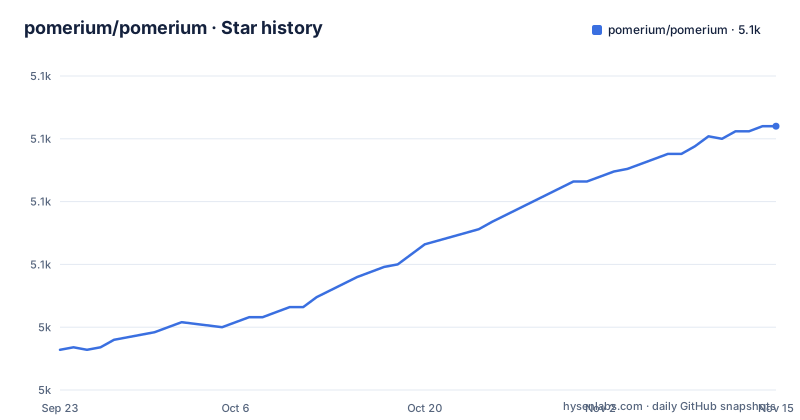
Star history
- pomerium/pomerium5,105 ★ · +89
| Repository | 2026-09-23 | 2026-11-15 |
|---|---|---|
| pomerium/pomerium | 5k | 5.1k |
89 Stars in the last 53 days, measured from the daily GitHub snapshot. Compare with other projects
Editorial analysis
The front page makes four claims and hands you to the docs site
The technical content of the README fits in a paragraph: Pomerium is an identity and context-aware reverse proxy that builds clientless connections to internal web apps and other services without a corporate VPN. Then come four claims in a list, that it is easier with clientless access, faster because it is tunnel-free and deployed where your apps are, safer because every action is verified before it is allowed to execute, and tailored by integrating data for context-aware access. After that, two links: the documentation at pomerium.com/docs, and Go package documentation on pkg.go.dev. A link to the contributing guide, a Go Report Card badge, a pointer to a hosted control plane with a management GUI called Pomerium Zero, and a License section finish it. No route format, no config key, no flag. This page cannot tell you how to deploy anything.
authenticate, authorize, proxy and databroker are separate packages
The top level of the repository is the real documentation. Four directories carry the request path: `authenticate/`, `authorize/`, `proxy/`, and `databroker/`, with `pomerium.go` at the root as the module entry point. Around them sit `cmd/` for binaries, `config/` for configuration, `internal/` and `pkg/` for shared code, `k8s/` for Kubernetes pieces, `integration/` for integration tests, `ospkg/` for operating system packaging, `scripts/` for helper commands, and `ui/` for the console front end. The presence of `ui/` matters if you build from source, because the console is compiled separately and grafted onto the Go binary, which the Dockerfile does in stages. Module files are plural here too: `go.mod`, `go.sum`, `go.work` and `go.work.sum`, so this is a workspace and not a single module.
The final image is distroless and starts with a baked config path
The Dockerfile is three stages, and the last one tells you how the thing runs. The UI stage starts from `node:24.22.2-bookworm`, copies `.git`, the Makefile and the UI manifest, then runs `make npm-install` followed by `make build-ui`. The build stage starts from `golang:1.27.3-bookworm`, installs `zip`, copies the built UI assets across, runs `make build-go NAME=pomerium`, and touches an empty `/config.yaml`. The final stage is `gcr.io/distroless/base-nossl-debian13:debug`, so there is no package manager in the shipped image:
ENV AUTOCERT_DIR=/data/autocert
WORKDIR /pomerium
COPY --from=build /go/src/github.com/pomerium/pomerium/bin/* /bin/
COPY --from=build /config.yaml /pomerium/config.yaml
ENTRYPOINT [ "/bin/pomerium" ]
CMD ["--config","/pomerium/config.yaml"]
Two consequences follow. Certificate storage is expected at `/data/autocert`, which has to be a volume you keep, and the default configuration path is a default command argument rather than a discovered file, so mounting a different config means overriding the command arguments.
A dirty working tree ends up inside the version string
Version information is not read from a file, it is computed by the Makefile from the git checkout, which is why the UI stage copies `.git` in the first place. `VERSION ?= $(shell git describe --tags)` takes the nearest tag, `GITCOMMIT := $(shell git rev-parse --short HEAD)` takes the short hash, and a check on `git status --porcelain --untracked-files=no` sets `BUILDMETA := dirty` whenever any tracked file has uncommitted changes. Those values are injected with linker flags into `internal/version`: GitCommit, Version, BuildMeta, ProjectName and ProjectURL, passed through `GO_LDFLAGS` as `-s -w`. The practical effect is that a build from a tarball without tags has no version to describe, and a build with an uncommitted change announces itself as dirty. That is useful in a support conversation and surprising the first time you see it.
The race detector is switched off on macOS and on
Test flags are set once and then quietly reduced on one platform. `GO_TESTFLAGS := -race` is the default, and the Makefile clears it when the host reports darwin, exporting `POMERIUM_SOCKET_DIRECTORY := /tmp` in the same branch. So the same test suite runs with concurrency instrumentation on Linux and without it on a Mac. That choice is easy to accept until you are chasing a bug that only reproduces under the detector: local runs stay green, and the failure shows up somewhere else. The umbrella target makes the intended order explicit:
all: clean deps-build test lint buildThat line runs clean, dependency build, test, lint and build in sequence, with `.golangci.yml`, `.pre-commit-config.yaml`, `.clang-format` and `.tool-versions` at the root telling you which linters and formatters are expected to pass before any of it.
ENVOY_OCI_REPO points at a custom Envoy image
Two parts of the Makefile explain how the project assembles a proxy rather than only compiling one. First, `ENVOY_OCI_REPO ?= "ghcr.io/pomerium/envoy-custom"` sits next to an empty `GET_ENVOY_DEBUG`, so the build refers to a custom Envoy image under the project's own registry, and the module requirements line up with that: `cncf/xds/go` and the ConnectRPC gRPC libraries are the control plane surface such a proxy needs. Second, component versions are merged rather than chosen by hand. A `setup-merge-driver` target registers a git merge driver that calls `scripts/merge-components-json %O %A %B` under the name Merge components.json by picking highest semver. The consequence for a contributor is that a conflicting `components.json` is resolved by script when you pull.
Nine example layouts and three cloud SDKs in one module
The `examples/` directory is the deployment answer sheet, with nine layouts: `cloudrun/`, `config/`, `docker/`, `helm/`, `kubernetes/`, `mutual-tls/`, `sh/`, `tiddlywiki/` and `yml/`. Reading the module requirements shows the scope of what gets linked into one binary. The toolchain is Go 1.27.1 on module path `github.com/pomerium/pomerium`. Storage comes from three vendors at once: `cloud.google.com/go/storage`, the Azure SDK with `azcore`, `azidentity` and `azblob`, and `aws-sdk-go-v2` including the S3 manager. Identity and web plumbing come from `coreos/go-oidc/v3`, `filippo.io/csrf`, `filippo.io/keygen`, `caddyserver/certmagic` and `cloudflare/circl`. There is also a terminal interface stack on `charm.land` (bubbletea, bubbles and lipgloss), a Prometheus exporter on the OpenCensus bridge, `cockroachdb/pebble/v2` for storage, and Protovalidate from buf.build for schema validation. Root files worth knowing about include AGENTS.md, AI_POLICY.md, SECURITY.md and DEBUG.MD.
Editorial conclusion
Pomerium fits a team that already has an identity provider and wants internal web apps reachable without installing anything on laptops, and it will not fit a team looking for configuration help inside the repository, because the front page has none of it. Before you evaluate, read the documentation site for how routes and policy are actually declared, then look at `examples/helm/` and `examples/docker/` for two of the nine deployment layouts in examples/. Check that your provider works with the OIDC library in go.mod, and treat the bundled Envoy image reference in the Makefile as part of the build rather than an optional extra. Release pace is steady, with v0.33.5 and v0.33.6 on 2026-10-27 after v0.33.4 on 2026-10-02, and the last push was 2026-11-01.
Frequently asked questions
What is Pomerium?
Pomerium is an identity and context-aware reverse proxy that builds clientless connections to internal web apps and other services without a corporate VPN. It is described as tunnel-free, deployed where your apps and services are, checking every action before it is allowed to execute, and integrating data for context-aware access.
How do I install Pomerium?
The README carries no install command and points to the documentation at pomerium.com/docs/. What the repository shows is a container: a three stage Dockerfile ends in a distroless base that copies the binary to /bin/, sets AUTOCERT_DIR to /data/autocert, and starts /bin/pomerium with the argument --config /pomerium/config.yaml. The examples/ directory holds layouts for docker, kubernetes, helm, cloudrun, mutual-tls, sh, yml and config.
Is Pomerium open source?
The repository carries a LICENSE file at its top level and the Go module path is github.com/pomerium/pomerium, with package documentation published on pkg.go.dev. The README states the source code is available under the Apache License 2.0, while official builds are under a modified Apache 2.0 license. Alongside the source, the README points at Pomerium Zero, a hosted control plane with a management GUI.
Is Pomerium free to use?
Nothing on the front page states pricing. It presents the project itself as a self-hosted proxy and separately invites readers who want a hosted control plane and a management GUI to try Pomerium Zero. The README states the source code is under the Apache License 2.0, and that official builds (release binaries, deb and rpm packages, container images) are under a modified Apache 2.0 license.
How does Pomerium compare with Teleport?
The front page makes no comparison with Teleport or with any other product. What it says about itself is that it is an identity and context-aware reverse proxy for clientless access to internal web apps, that it is tunnel-free and deployed next to your services, and that every action is verified before it executes. Comparisons have to come from the documentation site.
Official sources
Add this badge to your README
If you maintain this project, the badge below links readers to this analysis and shows its maintenance status from the daily GitHub snapshot. Paste the markdown into your README; add ?metric=license or ?metric=stars to the image URL for a different field.

[](https://hysenlabs.com/projects/pomerium-pomerium)Star history chart for your README
[](https://hysenlabs.com/projects/pomerium-pomerium)Was this useful?