3dv_tutorial: OpenCV Lessons for 3D Vision
An Invitation to 3D Vision: A Tutorial for Everyone
At a glance
- What is it?
- 3dv_tutorial combines introductory 3D vision slides with short Python and C++ examples built around OpenCV. It suits learners who want direct contact with camera geometry, but it is a teaching repository rather than a production computer-vision library.
- Who is it for?
- Adopt this repository as a learning path when you want concise OpenCV examples tied to introductory 3D vision theory. Do not treat it as the basis of a production SLAM or reconstruction system without checking the custom LICENSE, build instructions, input assumptions and algorithmic coverage first.
- Can I use it commercially?
- Check first. The repository uses a licence we do not classify automatically, so read its LICENSE file before any commercial use.
- Is it still maintained?
- Yes. The repository last received commits 174 days ago.
- What is it written in?
- Mainly CMake, according to GitHub's language statistics.
Answers come from the project's GitHub data, last synced on November 6, 2026, and from our analysis. They are not legal advice.
Star history
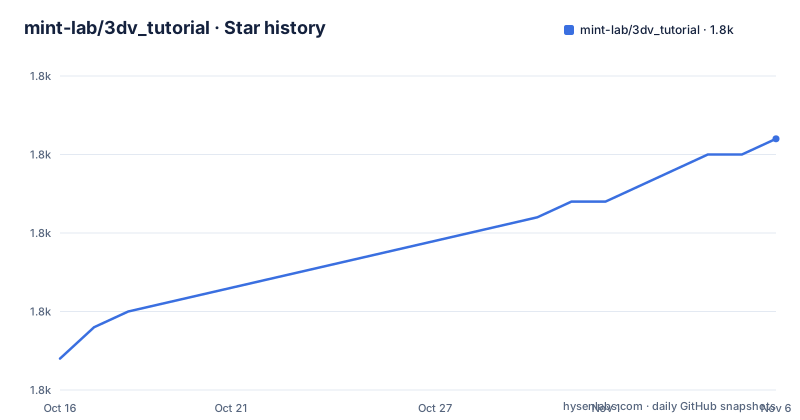
- mint-lab/3dv_tutorial1,826 ★ · +14
| Repository | 2026-10-16 | 2026-11-06 |
|---|---|---|
| mint-lab/3dv_tutorial | 1.8k | 1.8k |
14 Stars in the last 21 days, measured from the daily GitHub snapshot. Compare with other projects
Editorial analysis
What 3dv_tutorial teaches through OpenCV
3dv_tutorial addresses the gap between learning the equations of geometric vision and seeing those equations operate on camera images. The README describes it as an introductory course in 3D computer vision, geometric vision, visual geometry and multiple-view geometry. Its intended audience includes beginners, students, academic researchers, hobbyists and industry developers who want examples expressed through OpenCV without starting from a strong mathematical background.
The repository is most useful when the problem is conceptual. It covers a progression from rotations and the pinhole camera model to distortion, calibration, absolute pose estimation, homographies, image stitching, epipolar geometry and fundamental-matrix estimation. Its examples are paired with lecture slides for eight main sections, plus a separate reference to Bayesian filtering. The stated design constraint is brevity: most example programs are under 100 lines, which makes them easier to inspect than a larger application, provided the example files are available and their dependencies are installed.
This is a course repository, not an application with one user interface. It does not claim to provide a unified reconstruction pipeline, a finished SLAM system, or a general sensor-fusion framework. A learner is expected to move between a slide section, an example and the underlying geometry. That format favors understanding individual pieces over deploying them as an integrated robotics stack.
From 3dv_tutorial camera pixels to geometric constraints
The repository layout reflects a textbook progression through the 3D vision data flow. Early examples convert 3D rotation, form images, localize objects and visualize or correct geometric distortion. Calibration examples then estimate camera parameters, while pose-estimation examples combine known object geometry with image observations to recover a camera pose. The later examples estimate transformations and constraints between images, such as a homography or fundamental matrix.
The pinhole camera model is the central bridge between pixels and geometry. Files named `image_formation.py` and `object_localization.py` expose that relationship, while the distortion and fisheye examples address departures from the simple model. This order makes sense for learning because an incorrect camera model can make later geometric estimates misleading. Calibration is therefore not an isolated chore. It supplies assumptions used by pose estimation and multiple-view calculations.
For two-view work, the listed `perspective_correction`, `image_stitching` and `video_stabilization` programs focus on planar homography. The repository also includes `epipolar_line_visualization.py`, `fundamental_mat_estimation.py` and related implementation files. Those names point toward feature matching and multiview constraints, but the README does not specify the correspondence algorithm, estimator settings or error-handling procedure used by every program. Consult the relevant lecture slides and source file before assuming that each example implements the same pipeline.
The topic list also includes camera calibration, image rectification, visual odometry, visual SLAM, bundle adjustment and 3D reconstruction. Those labels describe the intended educational coverage. They do not by themselves establish that every listed topic has equally mature Python and C++ implementations or production-grade validation.
Python and C++ coverage in 3dv_tutorial
The README offers both Python and C++ links for several applications, including object localization, image formation, distortion correction, camera calibration, pose estimation, perspective correction, image stitching and video stabilization. This is useful for readers choosing between a quick Python experiment and a native C++ implementation. The repository includes `CMakeLists.txt`, `HOWTO_RUN_CPP.md` and C++ source files for the second route.
Python has the broader visible example set in the repository. Files cover rotation conversion, feature matching, KLT feature tracking, affine estimation, bundle adjustment, calibration implementations, corner detection, homography estimation and fundamental-matrix estimation. Python examples require packages listed in `requirements.txt`: `numpy`, `matplotlib`, `scipy`, `opencv-python` and `opencv-contrib-python`.
That dependency list deserves attention. It names both `opencv-python` and `opencv-contrib-python`, but neither the README nor the visible requirements file explains which distribution order or environment strategy the author expects. The dedicated run guides remain the authoritative setup references. Do not assume that every listed example has identical feature parity across both languages. The filenames demonstrate the types of topics represented, while the source files determine their actual interfaces, defaults and assumptions.
The C++ route has its own trade-off. A native implementation can fit a C++ application, but learners must deal with the repository's CMake configuration and native OpenCV build requirements. The README does not state supported compiler versions, operating systems or OpenCV ABI expectations.
Cloning 3dv_tutorial and preparing a first Python example
The README gives the following command for obtaining both the slides and example code. It places the repository in a local `3dv_tutorial` directory from the stated GitHub URL.
git clone https://github.com/mint-lab/3dv_tutorial.gitAfter cloning, follow `HOWTO_RUN_PYTHON.md` for the Python environment and execution procedure. The visible README does not provide a complete command sequence, so there is no verified one-line launcher to add here. The repository also includes `requirements.txt`, which lists the Python packages associated with the example set:
numpy
matplotlib
scipy
opencv-python
opencv-contrib-python
Use the exact environment and installation procedure in `HOWTO_RUN_PYTHON.md`, because the README does not define a Python version or a virtual-environment procedure. If that guide succeeds, a suitable first study sequence is `3d_rotation_conversion.py`, followed by `image_formation.py` and `camera_calibration.py`. Those examples progress from rotation representation to image formation and then camera-parameter estimation.
The README does not establish the expected output for this sequence. Read the matching slide section and source file to understand which inputs the script expects and how its result represents the modeled geometry. For the native route, use `HOWTO_RUN_CPP.md` and the repository's `CMakeLists.txt` rather than inventing build flags.
Limitations of 3dv_tutorial as production code
The main limitation is scope. The repository is aimed at introductory learning, while operational camera systems deal with exposure changes, moving objects, calibration drift, lens models, numerical conditioning, missing correspondences and resource limits. The README does not document how each example handles those cases. It also does not state that the code forms a production-ready visual odometry or SLAM implementation.
The short-program constraint has a second effect. Code under 100 lines can make a mathematical relationship visible, but it can also omit validation, logging, configuration handling and defensive checks. That is reasonable for a lesson and undesirable as a hidden assumption in an application. Before adopting a file as a component, inspect its source for hard-coded paths, camera assumptions, model choices and missing-input behavior.
Data handling is another boundary. The repository includes a `data/` directory, but the README does not document a data-download service, dataset licensing process or guarantee that every sample is present through Git clone. A lesson may also assume a controlled chessboard, book, camera or image pair. Those assumptions may not match uncontrolled deployment conditions.
The custom LICENSE is another adoption constraint. GitHub classifies it as Other, and the repository points readers to the `LICENSE` file without summarizing its terms in the README. This article cannot state permissions beyond that. Anyone considering redistribution or incorporation into another codebase should read the actual file first.
3dv_tutorial versus an integrated SLAM or mapping stack
A real alternative is a complete SLAM or mapping system, although the README names no specific competitor. The difference is architectural. 3dv_tutorial exposes individual geometric problems as small programs, with lecture slides as the teaching structure. An integrated SLAM stack is designed around a persistent map or trajectory, sensor synchronization, state estimation, loop closure, optimization and operational interfaces. The README does not claim those integration capabilities for 3dv_tutorial.
That does not make the tutorial unsuitable for industry. It makes it better suited to acquiring the concepts needed before selecting or implementing such a stack. A developer who needs a readable camera-calibration example or an illustration of homography may prefer the direct lesson files. A team that needs continuous pose tracking, map management or deployment support needs software whose documented purpose covers those requirements.
Another alternative is a text-first geometric-vision course without runnable code. Such a course can cover derivations more evenly, but 3dv_tutorial ties its examples directly to OpenCV calls and short programs. The trade-off is practical visibility versus implementation depth. The repository is strongest when the goal is to connect a formula, an image operation and a small program.
The repository is not archived, and the last push was on 2026-05-17. The only listed release is `misc`, labeled as old tutorial slides and dated 2017-02-10. Repository activity and release history are separate here. A recent push does not establish a versioned package-release cadence, compatibility matrix or long-term support commitment.
Editorial conclusion
Adopt this repository as a learning path when you want concise OpenCV examples tied to introductory 3D vision theory. Do not treat it as the basis of a production SLAM or reconstruction system without checking the custom LICENSE, build instructions, input assumptions and algorithmic coverage first. The first concrete adoption check is whether the documented setup on your target platform successfully builds or runs the Python and C++ material you need.
Frequently asked questions
How do I run the 3dv_tutorial Python examples?
The README directs users to `HOWTO_RUN_PYTHON.md` for the detailed procedure. The repository also provides `requirements.txt`, listing `numpy`, `matplotlib`, `scipy`, `opencv-python` and `opencv-contrib-python`.
Does 3dv_tutorial include C++ examples?
Yes. The README links C++ versions of several examples, including camera calibration, pose estimation, distortion correction, perspective correction, image stitching and video stabilization. It points to `HOWTO_RUN_CPP.md` and the repository's `CMakeLists.txt` for setup.
Is 3dv_tutorial a production-ready SLAM system?
No. The README describes the project as an introductory tutorial with educational example codes. It includes a visual SLAM and odometry lecture topic, but it does not document 3dv_tutorial as a deployment-ready SLAM package.
Official sources
Add this badge to your README
If you maintain this project, the badge below links readers to this analysis and shows its maintenance status from the daily GitHub snapshot. Paste the markdown into your README; add ?metric=license or ?metric=stars to the image URL for a different field.

[](https://hysenlabs.com/projects/mint-lab-3dv-tutorial)Star history chart for your README
[](https://hysenlabs.com/projects/mint-lab-3dv-tutorial)Was this useful?