antislop: a filter for AI coding agents, not a style guide
Rules for an AI coding agent to filter out generic AI-generated UI designs, text, and code.
At a glance
- What is it?
- antislop gives an AI coding agent 40 mandatory rules that strip generic UI, copy and code from its output. It filters; it does not supply direction, and the README is explicit that a sterile result means your DESIGN.md was missing.
- Who is it for?
- Adopt antislop if an agent writes your UI, copy or code and the output keeps landing on the same generic UI, fake stats and AI-shaped copy, and if you can write a DESIGN.md to fill the space the filter clears. Skip it if you expect the tool to make a page beautiful on its own: the README states that a sterile result means the direction was missing, not that the filter failed (R-37).
- Can I use it commercially?
- Yes. MIT is a permissive licence: you can use, modify and sell software built on it, as long as you keep its copyright and licence notices.
- Is it still maintained?
- Yes. The repository last received commits 2 days ago.
- What is it written in?
- Mainly JavaScript, according to GitHub's language statistics.
Answers come from the project's GitHub data, last synced on November 15, 2026, and from our analysis. They are not legal advice.
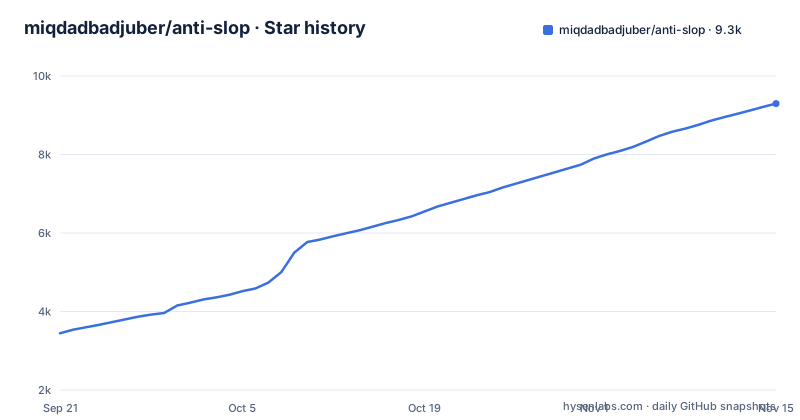
Star history
- miqdadbadjuber/anti-slop9,297 ★ · +5,852
| Repository | 2026-09-21 | 2026-11-15 |
|---|---|---|
| miqdadbadjuber/anti-slop | 3.4k | 9.3k |
5,852 Stars in the last 55 days, measured from the daily GitHub snapshot. Compare with other projects
Editorial analysis
The problem antislop names: generic output that is clean and dead
AI coding agents converge. The README shows this in its before-and-after comparisons for UI, copy and code: the build without antislop shows slop everywhere once you take a closer look, and the same page under DESIGN.md alone has direction but the slop still shows. Direction and filtering are separate jobs, and the second one is what antislop takes on. The audience is anyone whose agent produces the UI, the copy and the code: a frontend engineer reviewing agent-generated markup, a technical writer whose drafts all sound the same, a solo developer who does not want to hand-check every constant for a comment that restates it. The README frames the tool as "a filter, not a style guide": no prescribed colors, fonts or layouts. That restraint is the design decision worth noticing, because it is also the source of its main limitation.
38 rules in three tiers, and a Liveliness Toolkit with three dials
The rules live in the rules/ directory and run from R-01 to R-40, split into three tiers. On top of the rules sits the Liveliness Toolkit, with three dials named ENERGY, RHYTHM and MOTION, plus a Design Read. The point of those dials is the failure mode a pure filter would otherwise create. A rule set that only removes things converges on the same beige result every time, so the toolkit pushes back toward something alive and specific. R-37 states the boundary plainly: the core prevents slop but cannot invent direction, and a sterile result means the direction was missing rather than the filter having failed. Skills are additive, one per concern, so an agent loads only what a task needs. The core is always loaded.
Installing antislop and running a first build
antislop ships as standard agent skills: one folder per skill, each holding a SKILL.md. The README points new users at GUIDE.md first, and describes eleven install routes. The recommended one is the installer, which asks which extra skills you want, whether to install for this project or everywhere, and which agents you use, then copies the folders.
npx antislop-aiThe installer also writes the pointer that reloads antislop every session.
The second route goes through skills.sh, the open directory for agent skills, and copies the same folders without the pointer:
npx skills add miqdadbadjuber/anti-slopClaude Code users add the marketplace once and install the plugin:
/plugin marketplace add https://github.com/miqdadbadjuber/anti-slop
/plugin install antislop@anti-slop
Antigravity has its own CLI route, Codex has a marketplace plus plugin route, and the README also covers Cursor, Kimi Code, Cline, Oh My Pi, Pi and a single antislop.md file you can paste into any chat. For a first real use, the README's own comparison is the clearest test: give your agent a small landing page brief, then compare the output with the README's before-and-after examples. Before the work ships, the Delivery Gate expects a mandatory PASS/FAIL report in four blocks. If that report does not appear, the skill is not loading, and the install route you chose is the first thing to check.
What antislop will not do for you
The README is unusually direct about this: the core cannot invent direction, and a sterile result means the direction was missing. If you install antislop, apply no DESIGN.md, and ask for a marketing page, you should expect honest but plain output. The README's own comparison shows exactly that state in the antislop-alone column: the slop is gone, but so is the direction. That is a real cost, not a footnote. The README says it "never beautifies on its own" and that DESIGN.md is where direction comes from, so the workflow only works if a human writes that file. Teams that want a single command to produce a finished, on-brand page will find antislop removes more than it adds. The comparison table makes the pairing explicit: only the build with both antislop and DESIGN.md is clean and directed at the same time.
How antislop differs from a linter or a design system
A CSS linter checks syntax and property usage. A design system hands you tokens, components and spacing scales. antislop does neither. It is a set of instructions an agent reads before it generates, and the rules are phrased as gates the agent must pass rather than properties a tool can verify. That is why the Delivery Gate is a written PASS/FAIL report instead of a failing exit code: the check happens inside the agent's reasoning, not in a build step. The practical difference shows up in what each approach can catch. A linter will never flag an invented statistic, because the markup is valid. A design system will not flag it either, because the card uses the right tokens. antislop's Hard Gate is aimed at exactly that class of output. The trade-off is verification: because the rules run as agent instructions, you cannot run them in CI and get a deterministic result. The README's own framing of the tool as a filter rather than a style guide is the honest description of where it sits between those two alternatives.
Maintenance, licence and upgrade cost
The repository is MIT licensed, which permits commercial use and modification, with the usual absence of warranty; that is a description of the licence text, not legal advice. The last push was on 2026-11-01, and the release history shows rapid iteration: v3.2.23 on 2026-10-24 made the plugin-door probes report the newest copy, v3.2.24 on 2026-10-28 brought accessibility and performance into the Hard Gate, and v3.2.25 on 2026-11-01 made the installer fail cleanly and stay out of your home directory. That cadence is the upgrade cost. Even the rule set has grown (now R-01 to R-40), and install routes and agent coverage have changed within days of each other, so the version you installed last month may not match the current README. Since the skills are plain folders holding SKILL.md files, you can read the diff before overwriting.
Editorial conclusion
Adopt antislop if an agent writes your UI, copy or code and the output keeps landing on the same generic UI, fake stats and AI-shaped copy, and if you can write a DESIGN.md to fill the space the filter clears. Skip it if you expect the tool to make a page beautiful on its own: the README states that a sterile result means the direction was missing, not that the filter failed (R-37). Before you commit, run npx antislop-ai in one project, check which skills it copies and whether it writes the pointer file that reloads antislop every session, then confirm the four-block Delivery Gate report actually appears in your agent's output.
Frequently asked questions
What is anti-slop design?
In antislop's terms it is filtering rather than styling: 40 mandatory rules that remove generic AI output from UI, copy and code, with no prescribed colors, fonts or layouts. The README states that direction and beauty come from your own DESIGN.md, not from the filter.
What does "AI slop" mean in slang?
The README treats it as the generic UI, text and AI-shaped code an AI coding agent ships by default, and its before-and-after comparisons show slop that is everywhere once you take a closer look.
What is the Anti-AI slop Writing Skill?
antislop is a set of standard agent skills, one folder per skill holding a SKILL.md, and the README says it works on copy as well as pages: it writes and audits text so AI writing stops reading like AI. The skills are additive, so an agent loads only the ones a task needs.
What is considered slop content?
The README's skill list points at fake stats, AI-shaped headlines and copy, generic layout and decoration, and AI-slop comments in code. The rules run from R-01 to R-40 across a Hard Gate, a Purpose-Gate and Quality Locks.
Official sources
Add this badge to your README
If you maintain this project, the badge below links readers to this analysis and shows its maintenance status from the daily GitHub snapshot. Paste the markdown into your README; add ?metric=license or ?metric=stars to the image URL for a different field.

[](https://hysenlabs.com/projects/miqdadbadjuber-anti-slop)Star history chart for your README
[](https://hysenlabs.com/projects/miqdadbadjuber-anti-slop)Was this useful?