Nodify: WPF node-editor controls built for data-binding and MVVM
Highly performant and modular controls for node-based editors designed for data-binding and MVVM.
At a glance
- What is it?
- Nodify is a WPF control library for building node-based editors with no dependencies beyond WPF itself. At v7.3.0, it ships five example applications and handles the canvas, selection and connection layers, but its wiki documentation carries a work-in-progress badge.
- Who is it for?
- Adopt Nodify if you are building a node-based editor as a WPF desktop application and want to bind node state to view-models without writing the canvas, connection routing, selection and panning layers yourself. Skip it if your target includes macOS, Linux or a browser: the library is WPF and therefore Windows only.
- Can I use it commercially?
- Yes. MIT is a permissive licence: you can use, modify and sell software built on it, as long as you keep its copyright and licence notices.
- Is it still maintained?
- Yes. The repository last received commits 1 day ago.
- What is it written in?
- Mainly C#, according to GitHub's language statistics.
Answers come from the project's GitHub data, last synced on November 7, 2026, and from our analysis. They are not legal advice.
Star history
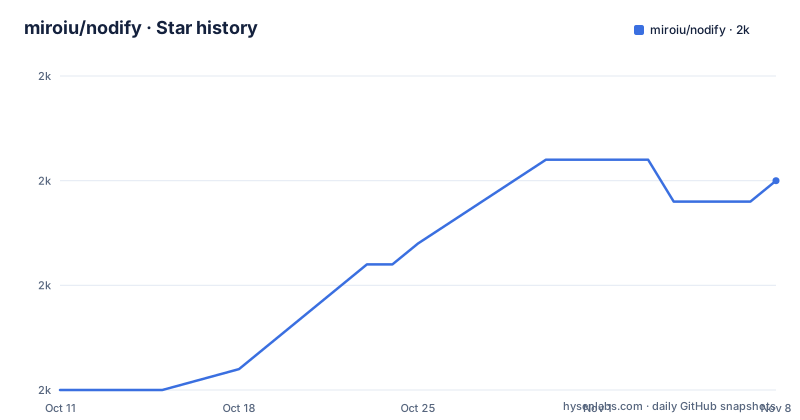
- miroiu/nodify2,014 ★ · +9
| Repository | 2026-10-11 | 2026-11-07 |
|---|---|---|
| miroiu/nodify | 2k | 2k |
9 Stars in the last 27 days, measured from the daily GitHub snapshot. Compare with other projects
Editorial analysis
Node editing on a WPF canvas without building the interaction layer from scratch
WPF ships with no node editor control. Applications that need one, from CI/CD pipeline designers to visual scripting tools, have traditionally built the canvas layer themselves: an infinite canvas, drag-to-connect logic, selection hit-testing and viewport panning. Nodify packages that layer as a set of WPF controls available through a single NuGet install.
The five example applications in the repository show the range of applications the controls support. Nodify.Workflow visualizes CI/CD pipelines and their dependencies. Nodify.Shapes is a canvas for drawing and connecting shapes. Nodify.Playground provides an interactive way to test all available settings. Nodify.StateMachine builds a machine where each state is an executable action and each transition is a condition for reaching the next action. Nodify.Calculator wires node operations together so that each node's output feeds directly into the next node's input.
Each example is a self-contained project under the Examples/ directory. Together they serve as the primary reference for seeing the controls in use before exploring the wiki.
Node and connection state lives in view-models, not in the control's internal state
The library is designed for MVVM from the start rather than adapted for it afterward. In WPF, that commitment means controls expose dependency properties and commands rather than requiring code-behind manipulation. The feature list marks MVVM support as a founding design decision, and "lots of configurable dependency properties" appears as a separate line item, signaling that the binding surface is intentionally wide.
For an integrating application, this means node positions on the canvas, the selected set and the connection graph are all bindable from view-models you control. Changing those values in the view-model changes what appears on the canvas. That architecture is what makes undo and redo tractable: the calling application maintains an undo stack, changes view-model state to reverse an operation, and the controls reflect the change through binding. The feature list notes the controls are "ready for undo/redo" without specifying an undo stack implementation, so the expectation is that the application supplies one.
Each node type is a view-model backed by a binding rather than a subclass of a control. New node types come from new view-model types, not from extending the control library.
One NuGet package with no extra dependencies beyond WPF
Installing Nodify requires a single command in the Package Manager Console:
Install-Package NodifyThe feature list states there are "no dependencies other than WPF," which means the package does not pull additional assemblies into the project. For an existing WPF project, this keeps the dependency tree flat.
The README stops at the install command. No first-use code example appears in the README itself. The wiki at github.com/miroiu/nodify/wiki is the named documentation location, and the Playground example in the repository is the most direct path to exploring the available settings. The README says of it: "a playground application where you can try all the available settings." Running that project before integrating the controls into your own codebase gives a working reference for which dependency properties control which behaviors.
The top-level repository also contains Nodify.sln, a build/ directory and a docs/ directory, which means building from source is possible, but the README gives no build command, no task name and no prerequisite list.
The performance claim for hundreds of nodes is stated but not explained
One entry in the feature list reads: "Optimized for interactions with hundreds of nodes at once." No description of what that optimization consists of follows in the README. There is no mention of a virtualization strategy, a deferred rendering approach or any internal mechanism that produces the claimed performance. The claim appears in the feature list and stops there, unaccompanied by any technical detail or benchmark figure.
If your graph regularly reaches several hundred nodes, the Nodify.Calculator and Nodify.Workflow examples are the closest proxy for testing that claim. Adding a large number of nodes to either example and observing the resulting interaction is the only verification path the repository gives.
This matters at evaluation time. A performance assertion without a number, a method or a test case attached cannot be treated as a specification. It is a claim the example projects can either confirm or fail to confirm for your specific workload.
Auto-panning, configurable gestures and keyboard navigation are built-in behaviors
Selection, zooming and panning all ship as built-in behaviors. Auto-panning activates when a drag operation approaches the edge of the viewport and moves the canvas automatically. This is a practical necessity for graphs that span more than one screen, since manual repositioning interrupts the drag. Select, move and connect are the three core operations on nodes.
Input gestures for each action are configurable. The library does not hardcode which mouse buttons or keys trigger zoom, pan, select and connect, so an application can replace them to match its own conventions. A built-in keyboard navigation system is listed alongside gesture configuration.
Dark and light themes are also built in, switching between them through a configuration step rather than writing custom WPF resource dictionaries.
Taken together, these built-in behaviors substantially reduce the amount of interaction code an application must write, though an application that requires significantly different behavior for any one action has to work through the dependency property and gesture configuration system rather than overriding a method. The trade-off is that a behavior you want to disable or significantly change must be handled through the dependency property and gesture configuration rather than by ignoring a base class method.
WPF ties Nodify to Windows desktop: no macOS, Linux or browser target
WPF runs only on Windows. Since Nodify's sole dependency is WPF, any application built on the library is also Windows-only. There is no browser, no macOS and no Linux deployment path through this library. The repository topics include "net6" alongside "wpf," indicating the library targets .NET 6, but .NET 6's cross-platform runtime does not help here because WPF's rendering layer is Windows-specific.
For cross-platform requirements, the README points to a community project. A note near the top says: "There is now a fantastic Avalonia port available!" The port, at github.com/BAndysc/nodify-avalonia, is maintained by BAndysc and is not part of the miroiu/nodify repository. Avalonia runs on Windows, macOS and Linux, so the port offers a path to other platforms. How closely it tracks the main library's features and API is not documented in this repository.
If your team needs the node editor in an application that deploys on multiple operating systems, the Avalonia port is the only alternative the main repository mentions.
A version 7 library whose documentation badge still reads WIP
The README's header section contains four status badges. The one for documentation displays the message "WIP" in orange. This flag points to the wiki at github.com/miroiu/nodify/wiki and indicates the documentation there is not complete.
That detail is notable because the rest of the repository signals a mature project. Version 7.3.0 was released on 2026-04-23, with the last push to the repository on 2026-06-10, and the v7 series has maintained a regular release cadence tracked by CHANGELOG.md at the repository root; five example applications cover distinct use cases. The codebase reflects work that has been through many iterations. The WIP documentation badge says the written explanation of that codebase has not kept up.
The README addresses this gap directly by listing "helping with documentation" as an explicitly welcome form of contribution in the README's Contributing section, alongside bug reports and pull requests. CONTRIBUTING.md and CODE_OF_CONDUCT.md both sit at the repository root.
For adoption decisions, the practical risk is that a configuration option or edge-case behavior you need may not appear in the wiki or the examples, which means locating it requires reading the library source.
Editorial conclusion
Adopt Nodify if you are building a node-based editor as a WPF desktop application and want to bind node state to view-models without writing the canvas, connection routing, selection and panning layers yourself. Skip it if your target includes macOS, Linux or a browser: the library is WPF and therefore Windows only. Before committing to it, run the Nodify.Playground example from the Examples/ directory to confirm the configurable dependency properties fit your interaction requirements, and read the CHANGELOG.md at the repository root before upgrading.
Frequently asked questions
What is Nodify?
Nodify is a C# WPF control library for building node-based editors. It handles the infinite canvas, connection routing, selection and panning so that the calling application can focus on binding data to view-models rather than writing interaction code.
How do I install Nodify?
Install it from NuGet using Install-Package Nodify in the Package Manager Console. The package has no dependencies beyond WPF itself.
Does Nodify support MVVM?
Yes. The library is described as designed from the start to work with MVVM, and the feature list includes lots of configurable dependency properties. Node positions, connections and selection state are bindable from view-models.
Does Nodify work on macOS or Linux?
No. Nodify depends only on WPF, and WPF runs only on Windows. The README does point to a community Avalonia port at github.com/BAndysc/nodify-avalonia that targets multiple platforms, but that is a separate project.
What example applications come with Nodify?
The repository includes five examples under the Examples/ directory: a CI/CD workflow designer, a shapes canvas, a playground for testing all settings, a state machine and a calculator that chains node outputs.
Official sources
Add this badge to your README
If you maintain this project, the badge below links readers to this analysis and shows its maintenance status from the daily GitHub snapshot. Paste the markdown into your README; add ?metric=license or ?metric=stars to the image URL for a different field.

[](https://hysenlabs.com/projects/miroiu-nodify)Star history chart for your README
[](https://hysenlabs.com/projects/miroiu-nodify)Was this useful?