Aspire: A Code-First Toolchain for Distributed App Definition and Deployment
Project brief: Aspire is the tool for code-first, extensible, observable dev and deploy.
At a glance
- What is it?
- Aspire lets you define an entire distributed application, from containers to connections, in code, then run it locally with built-in observability and deploy the same definition. This review covers its mechanism, setup, limitations, and alternatives.
- Who is it for?
- Adopt Aspire if you are building a distributed application and want a single code definition that runs locally with observability and can be carried into deployment, especially if you already work in C# or TypeScript. Do not adopt it if you are not prepared to evaluate the third-party containers that Aspire orchestrates.
- Can I use it commercially?
- Yes. MIT is a permissive licence: you can use, modify and sell software built on it, as long as you keep its copyright and licence notices.
- Is it still maintained?
- Yes. The repository received new commits within the last day.
- What is it written in?
- Mainly C#, according to GitHub's language statistics.
Answers come from the project's GitHub data, last synced on November 14, 2026, and from our analysis. They are not legal advice.
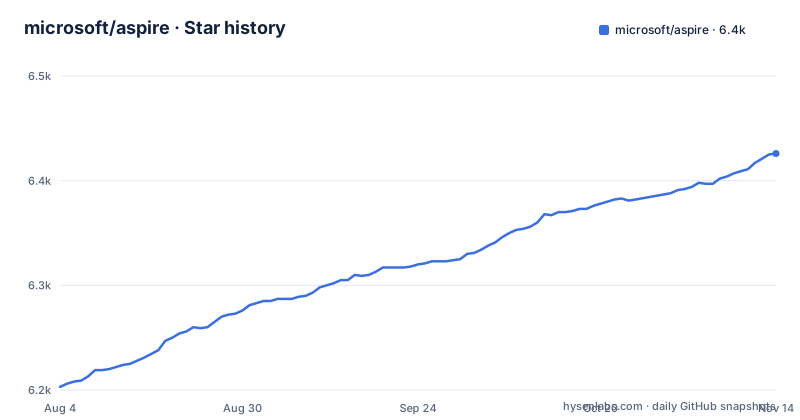
Star history
- microsoft/aspire6,426 ★ · +223
| Repository | 2026-08-04 | 2026-11-14 |
|---|---|---|
| microsoft/aspire | 6.2k | 6.4k |
223 Stars in the last 102 days, measured from the daily GitHub snapshot. Compare with other projects
Editorial analysis
What Aspire Actually Solves
Aspire addresses the problem of describing a distributed application in a way that is both runnable locally and deployable to production. The README states that Aspire is a multi-language, code-first toolchain for building, running, and deploying distributed applications. You describe how services, frontends, containers, databases, caches, and connections fit together in code. The Aspire CLI then runs the whole app locally, exposes OpenTelemetry-based observability, and carries the same definition into deployment. This is for developers who are tired of maintaining separate configuration for local development, staging, and production, and who want a single source of truth for the application topology.
The Mechanism: Code as the Single Source of Truth
The core idea is that the application definition is code. The README shows a C# example where you create a builder, add resources like Redis, Node apps, and Vite frontends, and then chain methods like WithReference, WaitFor, and WithHttpEndpoint. The TypeScript example mirrors this with a similar API. This is not a declarative YAML file; it is imperative code that builds a model of the application. The CLI reads this model to orchestrate local execution. The same definition is then used for deployment. The repository contains the Aspire CLI, AppHost SDK, dashboard, service discovery infrastructure, project templates, integrations, and a VS Code Extension.
Getting It Running: Installation and First Steps
Installation is straightforward. On Windows, you run a PowerShell command: irm https://aspire.dev/install.ps1 | iex. On Linux or macOS, you use curl -sSL https://aspire.dev/install.sh | bash. The README notes that if you want daily builds, you should follow instructions in docs/using-latest-daily.md. After installation, you write an apphost file in C# or TypeScript, as shown in the examples. The README links to a 'Build your first app' guide, which is the natural next step.
Observability and Deployment: The Same Definition, Two Environments
Aspire's key promise is that the definition you write is not just for local development. The README says the CLI runs the whole app locally and exposes OpenTelemetry-based observability. The same definition is carried into deployment. The README does not specify which cloud providers are supported, and it links to a separate Developer Control Plane (DCP) repository.
Limitations and Wrong Tool Cases
Aspire is not a fit for every scenario. The README includes a note that the Aspire team cannot evaluate the underlying third-party containers for which it provides API support. This means you are responsible for assessing the security and compliance of the containers you use. If your organization has strict container security requirements, you will need to add that evaluation layer. Also, Aspire's code-first approach may not suit teams that prefer declarative configuration, because it requires writing and maintaining code in C# or TypeScript. The README lists C# and TypeScript as examples, but it is not clear which other languages are supported.
Alternatives: Docker Compose and Kubernetes
A direct alternative is Docker Compose, which also defines multi-container applications in code (YAML) and runs them locally. Aspire's README highlights built-in OpenTelemetry-based observability and carrying the same definition into deployment. Kubernetes is another alternative, but it is much lower-level and requires you to write manifests for each resource. The README does not mention any integration with Kubernetes, so it is unclear how Aspire deploys to production.
Maintenance and Upgrade Cost
The repository's latest release is v13.6.4, published on 2026-10-24, following v13.6.3 and v13.6.2 earlier in October. This indicates an active maintenance cycle. The README mentions daily builds, which suggests frequent updates. This is both a benefit and a cost: you get bug fixes and new features, but you must keep up with the release cadence. The license is MIT, which is permissive, but you should review the LICENSE.TXT file for any specific terms. The README also includes a security note about containers, which is a reminder that your maintenance responsibility extends to the containers you choose to use with Aspire. Upgrading Aspire may require updating your apphost code if the API changes.
Editorial conclusion
Adopt Aspire if you are building a distributed application and want a single code definition that runs locally with observability and can be carried into deployment, especially if you already work in C# or TypeScript. Do not adopt it if you are not prepared to evaluate the third-party containers that Aspire orchestrates. Before adopting, verify that your target deployment environment supports Aspire's abstractions and that the containers you plan to use meet your security and regulatory requirements.
Frequently asked questions
how to install aspire
Install the Aspire CLI with the platform script. On Windows run irm https://aspire.dev/install.ps1 | iex. On Linux or macOS run curl -sSL https://aspire.dev/install.sh | bash. For the latest daily builds instead of the released version, follow docs/using-latest-daily.md.
how to use aspire software
Write an AppHost program that registers each resource, connect them with WithReference and WaitFor, then call builder.Build().Run(). The same definition can be written in C# as apphost.cs or in TypeScript as apphost.ts. The CLI runs the app locally, exposes OpenTelemetry-based observability, and carries the definition into deployment.
how to use aspire
Describe services, frontends, containers, databases, caches, and connections in code through the AppHost builder, then run it. The repo includes the Aspire CLI, AppHost SDK, dashboard, service discovery infrastructure, project templates, integrations, and a VS Code extension.
Official sources
Add this badge to your README
If you maintain this project, the badge below links readers to this analysis and shows its maintenance status from the daily GitHub snapshot. Paste the markdown into your README; add ?metric=license or ?metric=stars to the image URL for a different field.

[](https://hysenlabs.com/projects/microsoft-aspire)Star history chart for your README
[](https://hysenlabs.com/projects/microsoft-aspire)Was this useful?