kraken: an OCR engine built for historical and non-Latin material
OCR engine for all the languages
At a glance
- What is it?
- kraken is a Python OCR and handwritten text recognition system optimised for historical documents and non-Latin scripts, with trainable layout analysis, reading order and character recognition, and output in ALTO, PageXML, abbyyXML and hOCR. It suits a library or archive digitising a collection in a script that commercial OCR handles badly, and it needs a trained model per script.
- Who is it for?
- kraken suits a digitisation project with a large body of historical or non-Latin material, a research group willing to train or fine tune a model, and an output requirement in ALTO, PageXML or hOCR. It does not suit someone who wants a scanner to text conversion in ten minutes, because a recognition model is a required input rather than something the tool supplies.
- Can I use it commercially?
- Yes. Apache-2.0 is a permissive licence: you can use, modify and sell software built on it, as long as you keep its copyright and licence notices.
- Is it still maintained?
- Yes. The repository last received commits 5 days ago.
- What is it written in?
- Mainly Python, according to GitHub's language statistics.
Answers come from the project's GitHub data, last synced on November 7, 2026, and from our analysis. They are not legal advice.
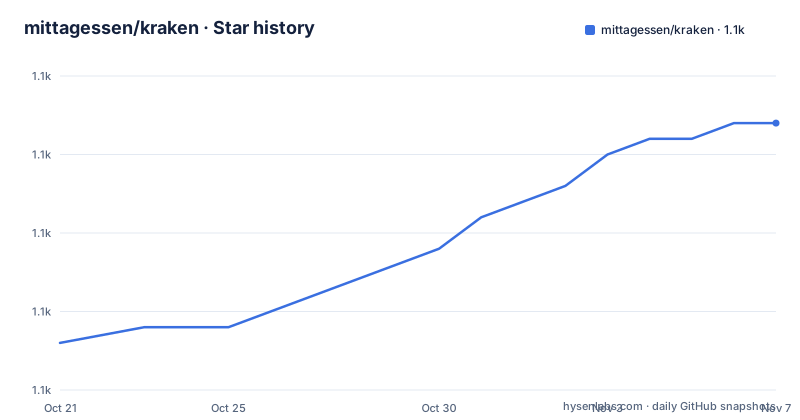
Star history
- mittagessen/kraken1,102 ★ · +14
| Repository | 2026-10-21 | 2026-11-07 |
|---|---|---|
| mittagessen/kraken | 1.1k | 1.1k |
14 Stars in the last 17 days, measured from the daily GitHub snapshot. Compare with other projects
Editorial analysis
Everything is trainable, which is the whole point
kraken is a turn-key OCR system optimised for historical and non-Latin script material, and the feature list explains what that means in practice. Layout analysis, reading order and character recognition are all fully trainable. That is a different proposition from a system where recognition is a fixed model and you accept what it gives you, and it is the reason the project exists in the form it does. Historical material has layouts no commercial OCR was tuned on, degraded paper, marginalia, mixed scripts, and a character repertoire that is not Latin. An existing model may work for suitable material; training or fine-tuning can improve results when the material differs from available models.
The script handling is the other headline. Right-to-left, BiDi and top-to-bottom script support are listed as core features, and multi-script recognition support means one system can read a document containing more than one script. The word level output includes word bounding boxes and character cuts, which is what a researcher needs in order to train on the result or to align it with an existing transcription. The recognition network architecture is variable, so you can change the model shape rather than accepting a fixed one.
The output formats are the ones the digital humanities actually consume: ALTO, PageXML, abbyyXML and hOCR. ALTO and PageXML are XML schemas for describing a page, its regions and its text lines, and hOCR is a microformat for embedding recognised text in an image. Producing them is what separates an OCR tool from a text extraction script, because the output is a structural description of the page rather than a flat string. The project is Apache-2.0 licensed, written in Python, and the package metadata classifies it as Production/Stable, with the Environment classifier listing both Console and GPU.
Installing with pipx so the dependency set stays out of your system
kraken runs on Linux or Mac OS X, on both x64 and ARM. Installation goes through pip, and the documentation recommends a virtual environment specifically so as not to pollute the global state of the distribution's package manager, and suggests pipx if you would rather not handle virtual environments yourself.
sudo apt install pipx
pipx install kraken
The interpreter range is Python 3.10 to 3.13 according to the install section, and the pyproject metadata is slightly wider, requiring 3.10 up to below 3.15. There is a documented failure mode here that is worth knowing about. The installation can fail because pipx defaults to an unsupported interpreter version, and the fix is to install a compatible interpreter and specify it explicitly.
sudo apt install python3.13-full
pipx install --python python3.13 kraken
If you prefer a plain virtual environment, pip install kraken does the job, and pip install . does the same from a git checkout. There is an extras package for direct PDF and multi-image TIFF and JPEG2000 support, which pulls in pyvips, and the extras name is pdf.
pip install kraken[pdf]The dependency list explains what you are agreeing to. Torch and torchvision are the deep learning core, lightning and torchmetrics handle training and metrics, scikit-learn and scikit-image cover the classical vision pipeline including binarisation, shapely does the polygon geometry, htrmopo is the layout analysis component, pyarrow handles the Arrow data format, and safetensors is the model serialisation format. There is a coremltools dependency, which points at the Apple CoreML path for inference on Macs. Running the test suite needs the test extra.
pip install ".[augment,test]"
pytest
Models come from a public repository, not from the package
The step that trips up newcomers is that installing kraken does not give you a recogniser. The documentation is explicit that you have to find a model to do the actual recognition of characters, and the default model offered is for printed French text. The command fetches it by its Zenodo DOI.
kraken get 10.5281/zenodo.10592716The models live in a public repository of model files, and you can list what is available there.
kraken listThis design has a consequence worth sitting with. Because a model is a separate artifact with a DOI, it has a version and a citation, which is what you want in a research setting where a result has to be reproducible years later. It also means the quality of your output is bounded by the model you choose, and choosing it is part of the work rather than an implementation detail. For historical material, the usual path is to take a base model, fine tune it on a sample of pages transcribed from the same collection, and then run the rest. The fully trainable design exists precisely to make that path available, and the tool that pairs with it in practice is the eScriptorium project, developed in the same research group, which provides a user friendly interface for annotating data, training models and inference.
The command line separates binarize, segment and ocr
The quickstart shows a design decision that matters for large collections. Rather than one monolithic call, the pipeline stages are separate subcommands, and you can run them together or one at a time. Recognising text on an image with the default parameters, including the prerequisite steps of binarisation and page segmentation, is one line.
kraken -i image.tif image.txt binarize segment ocrBinarisation alone uses the nlbin algorithm, which turns the page into a black and white image.
kraken -i image.tif bw.png binarizeSegmentation with the baseline segmenter writes a lines.json file describing the text lines it found.
kraken -i image.tif lines.json segment -blAnd segmenting and recognising with a specific model, rather than the default, names the model file directly.
kraken -i image.tif image.txt segment -bl ocr -m catmus-print-fondue-large.mlmodelThe staging has a practical justification. On a collection of ten thousand pages, binarisation and segmentation are the steps you want to run once, inspect, and keep, because they are where the failures are visible and where a human can intervene. Recognition is the expensive step you may want to re-run after retraining. Keeping them separate means you do not pay for segmentation every time you try a new model, and it means a bad segmentation can be fixed without redoing the whole page. The output formats also come out of this structure, since the line regions and baselines produced by segmentation are what the ALTO and PageXML writers need.
Where kraken is the wrong tool
Three cases argue against it. The first is a single page of clean printed text in a well supported script. The overhead of a deep learning recogniser, the model download, the environment setup and the training workflow are all justified by scale and by material difficulty, and if you have neither, a general purpose OCR tool will produce a result faster with less to install. The second is a team that cannot find an appropriate pretrained model and cannot train or fine-tune one. Model suitability depends on the script and material, so evaluate accuracy on representative pages before adoption. The third is a Windows deployment, since the documentation states that kraken can be run on Linux or Mac OS X and does not mention Windows, so the platform support is narrower than a general OCR product.
There is also a dependency weight issue. The install brings in torch, torchvision, lightning, scikit-learn, scikit-image and a set of compiled wheels, and the ranges are pinned fairly tightly, so a machine with other projects needing different torch versions will need a separate environment, which is exactly why the documentation pushes pipx. A GPU is optional but expected for anything beyond a page or two, and the Environment classifier listing GPU is a hint about the intended deployment rather than a requirement.
On the operational side, the model repository is a public collection of model files rather than a curated registry, so choosing a model is a research decision rather than a lookup, and the ones you will actually want for a specific historical collection are probably the ones you train yourself. The release history shows a security hotfix release, 7.0.2 in May 2026, alongside the regular 7.0.3 and 7.1 lines, so the project does handle security issues in the versioned releases, and the version comes from versioningit at build time, so the artifact you install is the one on PyPI. The project is developed at the École Pratique des Hautes Études and Université PSL, with European Union and French national funding noted in the README, which is a reasonable signal for a research tool that will keep existing, though it is not a commercial support commitment.
Editorial conclusion
kraken suits a digitisation project with a large body of historical or non-Latin material, a research group willing to train or fine tune a model, and an output requirement in ALTO, PageXML or hOCR. It does not suit someone who wants a scanner to text conversion in ten minutes, because a recognition model is a required input rather than something the tool supplies. Before you install it, create a virtual environment or use pipx so the dependency set does not conflict with the rest of your system, fetch a model with kraken get, and note that the project is developed at the École Pratique des Hautes Études and Université PSL, with the newest release at 7.1 from 2026-08-05 and the last push on 2026-10-12.
Frequently asked questions
How do I install kraken?
The documentation recommends pipx so the dependency set does not pollute your system package manager, running sudo apt install pipx and then pipx install kraken. A plain virtual environment with pip install kraken works too, and pip install . does the same from a git checkout.
Where do I get an OCR model for kraken?
Models come from a public repository, not from the package. Run kraken get 10.5281/zenodo.10592716 to download the default model for printed French text, and kraken list to see what is available in the central repository.
Which output formats can kraken produce?
The feature list names ALTO, PageXML, abbyyXML and hOCR output, along with word bounding boxes and character cuts. The package also carries an hocr-spec dependency in its test extra for validating the hOCR output.
Does kraken support right-to-left and bidirectional scripts?
Yes. The feature list names right-to-left, BiDi and top-to-bottom script support, and multi-script recognition support, so one system can read documents containing more than one script.
Official sources
Add this badge to your README
If you maintain this project, the badge below links readers to this analysis and shows its maintenance status from the daily GitHub snapshot. Paste the markdown into your README; add ?metric=license or ?metric=stars to the image URL for a different field.

[](https://hysenlabs.com/projects/mittagessen-kraken)Star history chart for your README
[](https://hysenlabs.com/projects/mittagessen-kraken)Was this useful?