Minimal Mistakes: A Jekyll Theme That Puts Content First and Customization in Your Hands
:triangular_ruler: Jekyll theme for building a personal site, blog, project documentation, or portfolio.
At a glance
- What is it?
- Minimal Mistakes is a two-column Jekyll theme for personal sites, blogs, and portfolios. It offers a lean default style, multiple skins, and a plugin dependency that you must handle before first build.
- Who is it for?
- Adopt Minimal Mistakes if you want a Jekyll theme that gives you a clean two-column layout, multiple skins, and broad integration options without forcing a particular design. Do not use it if you want a zero-dependency theme or if you cannot add the jekyll-include-cache plugin to your Gemfile and _config.yml.
- Can I use it commercially?
- Yes. MIT is a permissive licence: you can use, modify and sell software built on it, as long as you keep its copyright and licence notices.
- Is it still maintained?
- Yes. The repository last received commits 37 days ago.
- What is it written in?
- Mainly HTML, according to GitHub's language statistics.
Answers come from the project's GitHub data, last synced on November 14, 2026, and from our analysis. They are not legal advice.
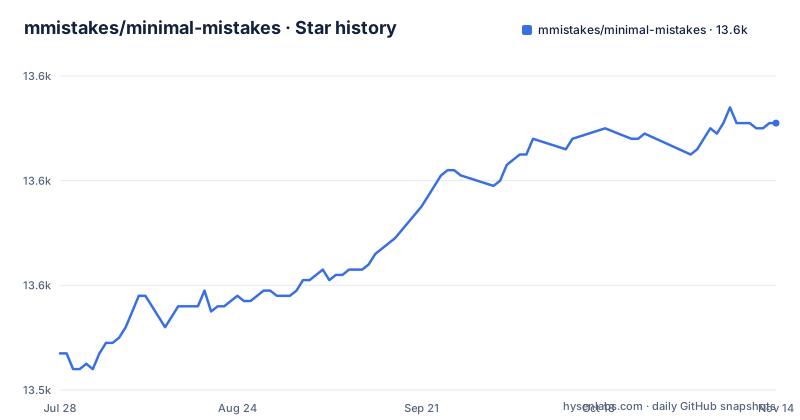
Star history
- mmistakes/minimal-mistakes13,591 ★ · +44
| Repository | 2026-07-28 | 2026-11-14 |
|---|---|---|
| mmistakes/minimal-mistakes | 13.5k | 13.6k |
44 Stars in the last 109 days, measured from the daily GitHub snapshot. Compare with other projects
Editorial analysis
What Minimal Mistakes Solves and Who It Serves
Minimal Mistakes addresses a common problem for Jekyll users: the default Minima theme is bare, and building a personal site or portfolio from scratch means writing HTML, CSS, and layouts yourself. This theme provides a structured two-column layout with built-in support for posts, pages, archives, search, and splash pages. It targets individuals who want a professional-looking site without designing from zero. The README mentions personal sites, blogs, and portfolios explicitly. It also covers project documentation, which is a broader use case than many Jekyll themes offer. The theme's flexibility is its main selling point, but that flexibility means you must be comfortable tweaking configuration files and layouts to get the exact look you want.
How the Theme Works: Layouts, Skins, and Plugins
Minimal Mistakes is a two-column theme, meaning content sits in a main column and secondary content appears in a sidebar. The theme uses Jekyll's built-in Sass/SCSS preprocessor, so you can customize styles by editing SCSS variables rather than overriding entire stylesheets. It ships with eleven skins in addition to the default, each a color variation. The README lists skins like air, contrast, dark, dirt, mint, sunrise, aqua, neon, plum, catppuccin_latte, and catppuccin_mocha. You select a skin by setting a value in _config.yml. The theme also supports several layout types: single, archive index, search, splash, and paginated home page. This variety lets you build different sections of a site with different structures. A critical mechanism is the jekyll-include-cache plugin, which the theme requires. Without it, you get an 'Unknown tag include_cached' error at build time. That plugin caches included partials, which speeds up builds for sites with many includes. The theme also integrates with commenting systems like Disqus, Discourse, Staticman, utterances, and giscus. For analytics, it supports Google Analytics and Swetrix, the latter being GDPR-compliant. These integrations are configured through front matter or _config.yml, not through code changes.
Getting It Running: Commands and Configuration Keys
The README states that the theme is bundled as a theme gem, which simplifies installation and upgrades. To use it, you add the gem to your Gemfile and set the theme in _config.yml. The standard Jekyll workflow applies: run bundle install after adding the gem, then bundle exec jekyll serve to preview locally. The README specifically warns that jekyll-include-cache must be in your Gemfile and retained in the plugins array of _config.yml. That means your _config.yml must have a plugins section that includes jekyll-include-cache. If you skip this, the build fails. For GitHub Pages, the theme is compatible, but you need to ensure the plugin is allowed on that platform. The README links to documentation for header images, custom sidebars, table of contents, galleries, breadcrumb navigation, and navigation lists. Those features are enabled via front matter or _config.yml settings, as documented on the theme's docs site. The theme also supports localized UI text in over 30 languages.
A Real Limitation: The Plugin Dependency and Build Failures
The most obvious limitation is the hard dependency on jekyll-include-cache. The README is explicit: if the plugin is not installed and listed in plugins, you get an 'Unknown tag include_cached' error. This is not a minor warning; it blocks the build entirely. For users on GitHub Pages, this is a potential problem because GitHub Pages restricts which plugins can run. The README says the theme is compatible with GitHub Pages, but that compatibility depends on the plugin being available in that environment. If it is not, you cannot use the theme on GitHub Pages without a custom build process. Another limitation is that the theme is minimal by design. The name is not a joke. You get a clean two-column layout and a set of skins, but any visual flourish requires you to write custom CSS or override the theme's SCSS. That is fine for developers, but a non-technical user might find the default look too plain. Also, the README mentions support for Google+ in the commenting section, but Google+ is dead. That is a sign that some parts of the documentation are outdated, even if the theme itself is maintained. The last push was October 2026, so the project is active, but the README has not been fully scrubbed.
Comparison with an Alternative: The Minimal Mistakes Approach vs. a Static Site Generator
A real alternative to Minimal Mistakes is using a static site generator like Hugo or Eleventy with a theme of your choice. The difference in approach is fundamental. Minimal Mistakes is a Jekyll theme, so it inherits Jekyll's conventions: Liquid templates, _config.yml, front matter, and Ruby gems. Hugo, for example, uses Go templates and a different configuration structure. If you already know Jekyll, Minimal Mistakes is a natural fit. If you are starting fresh, Hugo might offer faster build times and no Ruby dependency, but you would lose the specific layout and integration ecosystem that Minimal Mistakes provides. Another alternative is to use a plain HTML template with a build tool like Gulp, but that means you lose Jekyll's built-in blog features like pagination and categories. The choice comes down to whether you want a ready-made Jekyll solution or a different toolchain. Minimal Mistakes is not a replacement for a static site generator; it is a theme that assumes you have already chosen Jekyll.
Maintenance and Upgrade Cost
The theme is distributed as a gem, which makes upgrades straightforward: you update the gem version in your Gemfile and run bundle update. The CHANGELOG is mentioned in the README, so you can track changes between releases. The recent releases show a steady cadence: 4.28.1 in August 2026, 4.28.0 in March 2026, and 4.27.3 in July 2025. That indicates active maintenance. However, upgrades can bring breaking changes, especially if you have customized the theme's SCSS or layouts. Since the theme is a gem, your customizations are separate from the theme files, which is good, but you still need to test after an upgrade. The plugin dependency is part of the maintenance cost: you must keep jekyll-include-cache in your Gemfile and ensure it remains compatible with your Jekyll version. The license is MIT, which means you can use, modify, and distribute the theme freely, with attribution. That is a permissive license, but it does not grant any warranty, so you are responsible for your own use.
Editorial conclusion
Adopt Minimal Mistakes if you want a Jekyll theme that gives you a clean two-column layout, multiple skins, and broad integration options without forcing a particular design. Do not use it if you want a zero-dependency theme or if you cannot add the jekyll-include-cache plugin to your Gemfile and _config.yml. Before committing, verify that your hosting environment supports the plugin, especially if you plan to use GitHub Pages, and check the CHANGELOG for any recent breaking changes. The theme's value rests on its flexibility, but that flexibility comes with a configuration burden that you must be ready to manage.
Frequently asked questions
Is GitHub Pages Jekyll?
This repository states only that the theme is compatible with GitHub Pages, and it does not describe how GitHub Pages handles Jekyll. On the theme side, jekyll-include-cache has to sit in the Gemfile and in the plugins array of `_config.yml`.
How do I add a Jekyll theme?
Minimal Mistakes is bundled as a theme gem for installation and upgrading, and the repository root carries minimal-mistakes-jekyll.gemspec. After the gem is in place, keep jekyll-include-cache in the Gemfile and in the `plugins` array of `_config.yml`, or the build stops with `Unknown tag 'include_cached'`.
What are some good themes for GitHub Pages?
No comparison is offered here. Minimal Mistakes describes itself as a flexible two-column Jekyll theme with 11 skins in addition to the default one, layout options covering single, archive index, search, splash and a paginated home page, and GitHub Pages compatibility as a listed feature.
Official sources
Add this badge to your README
If you maintain this project, the badge below links readers to this analysis and shows its maintenance status from the daily GitHub snapshot. Paste the markdown into your README; add ?metric=license or ?metric=stars to the image URL for a different field.

[](https://hysenlabs.com/projects/mmistakes-minimal-mistakes)Star history chart for your README
[](https://hysenlabs.com/projects/mmistakes-minimal-mistakes)Was this useful?