dadb: talk to an Android device over ADB without the adb binary
A Kotlin/Java library to connect directly to an Android device without an adb binary or an ADB server
At a glance
- What is it?
- dadb is a Kotlin and Java library that implements the ADB wire protocol itself, so a test or tooling process can install an APK, push files, run shell commands and forward ports on a connected device with no adb binary and no ADB server running.
- Who is it for?
- dadb suits an Android tooling or test suite that must install and drive devices from inside the JVM, where shipping an adb binary alongside your build is awkward or where a running ADB server cannot be assumed.
- Can I use it commercially?
- Yes. Apache-2.0 is a permissive licence: you can use, modify and sell software built on it, as long as you keep its copyright and licence notices.
- Is it still maintained?
- Yes. The repository last received commits 138 days ago.
- What is it written in?
- Mainly Kotlin, according to GitHub's language statistics.
Answers come from the project's GitHub data, last synced on November 7, 2026, and from our analysis. They are not legal advice.
Star history
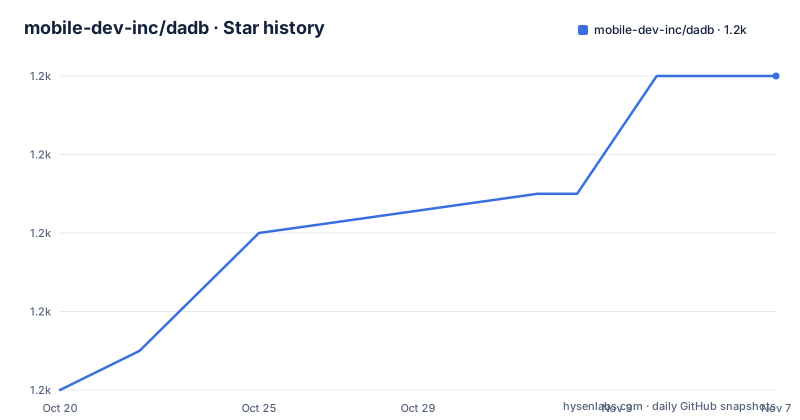
- mobile-dev-inc/dadb1,224 ★ · +8
| Repository | 2026-10-20 | 2026-11-07 |
|---|---|---|
| mobile-dev-inc/dadb | 1.2k | 1.2k |
8 Stars in the last 18 days, measured from the daily GitHub snapshot. Compare with other projects
Editorial analysis
The Gradle project, and the release process behind it
The repository is a plain Gradle project and the build files tell you more about the project than the README does.
The build uses the Kotlin DSL, with build.gradle.kts and settings.gradle.kts at the root, and the gradle wrapper checked in as both gradlew and gradlew.bat, so a checkout builds with the same Gradle version on every machine. The gradle directory holds the wrapper properties, and gradle.properties holds the project properties. The library source itself is in the dadb directory.
There is a CHANGELOG.md, which means the release history is written down rather than inferred from tags, and a RELEASING.md, which is the maintainer's release procedure. Between them they tell you that releases are a deliberate, documented process, and since there are no published GitHub releases, the Maven Central version and the changelog are the two places to look for what changed and what is current.
The CONTRIBUTING.md and the LICENSE.txt at the root complete a fairly conventional open source layout, and the.gitattributes file is there for line ending handling across platforms, which for a project that has to build on both Windows and Unix CI machines is not a cosmetic choice.
The.github directory holds the workflows. Since the artifact is a JVM library, that means the interesting part of the CI is not a matrix of operating systems for a binary but the compatibility matrix of the JVM and of Android API levels, and the release to Maven Central is the part that has to be reproducible, since downstream projects pin a version and cannot fix it themselves.
The project's origin story is worth a line as well, because it explains the shape of the code. The README links a blog post titled Our First Open-Source Project on the mobile.dev blog, with an image of what appears to be a diagram of the connection. The blog post announcing dadb is titled "Our First Open-Source Project", so this was the company's first open-source release.
What the library replaces
dadb is a Kotlin and Java library to connect directly to an Android device without an adb binary or an ADB server. The point is that it implements the ADB protocol itself, so the process running your tests or your tooling is the client.
That matters in a few concrete situations. A CI image that has the Android SDK for building but no adb on the path, an environment where starting an adb daemon is a side effect you would rather not have, a Gradle plugin that wants to talk to an emulator it started itself, a desktop tool that would rather not shell out to a binary it cannot guarantee is installed on the user's machine. In each case the alternative is process invocation and output parsing, and the output parsing is the fragile part, since adb prints human-readable text and the exit code tells you little about what actually went wrong.
The library is published on Maven Central as dev.mobile:dadb, and the Gradle dependency is:
dependencies {
  implementation("dev.mobile:dadb:<version>")
}
The coordinate carries the mobile.dev group, and the project is Apache-2.0 licensed with the copyright held by mobile.dev inc, dated 2021. The repository also has a blog post about it being the company's first open source project.
The repository layout is a normal Gradle project: a dadb source directory, build.gradle.kts, settings.gradle.kts, gradle.properties, the gradle wrapper with both gradlew and gradlew.bat, a CHANGELOG.md, a CONTRIBUTING.md and a RELEASING.md. There are no published GitHub releases, and the last push was on 2026-06-22.
The two kinds of failure, thrown and returned
The error handling design is the part of this library worth reading before you write a line against it, because it is deliberate and it differs from what most people expect from an IO-style API.
Transport failures throw an AdbException, which is an IOException. The concrete subclasses are AdbConnectException, AdbAuthException, AdbStreamOpenException, AdbConnectionClosedException and AdbProtocolException. The guidance is to catch AdbException to decide whether to reconnect.
Operation outcomes are returned, never thrown. install and installMultiple return an InstallResult, uninstall returns an UninstallResult, push and pull return a SyncResult, and root and unroot return a RootResult. A non-zero shell exit code stays a value on AdbShellResponse rather than becoming an exception.
So the split is: if the connection itself failed, you get an exception and the reasonable response is to retry or reconnect. If the operation ran and the answer was no, you get a result object and the reasonable response is to read it. That second half is the useful design, because a failing install is a normal outcome that a test should assert on, not an exception that unwinds a test runner.
The install example shows how the result type is used, with a when over the sealed InstallResult:
Dadb.create("localhost", 5555).use { dadb ->
    when (val result = dadb.install(apkFile)) {
        is InstallResult.Success -> println("installed")
        is InstallResult.Failure -> println("install failed: ${result.reason}")
    }
}
And the note attached to it is a genuine trap: connect to the odd adb daemon port, 5555, not the even emulator console port, 5554. The example in the prose says emulator-5554 while the code connects to 5555, and the note explains the discrepancy.
Discovery, USB, and the case that still needs an adb server
Device discovery is two calls. Dadb.discover() returns a connected device or emulator, and if there are multiple it returns the first one found. Dadb.list() gives you all of them.
val dadb = Dadb.discover()
if (dadb == null) throw RuntimeException("No adb device found")

val dadbs = Dadb.list()
The null return from discover is the API telling you nothing is connected, so the caller has to decide whether to fail or to wait.
Discovery and listing now both support USB-connected devices, and the documentation is explicit about the cost of that. Connecting to a physical device requires a running adb server, and in most cases that means you must have the adb binary installed on your machine. That is a genuine limitation rather than an oversight: talking to a USB device means speaking to the local adb server, which is what owns the USB connection, so a direct protocol client cannot bypass it.
When you want to connect to a specific physical device by its serial number, the path goes through the adb server with a device query:
val dadb = AdbServer.createDadb(
    adbServerHost = "localhost",
    adbServerPort = 5037,
    deviceQuery = "host:transport:${serialNumber}"
)
So the honest summary is: emulators over TCP need no adb at all, and physical devices over USB do. A project that only ever has emulators gets the full benefit; a project that mostly has physical devices on a build machine gets the adb dependency back for those cases.
The device operations, and the adb key that has to exist
The operation surface covers what a test harness actually needs. Installing and uninstalling an APK:
dadb.install(exampleApkFile)
dadb.uninstall("com.example.app")
Pushing and pulling files, which for a test means getting a test fixture onto the device and getting a result file back off it:
dadb.push(srcFile, "/data/local/tmp/dst.txt")
dadb.pull(dstFile, "/data/local/tmp/src.txt")
Running a shell command and reading the exit code and the output:
val response = dadb.shell("echo hello")
assert(response.exitCode == 0)
assert(response.output == "hello\n")
And TCP forwarding, which is scoped to a use block so the forward is torn down when the block ends:
dadb.tcpForward(
    hostPort = 7001,
    targetPort = 7001
).use {
    // localhost:7001 is now forwarded to device's 7001 port
    // Do operations that depend on port forwarding
}
Authentication is the piece that catches people out on a fresh machine. Dadb will use your adb key at ~/.android/adbkey by default, and if none exists at that location, the private and public keys are generated by dadb.
So there is no configuration step, and also no guarantee that the key is the one the device trusts. A device that has already authorised a different key will reject the newly generated one, and the failure arrives as an AdbAuthException, which is a transport failure, which is exactly the category you would reconnect on. That is a case where retrying does not help, and the distinction between the two failure categories is what tells you so.
If you need a specific key, the optional keyPair argument takes one read from a private and public key file:
val adbKeyPair = AdbKeyPair.read(privateKeyFile, publicKeyFile)
Dadb.create("localhost", 5555, adbKeyPair)
Editorial conclusion
dadb suits an Android tooling or test suite that must install and drive devices from inside the JVM, where shipping an adb binary alongside your build is awkward or where a running ADB server cannot be assumed. It is a poor fit if you want to replace adb for interactive use, since the library exposes device operations rather than a general shell tool, and a poor fit for connecting to a physical device by USB without an adb server present, because the documentation states that path requires one. Before adopting, read the error handling section and catch AdbException separately from the result types, and confirm the adb key at ~/.android/adbkey exists or is generated, since authentication is the first thing that will fail on a fresh machine.
Frequently asked questions
What is dadb and what does it replace?
dadb is a Kotlin and Java library to connect directly to an Android device without an adb binary or an ADB server. It speaks the ADB protocol itself, so a test or tooling process can install, push, pull, run shell commands and forward ports on a device without shelling out to adb.
How do I add dadb to a Gradle project?
Add the Maven Central dependency dev.mobile:dadb with implementation("dev.mobile:dadb:<version>"). The project is published under the mobile.dev group and is Apache-2.0 licensed.
How does dadb handle errors differently from other ADB libraries?
Transport failures throw an AdbException, an IOException, with subclasses AdbConnectException, AdbAuthException, AdbStreamOpenException, AdbConnectionClosedException and AdbProtocolException, and you catch it to decide whether to reconnect. Operation outcomes are returned instead, as InstallResult, UninstallResult, SyncResult and RootResult, and a non-zero shell exit code stays a value on AdbShellResponse.
Can dadb connect to a physical device over USB?
Discovery and listing include USB-connected devices, but the documentation states that connecting to a physical device requires a running adb server, and in most cases that means the adb binary must be installed on your machine. To target a specific device by serial you use AdbServer.createDadb with a deviceQuery of host:transport:${serialNumber}.
Which port should I connect to for an Android emulator?
The odd adb daemon port, 5555, not the even emulator console port, 5554. The documentation calls this out specifically, because the console port is the one most people try first.
Official sources
Add this badge to your README
If you maintain this project, the badge below links readers to this analysis and shows its maintenance status from the daily GitHub snapshot. Paste the markdown into your README; add ?metric=license or ?metric=stars to the image URL for a different field.

[](https://hysenlabs.com/projects/mobile-dev-inc-dadb)Star history chart for your README
[](https://hysenlabs.com/projects/mobile-dev-inc-dadb)Was this useful?