Tieba-Cloud-Sign: Docker setup for automated Tieba check-ins
百度贴吧云签到,在服务器上配置好就无需进行任何操作便可以实现贴吧的全自动签到。配合插件使用还可实现云灌水、点赞、封禁、删帖、审查等功能。注意:Gitee (原Git@osc) 仓库将不再维护,目前唯一指定的仓库为 Github。本项目没有官方交流群,如需交流可以直接使用Github的Discussions。没有商业版本,目前贴吧云签到由社区共同维护,不会停止更新(PR 通常在一天内处理)。
At a glance
- What is it?
- Tieba-Cloud-Sign is a PHP web application for running Baidu Tieba check-ins from a server. Its documented Docker Compose path starts the application and MySQL, then opens a browser-based configuration page at port 8080.
- Who is it for?
- Tieba-Cloud-Sign fits operators who want a server-hosted Tieba check-in service and are comfortable maintaining PHP, Docker Compose, and a MySQL database. It is a poor fit for users who need a supported commercial product, a documented hosted service, or clear evidence that every plugin action complies with Baidu Tieba rules.
- Can I use it commercially?
- Check first. The repository uses a licence we do not classify automatically, so read its LICENSE file before any commercial use.
- Is it still maintained?
- Yes. The repository last received commits 17 days ago.
- What is it written in?
- Mainly PHP, according to GitHub's language statistics.
Answers come from the project's GitHub data, last synced on November 7, 2026, and from our analysis. They are not legal advice.
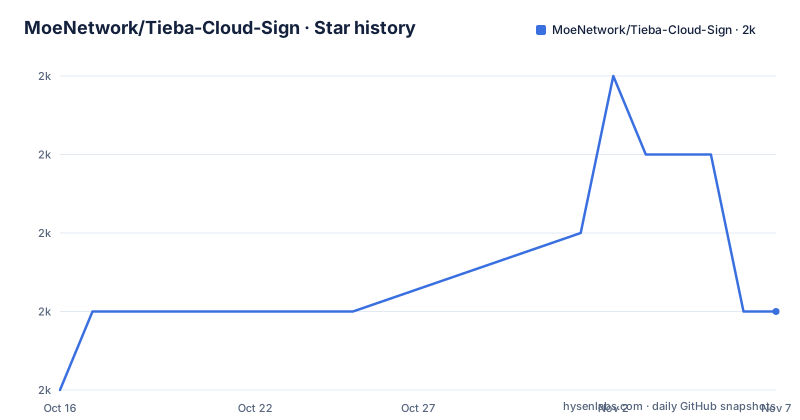
Star history
- MoeNetwork/Tieba-Cloud-Sign1,976 ★ · +1
| Repository | 2026-10-16 | 2026-11-07 |
|---|---|---|
| MoeNetwork/Tieba-Cloud-Sign | 2k | 2k |
1 Stars in the last 22 days, measured from the daily GitHub snapshot. Compare with other projects
Editorial analysis
What Tieba-Cloud-Sign Automates
Tieba-Cloud-Sign addresses a narrow operational problem: keeping Baidu Tieba sign-in activity on a server instead of requiring a person to sign in manually each day. The README describes the intended state after configuration as automatic check-in without further routine interaction. That makes it relevant to administrators, community operators, and other users who already manage a PHP or Docker hosted service and control the Tieba accounts involved.
The project is not limited to the core check-in feature. Its README says plugins can add cloud flooding, likes, banning, post deletion, and moderation functions. Those capabilities make plugin selection and permission review part of the adoption decision, not an afterthought. The repository includes a `plugins/` directory, while plugin downloads, tutorials, extensions, and further documentation are directed to the GitHub Wiki.
The application is community maintained rather than offered as a commercial edition. The README states that there is no official community chat group, directs discussion to GitHub Discussions, and says pull requests are usually answered within a day. That is a project communication claim, not an independent service-level agreement. The repository is not archived, and the last push was on 2026-10-13, but there are no GitHub releases listed, so versioned upgrades and compatibility depend on the repository and Wiki rather than a release stream.
The PHP Request and Database Shape
Based on the repository layout, the application is a PHP web application rather than a command-line-only script. The top level includes `index.php`, `ajax.php`, `do.php`, `init.php`, `setting.php`, and `config.php`, alongside `lib/`, `source/`, `templates/`, `plugins/`, and `setup/`. This layout suggests a browser-facing PHP application with request handling, configuration, templates, installation assets, and an extension area.
The exact internal scheduling and account-authentication flow are not described in the README. It does not state whether check-ins are executed by a web request, a background worker, or another trigger, and it does not document a scheduler command. It also does not explain how a Tieba account is authenticated, whether cookies are stored, or how failed check-ins are reported. Those are important gaps for an operator who needs to reason about server availability and account state.
The Docker path does confirm that MySQL is part of the deployment. The README says to select automatic import when configuring the database connection, so the documented setup is intended to create or load the application schema without manual SQL entry. For non-Docker installations, it points to `config.php` for database configuration and `/setup/install.template.sql` for manual database import. The FAQ separately documents alternate MySQL behavior through `mysql_autoload.php`, including changing `SQLMODE` from `mysqli` to `mysql` when a correctly configured database still returns an error in the 20XX range.
Docker Compose Installation and First Browser Configuration
The README gives a short Docker Compose path for a first deployment. It starts with installing Docker and Docker Compose, then downloads the repository's compose file. The documented command is:
wget https://raw.githubusercontent.com/MoeNetwork/Tieba-Cloud-Sign/master/docker/docker-compose.ymlAfter downloading the file, the documented deployment command starts the services in the background:
docker-compose up -dThe README says the compose file includes MySQL. Once the services start, the operator opens `http://<ip>:8080` from another machine, or `http://127.0.0.1:8080` on the same host. In the web configuration, select automatic import for the database connection rather than manually entering the details.
For Windows, the README specifically instructs users to review the MySQL persistence path in `docker-compose.yml`, which defaults to a local `mysql` folder. It also says that removing `volumes` is possible. The port mapping can be changed from the documented default:
8080:8080The README also identifies `CSRF=true` as the default setting in the compose file. It does not provide a complete alternative compose file, so changing image versions, credentials, storage paths, or other settings would require reading the actual file in the repository rather than assuming values.
Configuration, Database Failures, and Persistence
Tieba-Cloud-Sign has both an automatic Docker-oriented setup and a manual PHP hosting path. For a manual installation, the README says to upload the program to a website and visit it. It warns against editing `config.php` with Notepad because the program may stop working. The stated reason is not further explained, so the practical rule is to use an editor that preserves the file encoding and content expected by the application.
The documented MySQL connection switch is intentionally narrow. In `mysql_autoload.php`, the README shows the following replacement when a valid database configuration fails with an error code in the 20XX range:
define('SQLMODE', 'mysqli');The replacement described by the README is:
define('SQLMODE', 'mysql');For persistent database connections, the README documents changing `LONGSQL` from `false` to `true` in the same file:
define('LONGSQL', false);The replacement is:
define('LONGSQL', true);These are troubleshooting or hosting options, not defaults. The README does not explain the performance or compatibility consequences of persistent connections, nor does it identify which PHP or MySQL versions are supported. Manual users also need to run `/setup/install.template.sql`, and the file's comments are the only documented source for any edits required before import.
Upgrades Without GitHub Releases
The repository has no GitHub releases, so upgrade behavior is a concrete operational concern. The README documents two paths: an automatic update through the application's update check, and a manual update by downloading a Zip archive. For the manual path, it says to delete the archive's `config.php` before uploading the files to the website. The instruction preserves local configuration, but it also means operators should compare the downloaded version with the running version before replacing files.
Every major version is said to have an upgrade script whose filename generally follows this pattern:
update1.0to2.0.phpThe README says not to forget to run the relevant script. It does not document automated backups, rollback, migration failure handling, schema compatibility, or a way to verify that an upgrade completed correctly. The automatic update route is described only as a menu action, with no documented update endpoint, signing mechanism, or release checksum.
This makes Docker deployment easier to repeat, but not automatically safer to upgrade. A Docker volume protects MySQL data only if the volume and host path are configured correctly. Application files may still need manual comparison, and a major-version script may still be required. Operators using the web updater should first preserve a copy of the application directory and database state, although the project README does not provide a specific backup command.
Limits, Plugin Scope, and an Alternative Deployment Choice
The clearest limitation is incomplete operational documentation. The README does not state whether the application includes a scheduler, how it detects missed check-ins, what happens after a server restart, or how administrators inspect a failed account. It also does not document rate limits, account lockout behavior, token storage, or the permissions required by each plugin. The claims about cloud flooding, likes, banning, deleting posts, and reviewing content therefore describe available plugin functions, not a documented guarantee that Baidu will permit or safely accept those actions.
Docker Compose is the documented quick-start route because it combines the PHP application and MySQL. A manual PHP host is the real alternative. It gives an administrator control over an existing web server and database, but requires uploading files, configuring `config.php`, importing `/setup/install.template.sql`, and possibly adjusting `mysql_autoload.php`. The difference is operational ownership: Compose packages the services for a single documented launch, while manual hosting makes PHP, MySQL, persistence, and configuration part of the administrator's existing environment. The README does not compare their performance or reliability.
The custom license is another adoption boundary. GitHub cannot classify it as a standard open source license, and the repository includes `license.html` plus the referenced `LICENSE` context described in the project metadata. Anyone planning redistribution, modification, or commercial deployment must read the actual license text. This article does not interpret its permissions.
Editorial conclusion
Tieba-Cloud-Sign fits operators who want a server-hosted Tieba check-in service and are comfortable maintaining PHP, Docker Compose, and a MySQL database. It is a poor fit for users who need a supported commercial product, a documented hosted service, or clear evidence that every plugin action complies with Baidu Tieba rules. Verify the custom LICENSE file, inspect the relevant plugin permissions, test the Docker volume and port changes on a disposable host, and confirm the upgrade path for the installed version before adoption.
Frequently asked questions
How do I install Tieba-Cloud-Sign with Docker Compose?
The README instructs users to download `docker-compose.yml` and run `docker-compose up -d`. The compose file includes MySQL, and the application is then accessed at `http://<ip>:8080` or `http://127.0.0.1:8080` locally.
How do I configure the database after starting Tieba-Cloud-Sign?
The README says to select automatic import in the web configuration. For manual installations, edit `config.php` and import `/setup/install.template.sql` according to the comments in those files.
What should I do if Tieba-Cloud-Sign cannot connect to MySQL?
The README says that, if the database configuration is correct but the connection fails with an error code in the 20XX range, change `SQLMODE` from `mysqli` to `mysql` in `mysql_autoload.php`. It also documents changing `LONGSQL` from `false` to `true` for a persistent connection.
Official sources
Add this badge to your README
If you maintain this project, the badge below links readers to this analysis and shows its maintenance status from the daily GitHub snapshot. Paste the markdown into your README; add ?metric=license or ?metric=stars to the image URL for a different field.

[](https://hysenlabs.com/projects/moenetwork-tieba-cloud-sign)Star history chart for your README
[](https://hysenlabs.com/projects/moenetwork-tieba-cloud-sign)Was this useful?