ProjectSend's emergency switch only accepts two values, on purpose
Share files with your clients, from your own server. Free, open source (GPLv2), self-hosted — or use ProjectSend Cloud, the official hosted version run by the same team.
At a glance
- What is it?
- projectsend/projectsend is a self-hosted file delivery application for people who work with clients, written in PHP with a React front end and a Docker path it recommends. Its environment template contains a comment explaining why a mistyped flag must not disable a protection, and its repository ships a development stack that is not the one the install guide tells you to download.
- Who is it for?
- This suits someone sending documents to clients who need a login rather than a link, and who would rather hold the files on their own server than on a third party's. Two things to know first.
- Can I use it commercially?
- Yes, with conditions. GPL-2.0 is a copyleft licence: if you distribute software that includes it, you must release that software's source code under the same licence. Running it internally without distributing it does not trigger that obligation.
- Is it still maintained?
- Yes. The repository received new commits within the last day.
- What is it written in?
- Mainly PHP, according to GitHub's language statistics.
Answers come from the project's GitHub data, last synced on November 14, 2026, and from our analysis. They are not legal advice.
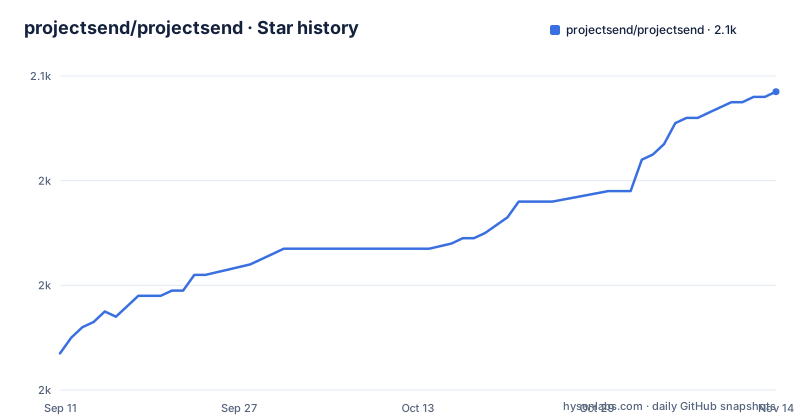
Star history
- projectsend/projectsend2,057 ★ · +50
| Repository | 2026-09-11 | 2026-11-14 |
|---|---|---|
| projectsend/projectsend | 2k | 2.1k |
50 Stars in the last 64 days, measured from the daily GitHub snapshot. Compare with other projects
Editorial analysis
The compose file you download is not the one in the repository
The quick start fetches a file from a production path in the repository, saves it into an empty directory of your choosing, tells you to edit the passwords and the site address, and then starts the stack:
curl -o compose.yaml https://raw.githubusercontent.com/projectsend/projectsend/main/docker/production/compose.example.yaml
# edit the passwords and APP_URL in compose.yaml, then:
docker compose up -d
Two details in that instruction are easy to lose. Every later compose command has to run from that directory, and it finds the file because the saved name is the conventional one; keep the original filename and every subsequent command looks for a file that is not there, which is why a rename line follows. The repository root also ships a compose file, and it is not the one the guide points at: that one mounts a sibling packages directory for shared development clones and carries comments about dev-only profiles. Two files with the same name, two purposes.
The default stack declares a restart policy, and the comment explains why
The committed stack has three services built from two images: an application container, a web container in front of it publishing a host port that defaults to just above eight thousand rather than the usual HTTP port, and a worker container running the queue command. The interesting part is a comment on the restart policy. It says the whole default stack declares one so that everything comes back after a reboot or a container restart, instead of half of it coming back, and it names that half-state as the confusing one where the queue is running and the site is down, with an issue number attached. The application service also waits for the database to report healthy and for the cache to have started, rather than merely being declared as a dependency, so ordering is enforced rather than hoped for.
The lint script rewrites files and the server build runs twice
The JavaScript side of the project is a React front end built on an Inertia-style client router, assembled from Radix primitives and a headless component library, with CodeMirror language modes for three languages and a drag-and-drop kit. Its four scripts are short and two of them are unusual. The lint script runs the checker with the fix flag, so a lint invocation edits your working tree rather than only reporting, which means it belongs in a commit step and not in an editor task. The server-side build script invokes the bundler and then invokes it again for a second target, which is the standard way to produce both bundles but is worth knowing before you wonder why a build takes twice as long as it should. Formatting is scoped to the resources directory rather than the whole tree.
An emergency switch that only two spellings can throw
The environment template carries the most carefully argued comment in the repository. It documents an off switch for the human-verification challenge on public forms, aimed at an operator who has a shell access but has locked themselves out of the login. Only the string true or the digit one switches it off, and the comment explains the reasoning: anything else, including no, off and a misspelling, leaves the challenge on, deliberately, because a flag that removes a protection should not remove it because a value was typed wrong. That is a small piece of defensive configuration design, and it is the kind of decision that is easy to copy into your own templates. The same file then documents how downloads leave the server, with an automatic mode and three explicit ones, and notes that the automatic path holds a PHP worker for the whole of every download when nginx is not doing the handoff.
Two scanner variables with deliberately different defaults
Virus scanning is configured twice in the same file, and the comments explain why the two are not redundant. One variable names the address of a scanning daemon, and the comment says that naming it makes scanning managed: it is used, and it cannot be switched off from the settings screen, and the address does not appear there. A second variable sets the address a fresh installation starts out pointed at, written into the settings on first boot and ignored on every later boot, which the comment frames as what a self-hosted operator wants, since it leaves both the address and the switch on the settings screen. One variable moves the feature out of the interface and makes it unavoidable; the other only seeds it. Same feature, two governance models, decided by which variable you set.
Moving from the previous generation is an import, not an upgrade
The project describes itself as a rebuild rather than a version bump, and the migration story matches that word. The previous generation lives in a separate repository, and the tooling that moves data across lives in a third one. What comes across is enumerated: accounts, clients, groups, categories, folders, files and history. Two properties are stated as guarantees rather than as intentions. The tool never writes to the old installation, and any run can be undone with a single command. There are two routes depending on whether you can still reach the old server, and one user-visible change is called out in advance: clients sign in with their email address now, using the same password. That last detail is the kind that decides whether you need a support email that day.
Copyleft, commercial terms and two contributor agreements
The licence paragraph is unusually explicit for an open-source project that also sells a hosted version. The software is free under the GNU General Public License at version two or, at your option, any later version, with the usual four-verbs summary attached. Then one sentence says commercial licences are available for organisations that cannot work under copyleft terms, and points at a document that explains both options. The boundary between the free core and the hosted offering is described in the same document, with a note in the introduction that every subscription funds the free software. Contributions require signing a contributor agreement, and there are two of them at the root, one for individuals and one for entities, which is a detail worth noticing before you send a patch.
A development clone is explicitly not an installation
Three documents split the three audiences, and the wording is precise. The Docker guide is where your database and uploads actually live, how to move them onto paths you chose, and how to back them up so an upgrade cannot take them with it, and the getting-started section says to read it before putting real files in. The install guide covers a server without containers, using a release zip, and says you need neither the PHP dependency manager nor the JavaScript one on the server because the archive ships ready to run. The update guide is one command on Docker and one script otherwise. Then the contributor section states plainly that cloning gets you a development copy rather than an installation, because the dependencies and the compiled front end are deliberately kept out of version control, so a clone needs both toolchains before it runs at all.
Editorial conclusion
This suits someone sending documents to clients who need a login rather than a link, and who would rather hold the files on their own server than on a third party's. Two things to know first. The compose file you download from the install guide is not the one at the repository root, and every later command has to run from the directory that holds it under the expected name, or nothing is found. And the application distinguishes a hosted edition from a self-hosted one by configuration and by which pieces are wired through settings rather than environment variables, so read the environment template before assuming a setting in the interface will do what you expect.
Frequently asked questions
What is projectsend/projectsend?
It is a self-hosted PHP application for getting files to clients: you upload what you want to send, choose exactly who can see it, and each client signs in to a private page to download it. There is no public link passed by email and no third-party service holding your clients' documents. An official hosted version run by the same team is offered as well, and every subscription funds the free software.
How do I install ProjectSend with Docker?
Download the production compose example into an empty directory, edit the passwords and the site address, and start the stack. Every later compose command must run from that directory and finds the file because it is saved under the conventional name; keeping the original filename means renaming it. The first visit shows a setup screen that creates the administrator account unless you uncomment the administrator variables first.
Do I need Docker to run ProjectSend?
No. For servers where containers are not an option there is a release archive to install, and the install guide says you need neither the PHP dependency manager nor the JavaScript one on the server because the archive ships ready to run. Docker is described as the quickest path and the recommended one, because the published image already contains its dependencies and its compiled front end.
How do I move from ProjectSend Legacy?
The previous generation lives in a separate repository and this one is a rebuild, so the move is an import rather than an upgrade, performed with a separate migration tool that brings across accounts, clients, groups, categories, folders, files and history. The tool never writes to the old installation and any run can be undone with one command. Clients will notice one change: they sign in with their email address now, using the same password.
What license is ProjectSend under?
The GNU General Public License at version two or, at your option, any later version. Commercial licences are available for organisations that cannot work under copyleft terms, and a separate document explains both options and the boundary between the free core and the hosted offering. Contributions require signing a contributor agreement, and the repository carries one for individuals and one for entities.
Official sources
Add this badge to your README
If you maintain this project, the badge below links readers to this analysis and shows its maintenance status from the daily GitHub snapshot. Paste the markdown into your README; add ?metric=license or ?metric=stars to the image URL for a different field.

[](https://hysenlabs.com/projects/projectsend-projectsend)Star history chart for your README
[](https://hysenlabs.com/projects/projectsend-projectsend)Was this useful?