cnspec: A Policy-as-Code Scanner That Covers Build, Runtime, and Everything Between
An open source, cloud-native security to protect everything from build to runtime
At a glance
- What is it?
- cnspec is an open-source security scanner from Mondoo that checks local machines, clouds, Kubernetes, containers, and more against policy-as-code. Its main trade-off is that vulnerability scanning requires a Mondoo Platform account, while policy scanning works standalone.
- Who is it for?
- Adopt cnspec if you need a single CLI that can scan a wide range of targets with policy-as-code, and you are comfortable with its default policies or writing your own MQL YAML. Do not adopt it if you need vulnerability scanning without a Mondoo Platform account, because that feature is gated behind login.
- Can I use it commercially?
- Check first. The repository uses a licence we do not classify automatically, so read its LICENSE file before any commercial use.
- Is it still maintained?
- Yes. The repository last received commits 2 days ago.
- What is it written in?
- Mainly Go, according to GitHub's language statistics.
Answers come from the project's GitHub data, last synced on October 21, 2026, and from our analysis. They are not legal advice.
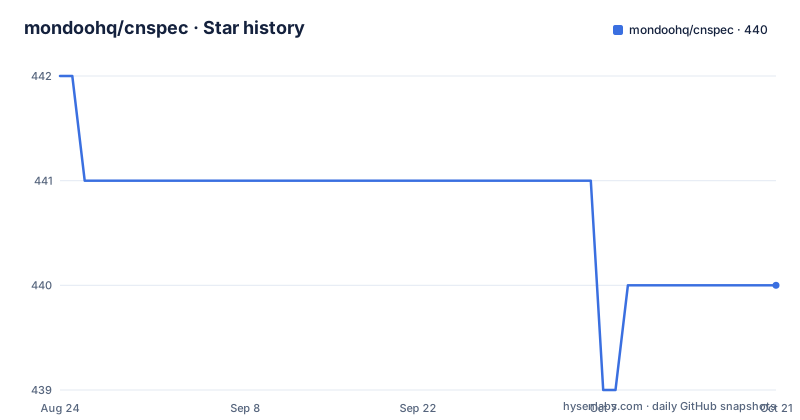
Star history
- mondoohq/cnspec440 ★ · -2
| Repository | 2026-08-24 | 2026-10-21 |
|---|---|---|
| mondoohq/cnspec | 442 | 440 |
-2 Stars in the last 58 days, measured from the daily GitHub snapshot. Compare with other projects
Editorial analysis
What cnspec Actually Covers
cnspec is a security and compliance scanner that checks infrastructure for misconfigurations and vulnerabilities. The README lists a broad set of targets: public and private clouds, Kubernetes clusters, containers, registries, servers, endpoints, SaaS products, infrastructure as code, and APIs. That is a wide net. The practical scope is visible in the supported platforms table for vulnerability scanning, which includes 16 Linux families, Windows versions, and VMware vSphere ESXi. The tool is built on Mondoo's security data fabric, but you do not need to understand that to use it. The core value is a single binary that can scan a local machine, a Docker image, an AWS account, or a Kubernetes cluster with the same command structure. This is aimed at security engineers and platform teams who want one tool for multiple environments instead of separate scanners for each.
How the Scan Mechanism Works
The README shows that cnspec uses a policy-as-code model. Policies are YAML files that express security rules. The engine evaluates these policies against resources it discovers on the target. The interactive shell gives a window into the resource model: you can run `help` to list resources like `ports`, and each resource has fields such as `listening`. You can then write MQL assertions, for example `ports.listening.none( port == 23 )`. That is the same query language used in policy files. So the mechanism is: cnspec connects to a target, enumerates resources, and evaluates MQL queries against them. The default policies are in the `content` directory of the repository, which means you can inspect exactly what checks are running. The scan output goes to STDOUT and, if you are logged in, to Mondoo Platform. That dual output is a key design choice: local results are immediate, but the platform adds context and prioritization.
Getting Started: Install and First Scan
The quick start is a one-liner: `bash -c "$(curl -sSL https://install.mondoo.com/sh)"` for Linux and macOS, or a PowerShell script for Windows. After installation, `cnspec scan local` checks your machine. That is the fastest way to see the tool in action. For remote targets, the README gives concrete examples: `cnspec scan docker image ubuntu:22.04`, `cnspec scan aws` (using your local AWS CLI config), `cnspec scan k8s` (using your kubectl config), and `cnspec scan k8s manifest.yaml` for a local manifest. You can also run a custom policy file with `cnspec scan local -f examples/example.mql.yaml`. The interactive shell is started with `cnspec shell local`, and inside it you can explore resources with `help` and run MQL queries. That shell is a practical way to learn the language before writing policies. The installation script is the only officially documented method, but the releases page has packages for manual installation.
The Vulnerability Scan Catch: Mondoo Platform Required
The README states this plainly: "Vulnerability scanning requires the client to be logged into Mondoo Platform." That is a significant limitation. The `cnspec vuln` subcommand, which scans for CVEs across platforms, will not work without an account and a token. The registration step is `cnspec login --token TOKEN`, where the token is generated in the Mondoo App. So if you want vulnerability data, you have to create an account and send your scan results to Mondoo's platform. That may be fine for organizations that want centralized visibility, but it is a deal-breaker for fully offline or air-gapped environments. Policy scanning, on the other hand, does not appear to require login. You can run `cnspec scan local` without any authentication. So the tool is split: policy checks are open, vulnerability feeds are not. This is a trade-off worth noting before you adopt it.
Writing Custom Policies: The MQL YAML Approach
Custom policies are YAML files that express security rules. The README points to the `examples` folder in the repo, and you can run one with `cnspec scan local -f examples/example.mql.yaml`. The interactive shell shows the MQL syntax, like `ports.listening.none( port == 23 )`. That is a simple assertion, but the language supports more complex queries across resources. The documentation is not in the README, but the shell's `help` command gives you the resource list and fields. For a team that wants to codify internal standards, this is the core feature. You can write a policy that checks for specific ports, file permissions, or cloud configurations, and run it against any target. The YAML format is declarative, which makes policies reviewable in code review. The downside is that you need to learn MQL, and the README does not provide a full language reference, so you will likely need to consult the docs at mondoo.com/docs/cnspec.
A Real Limitation: Platform Support and Version Gaps
The vulnerability scan platform table is detailed, but it has gaps. For example, Debian 8 is supported, but Debian 7 is not. CentOS 6 is supported, but CentOS 5 is not. If you run an older or niche distribution, you may not get vulnerability data. The table also shows a rolling release for Arch Linux, which is a different challenge. The README does not say what happens when an unsupported platform is scanned, but it is reasonable to expect either an error or a skipped scan. Another limitation is that the README is truncated, so the full list of supported targets for policy scanning is not visible. The examples show Docker, AWS, and Kubernetes, but the actual coverage may be broader. For a security tool, this ambiguity is a risk. You should verify that your exact target types and versions are covered before relying on cnspec for compliance reporting.
Alternative: OpenSCAP or InSpec
A common alternative to cnspec is InSpec from Chef, which is also an open-source policy-as-code scanner. InSpec uses a Ruby-based DSL for controls, while cnspec uses MQL. InSpec has a mature library of profiles and a large community, but it does not have the same breadth of cloud and container targets out of the box. Another alternative is OpenSCAP, which is more focused on compliance benchmarks like CIS and DISA STIG, and it uses XCCDF and OVAL formats. OpenSCAP is heavier and less friendly for ad-hoc queries. The key difference is that cnspec combines policy scanning with vulnerability scanning in one tool, but the vulnerability part is tied to Mondoo Platform. InSpec can run fully offline, and OpenSCAP is also self-contained. If you need a fully offline vulnerability scanner, cnspec is not the right choice; InSpec or OpenSCAP may be better, though they do not offer the same unified target coverage.
Maintenance and License Implications
The repository is actively maintained, with a recent release v13.37.0 on 2026-08-28 and a v14.0.0-rc.1 release candidate. The project is not archived, and the default branch is main. The license is listed as NOASSERTION, which means the repository does not declare a standard open-source license. That is a red flag for adoption. You should check the repository for a LICENSE file or contact the maintainers before using it in a commercial product. The README does not mention contribution guidelines or a code of conduct, but the examples folder suggests that community contributions are welcome. The maintenance cost for users is low: the binary is updated via the install script, and policy updates come from the `content` directory. However, if you rely on Mondoo Platform for vulnerability feeds, you are tied to their service and its uptime. The upgrade path from v13 to v14 is not documented in the README, so you should test the release candidate before upgrading in production.
Editorial conclusion
Adopt cnspec if you need a single CLI that can scan a wide range of targets with policy-as-code, and you are comfortable with its default policies or writing your own MQL YAML. Do not adopt it if you need vulnerability scanning without a Mondoo Platform account, because that feature is gated behind login. Before committing, verify that your target platforms are in the supported version list, especially if you run older or newer OS releases, and check the license situation since the repository declares NOASSERTION. Start with a local scan and the example policy to see if the MQL language fits your team.
Frequently asked questions
Does cnspec need a Mondoo Platform account for vulnerability scans?
Yes. The vulnerability section states that scanning requires the client to be logged into Mondoo Platform, and the token is applied with cnspec login --token TOKEN. The policy scan path runs without an account.
Which operating systems does cnspec support for vulnerability scanning?
The documented matrix covers Alpine 3.10 through 3.24, Debian 8 through 13, Ubuntu 18.04 through 26.04, Red Hat Enterprise Linux 6 through 10, CentOS 6 through Stream, Windows 10 through 2025 and VMware vSphere ESXi 6 through 9, alongside entries such as Arch Linux listed as Rolling.
How do I run a custom cnspec policy from a file?
A cnspec policy is a YAML file and the scan command takes one with -f, for example cnspec scan local -f examples/example.mql.yaml. Several example bundles ship in the examples directory of the repository.
Can cnspec scan a Kubernetes cluster that only exists as a manifest file?
Yes. Both forms appear side by side, cnspec scan k8s for the local kubectl config and cnspec scan k8s manifest.yaml for a manifest on disk.
Where do cnspec scan results go after a login?
Results are returned to STDOUT and, once authenticated, to Mondoo Platform. Uploading a bundle with cnspec bundle upload also requires an account, while running a bundle locally with -f does not.
What license is cnspec released under?
Repository metadata records NOASSERTION rather than a license name. A LICENSE file sits at the root and the Dockerfile carries the SPDX identifier BUSL-1.1, and no visible file reconciles the three.
Official sources
Add this badge to your README
If you maintain this project, the badge below links readers to this analysis and shows its maintenance status from the daily GitHub snapshot. Paste the markdown into your README; add ?metric=license or ?metric=stars to the image URL for a different field.

[](https://hysenlabs.com/projects/mondoohq-cnspec)Star history chart for your README
[](https://hysenlabs.com/projects/mondoohq-cnspec)