OpnForm is a form builder that ships its own worktree harness and its own MCP server
Beautiful Open-Source Form Builder
At a glance
- What is it?
- OpnForm/OpnForm is an open source form builder whose readme spends more words on how its developers run isolated worktrees than on the forms themselves. That imbalance is the interesting part: the project documents its internal test rig, its bundle-size regression check and its agent integration in the same voice as its feature list, which tells you what the maintainers actually worry about.
- Who is it for?
- OpnForm suits a team that wants to self-host a form builder under a copyleft licence and can run a container stack, or someone who would rather sign up for the managed service. It does not suit someone who needs the advanced features without accepting the enterprise terms, because those sit behind a separate proprietary licence.
- Can I use it commercially?
- Check first. The repository uses a licence we do not classify automatically, so read its LICENSE file before any commercial use.
- Is it still maintained?
- Yes. The repository last received commits 1 day ago.
- What is it written in?
- Mainly PHP, according to GitHub's language statistics.
Answers come from the project's GitHub data, last synced on November 15, 2026, and from our analysis. They are not legal advice.
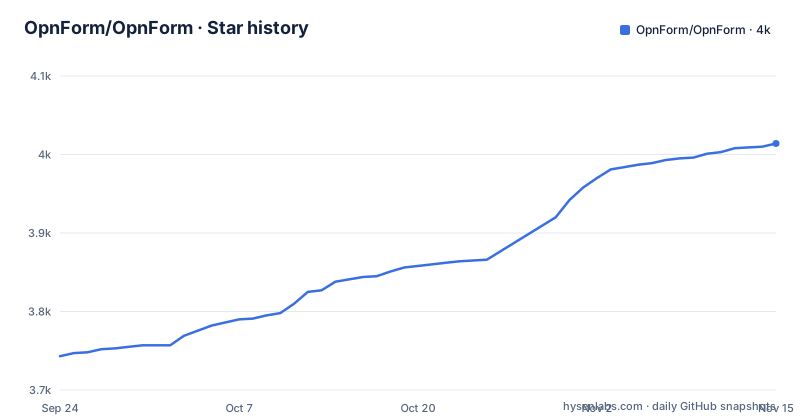
Star history
- OpnForm/OpnForm4,014 ★ · +271
| Repository | 2026-09-24 | 2026-11-15 |
|---|---|---|
| OpnForm/OpnForm | 3.7k | 4k |
271 Stars in the last 52 days, measured from the daily GitHub snapshot. Compare with other projects
Editorial analysis
The simplest path is a signup, not a clone
The getting-started section says outright that the easiest way in is the managed service, and lists what that buys: support, backups and upgrades, with the pitch framed as not having to think about maintenance or infrastructure. A link compares the cloud option against self-hosting, which is the document a reader should actually open before deciding. The self-hosted route is then summarised rather than documented: deployment guides for a real installation, and a container-based setup for local development. So the readme's centre of gravity is the hosted service and the open-source repository is the alternative, which is worth noticing because it inverts the usual expectation for a project whose own summary line says open source. The summary line itself is two words long, while the paragraph beneath it is the one making a commercial argument.
An agent can create a form draft without a login
There is a section on agents and a protocol server, and the details are specific. The remote server lets an agent create and preview a private form draft without requiring a login. An authorisation layer on top of that adds workspace-aware form management, plus read-only search over submissions, statistics and exports. The plugin package is installable in both a portable and a native form, and it lives in a plugins directory inside the repository, with a separate integration guide. So the machine interface is treated as a first-class surface with its own authorisation model, rather than as an afterthought bolted onto the web interface. The two halves of that design pull in opposite directions on purpose: the unauthenticated half can only produce a private draft, while the authenticated half is described as read-only over everything that already exists.
Each development worktree gets its own database and ports
The section on worktrees describes what the tool called Codex does, and the design choice is isolation rather than sharing. It creates an isolated local environment for each worktree, using a dedicated database volume in a container and local server and client processes, so that sibling worktrees do not share ports, data or API configuration. Three scripts are named for the lifecycle, one to set a worktree up, one to bring it up, and one to reset only that worktree's database. The startup command prints the worktree-specific address, and opening the root address signs in a local administrative account that the seed data creates, along with three seeded forms and five completed submissions so the dashboard is not empty when you look at it.
./scripts/codex-worktree-setup.sh
./scripts/codex-worktree-up.sh
./scripts/codex-worktree-reset-db.sh
Bundle size is a regression test
One line in the quick-start area describes a check that has nothing to do with forms. The client build command also checks the size of the public form bundle and its eagerly loaded dependencies, and the check reads a specific output directory independently of wherever the server-side build deploys to, which the readme names, including one particular hosting provider's directory. The test for that check is run from the client directory with a command that names the test file. So a change that quietly adds a kilobyte to what every visitor downloads fails the build, which is a defensible thing to automate for a project whose users mostly just load a form. The readme even points at the directory that the server-side build writes to as the place this check deliberately ignores, which means the two build outputs are known to diverge and only one of them is size-gated.
The form list batches fifty at a time, and the migration cannot be wrapped
A performance section gives concrete numbers and one operational warning. The dashboard fetches lightweight summaries in batches of fifty, while the API keeps a default page size of ten and a maximum of a hundred for other callers. It paginates before loading view and submission counts for the returned identifiers, and the historical view query uses an index on the statistics table's form column, with the aggregate explicitly aliased so the model uses the preloaded value rather than querying again. The warning is about the migration that adds that index: it runs outside a transaction and uses concurrent index creation on PostgreSQL so writes stay available, and it must not be wrapped in an external transaction, with other database engines using the standard schema migration instead.
The compose file is four services with three different health checks
The container definition is the clearest description of the architecture. There is an API service, a worker that runs the queue, a scheduler that runs the schedule, and a database and a cache, with the API and both background services sharing one environment block and one volume rather than repeating them. The health checks are the interesting part because each one probes something different: the API asks the framework to describe itself, the worker looks for its process in the process table, and the scheduler asks the application for a scheduler status with a time bound. So a slow queue or a stalled schedule is detected separately from an unreachable API, and the API waits for both the database and the cache to be healthy before it starts. The scheduler check is the most specific of the three: it asks the application for a scheduler status, in check mode, with a bound of a few minutes, which is a real liveness question rather than a port probe.
Copyleft core, proprietary features, and the reason given
The licensing section is the one to read before deploying. The project is open source under the copyleft licence at version three or any later version, and then it says it uses a dual-licence model to make the project sustainable. The core application is free and open source, giving freedom to use, modify and distribute. The advanced features live under a separate application path and are available under an enterprise licence and separate terms. The stated reason is that offering enterprise features alongside the open-source core funds ongoing development. So the boundary is drawn at a directory in the source tree, which means you can read exactly which features are not covered by the copyleft grant.
The support section is the mirror image of the getting-started section: the project asks you to join a chat community for help, and points at a product helpdesk and a technical documentation site. A separate feedback address and an issue and discussion link sit in the badge row at the top, so there are four ways to reach the project and the documentation is the one that is versioned.
Editorial conclusion
OpnForm suits a team that wants to self-host a form builder under a copyleft licence and can run a container stack, or someone who would rather sign up for the managed service. It does not suit someone who needs the advanced features without accepting the enterprise terms, because those sit behind a separate proprietary licence. Before deploying, read the licensing section rather than the feature list, and note that the index migration must not be wrapped in an external transaction on PostgreSQL.
Frequently asked questions
Is there an open source form builder?
This repository is one. OpnForm is described in its own summary as an open-source form builder, licensed under the copyleft licence at version three or any later version, and its key features list covers a no-code builder with unlimited forms and submissions, several input types including file uploads, embedding anywhere, email notifications, third-party integrations, form logic, captcha protection and form analytics.
What is the best free form builder?
The project does not rank form builders, including itself. What it states is its own arrangement: an open-source core under the copyleft licence, advanced features under a separate enterprise licence, and a managed cloud service offered as the easiest way to start, with a separate guide comparing that against self-hosting.
How do I create my own form?
Two paths are documented. The fastest is to sign up for the managed service, named as the easiest way to get started. For your own infrastructure there are deployment guides plus a container-based setup for local development, and the agent protocol server can also create and preview a private form draft without a login.
Which form builder is the best in 2026?
The repository does not answer comparative questions. What it documents about itself is the build rig: isolated development worktrees each with their own database volume and ports, scripts that seed three forms and completed submissions so a worktree is immediately useful, and a client build step that fails when the public form bundle grows.
Official sources
Add this badge to your README
If you maintain this project, the badge below links readers to this analysis and shows its maintenance status from the daily GitHub snapshot. Paste the markdown into your README; add ?metric=license or ?metric=stars to the image URL for a different field.

[](https://hysenlabs.com/projects/opnform-opnform)Star history chart for your README
[](https://hysenlabs.com/projects/opnform-opnform)Was this useful?