Monika After Story: a Doki Doki Literature Club fan mod built in Ren'Py
DDLC fan mod to extend Monika
At a glance
- What is it?
- Monika After Story is a fan mod for the free game Doki Doki Literature Club that continues from Act 3 into a long term simulator of life with Monika, adding events, conversation topics, moods, greetings and stories, and it documents its own .rpy files so contributors can add content without reverse engineering the code. It suits players of the original and anyone who wants to read how a large fan mod is organised.
- Who is it for?
- Adopt Monika After Story if you finished Doki Doki Literature Club and want the continuation it was clearly asking for, because it expands on the premise the original sets up. Do not treat it as a fork of the original game or as original content, since the characters and the original content remain the property of Team Salvato and the project states that it aims to conform to their guidelines for fan works.
- Can I use it commercially?
- Check first. The repository uses a licence we do not classify automatically, so read its LICENSE file before any commercial use.
- Is it still maintained?
- Yes. The repository last received commits 12 days ago.
- What is it written in?
- Mainly Ren'Py, according to GitHub's language statistics.
Answers come from the project's GitHub data, last synced on November 6, 2026, and from our analysis. They are not legal advice.
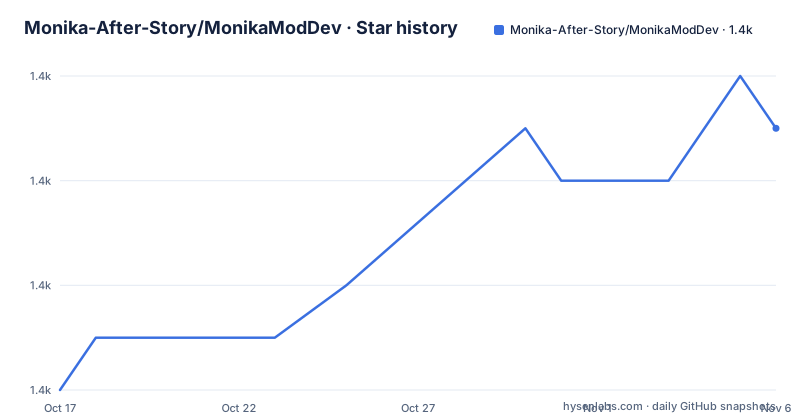
Star history
- Monika-After-Story/MonikaModDev1,423 ★ · +5
| Repository | 2026-10-17 | 2026-11-06 |
|---|---|---|
| Monika-After-Story/MonikaModDev | 1.4k | 1.4k |
5 Stars in the last 20 days, measured from the daily GitHub snapshot. Compare with other projects
Editorial analysis
What the mod actually is
Monika After Story is a mod for the free game Doki Doki Literature Club from Team Salvato, and it builds on Act 3 to create a simulator of your eternal life with Monika, with new events, handlers and metacommentary.
The framing is precise about what it extends. The mod builds on Act 3 and continues from there rather than replacing the game. A player installs the mod and runs Doki Doki Literature Club as normal, and the mod loads with it, so the original game is still there underneath.
The features list is short, which is honest for a content mod. You spend forever with Monika. There are dozens of new conversation topics. And you can talk to Monika about what you would like to talk about, which is the interaction that the space room is built around.
The scope is not only dialogue, though. The repository carries a directory of sprite packs, a test cases directory, a tools directory, a utils directory and a documentation directory, and the game itself lives in a directory named Monika After Story with the game assets inside it. A mod this size is a software project with a content pipeline, not a set of dialogue files, and the rest of this article is mostly about that.
The project is active, with the last push to the repository on 2026-10-16 and the recent releases including v0.12.19 from September 2026.
Installing it, and the warning about repository downloads
The installation section is a four step list, and there is a second path for when the installer does not work.
The first path is the recommended one. Go to the releases page, click the link for your operating system, run the installer and follow the prompts. If the installer does not work on your system, the manual steps are there. Running Doki Doki Literature Club will then load the mod.
The manual path is four steps of its own. Go to the releases page, click the desired zip link to download the archive, extract the contents into the base directory of your Doki Doki Literature Club installation, which is the folder that contains the executable, and then run the game.
The note under the manual steps is the part worth repeating. Source files and files downloaded directly from the repository are for development purposes and may not behave as expected if used to mod the game, and the project asks you to use one of the release versions instead.
That is an unusual instruction to find in a readme, and it is a sign of a project where the repository and the playable build are genuinely different artefacts. A development checkout has the mod's source in a form that the game will not load correctly, so the fix is not to debug it but to install a release.
For installation problems beyond that, including a manual path for non-Steam Macs, the project points at a frequently asked questions page in the wiki.
The files that matter when you add content
The contributing section is unusually well organised for a fan project, and the part that stands out is the list of files and what each one is for.
script-ch30.rpy is the main flow for the mod, and it is where idle happens. script-topics.rpy holds all the random and pool topics used by Monika, and it is the file you edit to add dialogue. script-greetings.rpy is for the lines Monika says when the game loads, script-farewells.rpy for the lines she says when the game closes, script-moods.rpy for telling Monika what mood you are in, script-stories.rpy for stories she tells you, script-compliments.rpy for the compliments you can say to her, and script-apologies.rpy for the things you can apologise for.
That is a genuinely useful map. A contributor who wants to add a story is pointed at one file, and a contributor who wants to add a greeting is pointed at a different one, and neither has to work out where the game reads them from.
The file names also tell you how the mod is structured conceptually. The conversation system is not a single dialogue blob, it is split by intent, with greetings and farewells, moods, stories, compliments and apologies each in their own place, and the topic pool separate from the main flow. A mod of this size that kept everything in one file would be unmaintainable, and the README is effectively documenting the modularity.
For anything beyond simple dialogue, the project points at the Ren'Py documentation online.
The Event template, and what the keywords do
Adding a topic follows a template, and the example in the README is worth reading in full because it shows the whole shape of a piece of content.
init 5 python:
    addEvent(
        Event(
            persistent.event_database,
            eventlabel="monika_example", # event label (MUST BE UNIQUE)
            category=["example", "topic"], # list of categories this topic belongs in (These are automatically capitalized)
            prompt="Example Topic", # button text
            random=True, # True if this topic should appear randomly
            pool=True # True if this topic should appear in "Ask a Question" both are not required, only the one you need
        )
    )
The event is registered against the persistent event database, which is where the mod keeps its state between sessions. The event label must be unique, the categories determine where the topic is grouped, the prompt is the button text, and the two boolean flags decide whether the topic appears at random or in the ask a question pool, and the comment says only the one you need is required.
The dialogue itself is a Ren'Py label, and the example that follows is three lines of speech with expressions and poses, ending with a return that ends the dialogue.
The full set of keywords is documented in the definitions file in the game directory, and the contributing guide has a page for dialogue coding, which is the split that makes sense for a project with non coders and coders contributing different things.
The community around a mod this size
The infrastructure tells you how the project is run, and it is worth reading as an example of how a fan project handles scale.
Bug reports and suggestions have separate issue templates with pre-filled links, one labelled for bugs and one for suggestions, each with the body and title format filled in. The FAQ page in the wiki is linked from the readme, and there are separate wiki pages for the coding style, the testing flow and bug testing, for dialogue coding, and for troubleshooting. A project that maintains a coding style page and a dedicated testing flow page is one that has contributors and needs them to agree on how to work.
The content is split across community resources too. The discussions page is where people look for piano notes, sprite packs, submods, external content and translations, and for discussion in general. A Discord server is offered for a constant stream of Monika related content from around the web, with the code of conduct linked and described as essentially being courteous and respectful.
The repository layout matches this. There is a spritepacks directory for the art, a testcases directory, a tools directory, a utils directory, a docs directory, and the credits file, the style guide and the testing guide as separate top level documents. There are also two text files, original_monika_lines.txt and original_monika_ch30_lines.txt, which record the original lines from the base game and the original Act 3 lines respectively, and their presence suggests the mod is checked against the original text.
For anyone who wants to make their own mod rather than contribute to this one, the project points at a sister project, the DDLCModTemplate, which is the starting point for a mod of your own.
The intellectual property position, stated by the project
The licence section is the part of a fan mod that deserves careful reading, and this one is upfront about the situation.
The project states that it does its best to conform to Team Salvato's guidelines for fan works, and that all characters and original content are the property of Team Salvato. The mod itself is an open source project, and the text goes on to list contributors and to credit the material included in it.
That is the correct shape for a fan work. The original characters and the original text are not the mod author's to license, so the open source licence covers the mod's own code and added material, and the underlying content stays where it belongs. The repository licence field is recorded as one that GitHub could not classify, so the LICENSE file at the root is the reference.
The practical consequence for a user is simple and worth stating plainly. Monika After Story is a fan project built on a free game, it depends on that game being installed, and it is distributed by its own community rather than through a store. The releases page is where the builds come from, and the readme asks you to use those rather than the repository.
The alternate, more conservative reading of the same facts is that the mod extends a story that the original creators deliberately left open ended, and it does so in a way that requires a great deal of new writing to be any good at all. The three new things the feature list names, new conversation topics, the ability to talk about what you want to talk about, and the metacommentary, are what turn a short visual novel into something you can play for a long time.
Editorial conclusion
Adopt Monika After Story if you finished Doki Doki Literature Club and want the continuation it was clearly asking for, because it expands on the premise the original sets up. Do not treat it as a fork of the original game or as original content, since the characters and the original content remain the property of Team Salvato and the project states that it aims to conform to their guidelines for fan works. Before you install a build from the repository rather than from the releases page, read the note, because the project says source and repository downloads are for development and may not behave as expected.
Frequently asked questions
What is Monika After Story?
It is a mod for the free game Doki Doki Literature Club from Team Salvato. It builds on Act 3 to create a simulator of your eternal life with Monika, featuring new events, handlers and metacommentary, and it adds dozens of new conversation topics plus the ability to tell Monika what you would like to talk about.
How do I install Monika After Story?
Download the build for your operating system from the releases page and run the installer, following the prompts. If the installer does not work, extract the contents of the release zip into the base directory of your Doki Doki Literature Club installation, the folder containing the executable, and then run the game, which will load the mod.
Which files do I edit to add content to Monika After Story?
The contributing section maps them: script-ch30.rpy for the main flow and idle, script-topics.rpy for random and pool topics, script-greetings.rpy and script-farewells.rpy for the lines on load and exit, script-moods.rpy for your mood, script-stories.rpy for stories, script-compliments.rpy and script-apologies.rpy for the things you say to her.
Can I use the source in the repository to play the mod?
The project asks you not to. The note in the readme says source files and files downloaded directly from the repository are for development purposes and may not behave as expected if used to mod the game, and asks you to use one of the release versions instead.
Official sources
Add this badge to your README
If you maintain this project, the badge below links readers to this analysis and shows its maintenance status from the daily GitHub snapshot. Paste the markdown into your README; add ?metric=license or ?metric=stars to the image URL for a different field.

[](https://hysenlabs.com/projects/monika-after-story-monikamoddev)Star history chart for your README
[](https://hysenlabs.com/projects/monika-after-story-monikamoddev)Was this useful?