crawler-user-agents: a regex list of the strings bots put in their User-Agent
Syntactic patterns of HTTP user-agents used by bots / robots / crawlers / scrapers / spiders. pull-request welcome :star:
At a glance
- What is it?
- crawler-user-agents is a single JSON file of regular expressions matching the User-Agent strings of robots, crawlers and spiders, published as npm, PyPI and Go packages. It suits a server that wants to tell a bot from a browser without maintaining a crawler database, and it is a pattern list, not a classifier.
- Who is it for?
- crawler-user-agents fits a service that wants a cheap first pass at telling a crawler from a browser, because the patterns are a maintained, curated list with discovery dates and official URLs rather than a set of guesses, and because the same data ships as a JSON file, an npm package, a PyPI package and a Go module.
- Can I use it commercially?
- Yes. MIT is a permissive licence: you can use, modify and sell software built on it, as long as you keep its copyright and licence notices.
- Is it still maintained?
- Yes. The repository last received commits 8 days ago.
- What is it written in?
- Mainly Go, according to GitHub's language statistics.
Answers come from the project's GitHub data, last synced on November 7, 2026, and from our analysis. They are not legal advice.
Star history
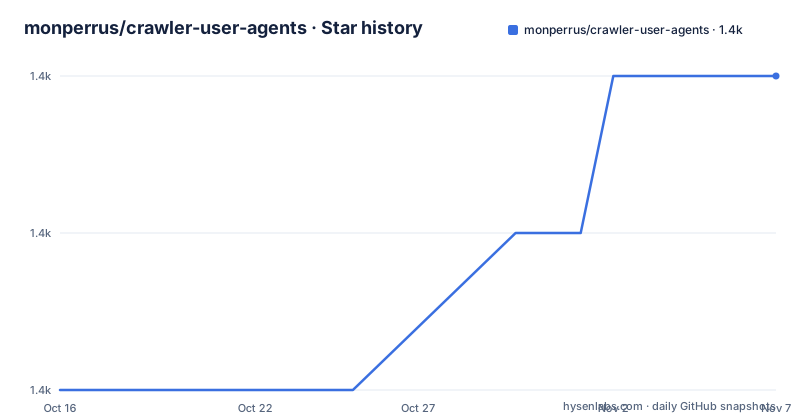
- monperrus/crawler-user-agents1,413 ★ · +2
| Repository | 2026-10-16 | 2026-11-07 |
|---|---|---|
| monperrus/crawler-user-agents | 1.4k | 1.4k |
2 Stars in the last 22 days, measured from the daily GitHub snapshot. Compare with other projects
Editorial analysis
One JSON file, and what a pattern looks like
crawler-user-agents contains a list of HTTP user-agents used by robots, crawlers and spiders as a single JSON file. That is the whole artefact, and the rest of the project is packaging it for three ecosystems.
Each `pattern` is a regular expression, and the documentation says it should work out of the box with your favourite regex library. That is a deliberate constraint. If the patterns used a feature from one library's dialect, the file could not be shared between a Python server and a Node service, and the whole value of a central list evaporates. So every pattern is written in the intersection of what regular expression engines agree on.
The entry format is specified in the contributing section, and the example is short:
{
  "pattern": "rogerbot",
  "addition_date": "2014/02/28",
  "url": "http://moz.com/help/pro/what-is-rogerbot-",
  "instances" : ["rogerbot/2.3 example UA"],
  "tags": ["seo"]
}
Five fields, and each one earns its place. `pattern` is the regular expression. `addition_date` is the discovery date in year/month/day form. `url` is the official URL of the robot. `instances` holds real User-Agent strings that the pattern was written against, which is what lets a contributor check the pattern against reality rather than against their imagination. `tags` is a free classification, with `seo` used in the example.
The `instances` field is the most useful of the five and the one most lists like this skip. A pattern without example strings is a guess, and a guess cannot be validated. With instances, a reviewer can check that the expression matches the sample and does not match a browser string, which is the only way to tell a useful pattern from a dangerous one.
The licence is MIT, and the documentation records the history, saying the versions prior to Nov 7, 2016 were under a CC-SA licence. The last push was on 2026-09-29.
The contributing rules are a quality control mechanism
The contribution guidelines are unusually prescriptive, and reading them tells you how the list stays usable.
A pull request should contain a single addition. It should specify a discriminant relevant syntactic fragment, and the example given is explicit: "totobot" and not "Mozilla/5 totobot v20131212.alpha1". It should contain the pattern as a generic regular expression, the discovery date, and the official url of the robot. And it should result in a valid JSON file, with the note not to forget the comma between items.
The discriminant rule is the important one and it is a security decision disguised as a style rule. A pattern that matches a whole User-Agent string, including the browser part, will match any browser that spoofs that string, and a pattern that matches a fragment like `totobot` matches only the bot's own token. The wider the pattern, the more false positives you get on real traffic.
This is the failure mode of every user-agent list, and the rule against it is the whole reason the list is worth using. A pattern of `Mozilla/5` or `compatible` would match a large fraction of legitimate traffic.
The single-addition rule has a similar purpose. It keeps every pull request reviewable in isolation, so a reviewer can check one new pattern against the existing set without reasoning about a diff that changes fifty entries. It also keeps the merge history clean, which matters for a file that people import wholesale.
The validation tooling in the repository matches those rules. There are `validate.py`, `validate.php` and `validate.go` files, plus `validate_test.go` and `test_validation.py`, so the same validation is implemented in three languages. That is what you would expect from a file consumed by Python, PHP and Go, and it means a malformed pattern is caught at contribution time rather than by a consumer at runtime.
The repository also carries a `test_harness.py` and a `format.js`, and a `cmd/` directory, which suggests a command that can regenerate or check the packaged forms.
Three packages, and a performance note worth reading
The same data is published three ways, and the documentation gives an example for each.
For JavaScript, the package is on npm and installs with `npm install --save crawler-user-agents` or `yarn add crawler-user-agents`. The `main` field points at the JSON file itself, so requiring the package gives you the array of crawler user agents directly:
const crawlers = require('crawler-user-agents');
console.log(crawlers);
The `exports` map in the manifest is more careful than the main field alone. The require condition gets the types from `index.d.ts` and the JSON as the default, and the import condition gets `index.d.mts` and `index.mjs`, so an ESM import and a CommonJS require both work and both get types. The manifest also has a `typings` field pointing at the same declaration file for older tooling.
For Python, the package is on PyPI and installs with `pip install crawler-user-agents`, and the module provides a predicate and a lookup:
import crawleruseragents
if crawleruseragents.is_crawler("Googlebot/"):
   # do something
And a variant that tells you which entries matched:
import crawleruseragents
indices = crawleruseragents.matching_crawlers("bingbot/2.0")
print("crawlers' indices:", indices)
The performance note is the part to notice. `matching_crawlers` is much slower than `is_crawler`, if the given User-Agent does indeed match any crawlers. The reason is structural rather than a missing optimisation. `is_crawler` can stop at the first matching pattern, while `matching_crawlers` has to evaluate every pattern in the list and collect all the matches, so on a busy server the cheap check is the one to call on the hot path and the exhaustive one is for when you need the identity of the bot.
For Go, the module is `github.com/monperrus/crawler-user-agents` at go 1.19, and it provides a global variable `Crawlers` that is synchronized with the JSON file, plus the functions `IsCrawler` and `MatchingCrawlers`. The example output shows the shape of the answer, with a Discord bot user agent producing `isCrawler: true`, the index 237 and the crawler's URL.
There is also a direct download of the `crawler-user-agents.json` file for anyone who does not want a package manager, and the top level of the repository carries a `composer.json` and a `main.php`, so a PHP consumer is served as well.
The data is the product, and it is versioned like one
Because the artefact is a data file, the project's versioning has an unusual shape, and it is worth understanding before you depend on it.
The npm package is versioned 1.0.0 while the Python package in `pyproject.toml` is version 0.1 and the Go module carries no version in its `go.mod` at all beyond the language version, go 1.19. So the three published artefacts do not share a version number, and a consumer pinning a version in one ecosystem gets a different snapshot from a consumer pinning in another.
The reason is that the package wrappers are thin and the data is the thing that changes. Each wrapper points at the same JSON file, and the Go package documents that its `Crawlers` variable is synchronized with `crawler-user-agents.json`, meaning the Go module ships a copy of the data rather than fetching it.
That design has a consequence worth planning around. A wrapper release does not necessarily contain a newer list, and a newer list does not necessarily produce a wrapper release. If you care about the freshness of the data, the thing to watch is the JSON file itself, and the direct download link is there for exactly that reason, since it gives you the current list without a package manager in the way.
The repository layout also shows the multi-language ambition. There is an `__init__.py` at the top level, which is the Python package module, a `pyproject.toml` that configures setuptools with the package directory pointing at the repository root and the JSON file included as package data. There is a `composer.json` and a `main.php` for PHP. There are `validate.py`, `validate.php` and `validate.go`, so the same validation logic is written three times rather than shared through a service, which is the right call for a file that is supposed to work offline in every ecosystem.
There is also a `MANIFEST.in` for the Python distribution, an `index.d.ts`, an `index.d.mts` and an `index.mjs` for the two JavaScript module systems, and a `format.js` plus a `cmd/` directory that look like the tooling used to produce the packaged forms.
The sponsor note in the documentation is worth repeating, because it is the maintainer's own statement of the economics. The package is free to use, but it takes real time to maintain and expand, and if it is providing value then you should consider sponsoring at the commercial tier. For a project whose entire value is the freshness and accuracy of a growing list, that is an honest description of the sustainability problem.
Related work, and where a pattern list stops
The documentation lists what else exists, and the grouping is instructive.
There are wrapper libraries that use this data to detect bots. Voight-Kampff and isbot in Ruby, crawlers in Clojure, and isBot in Node.js. Then there are other systems for spotting robots, crawlers and spiders that you may want to consider: Crawler-Detect and BrowserDetector in PHP, and browscap, which is a set of JSON files.
The distinction between the two groups is the interesting one. The wrappers reuse this list and add a convenient API. The second group does something different. Crawler-Detect and BrowserDetector are listed as PHP systems for spotting robots, crawlers and spiders. And browscap is listed as a set of JSON files.
That is where a pattern list stops. A regex list of known crawler strings answers one question, is this a known bot, and it answers it by string comparison. It does not answer whether the client is claiming to be something it is not, which is the case a scraper trying to be a browser presents, and it does not answer whether a known bot is behaving well. A crawler that identifies itself honestly is in the list, and so is a scraper that copies a crawler's User-Agent string.
The verification approach is the other limit. The list is a set of patterns, so a request is classified by its User-Agent header alone, and any client can send any header it likes. Checking whether a claimed Googlebot actually comes from Google's address ranges is a different mechanism, based on the source address rather than the string, and this data does not do it. The `url` field points at the robot's official page, which is what lets a user go and check whether the pattern is still current.
The pragmatic conclusion is that this list is a strong first filter. It is cheap, it is maintained, and it catches the large population of well-behaved crawlers. Anything beyond that needs a different signal, and the related work section is the pointer to where to look for it.
Editorial conclusion
crawler-user-agents fits a service that wants a cheap first pass at telling a crawler from a browser, because the patterns are a maintained, curated list with discovery dates and official URLs rather than a set of guesses, and because the same data ships as a JSON file, an npm package, a PyPI package and a Go module. Skip it if you need to distinguish a well-behaved crawler from a scraper, since the list identifies known bots and says nothing about intent, and skip it if you need reverse DNS verification, which this data does not perform. Before you rely on it, read the entry format, because each pattern is a generic regular expression and a loose one will match browsers too, and note the licence history, since versions before 2016-11-07 were under a CC-SA licence and the current list is MIT.
Frequently asked questions
What does crawler-user-agents contain?
A single JSON file of HTTP user-agents used by robots, crawlers and spiders, where each pattern is a generic regular expression that works with your favourite regex library, published as npm, PyPI and Go packages.
How do I add a crawler to the crawler-user-agents list?
Open a pull request containing a single addition, with a discriminant syntactic fragment such as "totobot" rather than a whole User-Agent string, the pattern, the discovery date, the official URL and example instances, so that the JSON file stays valid.
What is the difference between is_crawler and matching_crawlers?
is_crawler is the cheap check that stops at the first match, while matching_crawlers returns the indices of every matching entry, and the documentation notes that matching_crawlers is much slower when the user agent does match.
How do I install crawler-user-agents in Go, Python or JavaScript?
In Go use the module github.com/monperrus/crawler-user-agents for the Crawlers variable and the IsCrawler and MatchingCrawlers functions. In Python use `pip install crawler-user-agents`. In JavaScript use `npm install --save crawler-user-agents` or `yarn add crawler-user-agents`, or download the JSON file directly.
What licence applies to the crawler-user-agents list?
The list is under an MIT licence, and the versions prior to Nov 7, 2016 were under a CC-SA licence.
Official sources
Add this badge to your README
If you maintain this project, the badge below links readers to this analysis and shows its maintenance status from the daily GitHub snapshot. Paste the markdown into your README; add ?metric=license or ?metric=stars to the image URL for a different field.

[](https://hysenlabs.com/projects/monperrus-crawler-user-agents)Star history chart for your README
[](https://hysenlabs.com/projects/monperrus-crawler-user-agents)Was this useful?