Motion: The Framer Motion Successor That Merges React, Vue, and Vanilla JS Animation
A modern animation library for React and JavaScript
At a glance
- What is it?
- Motion is a TypeScript animation library for React, Vue, and plain JavaScript, built on a hybrid engine that combines JavaScript control with native browser APIs. It replaces Framer Motion under a new import path and adds a paid tier for advanced APIs.
- Who is it for?
- Adopt Motion if you need a single animation library across React, Vue, and vanilla JavaScript, especially if you already use Framer Motion and want a modernized import path. Avoid it if you require advanced features like the Cursor or Ticker APIs without paying for Motion+, or if your project cannot tolerate the recent rename and rebranding.
- Can I use it commercially?
- Yes. MIT is a permissive licence: you can use, modify and sell software built on it, as long as you keep its copyright and licence notices.
- Is it still maintained?
- Yes. The repository received new commits within the last day.
- What is it written in?
- Mainly TypeScript, according to GitHub's language statistics.
Answers come from the project's GitHub data, last synced on November 25, 2026, and from our analysis. They are not legal advice.
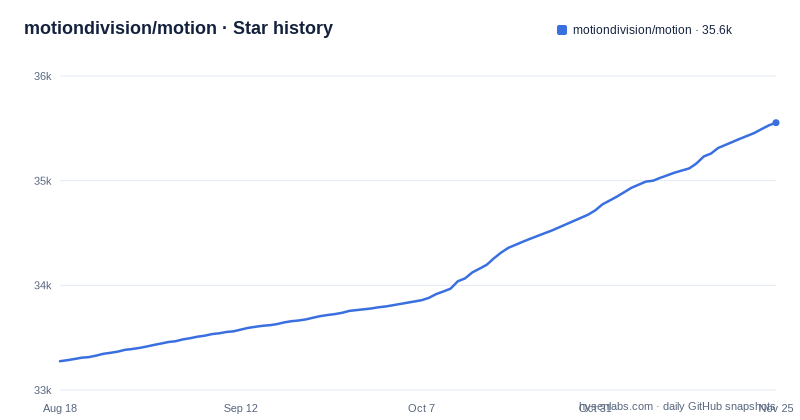
Star history
- motiondivision/motion35,554 ★ · +2,279
| Repository | 2026-08-18 | 2026-11-25 |
|---|---|---|
| motiondivision/motion | 33.3k | 35.6k |
2,279 Stars in the last 99 days, measured from the daily GitHub snapshot. Compare with other projects
Editorial analysis
What Motion Solves and Who It Targets
Motion addresses the fragmentation of animation libraries across JavaScript frameworks. It offers first-class packages for React, Vue, and vanilla JavaScript. For React developers, it is a direct successor to Framer Motion, which the README states is now Motion. The library targets teams building interactive web interfaces that need gestures, springs, layout transitions, and scroll-linked effects without assembling multiple libraries. The primary audience is front-end engineers who want a consistent animation API across projects, whether they use a framework or no framework at all.
The Hybrid Engine: JavaScript and Native Browser APIs
Motion's core claim is a hybrid engine that combines the power of JavaScript with native browser APIs. According to the README, this achieves 120fps, GPU-accelerated animations. The mechanism is not detailed in the README, but the description implies that Motion uses JavaScript for control logic and delegates heavy animation work to browser-native features like the Web Animations API or CSS transitions. This is a common pattern in modern animation libraries. The benefit is performance, but the trade-off is that you depend on browser support for those native APIs. If a browser lacks a specific feature, Motion likely falls back to JavaScript-driven animation, which may be slower. The README does not specify which APIs are used or how the fallback works, so you should verify this in the documentation before relying on the 120fps claim.
Getting Started: Installation and Basic Usage
Installation is straightforward. For React or JavaScript, run `npm install motion`. For Vue, run `npm install motion-v`. The README shows a simple React example: `import { motion } from "motion/react"` and then `<motion.div animate={{ x: 100 }} />`. This mirrors Framer Motion's syntax, but the import path changed from `framer-motion` to `motion/react`. For vanilla JavaScript, the example uses `import { animate } from "motion"` and calls `animate("#box", { x: 100 })`. This shows that the core API is framework-agnostic, with framework-specific wrappers. The Vue example uses `import { motion } from "motion-v"` and a template with `<motion.div :animate={{ x: 100 }} />`. The API is concise, but you need to know which package to install for each environment. The README does not show how to configure a bundler or set up TypeScript types, so you should check the official docs for those details.
Feature Set: Gestures, Springs, and Layout Transitions
Motion ships with a set of features labeled "batteries included" in the README. These include gestures, springs, layout transitions, scroll-linked effects, and timelines. Gestures likely cover hover, tap, and drag interactions. Springs are a physics-based animation type that gives natural, bouncy motion. Layout transitions animate elements when their position or size changes, which is useful for reordering lists or resizing containers. Scroll-linked effects tie animation progress to scroll position. Timelines allow sequencing multiple animations. The README does not provide code examples for these features, but it points to 450+ official examples and 110+ tutorials. This suggests that the feature set is broad enough to require substantial documentation. However, the README does not specify which features are free versus paid, except for the premium APIs like Cursor and Ticker, which are listed under Motion+.
The Motion+ Paid Tier: What You Do Not Get for Free
Motion is MIT licensed, but the README describes a paid membership called Motion+. For a one-time Personal licence with lifetime updates (or an annual per-seat Business plan), you get 450+ examples, 110+ tutorials, premium APIs like Cursor and Ticker, a transition editor for Cursor and VS Code, an AI Kit (example and Motion UI source, MotionScore audits and CSS springs for your agent), a private Discord, and early access content. This is a significant point. The core library is free, but some APIs are gated behind a payment. The README does not list which other APIs are premium, but it explicitly names Cursor and Ticker. If your project needs these specific APIs, you must pay. This is a departure from typical open-source models where all features are free.
A Real Alternative: Framer Motion and the Rename Problem
The most direct alternative to Motion is Framer Motion, which is now the same project under a new name. The README explicitly notes: "Framer Motion is now Motion. Import from `motion/react` instead of `framer-motion`." This means that if you are already using Framer Motion, Motion is a rename, not a new competitor. The difference is the import path and the expanded scope to Vue and vanilla JavaScript. Framer Motion was React-only. Motion extends the same API to Vue and JS. If you are a React-only user, the alternative is to stay on Framer Motion, but you will miss out on future updates that likely target the new `motion` package. The real difference in approach is that Motion unifies the API across frameworks, whereas Framer Motion was tied to React. For a non-React project, alternatives like GSAP exist, but they are not mentioned in the README. The key takeaway is that if you are evaluating Motion, you are evaluating a rebranded and expanded Framer Motion, not a fresh competitor.
Maintenance, Upgrade Cost, and License Implications
The repository is not archived, the last push was on 2026-11-01, and it publishes no GitHub releases, though it has a CHANGELOG.md. The README mentions an extensive test suite and TypeScript, which suggests active development, but you should check the repository's commit history and release tags before adopting. The upgrade cost from Framer Motion to Motion is low for simple imports: change `framer-motion` to `motion/react` in your import statements. However, if you use advanced features that changed names or moved to premium, the cost could be higher. The license is MIT, which allows commercial use, modification, and distribution with attribution. The README does not mention any patent or trademark concerns, but the Motion+ paid tier introduces a dual model: the core is open source, while some APIs are commercial. This is not a license issue, but it does affect your cost. You should verify that the premium APIs are not necessary for your use case before committing.
Editorial conclusion
Adopt Motion if you need a single animation library across React, Vue, and vanilla JavaScript, especially if you already use Framer Motion and want a modernized import path. Avoid it if you require advanced features like the Cursor or Ticker APIs without paying for Motion+, or if your project cannot tolerate the recent rename and rebranding. Before adopting, verify the current version's API stability, check the migration guide from framer-motion to motion/react, and confirm that the hybrid engine's native API fallbacks work in your target browsers. This library is production-ready and MIT licensed, but its premium tier creates a clear boundary between free and paid capabilities.
Frequently asked questions
What is the Motion animation library?
It is an open source animation library for JavaScript, React and Vue, MIT licensed, with first-class packages for each. The project describes a hybrid engine combining JavaScript with native browser APIs for 120fps GPU-accelerated animations, written in TypeScript, tree-shakable, with gestures, springs, layout transitions, scroll-linked effects and timelines included.
Is Framer Motion the same as Motion?
Yes. The README states that Framer Motion is now Motion, and that you should import from `motion/react` instead of `framer-motion`. The repository still carries older names in places, since the root package.json is named motion-one and the Makefile still builds a framer-motion package directory.
How do I install Motion?
Run `npm install motion` for React or JavaScript, or `npm install motion-v` for Vue. React code imports from `motion/react`, plain JavaScript imports the animate function from `motion`, and Vue imports from `motion-v`. The package is also available through jsDelivr.
Does Motion have a paid tier?
The library itself is MIT licensed with no paid runtime. A separate Motion+ product is sold as a one-time Personal licence with lifetime updates or an annual per-seat Business plan, adding 450+ examples, 110+ tutorials, premium APIs such as Cursor and Ticker, a transition editor for Cursor and VS Code, an AI Kit with example and Motion UI source, MotionScore audits and CSS spring generation, a private Discord and early access content.
Can I give a coding agent the Motion documentation?
Yes. `npx motion-ai` installs a free, MIT-licensed /motion skill and sets up Motion's MCP servers for Claude Code, Cursor, Amp, OpenCode, Gemini CLI and Copilot, and a hosted server at mcp.motion.dev searches the docs and example metadata with no account. The index at motion.dev/llms.txt covers every documentation page and labels the Motion+ pages as paid.
What is Motion Studio?
It is a visual animation editor for your website, where you edit keyframes, easing curves and springs on a live timeline, or describe changes to an agent called Ultramotion and then apply the result straight to your code with Cursor, Codex or Claude.
Official sources
Add this badge to your README
If you maintain this project, the badge below links readers to this analysis and shows its maintenance status from the daily GitHub snapshot. Paste the markdown into your README; add ?metric=license or ?metric=stars to the image URL for a different field.

[](https://hysenlabs.com/projects/motiondivision-motion)Star history chart for your README
[](https://hysenlabs.com/projects/motiondivision-motion)Was this useful?