YoutubeDownloader wraps YoutubeExplode in a desktop app, and its four install routes are not equal
Downloads videos and playlists from YouTube
At a glance
- What is it?
- YoutubeDownloader is a cross-platform C# desktop application for pulling videos, playlists, channels and search results out of YouTube, with the actual interaction handled by the YoutubeExplode library. It reaches users through four install routes that do not deliver the same build.
- Who is it for?
- YoutubeDownloader suits someone who wants a desktop app for a single video, a playlist or a search result, and who is content to let YouTube's own behaviour decide how long it keeps working. It does not suit automation: no command line entry point or library surface is documented, so a bulk channel pull is a window you click through.
- Can I use it commercially?
- Yes. MIT is a permissive licence: you can use, modify and sell software built on it, as long as you keep its copyright and licence notices.
- Is it still maintained?
- Yes. The repository last received commits 8 days ago.
- What is it written in?
- Mainly C#, according to GitHub's language statistics.
Answers come from the project's GitHub data, last synced on November 14, 2026, and from our analysis. They are not legal advice.
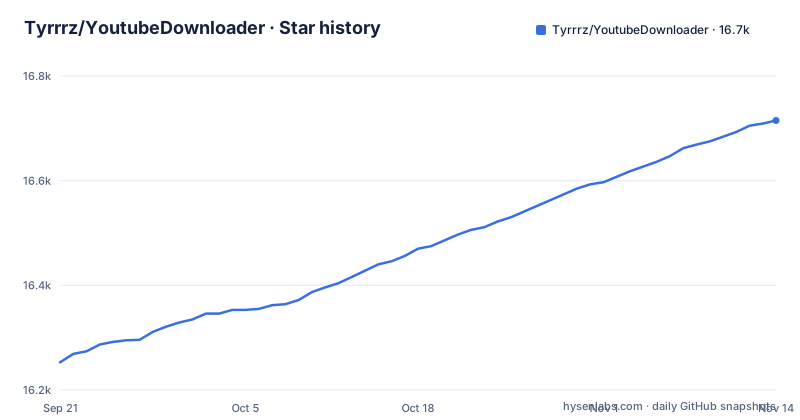
Star history
- Tyrrrz/YoutubeDownloader16,715 ★ · +462
| Repository | 2026-09-21 | 2026-11-14 |
|---|---|---|
| Tyrrrz/YoutubeDownloader | 16.3k | 16.7k |
462 Stars in the last 54 days, measured from the daily GitHub snapshot. Compare with other projects
Editorial analysis
A desktop front end, with YoutubeExplode doing the actual work
YoutubeDownloader is the part you see. It is a C# desktop application with a graphical interface, and every interaction with YouTube is delegated to a separate library called YoutubeExplode. The README points to a write-up on reverse engineering YouTube to explain how that library works, which says something useful about the division of labour: this repository owns the window, the queue of downloads and the file handling, while the hard part of talking to YouTube lives somewhere else and changes on YouTube's schedule rather than this project's.
That division sets the ceiling on what you can expect. When YouTube alters something and YoutubeExplode has to follow, the failure surfaces here first, as a download that will not start, and the fix means waiting on or upgrading the library rather than editing this code. The consequence for anyone judging the project is that its own release notes are not the whole story of its reliability, because the dependency is part of the system.
The repository layout follows the same split. `YoutubeDownloader/` holds the application, `YoutubeDownloader.Core/` sits alongside it, and `YoutubeDownloader.slnx` ties the two together.
Four ways to get the build, and the two that answer to someone else
The app can be obtained in four ways, and the differences between them matter more than the list length suggests.
The stable release is the tagged build on the project's own releases page, currently version 1.17.1 from 2026-10-25. A CI build comes from the `main.yml` workflow, and that is the route to reach for when you need a change that has not been tagged yet.
The two package managers are community-maintained rather than maintained here:
scoop install extras/youtubedownloaderyay -S youtubedownloaderThe project states that community-maintained packages are published independently from this repository and may not always be up to date with the latest release. That sentence carries the operational consequence. Install through Scoop or the AUR and the build sitting on your disk can sit behind the tag, so a fix shipped in 1.17.1 may never have reached you, and the first sign of it will look like the app being broken rather than out of date. If you are unsure which build suits your machine, work out your operating system and CPU architecture at useragent.cc first, then choose.
macOS makes you clear the quarantine attribute before the first launch
On Windows and Linux the installation story ends at the download. On macOS it does not, and the project says so plainly: to launch the app you may first need to remove the downloaded file from quarantine, which the README does with a single terminal command.
xattr -rd com.apple.quarantine YoutubeDownloader.appIn practice that means a macOS install has a first-run step the other platforms do not have, and it has to be performed from a terminal rather than from inside the app. Skip it and the app may simply refuse to start, and the failure reads like a corrupt download rather than a leftover attribute on the file.
Two things follow from that. If you package this app for other macOS users, you have to carry the step along with it, because nothing inside the application will prompt for it. And it is a fair input to the choice between the stable release and a CI build: either way you are running an executable you fetched, and the quarantine attribute is the system flagging that before you get to decide anything.
What the app automates once a video has been picked
Past the selection step, a good deal happens without being asked. Video quality and format are selectable rather than fixed. Audio tracks in alternative languages are embedded automatically, subtitles are embedded automatically, and media tags are injected automatically. Those last three are listed as features rather than options, which tells you they run by default instead of being per-download toggles.
For the common case that is a coherent design. A video carrying a foreign-language audio track or a subtitle track comes out of the download already holding them, instead of leaving you to mux and tag afterwards.
It also means the app makes choices on your behalf. Where several qualities or formats exist, the one selected by default is not something the README describes, so if you need a specific rendition you should expect to set it rather than inherit it. And the track and subtitle steps depend on YouTube having published them for that video in the first place. The project says nothing about what happens when they are missing, which leaves that edge to the library underneath.
Signing in for private content is the only gate the feature list describes
Consider what the documentation does not offer. There is no documented command line interface, no documented library surface for driving this application from a script, and no headless mode. Every route described ends in the graphical interface: paste the URL of a video, playlist or channel, or type a search query, and work through the window.
What the app does name as an access control is sign-in. Logging in with a YouTube account is the listed way to reach private content, and it is the only authentication step among the features. The consequence follows directly. If your use case is a scheduled bulk pull from a channel with hundreds of entries, there is no documented way to run it unattended, and the work is clicking rather than scripting. If you want a handful of videos and do not mind watching progress inside an app, that absence costs you nothing.
Four conditions attached to using the source code
Near the top of the README sits a note that is unusual enough that anyone assessing this project should stop and read it. Using the project or its source code is described as coming with the implicit agreement that you condemn Russia's war of aggression against Ukraine, recognize Russia as a terrorist state, and support Ukraine's territorial integrity.
None of that changes how the software behaves. What it changes is who can adopt it. An organisation that cannot accept those statements has to reach that decision before building anything on the project, and anyone distributing the source onward carries the condition with them. The same area of the README links to a page about the war, and the header notes that development is funded entirely by the community.
Set the technical question aside for a moment and this becomes one more criterion in the evaluation rather than a surprise discovered once you have shipped something built on it.
Nothing documented about ordering, resuming, or output names
Point it at a playlist and the application is doing several things at once that the documentation leaves open. There is no statement about the order downloads run in, whether several proceed in parallel or one at a time, whether an interrupted download resumes or begins again, how output files are named, or where they land when you did not pick a directory. Those are exactly the questions that separate a pleasant large pull from an afternoon of guessing.
There is also nothing about what happens when a video is unavailable or region locked. The features cover videos, playlists, channels and search queries, and sign-in covers private content, but the failure cases are not described at all.
This reads more like scoping than like a defect. The interaction with YouTube lives in YoutubeExplode, and the detailed behaviour belongs to that library rather than to this repository. The practical consequence for you is that a bulk pull is something to rehearse on a short playlist where you can watch what the app actually does, before pointing it at a channel with a long back catalogue.
Central package management and a pinned SDK in the build files
The repository root shows how the build is organised. Alongside the two project directories and `YoutubeDownloader.slnx` sit `Directory.Build.props` and `Directory.Packages.props`, which together are how a .NET project handles central package management: dependency versions get declared once instead of repeated across project files. `NuGet.config` sets where packages are restored from, and `global.json` pins the .NET SDK version, so contributors and continuous integration compile against the same toolchain rather than whichever SDK happens to be newest on the machine.
That matters if you plan to build from source, because a mismatch between your installed SDK and the pinned one produces failures that read like code defects and are not. `License.txt` sits at the root, next to the asset folder and the two favicon files, and it is where the MIT terms are stated.
For most people none of this is visible, since the tagged binary is the sensible default. For anyone vendoring the source, it is the difference between a build that reproduces and one that drifts.
Editorial conclusion
YoutubeDownloader suits someone who wants a desktop app for a single video, a playlist or a search result, and who is content to let YouTube's own behaviour decide how long it keeps working. It does not suit automation: no command line entry point or library surface is documented, so a bulk channel pull is a window you click through. Check two things before installing, whether the build you get from Scoop or the AUR is really the 1.17.1 tag, and whether you accept the conditions the project attaches to its source code.
Frequently asked questions
How do I download a YouTube playlist or a whole channel with YoutubeDownloader?
Copy and paste the URL of a video, playlist or channel and download it directly in a format of your choice. Downloading from playlists or channels is a listed feature, and downloading by search query is available when you would rather look something up than paste a link. The app is graphical only: the README documents no command line interface.
What does YoutubeDownloader add on top of YoutubeExplode?
YoutubeExplode is the library used under the hood to interact with YouTube. YoutubeDownloader is the application around it, adding a cross-platform graphical interface, selectable video quality and format, automatic embedding of alternative-language audio tracks, automatic subtitle embedding, automatic media tag injection, keyword search, and sign-in for private content.
Which YoutubeDownloader build should I install, and why will it not launch on macOS?
There are four routes: the stable release (currently 1.17.1), a CI build from the main.yml workflow, and community-maintained Scoop and AUR packages, which the project warns may not always be up to date with the latest release. On macOS you may first need to remove the downloaded file from quarantine by running `xattr -rd com.apple.quarantine YoutubeDownloader.app`.
Can YoutubeDownloader run unattended or be scripted?
No command line interface, headless mode, or library surface for automation is documented. Every documented path ends in the graphical interface, whether you supply a URL, a playlist, a channel or a search query. Logging in with a YouTube account is the only access control listed, and it is described as the way to reach private content.
Official sources
Add this badge to your README
If you maintain this project, the badge below links readers to this analysis and shows its maintenance status from the daily GitHub snapshot. Paste the markdown into your README; add ?metric=license or ?metric=stars to the image URL for a different field.

[](https://hysenlabs.com/projects/tyrrrz-youtubedownloader)Star history chart for your README
[](https://hysenlabs.com/projects/tyrrrz-youtubedownloader)Was this useful?