Yaak: a desktop API client built on Tauri, Rust and React
The most intuitive desktop API client. Organize and execute REST, GraphQL, WebSockets, Server Sent Events, and gRPC 🦬
At a glance
- What is it?
- Yaak is an offline-first desktop client for REST, GraphQL, gRPC, WebSocket and Server-Sent Events, MIT licensed with paid prebuilt binaries for commercial use. Here is how it installs, how its plugin architecture works, and where it stops being the right tool.
- Who is it for?
- Adopt Yaak if you want a local-first desktop client that speaks REST, GraphQL, gRPC, WebSocket and SSE from one window, and you accept that the prebuilt binaries carry a licence requirement for commercial use. Do not adopt it if you need a browser-based client with no install step, or if you depend on community pull requests landing quickly, since the contribution policy limits them to bug fixes.
- Can I use it commercially?
- Yes. MIT is a permissive licence: you can use, modify and sell software built on it, as long as you keep its copyright and licence notices.
- Is it still maintained?
- Yes. The repository last received commits 1 day ago.
- What is it written in?
- Mainly TypeScript, according to GitHub's language statistics.
Answers come from the project's GitHub data, last synced on November 14, 2026, and from our analysis. They are not legal advice.
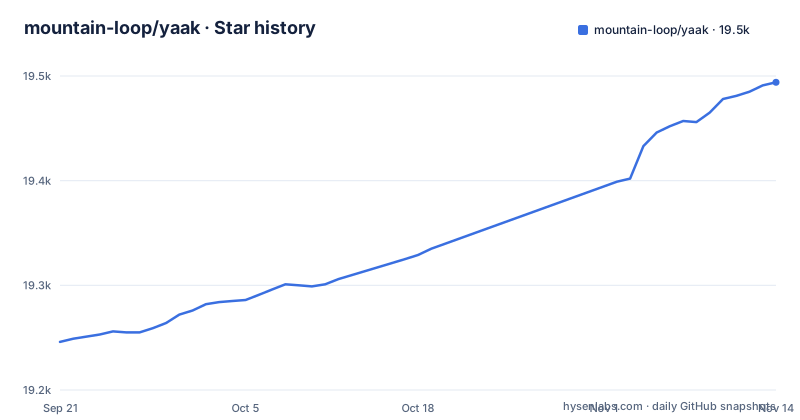
Star history
- mountain-loop/yaak19,494 ★ · +248
| Repository | 2026-09-21 | 2026-11-14 |
|---|---|---|
| mountain-loop/yaak | 19.2k | 19.5k |
248 Stars in the last 54 days, measured from the daily GitHub snapshot. Compare with other projects
Editorial analysis
What problem Yaak solves, and for whom
Most teams end up with several protocol-specific tools: one client for REST, another scratchpad for GraphQL, a CLI for gRPC, and a browser tab for WebSocket debugging. Yaak collapses those into a single desktop application. The README describes it as an offline-first API client that works with REST, GraphQL, gRPC, WebSocket and Server-Sent Events, and it lists importers for Postman, Insomnia, OpenAPI, Swagger and Curl, so an existing collection is not stranded.
The target user is an engineer who already has a collection somewhere and wants it on their own machine. The README states there is no telemetry, no VC funding and no cloud lock-in, and that workspaces can be mirrored to the filesystem for versioning in Git or syncing with Dropbox. That filesystem mirror is the part worth noticing: it turns a request collection into something reviewable in a pull request rather than a blob inside a vendor account.
It is not aimed at people who want to share a workspace through a hosted URL with zero setup. There is no account tier described in the README, and the collaboration story is Git or Dropbox, not a Yaak-hosted sync service.
Inside the Tauri shell: Rust crates, a TypeScript UI, and plugins
The repository is a monorepo with two build systems. Cargo.toml declares a workspace whose members include crates/yaak-core, crates/yaak-http, crates/yaak-grpc, crates/yaak-ws, crates/yaak-sse, crates/yaak-templates, crates/yaak-plugins, crates/yaak-sync, crates/yaak-git and crates/yaak-crypto, plus Tauri-specific crates under crates-tauri/ and a CLI under crates-cli/yaak-cli. Each protocol gets its own crate rather than one shared networking layer, which is a reasonable split given how differently gRPC and Server-Sent Events behave.
package.json declares an npm workspace over packages/ui, packages/theme, packages/model-store, packages/plugin-runtime and a long list of plugins. That list is the clearest picture of how the app is composed. Authentication lives in plugins/auth-apikey, plugins/auth-aws, plugins/auth-basic, plugins/auth-bearer, plugins/auth-digest, plugins/auth-jwt, plugins/auth-ntlm, plugins/auth-oauth2 and plugins/auth-oauth1. Importers are separate packages: importer-bruno, importer-curl, importer-insomnia, importer-openapi, importer-postman, importer-postman-environment and importer-yaak.
The template-function plugins are the most interesting design decision. plugins/template-function-uuid, template-function-timestamp, template-function-random, template-function-hash, template-function-encode, template-function-json, template-function-xml, template-function-regex, template-function-fs, template-function-1password, template-function-prompt, template-function-cookie, template-function-ctx, template-function-request and template-function-response are all discrete packages. Dynamic values are not hardcoded into the request editor; they are functions a plugin supplies. The cost is indirection, since a template tag you rely on may come from a package you have to reason about separately. The benefit is that adding a new one does not mean touching the core request pipeline.
Cargo.toml also shows the HTTP stack. The workspace pins reqwest 0.13.5 with default features disabled and an explicit feature set of charset, http2, system-proxy and native-tls, with a comment noting that reqwest 0.13 switched default-tls from native-tls to rustls and that the project chose to stay on native-tls. rustls 0.23.34 is still present as a workspace dependency. That is a deliberate trade-off: native-tls defers to the platform trust store, which matters on corporate networks with injected certificates, while rustls would give more consistent behaviour across operating systems.
Installing Yaak and sending a first request
The README does not document a package-manager install path inline. It says to download Yaak for macOS, Windows or Linux from yaak.app/download, and that package managers and other install methods are covered in the installation docs at yaak.app/docs/getting-started/installation. So the first step is a download, not a command.
For anyone building from source rather than using a binary, the README points to DEVELOPMENT.md for local setup and CONTRIBUTING.md for policy. The repository layout confirms the two toolchains involved: Cargo.toml at the root for the Rust workspace, and package.json for the npm workspaces. The .node-version and .npmrc files at the top level indicate a pinned Node version, which is what you would expect from a Vite and React front end.
Once the app is open, the workflow the README describes is to group requests into workspaces and nested folders, then use environment variables to switch between dev, staging and prod.
For a request that needs a credential, the README lists OAuth 2.0, JWT, Basic Auth and custom plugins, with sensitive values held in encrypted secrets and stored in the OS keychain. The keyring crate version 3.6.3 in the Cargo workspace is consistent with that claim. Importing an existing collection is the fastest way to see whether the model fits: the importer plugins cover Postman, Insomnia, OpenAPI, Swagger and Curl, so an existing export can be brought across instead of rebuilt by hand.
git clone https://github.com/mountain-loop/yaak.git
cd yaak
The two files that govern a source build are both at the repository root. Running the front end and the Tauri shell is described in DEVELOPMENT.md, which the README names as the local setup guide; the exact commands are not reproduced in the README itself.
Where Yaak is the wrong tool
The clearest limitation is the licence split, and it is easy to misread. The source is MIT licensed and the README says it can be built and run for free for both personal and commercial use. The prebuilt binaries do not follow the same terms: they are governed by Yaak's pricing page, free for personal use with a licence required for commercial use. A team that downloads the installer and deploys it across an engineering org is in a different position from a team that compiles from source. The README does not spell out how compliance is enforced for the binary path, so that is a question for the pricing terms rather than the repository.
Community contribution is the second constraint, and it is explicit. The README carries a contribution policy stating that community PRs are currently limited to bug fixes, and that a non-bug-fix PR must link a feedback item where the maintainer gave permission. For a team that wants to upstream a feature it needs, that policy is a wall, not a speed bump. Bug fixes are welcome; roadmap influence runs through the feedback site.
A third limit is architectural. This is a desktop application built with Tauri, Rust and React. There is no browser-based client described in the README, and the repository does contain crates-server/yaak-web and crates-server/yaak-playground alongside Dockerfile.web and Dockerfile.playground, which suggests a hosted tier exists, but the README does not document it as a user-facing product. If your constraint is that nothing can be installed on a workstation, or that requests must originate from a shared CI host with a browser, Yaak's main distribution path does not fit.
Finally, the README does not document rollback, migration between major versions, or what happens to a filesystem-mirrored workspace when the app's internal model changes. The repository has a crates/yaak-sync crate and a crates/yaak-git crate, so the mechanism exists, but the README is silent on compatibility guarantees for the mirrored format. Treat that as unverified rather than safe.
How Yaak differs from Bruno and Insomnia
The README links comparison pages at yaak.app/alternatives/postman, yaak.app/alternatives/bruno and yaak.app/alternatives/insomnia. Those pages are the project's own framing, so read them with that in mind.
The substantive difference visible from the repository is the plugin surface. Insomnia has historically supported plugins, but Yaak's plugin list is unusually granular: every authentication scheme, every importer, every response filter and every template function is its own npm workspace package. That means the boundary between core and extension is visible in the directory tree rather than buried in an internal API. The trade-off is that the plugin-runtime and plugin-runtime-types packages become load-bearing: a plugin author is coding against a runtime that the app itself depends on.
Against Bruno, which also positions itself around local file storage, the difference the README draws is protocol breadth. Yaak's README claims REST, GraphQL, gRPC, WebSocket and Server-Sent Events in the same client, with dedicated Rust crates for gRPC, WebSocket and SSE. Bruno's own documentation is the place to check its protocol coverage.
One thing Yaak does not appear to offer is a headless mode as its primary interface. There is a crates-cli/yaak-cli workspace member and a plugins-external/mcp-server package, so a CLI and an MCP server exist in the tree, but the README presents the desktop client as the product and does not document either as a supported entry point. If your workflow is scripted requests in CI, verify that separately before assuming it.
Licence, maintenance and what an upgrade costs you
The repository is not archived and the last push was on 2026-11-02. The most recent releases listed are v2026.10.0-beta.2 and v2026.9.1, both on 2026-11-01, preceded by v2026.10.0-beta.1 on 2026-10-26. That cadence, with betas shipping alongside stable tags, tells you the project ships on a versioned train rather than a rolling main branch. Plan upgrades around the stable tag, not the betas.
On licensing: the source is MIT, which permits building and running for free in commercial settings. The prebuilt binaries are governed separately by the pricing terms, free for personal use and requiring a licence for commercial use. That is a distinction with real consequences for how a company distributes the app to engineers, and the README states it plainly. Nothing here is legal advice; the pricing page is the document that governs the binary path, and it is the one to read before a procurement conversation.
Upgrade cost is harder to estimate. The workspace pins specific versions of reqwest, rustls, serde, tauri and keyring in Cargo.toml, and the README points to a bundled feedback site for bugs. It does not describe a release-notes policy, a deprecation window, or how workspace files migrate between versions. The practical exposure is the mirrored workspace: if the on-disk format changes, your Git history is where the breakage shows up. Back up or branch before a major upgrade, and read the release notes for the version you are moving to rather than assuming the format is stable.
Editorial conclusion
Adopt Yaak if you want a local-first desktop client that speaks REST, GraphQL, gRPC, WebSocket and SSE from one window, and you accept that the prebuilt binaries carry a licence requirement for commercial use. Do not adopt it if you need a browser-based client with no install step, or if you depend on community pull requests landing quickly, since the contribution policy limits them to bug fixes. Before you commit, check the pricing terms against how your team actually uses it, and confirm your data stays on disk rather than in a hosted account.
Frequently asked questions
Is Yaak free to use?
The source is MIT licensed and the README says it can be built and run for free for personal and commercial use. The prebuilt binaries follow Yaak's pricing terms instead: free for personal use, with a licence required for commercial use.
Which protocols does Yaak support?
The README lists REST, GraphQL, gRPC, WebSocket and Server-Sent Events, and the Cargo workspace has separate crates for gRPC, WebSocket and SSE. Responses can be filtered with JSONPath or XPath.
Can I import my Postman or Insomnia collections into Yaak?
Yes. The README lists importers for Postman, Insomnia, OpenAPI, Swagger and Curl, and package.json shows them as separate packages under plugins/, including importer-postman, importer-postman-environment and importer-insomnia.
Does Yaak send my requests through a cloud service?
The README describes Yaak as offline-first with no telemetry and no cloud lock-in, and says workspaces can be mirrored to the filesystem for versioning in Git or syncing with Dropbox. Secrets are described as encrypted and stored in the OS keychain.
Can I contribute a feature to Yaak?
Community PRs are currently limited to bug fixes. The README says a non-bug-fix PR must link a feedback item where the maintainer explicitly gave permission to work on it.
Official sources
Add this badge to your README
If you maintain this project, the badge below links readers to this analysis and shows its maintenance status from the daily GitHub snapshot. Paste the markdown into your README; add ?metric=license or ?metric=stars to the image URL for a different field.

[](https://hysenlabs.com/projects/mountain-loop-yaak)Star history chart for your README
[](https://hysenlabs.com/projects/mountain-loop-yaak)Was this useful?