mcp-remote puts a stdio process in front of a remote MCP server so the OAuth flow can happen
Connect an MCP Client that only supports local (stdio) servers to a Remote MCP Server.
At a glance
- What is it?
- An npm package that lets a client which only speaks stdio talk to a remote MCP server with full authorization, by running a local shim that owns the token exchange. The interesting parts are the four values that decide which OAuth session you get, the header flags that decide where your credential is visible, and a version number that disagrees with its own tags.
- Who is it for?
- mcp-remote is the right shape for the gap it names: a client that only launches stdio servers cannot do the browser redirect an authorization server expects, and something local has to own that exchange. It is not a way to avoid running local code, because a process launched through npx still runs on your machine; what moves to the web is the server.
- Can I use it commercially?
- Yes. MIT is a permissive licence: you can use, modify and sell software built on it, as long as you keep its copyright and licence notices.
- Is it still maintained?
- Yes. The repository last received commits 3 days ago.
- What is it written in?
- Mainly TypeScript, according to GitHub's language statistics.
Answers come from the project's GitHub data, last synced on November 13, 2026, and from our analysis. They are not legal advice.
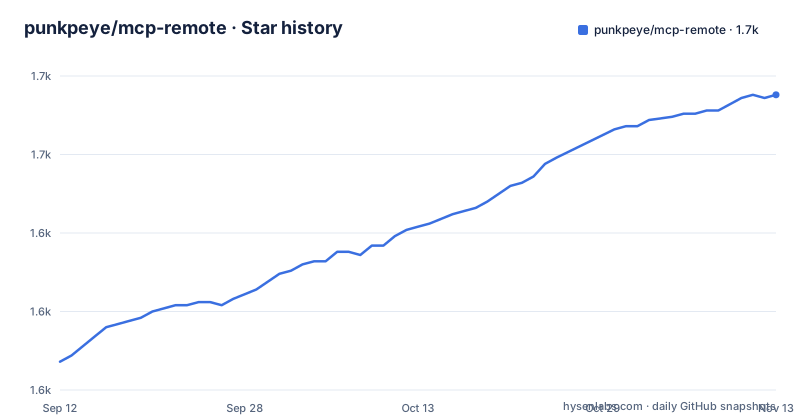
Star history
- punkpeye/mcp-remote1,669 ★ · +85
| Repository | 2026-09-12 | 2026-11-13 |
|---|---|---|
| punkpeye/mcp-remote | 1.6k | 1.7k |
85 Stars in the last 62 days, measured from the daily GitHub snapshot. Compare with other projects
Editorial analysis
Your client still launches a local process, and that process owns the token
The configuration is two fields. A command of npx, and arguments naming the package and a remote URL:
{
  "mcpServers": {
    "remote-example": {
      "command": "npx",
      "args": [
        "mcp-remote",
        "https://remote.mcp.server/sse"
      ]
    }
  }
}
The client spawns npx, npx runs the package, and the package speaks stdio to the client on one side and HTTP plus SSE to the remote server on the other. What it adds in the middle is the authorization handshake: a local HTTP listener for the redirect, a browser login, and token storage afterwards.
That is worth being blunt about, because the argument for remote MCP servers is that code stops running on users' laptops. With a shim in the path, code still runs on your laptop. What the remote arrangement removes is the server half. The README frames the tool as temporary in exactly this spirit, saying that as soon as your client supports remote authorized servers you can remove it.
The published tarball is dist, README and LICENSE, and it has a second binary
The packaging file decides what a user actually receives:
  "files": [
    "dist",
    "README.md",
    "LICENSE"
  ],
  "bin": {
    "mcp-remote": "dist/proxy.js",
    "mcp-remote-client": "dist/client.js"
  },
Source files are not shipped. Whoever wants to read the TypeScript has to clone the repository, which is normal for an npm package but means the code a user runs is build output produced by tsup rather than anything reviewable in place.
The bin block is the more interesting half. There are two executables. The guide only ever tells you to run the first, mcp-remote, which is dist/proxy.js. The second, mcp-remote-client, points at dist/client.js and is documented nowhere in the README, though the development scripts include a dev:client entry that runs the matching source file. So the package installs a command the documentation never mentions.
The packaging file says 0.1.38 and the newest tag is v0.14.3
These are two different numbers for the same artefact. The version field in the packaging file is 0.1.38. The tags on the repository are v0.14.3, v0.14.2 and v0.14.1, with v0.14.3 dated seconds after the last recorded push. That is a gap of an order of magnitude, not a rounding difference, and nothing in either place explains it.
The release setup is supposed to prevent that class of drift. Releases are delegated to semantic-release with its commit analyser, notes generator, npm plugin and GitHub plugin, restricted to the main branch, which is the arrangement that keeps the npm version and the git tag in step because both come from one run. A preversion step is present too, with prepack running the same tsup build as the build script, so a published tarball is built rather than assembled from whatever was in the tree.
So either the tag series and the registry version have parted company, or one of the two numbers is stale. Either way, pinning by version is the only safe move, and the flag that forces a check, adding @latest to the package name, gets you the newest thing npm has rather than the newest tag.
Credentials in args are readable from the process list, and the file form fails closed
The header flags are where this tool handles secrets, and the guide is unusually direct about the risk of the obvious approach. Passing --header puts the value on the command line, where any other user on the machine can read it from the process list. The documented escape is --header-file, with one Name and value pair per line and # starting a comment:
# credentials for the example server
Authorization: Bearer my-token
X-Custom-Header: custom-value
passed as:
      "args": [
        "mcp-remote",
        "https://remote.mcp.server/sse",
        "--header-file",
        "/path/to/headers.txt"
      ]
The property that makes the file form safe rather than merely private is the failure mode. A header file that cannot be read is treated as an error rather than a warning, so a mistyped path stops the request instead of letting it go out unauthenticated. That is the difference between a secret that is hidden and a secret that is quietly dropped.
The env block in the config is the middle option: the guide shows a token held in an env var and interpolated into the header, which keeps it out of argv but leaves it in whatever the client does with the environment.
Three clients mangle spaces inside args, and the fix changes your header syntax
Cursor, Codex-Cli and Claude Desktop on Windows share a bug where spaces inside args are not escaped when the client invokes npx, which mangles header values. The workaround is a change to the header syntax rather than to the client: drop the spaces around the colon, and move the space into the environment variable instead.
The example is labelled jsonc and carries a comment line saying the rest of the config is unchanged, plus a trailing comma after the closing brace of the entry. That is convenient to read and is not valid JSON, which matters because the file it goes in is parsed as JSON by the very clients being worked around.
The underlying issue is that a header is one string with a colon and a space in it, pushed through an argument list that three clients assemble incorrectly. Every config snippet in the guide is really a fragment of a larger file, which is normal for documentation and easy to misread as something you can paste whole.
The OAuth session key is four values, and changing one abandons the token you had
Running two instances of the same remote server, say two Atlassian tenants, is done with the --resource flag to isolate the sessions:
      "args": [
        "mcp-remote",
        "https://mcp.atlassian.com/v1/sse",
        "--resource",
        "https://tenant1.atlassian.net/"
      ]
The isolation rule is stated as a single sentence: each unique combination of server URL, resource, custom headers and --authorize-param values keeps its own OAuth session and its own token storage. So the session identity is a hash of four inputs, and every one of them is something you are invited to edit.
That has an operational edge. Adding a header to a working config is not a tweak, it is a new login, and the token from the previous combination is still on disk under a key nothing points at any more. The same is true of changing an authorization parameter, for a stated reason: a parameter such as audience decides which API the token is for, and a token issued for one API is not valid for another.
The resource value itself follows RFC 8707 and is sent on the authorization, token and refresh requests alike, so the three always agree. Some authorization servers refuse it outright, and the guide names one error code, AADSTS9010010 from Microsoft Entra ID v2, with --disable-resource-parameter to omit it.
Five authorization parameters are refused on purpose
Some authorization servers want parameters of their own on the authorize call, and each is passed as --authorize-param key=value, repeated as needed:
      "args": [
        "mcp-remote",
        "https://remote.mcp.server/mcp",
        "--authorize-param",
        "access_type=offline",
        "--authorize-param",
        "prompt=consent"
      ]
Those two exist because Google will not part with a refresh token without them, since it does not recognise the offline_access scope. Auth0 wants an audience parameter to issue a JWT rather than an opaque token, and login_hint is described as common.
The interesting part is the refusal list. state, code_challenge, client_id, redirect_uri and response_type are all rejected, because the flow derives them per request and a value that disagrees with the real one surfaces as an opaque server error on the far side. The tool chooses a clear local failure over a confusing remote one. These parameters apply to the authorization request only, with resource as the single named exception, which is exactly what RFC 8707 requires.
The redirect port comes from the server URL and is never silently moved
Authorization needs a local listener for the browser redirect, and the port is derived from the server URL so each remote server gets a stable port of its own somewhere in the 3335 to 49150 range. If that port is taken, mcp-remote walks up to eight ports from it.
What it will not do is move a port you named yourself. An explicit port is used as-is, and the run fails rather than quietly listening somewhere else, because an explicit port implies a redirect_uri that the authorization server has already been told about. The --static-oauth-client-info flag pins the port the same way and for the same reason.
That is a small design decision with a large blast radius if it went the other way. A proxy that drifted to a different port would produce a redirect_uri mismatch at the authorization server, which is precisely the class of error the parameter refusal list above exists to avoid.
The toolchain behind all of this is visible in the scripts: tsup to build, vitest to test, and a lint chain of oxfmt --check, oxlint with warnings denied, and two separate tsc passes, the second against the test project with no emit.
Editorial conclusion
mcp-remote is the right shape for the gap it names: a client that only launches stdio servers cannot do the browser redirect an authorization server expects, and something local has to own that exchange. It is not a way to avoid running local code, because a process launched through npx still runs on your machine; what moves to the web is the server. Before relying on it, pin the version yourself, since the packaging file and the tag series disagree, put credentials in a header file rather than in args because arguments are readable from the process list, and remember that the server URL, resource, headers and authorize parameters together form your session identity, so changing any one of them starts a new sign-in and abandons the token you had. If your client gains native remote support, this layer becomes something to delete.
Frequently asked questions
How do I install mcp-remote for a stdio-only client?
Add an entry to the client's mcpServers config with command npx and args naming mcp-remote followed by the remote server URL. If npx reports errors, put -y as the first argument so the package install is accepted automatically, and add @latest to the package name to force a version check.
Does mcp-remote run code on my own machine?
Yes. The client's config launches npx, npx runs the package, and that process speaks stdio to the client and HTTP plus SSE to the remote server. What moves to the web is the server half, not the client-side shim.
How do I keep an API key out of the process arguments in mcp-remote?
Use --header-file with a path instead of --header with the value. The file holds one Name and value pair per line and treats # as a comment, and a file that cannot be read is an error rather than a warning, so a bad path fails instead of sending the request unauthenticated.
Why do my two mcp-remote entries sign in separately?
Each unique combination of server URL, resource, custom headers and --authorize-param values keeps a separate OAuth session and token store. Changing any one of those four starts a new sign-in and leaves the earlier token behind.
What happens when an MCP server rejects the resource parameter?
Some authorization servers refuse it outright, and Microsoft Entra ID v2 answers AADSTS9010010. Pass --disable-resource-parameter to omit it, which is why the tool does not simply retry with the parameter dropped.
Can mcp-remote change the port used for the OAuth redirect?
Only upward, and only when the port was not chosen by you. The default is derived from the server URL within a range of 3335 to 49150, and up to eight further ports are tried if that one is taken. A port you pass explicitly is used as is, and the run fails rather than moving, because the matching redirect_uri was already registered.
Official sources
Add this badge to your README
If you maintain this project, the badge below links readers to this analysis and shows its maintenance status from the daily GitHub snapshot. Paste the markdown into your README; add ?metric=license or ?metric=stars to the image URL for a different field.

[](https://hysenlabs.com/projects/punkpeye-mcp-remote)Star history chart for your README
[](https://hysenlabs.com/projects/punkpeye-mcp-remote)Was this useful?