doggo: a command-line DNS client for humans, written in Go
:dog: Command-line DNS Client for Humans. Written in Golang
At a glance
- What is it?
- doggo is a dig-style DNS client in Go that adds DoH, DoT, DoQ and DNSCrypt transports plus JSON output. It suits engineers who script DNS checks or need encrypted resolvers from the terminal.
- Who is it for?
- Adopt doggo if you want dig-style lookups with encrypted transports, JSON output for scripts, or a TOML config so flags do not have to be repeated. Skip it if you need a full DNS debugging suite with zone transfer tooling, or if you must avoid GPL-3.0 in your distribution.
- Can I use it commercially?
- Yes, with conditions. GPL-3.0 is a copyleft licence: if you distribute software that includes it, you must release that software's source code under the same licence. Running it internally without distributing it does not trigger that obligation.
- Is it still maintained?
- Yes. The repository last received commits 3 days ago.
- What is it written in?
- Mainly Go, according to GitHub's language statistics.
Answers come from the project's GitHub data, last synced on November 15, 2026, and from our analysis. They are not legal advice.
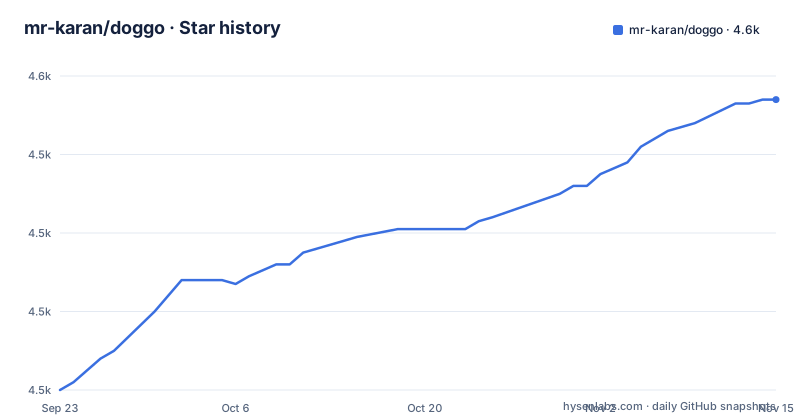
Star history
- mr-karan/doggo4,554 ★ · +74
| Repository | 2026-09-23 | 2026-11-15 |
|---|---|---|
| mr-karan/doggo | 4.5k | 4.6k |
74 Stars in the last 53 days, measured from the daily GitHub snapshot. Compare with other projects
Editorial analysis
What doggo solves, and who it is for
dig has been the default answer for terminal DNS lookups for decades, and its output has never been friendly to parse or read. doggo is a rewrite of that idea in Go, inspired by the Rust project dog, with the stated goal of printing information in a neat concise manner. The scope is narrow: resolve names, show records, and support modern transports.
The audience is engineers who already live in a shell. If you check MX records while debugging mail delivery, verify a CNAME chain before a certificate issue, or want a DNS query in a CI script that returns structured data, doggo is aimed at you. The README lists JSON output support for easy scripting and parsing, which is the clearest signal that scripting is a first-class use case rather than an afterthought.
It is not a resolver, a caching layer, or a server. It is a client. That distinction matters when you evaluate it: everything doggo does happens in a single process for the duration of one command.
How doggo resolves a name: transports, config precedence and trace
Under the hood doggo builds on github.com/miekg/dns, the standard Go DNS library, and adds transport layers on top: DoH, DoT, DoQ, TCP, UDP and DNSCrypt. The go.mod file confirms the dependencies that make this possible, including github.com/ameshkov/dnscrypt/v2 for DNSCrypt, github.com/ameshkov/dnsstamps for DNS stamps, and github.com/quic-go/quic-go for QUIC-based transports such as DoQ and HTTP/3.
Configuration flows through knadh/koanf, with separate providers for TOML files, environment variables and pflag. That architecture explains the documented precedence order, lowest to highest: flag defaults, then config file, then environment variables, then command line flags. If a value appears in both a config file and an environment variable, the environment variable wins. This is worth internalizing before you debug a surprising nameserver, because a stale DOGGO_NAMESERVER in your shell profile will silently override the config file you just edited.
The trace mode is the other mechanism worth understanding. doggo example.com --trace follows the delegation chain iteratively, meaning it queries the root, then the TLD, then the authoritative server rather than asking one recursive resolver for the final answer. That is the same class of behavior dig +trace provides, and it is the feature that makes doggo useful for diagnosing delegation problems rather than just record values.
One more detail from the README: HTTP/3 must be paired with a persistent HTTPS (DoH) nameserver. The http3 flag is not a general switch you can flip on any resolver address; it depends on a DoH endpoint being configured.
Installing doggo and running a first query
The README recommends the install script for the easy path.
curl -fsSL https://raw.githubusercontent.com/mr-karan/doggo/main/install.sh | shIf you would rather use a package manager, the README lists Homebrew (brew install doggo), Scoop and Winget on Windows, pacman on Arch, nix profile install nixpkgs#doggo, and eget mr-karan/doggo among others. With Go installed, go install github.com/mr-karan/doggo/cmd/doggo@latest puts the binary in $GOPATH/bin/doggo. For a container, the README gives a two-line Docker example.
docker pull ghcr.io/mr-karan/doggo:latest
docker run --rm ghcr.io/mr-karan/doggo:latest example.com
Once installed, the simplest query is just the domain. The output is color-coded and tabular, with response time measurement included.
doggo example.comTo query a specific record type against a specific resolver, pass the type and the nameserver with an @ prefix. This is the form most people reach for when comparing resolvers.
doggo MX github.com @9.9.9.9For encrypted DNS, pass a DoH URL as the nameserver. The README gives this exact example.
doggo example.com @https://cloudflare-dns.com/dns-queryIf you plan to script the output, JSON mode is the one to learn. The README shows piping it into jq to pull addresses out of the answer array.
doggo example.com --json | jq '.responses[0].answers[].address'Finally, defaults can be set once in a TOML config file rather than repeated on every invocation. The README documents the locations as ~/.config/doggo/config.toml (or $XDG_CONFIG_HOME/doggo/config.toml, or ~/.doggo.toml), and config-cli-sample.toml in the repository documents every supported key with its default.
strategy = "first"
color    = false
timeout  = "10s"

# HTTP/3 must be paired with a persistent HTTPS (DoH) nameserver.
nameserver = ["https://cloudflare-dns.com/dns-query"]
http3     = true
The equivalent environment variables are DOGGO_STRATEGY, DOGGO_COLOR, DOGGO_NAMESERVER and DOGGO_HTTP3. A custom config path is loaded with --config=PATH or DOGGO_CONFIG.
Where doggo falls short
The most obvious limitation is the licence. doggo is GPL-3.0. If you are packaging it into a product that cannot carry copyleft obligations, that is a hard blocker, and it is not something a config flag can work around. The repository links to a LICENSE file; the terms are what they are. This is not legal advice, and you should have someone qualified read the licence against your distribution model rather than assuming a CLI tool is harmless.
The second limitation is scope. doggo is a query client. The README does not describe zone transfer support, dynamic update, or server-side validation tooling. If your job is administering authoritative zones, doggo covers the lookup half of that work and leaves the rest to other tools.
Third, the feature list is wide, and wide feature lists age badly. The README advertises DoH, DoT, DoQ, DNSCrypt, EDNS Client Subnet, NSID, Cookies, Padding, Extended Errors, IDN punycode conversion, ndots and search handling, multiple resolvers with query strategies, source address binding, reverse lookups, shell completions and a web interface. Each of those is a surface that can break independently when a protocol or a dependency moves. The dependency on quic-go and the DNS stamp libraries in particular means the QUIC and DNSCrypt paths track upstream libraries closely.
Finally, there is a documentation gap worth naming. The README documents the install script, package managers, Go install and Docker, and it points to a full installation guide and a CLI reference on the docs site. It does not document rollback or a downgrade path in the README itself. If you pin a version and it regresses, the README is silent on how to move back; you would be working from the Releases page.
doggo compared with dig and dog
The honest comparison is with dig, because that is what most readers already have installed. dig is part of the BIND distribution, ships with nearly every Unix-like system.
doggo's difference is in the default experience and the transport list. Color-coded tabular output, JSON as a first-class mode, and DoH, DoT, DoQ and DNSCrypt built in rather than bolted on. If your workflow is a shell script that needs an address out of a DNS response, doggo's --json flag is a smaller step than parsing dig output with awk.
The other comparison is dog, the Rust project the README names as the inspiration. doggo exists because the author wanted to add features to dog but does not know Rust, so the project was written from scratch in Go. That origin explains the name (dog plus go) and the feature set. If you are choosing between them, the practical difference is the ecosystem: doggo is a Go module you can go install and vendor into Go tooling, while dog is a Rust binary. Both are command-line DNS clients with human-readable output; doggo's README is the one that documents DoQ, DNSCrypt, HTTP/3, Globalping integration and a web interface.
Maintenance, releases and upgrade cost
The repository is not archived, and the last push was on 2026-10-30. The most recent release listed is v1.4.2, dated 2026-10-22, following v1.4.1 on 2026-10-12 and v1.4.0 on 2026-09-01. That is a recent release cadence, and it means upgrades arrive often enough that pinning a version is worth the effort in a scripted environment.
Upgrade cost is low for the CLI itself. The install script fetches a binary, package managers handle their own upgrades, and go install rebuilds from source. The things that can bite you on upgrade are the config keys and the flag surface. Because precedence runs from flag defaults up through config file, environment variables and command line flags, a new key with a changed default can be masked by an environment variable you set months ago. The repository ships config-cli-sample.toml, which the README says documents every supported key with its default, and that file is the thing to diff when you upgrade.
There is also a web component in the repository: web/, web.Dockerfile, config-api-sample.toml and a Makefile target run-web that builds ./bin/doggo-web.bin and runs it with --config config-api-sample.toml. If you only need the CLI, that entire surface is something you can ignore, which keeps your upgrade exposure smaller.
Editorial conclusion
Adopt doggo if you want dig-style lookups with encrypted transports, JSON output for scripts, or a TOML config so flags do not have to be repeated. Skip it if you need a full DNS debugging suite with zone transfer tooling, or if you must avoid GPL-3.0 in your distribution. Before rolling it out, verify that the transport you need is paired correctly, since the README states HTTP/3 must be paired with a persistent HTTPS (DoH) nameserver, and check the config precedence order for your own flag defaults.
Frequently asked questions
How do I install doggo?
The README recommends the install script, curl -fsSL https://raw.githubusercontent.com/mr-karan/doggo/main/install.sh | sh, and also lists package managers including Homebrew, Scoop, Winget, pacman, Nix and Eget. With Go installed you can run go install github.com/mr-karan/doggo/cmd/doggo@latest, and a Docker image is published at ghcr.io/mr-karan/doggo:latest.
Does doggo support DNS over HTTPS?
Yes. The README gives the example doggo example.com @https://cloudflare-dns.com/dns-query, and the feature list names DoH, DoT, DoQ, TCP, UDP and DNSCrypt as supported transports. There is also an --http3 flag, which the README states must be paired with a persistent HTTPS (DoH) nameserver.
Can doggo output JSON for scripting?
Yes. The README lists JSON output support for easy scripting and parsing, and shows the example doggo example.com --json | jq '.responses[0].answers[].address'. The JSON mode is what makes doggo a reasonable fit for CI checks and shell pipelines.
What is doggo written in?
doggo is written in Go, according to the README and the go.mod file at the repository root. The README states it was inspired by the Rust project dog, and that the author wrote a DNS client from scratch in Go because they did not know Rust.
What licence does doggo use?
The repository is licensed under GPL-3.0 and links to a LICENSE file. That is a copyleft licence, so redistribution inside another product carries obligations you should have reviewed before you ship.
Official sources
Add this badge to your README
If you maintain this project, the badge below links readers to this analysis and shows its maintenance status from the daily GitHub snapshot. Paste the markdown into your README; add ?metric=license or ?metric=stars to the image URL for a different field.

[](https://hysenlabs.com/projects/mr-karan-doggo)Star history chart for your README
[](https://hysenlabs.com/projects/mr-karan-doggo)Was this useful?