vtop: A terminal activity monitor that trades depth for legibility
GitHub describes it as Wow such top. So stats. More better than regular top.. The repository metadata lists JavaScript as its primary language. The metadata lists the MIT license. This article stays within the project description and details documented in the GitHub repository README.
At a glance
- What is it?
- vtop turns the classic top output into Unicode braille charts and grouped process rows. It is a 2014-era Node.js tool that still installs cleanly, but its CPU math and feature set are frozen in time.
- Who is it for?
- Adopt vtop if you want a quick, visually distinct process list on a Mac or Linux box, if you already run Node.js, and if you prize glanceable graphs over exact numbers. Do not adopt it if you need per-process CPU accounting that matches Activity Monitor, if you rely on mouse support in terminals without proper mouse events, or if you expect updates for modern CPU architectures.
- Can I use it commercially?
- Yes. MIT is a permissive licence: you can use, modify and sell software built on it, as long as you keep its copyright and licence notices.
- Is it still maintained?
- Probably not. The repository last received commits 73 months ago, on October 8, 2020.
- What is it written in?
- Mainly JavaScript, according to GitHub's language statistics.
Answers come from the project's GitHub data, last synced on October 22, 2026, and from our analysis. They are not legal advice.
Star history
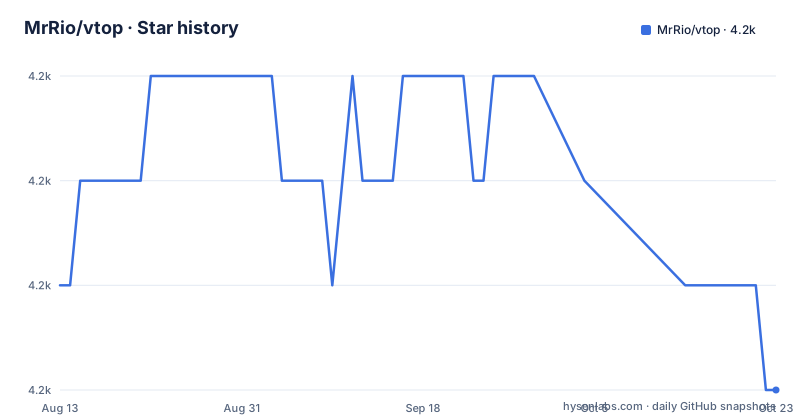
- MrRio/vtop4,170 ★ · -1
| Repository | 2026-08-13 | 2026-10-22 |
|---|---|---|
| MrRio/vtop | 4.2k | 4.2k |
-1 Stars in the last 70 days, measured from the daily GitHub snapshot. Compare with other projects
Editorial analysis
What vtop actually changes about top
The ordinary top command prints rows of numbers that update in place. vtop replaces those numbers with Unicode braille charts for CPU and memory, drawn by the drawille library. The README says it uses drawille to draw CPU and Memory charts with Unicode braille characters, helping you visualize spikes. That is the core pitch: not more data, but data shaped so a spike is visible as a shape, not a changing integer. The target user is someone who lives in a terminal, misses the graphical glanceability of a desktop activity monitor, and wants that without leaving the shell. The project groups processes with the same name together, which is another departure from top's per-process rows. That grouping reduces noise when you run many workers with identical command names, but it also hides individual process IDs unless you look more closely. The README does not describe how to see individual PIDs within a group, so the grouping is a blunt instrument.
The mechanism: braille pixels and grouped process rows
Under the hood, vtop samples system process data and feeds it into drawille, which maps values to the dots of Unicode braille characters. Each braille cell can represent a small grid of pixels, so the terminal draws charts made of characters instead of graphics. The README explains that CPU percentage is calculated as a total of your overall system power, where 100% is all cores and HyperThreads maxed out. That is a specific design decision. Apple's Activity Monitor, by contrast, often shows percentages relative to one core, so a single fully loaded core reads as 100%. vtop's number will look lower on a multi-core machine, and the README itself flags this as a known source of confusion. Process grouping is also part of the mechanism. The README says the tool groups processes with the same name together, and the keyboard shortcut 'dd' kills all the processes in that group. That is a powerful and dangerous action, because one keystroke pattern removes every process sharing a name, not just the selected one.
Install and first run: commands from the README
Installation is a single npm command. The README says: npm install -g vtop. If you get file permission errors on macOS, it suggests sudo npm install -g vtop, but warns not to do that if you use nvm. That warning is important because sudo with an nvm-managed Node can write into the wrong directory tree. After install, run vtop. The README gives an alias recipe for people who want to keep typing top: alias top="vtop" and alias oldtop="/usr/bin/top". That alias pair is a neat way to keep the old command available. The README also documents a --no-mouse flag to disable mouse control, and a --theme flag that takes a theme name, for example vtop --theme wizard. The theme files live in a themes/ directory, and the README invites users to make their own and submit a pull request. There is a --theme brew alias example as well. So the configuration surface is small: flags for mouse and theme, plus aliases for convenience.
Keyboard and mouse control: what is actually implemented
The README lists a full set of keyboard shortcuts: u updates vtop to the latest version, arrow keys and j/k move through the process list, h and l zoom the graphs in and out, g and G jump to top and bottom of the list, and dd kills all processes in a group. That dd shortcut is worth repeating because it is destructive and easy to trigger accidentally. The README also says mouse control works if your terminal supports mouse events, like iTerm, and you can click items and use the scroll wheel. The --no-mouse option disables this for terminals that misbehave. The update shortcut, u, is notable because it means the tool can self-update from inside the interface, which is convenient but also means it fetches from the network on demand. The README does not explain what happens if you press u while offline, or whether it prompts before updating.
Themes and customization: a thin but real extension point
vtop supports themes through a --theme flag. The README gives two examples: vtop --theme wizard and an alias with --theme brew. The themes are files in a themes/ folder, and the README says you can make your own and send a pull request. That is the entire documentation for theming. There is no description of the theme file format, what keys it contains, or how colors map to chart elements. So customization is possible, but you would need to read the source to understand it. The README also mentions a sensors/ folder in the context of measuring server req/s or log entries, saying that is on the list and inviting pull requests. That means the architecture has a sensor concept, but the README does not document how to write a sensor. For an engineer deciding whether to adopt, this is a signal that the extension points exist but are underdocumented.
Limitations: frozen CPU math, no modern updates, and the dd trap
The most concrete limitation is the CPU calculation. The README states that 100% means all cores and HyperThreads maxed out. On a modern machine with many cores, a single busy core will show as a small percentage, which can make it look like nothing is happening. The README acknowledges this is different from Apple Activity Monitor, but it does not offer a flag to change the calculation. Another limitation is the project's age. The last push was June 2014, and the latest release is 0.1.8 from that same date. The repository is not archived, but no commits have happened in over a decade. That means it has not been updated for newer Node.js versions or changes in operating system process APIs. The README's install command will likely still work, but there is no guarantee. The dd shortcut is a third limitation: killing all processes in a group is a broad action, and the README does not mention any confirmation step. If you accidentally press dd twice, you could kill a group of processes you meant to keep. The mouse support also depends on terminal capabilities, so on a plain Linux console without mouse events, that feature is dead.
Alternatives: top, htop, and the difference in approach
The obvious alternative is the system's native top, which vtop's alias recipe explicitly preserves as oldtop. top gives per-process rows, exact CPU numbers, and no grouping. htop is another common alternative, though it is not mentioned in the README. htop shows a tree view, per-core bars, and a text-based interface that is more information-dense than vtop. The key difference is approach: vtop sacrifices numeric precision and per-process detail for visual shape and grouping. htop keeps the numbers and adds color and a tree. If you need exact per-process CPU values for debugging, top or htop serve better. If you want to see a spike as a shape at a glance, vtop's braille charts are unique. The README does not compare itself to htop, but the trade-off is clear from the features it lists.
Maintenance and license: what you are signing up for
The project is under the MIT license, which the README summarizes as 'do what you like with it'. That is permissive, but it also means there is no guarantee of maintenance. The last push was in 2014, and the repository is not archived, but there is no sign of active development. The README mentions that npm test runs the Standard JS checker, and the project uses Travis CI, but those references are from the same era. For a user today, the maintenance cost is zero because there is nothing to maintain, but the upgrade cost is also zero because there are no upgrades. If a future Node.js version breaks a dependency, you would need to fork it yourself. The README's self-update shortcut, u, suggests the tool was designed to fetch new versions, but with no releases after 0.1.8, that shortcut will find nothing new. The practical implication is that vtop is a finished, frozen tool. You can rely on it to do what it did in 2014, but not to adapt to changes in your system.
Editorial conclusion
Adopt vtop if you want a quick, visually distinct process list on a Mac or Linux box, if you already run Node.js, and if you prize glanceable graphs over exact numbers. Do not adopt it if you need per-process CPU accounting that matches Activity Monitor, if you rely on mouse support in terminals without proper mouse events, or if you expect updates for modern CPU architectures. Before adopting, verify that your terminal emulator renders Unicode braille characters correctly, and test the CPU percentages against your system monitor, because vtop treats 100% as all cores and threads maxed out, which is a deliberate but confusing choice.
Frequently asked questions
What is vtop used for?
It is a graphical activity monitor for the command line. It lists processes like top does, groups processes that share a name, and adds CPU and memory charts drawn with Unicode braille characters so spikes are visible.
How do I install vtop?
With npm install -g vtop. On macOS, or if you hit file permission errors, the same command under sudo may be needed, but the README says not to do that when you use nvm.
Can vtop update itself?
Yes. Pressing u updates to the latest version from inside the interface, using the upgrade.js script at the repository root.
Why does the CPU percentage in vtop look different from other tools?
It is computed as total system power, where 100 percent means every core and hyperthread at maximum. The README notes this is different from how Apple Activity Monitor reports it.
How do I change the vtop colour scheme?
Pass a theme name, for example vtop --theme wizard, which loads the matching file from the themes directory. You can write your own theme file and send it as a pull request, or alias the command with the option.
When was vtop last updated?
The last push to the repository is dated October 8, 2020, and the only published release is 0.1.8 from June 10, 2014. The package manifest declares version 0.6.1, so the installed version is ahead of the released tags.
Official sources
Add this badge to your README
If you maintain this project, the badge below links readers to this analysis and shows its maintenance status from the daily GitHub snapshot. Paste the markdown into your README; add ?metric=license or ?metric=stars to the image URL for a different field.

[](https://hysenlabs.com/projects/mrrio-vtop)Star history chart for your README
[](https://hysenlabs.com/projects/mrrio-vtop)