Raneto binds to loopback by default, and its image overrides that with a deprecated variable
Markdown powered Knowledgebase Wiki for Node.js
At a glance
- What is it?
- Raneto is a file-based markdown knowledge base for Node.js: content is markdown on disk, served by an Express application with a login and a browser editor that are both switched off until you turn them on. The configuration reference is the most useful part of the repository, and it has two details worth knowing before you deploy it. The documented default listen address is loopback, and the container image overrides it using the one variable the reference marks as deprecated.
- Who is it for?
- Raneto fits an internal documentation site where the content is a directory of markdown files that somebody edits in a browser, and where the appeal is that there is no database to administer. Two things to settle before you deploy it.
- Can I use it commercially?
- Yes. MIT is a permissive licence: you can use, modify and sell software built on it, as long as you keep its copyright and licence notices.
- Is it still maintained?
- Activity is slowing. The repository last received commits 8 months ago.
- What is it written in?
- Mainly JavaScript, according to GitHub's language statistics.
Answers come from the project's GitHub data, last synced on November 25, 2026, and from our analysis. They are not legal advice.
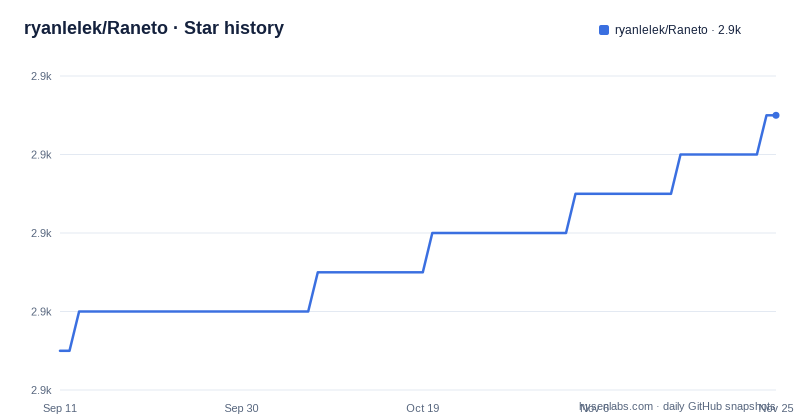
Star history
- ryanlelek/Raneto2,907 ★ · +6
| Repository | 2026-09-11 | 2026-11-25 |
|---|---|---|
| ryanlelek/Raneto | 2.9k | 2.9k |
6 Stars in the last 75 days, measured from the daily GitHub snapshot. Compare with other projects
Editorial analysis
Loopback by default, and an image that says otherwise
The configuration reference lists two server variables and one listen address. The address variable defaults to 127.0.0.1, and the port variable defaults to 8080. A third variable, named host, is listed with the same server group and marked as deprecated in favour of the address variable.
So the documented default is that the server listens on the loopback interface only, which means nothing can reach it from another machine until you change one variable.
The container image does the opposite. It sets three environment variables before anything else runs: the deprecated host variable to 0.0.0.0, the port to 8080, and the node environment to production. That is the one variable the reference tells you not to use, used to do the one thing the reference's default prevents.
The rest of the image is careful. It runs from a pinned Node image, creates the content directory, chowns the work directory to the unprivileged user, switches to that user by numeric id before installing anything, copies only the manifest first so the dependency install is cached as its own layer, then copies the rest. Nothing here contradicts the reference except that one line.
Login and editing are two separate switches, both off
Two boolean variables decide what the application will let a visitor do.
One enables authentication, described as a login system for edit protection. The other enables the web editor. Both are described as set to true to turn the feature on, which means both are off by default, and nothing in the reference says one implies the other.
That combination has a consequence worth being explicit about. A default install is a read-only site with no login at all, and the login does not appear until you enable it. The editor is the more sensitive of the two, because it writes to the content directory on disk, so a deployment that turns on editing without turning on authentication is serving a file-writing interface to anyone who can reach the port.
The credentials come from their own pair of variables, which the reference insists must be set together. One is the admin username and one is the admin password, and each entry's description says it must be set alongside the other. There is no documented way to add a second account, and the reference shows a single credential slot rather than a list.
Two variables write the same configuration key
The reference is laid out as a table with three columns worth reading: the variable, the configuration key it writes to, and the type.
Most rows are one to one. The username and password rows are not. Both write to the same key, named as the first element of a credentials array, which is how one credential pair is assembled from two separate environment variables. It is a small design detail, and it is the reason the reference can say each must be set with the other and mean it literally.
The other rows are ordinary: where the content directory lives, defaulting to a pages folder inside content; the site's base address; the site title; an analytics measurement identifier; and a locale code for the interface translations.
One row has no configuration key at all. The address, port and deprecated host variables are grouped as server settings rather than as config keys, which tells you they are read somewhere other than the config file the others override.
And the priority rule is stated once at the top: environment variables take the highest priority and override values set in the config file.
Every runtime dependency is pinned to an exact version
The manifest's dependency list has no version ranges in it at all. Each entry is an exact version: a markdown table-of-contents helper at a fixed release, the default theme at a fixed release, and then a run of framework and utility packages each pinned the same way, including the HTTP framework on its current major, a security headers middleware, a rate limiter, session and cookie middleware, a body parser, a file helper, a globber, a YAML parser and a debug logger.
Pinning exactly is unusual for an application manifest. It means two installs a year apart get the same tree, which is the point for a documentation server that people run and forget about, and it means every security update to any of those packages has to arrive as a commit to this repository.
The tooling around them is current rather than pinned. The engine requirement names a recent Node and a recent npm as minimums, and the test command sets an experimental VM modules flag, which is what a test runner needs when the code under test is native modules. The lint, format and test tools are all invoked through a single script that runs them in sequence, and the formatter's settings live in the manifest while the linter's live in a separate flat configuration file.
The default make target deletes node_modules and reinstalls
The Makefile is a convenience wrapper over npm, and its first target does more than it looks.
The default target is two steps: clean, then install. Clean removes the node modules directory outright. Install runs npm install. So invoking the make file with no arguments deletes every installed dependency and reinstalls them from scratch, which is a reasonable thing for a clean checkout and an unpleasant surprise in a working directory.
The rest is thin. A lint target is named for deleting lint, which is a word that does not exist, and it calls the lint script. A unit target calls the unit test script. A start target runs the server file directly. A deploy target installs with development dependencies omitted.
The container targets are three: build an image locally, run it with a port mapping and an interactive flag, and open a shell inside it. The interactive flag on a server that prints logs is a small thing, and the shell target is the more useful of the two.
A build target that only echoes a word, and a bin field set to none
Two entries in the manifest are worth a second look because they say something about how the project is packaged.
The first is a binary declaration whose value is the word none. A package that is an application rather than a command line tool normally omits that field; setting it to a string declares an executable with that name. So the manifest says, in effect, that this package provides a command called none.
The second is the entry point, declared twice and identically: both the main field and the exports field point at the same file inside the app directory. Declaring both is the modern, correct thing to do, and having them agree is what you want.
There is also a Docker ignore file and an npm ignore file and a prettier ignore file, three different exclusion lists for three different consumers, and a single Markdown ignore file whose name does not follow the usual convention for that file. Two authors are credited in the manifest, and the licence is declared twice as well, once as a field and once as a structured entry with its own address.
The live demo and the documentation are the same address
The header of the file offers three outbound links and they do not go where their labels suggest.
One points at the project's own marketing page. The next two, labelled as a live demo and as documentation, point at the same documentation address. So the demo people are invited to try is the documentation site, which means there is no public instance of the running application to look at.
The feature list is five items, and they are honest about what the thing is: all content is file-based, search covers file names and contents as well as bodies, there is a markdown editor in the browser, there is a login system for edit protection, and it describes itself as simple and lightweight.
The other outbound element is a mailing list form, reached through a long generated address, described as the place for project news and important security alerts. That is worth knowing given the state of the repository: the last commit is dated 2026-03-18, there are no releases after that date, and the release history itself has a long gap in it, with the version before the newest one going back to September 2025 and the one before that to February 2024.
Editorial conclusion
Raneto fits an internal documentation site where the content is a directory of markdown files that somebody edits in a browser, and where the appeal is that there is no database to administer. Two things to settle before you deploy it. Decide what the listen address should be, because the documented default keeps the server on loopback and the container image replaces that with the variable the reference deprecates, so the container and the documentation disagree about the default. And decide the order in which you switch things on, because the login system and the web editor are separate switches and the second one is the one that writes files.
Frequently asked questions
What is Raneto used for?
A file-based markdown knowledge base for Node.js. All content is markdown files on disk, search covers file names and file contents, there is a markdown editor in the browser, and a login system provides edit protection. The feature list describes it as simple and lightweight, and the whole content directory is the database.
How do I enable the browser editor in Raneto?
Two separate boolean variables, both described as set to true to enable and both off by default. One turns on authentication, the login system used for edit protection. The other turns on the web editor. The reference does not say either implies the other, so enabling editing without authentication exposes a file-writing interface.
How do I change which port Raneto listens on?
With the port variable, which defaults to 8080. The listen address is a separate variable defaulting to 127.0.0.1, and a third variable for the host is listed as deprecated in favour of the address variable. The container image sets that deprecated host variable to all interfaces instead.
Does Raneto need a database?
No. The top features state that all content is file-based, and the configuration reference points at a content directory containing markdown files, with a variable to change its location and a default of a pages folder inside content. The only persistent state outside that directory is whatever the login system uses.
What Node.js version does Raneto need?
The manifest requires a recent Node release and a recent npm as minimums, and the container image is built from a pinned Node version on Alpine. The test command also sets an experimental flag for the test runner, which it needs because the application is native modules.
Official sources
Add this badge to your README
If you maintain this project, the badge below links readers to this analysis and shows its maintenance status from the daily GitHub snapshot. Paste the markdown into your README; add ?metric=license or ?metric=stars to the image URL for a different field.

[](https://hysenlabs.com/projects/ryanlelek-raneto)Star history chart for your README
[](https://hysenlabs.com/projects/ryanlelek-raneto)Was this useful?