MUI: A 6.6 KB CSS Framework That Sticks to Material Design Basics
GitHub describes it as Lightweight CSS framework. The repository metadata lists JavaScript as its primary language. The metadata lists the NOASSERTION license. This article stays within the project description and details documented in the GitHub repository README.
At a glance
- What is it?
- MUI is a lightweight CSS framework with a 6.6 KB gzipped CSS file and no dependencies, aimed at developers who want Material Design styling without the bulk of larger frameworks. It includes a responsive grid, a small JavaScript library, and a separate email styling tool.
- Who is it for?
- Adopt MUI if you need a minimal Material Design look for a small site, a prototype, or an HTML email, and you are comfortable with a framework that has not seen a release in years and offers few components. Do not use it for a complex enterprise app that needs theming, accessibility guarantees, or active maintenance.
- Can I use it commercially?
- Check first. The repository uses a licence we do not classify automatically, so read its LICENSE file before any commercial use.
- Is it still maintained?
- Probably not. The repository last received commits 62 months ago, on August 23, 2021.
- What is it written in?
- Mainly JavaScript, according to GitHub's language statistics.
Answers come from the project's GitHub data, last synced on October 21, 2026, and from our analysis. They are not legal advice.
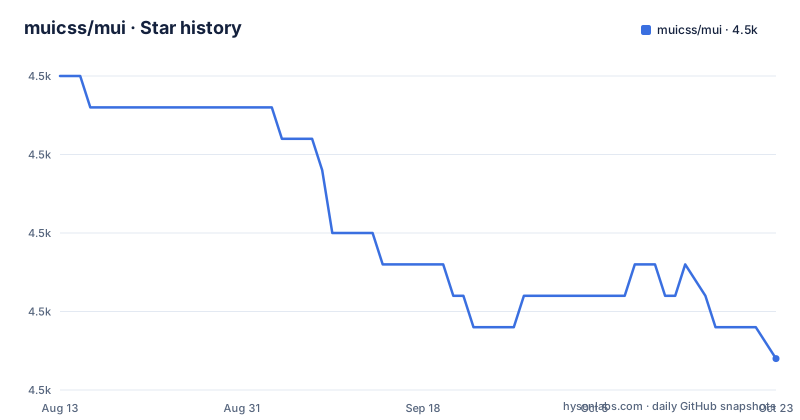
Star history
- muicss/mui4,477 ★ · -8
| Repository | 2026-08-13 | 2026-10-21 |
|---|---|---|
| muicss/mui | 4.5k | 4.5k |
-8 Stars in the last 69 days, measured from the daily GitHub snapshot. Compare with other projects
Editorial analysis
What MUI Solves and Who It Is For
MUI targets a specific gap: developers who want Google's Material Design visual language without the weight of a full framework like Materialize or Angular Material. The README states the goal is to be 'fast, small and developer friendly' and to include only the basic components needed for a Material Design site. The file sizes back that up: mui.min.css is 6.6K and mui.min.js is 5.4K, both gzipped. This is for someone building a landing page, a simple web app, or a static site who wants a consistent look quickly. It is not for a large application with dozens of UI patterns; the framework intentionally omits advanced widgets. The audience is a developer who values a small payload and is willing to accept a limited component set.
How MUI Works: Files, Grid, and JavaScript
The framework splits into a CSS library and a JavaScript library. The CSS provides the responsive grid and component styling. The JavaScript handles interactive elements like dropdowns and selects, though the README does not list which components. The grid is mobile-friendly, meaning it uses a column-based system that stacks on smaller screens. The JavaScript can be loaded asynchronously, which helps page load times. There is also an email library for styling HTML emails, which is unusual for a CSS framework. The build process produces multiple packages: standard CSS, a right-to-left (RTL) variant, a 'noglobals' version that avoids global styles, and separate bundles for Angular, React, and Web Components. This modular approach lets you pick only what you need, but it also means you have to understand which package fits your stack.
Getting MUI Running: CDN, NPM, and Bower
The quickest way to use MUI is the CDN. The README gives two snippets: one for a pinned version (mui-0.10.3) and one for 'latest'. The pinned version is safer for production, but the latest is convenient for development. To install via npm, run 'npm install --save muicss'. There is also a Bower option: 'bower install mui'. For local development, you clone the repository, run 'npm install', then build examples with 'npm run build-examples'. To view them, you can start a static server with 'npm run http-server -- -p 3000' and visit http://localhost:3000/examples. The README also mentions a GitPod pre-configured environment, which is a nice touch for quick contributions. There is no mention of a CSS preprocessor setup or custom theme variables beyond 'customized with your own colors', so you may need to override styles manually.
Limitations and Where MUI Falls Short
The most obvious limitation is the component set. The README says it includes 'basic components' but does not enumerate them. You will likely find buttons, forms, and a grid, but do not expect data tables, modals, or autocomplete widgets. The browser support is dated: IE10+ and iOS 6+. That means no support for older Android browsers, and it does not mention Edge or modern Safari versions. The lack of recent releases is a red flag. The repository shows no recent releases, and the CDN link points to version 0.10.3, which suggests the project may be stagnant. If you need a framework that evolves with web standards, this could be a problem. Also, the license is listed as NOASSERTION, which means you cannot assume it is MIT or BSD. You would need to check the repository files to see the actual license. For a production project, that is a risk.
Alternative: Materialize or Hand-Rolled CSS
A direct alternative is Materialize, a popular Material Design framework that offers a much larger set of components, including modals, carousels, and date pickers. The difference is in approach: Materialize is heavier, with more CSS and JavaScript, but it gives you a complete UI kit out of the box. MUI is the opposite: it strips down to the essentials and lets you add your own components. Another alternative is to write your own CSS using a preprocessor like Sass, which gives you full control but requires more effort. If you only need a grid and basic buttons, you might be better off with a utility framework like Bootstrap's grid alone. The key trade-off is maintenance: Materialize has a larger community and more frequent updates, while MUI is smaller but appears dormant. For a project that needs long-term support, that difference matters more than file size.
Maintenance and Upgrade Costs
The README shows a development workflow with npm scripts for building CDN, NPM, and Meteor packages. That suggests a structured release process, but the absence of recent releases contradicts that. If you adopt MUI, you are essentially on your own for upgrades. The project has not released a new version in a long time, so you will not get bug fixes or new features. The build process requires Node.js, npm, Sass, and http-server, which is a moderate setup. The repository includes unit tests and E2E tests, which is a positive sign for code quality, but it does not guarantee ongoing maintenance. The license issue is a real cost: without a clear license, you may be unable to use it in a commercial product without legal review. The documentation is thin, so you will likely need to read the source code to understand how to customize colors or extend components.
Editorial conclusion
Adopt MUI if you need a minimal Material Design look for a small site, a prototype, or an HTML email, and you are comfortable with a framework that has not seen a release in years and offers few components. Do not use it for a complex enterprise app that needs theming, accessibility guarantees, or active maintenance. Before adopting, verify the current browser support yourself, check the license because the repository does not state one, and review the source on GitHub to confirm the framework still meets your needs.
Frequently asked questions
What does the muicss MUI package stand for?
The repository is muicss/mui and the npm package is muicss, published under version 0.10.3. package.json describes it as Source code for MUI and the homepage is www.muicss.com, a lightweight CSS framework following Material Design guidelines.
Is the MUI CSS framework still maintained?
The last push to the repository was on 2021-08-23 and it is not archived, but no GitHub releases exist. The documented release sequence is the CDN path, where 0.10.3 is the current build.
How do I add MUI CSS to a page?
Use the CDN link and script tags for mui-0.10.3, or install the package with npm install --save muicss. A pinned path such as mui-latest is offered for development only.
Does MUI CSS need a build step or a JavaScript runtime dependency?
No external dependencies are listed, and the JavaScript file can be loaded asynchronously. Building from source is a separate matter, since it needs nodejs, npm, sass, http-server and a gulp toolchain.
Official sources
Add this badge to your README
If you maintain this project, the badge below links readers to this analysis and shows its maintenance status from the daily GitHub snapshot. Paste the markdown into your README; add ?metric=license or ?metric=stars to the image URL for a different field.

[](https://hysenlabs.com/projects/muicss-mui)Star history chart for your README
[](https://hysenlabs.com/projects/muicss-mui)