Plyr's own README now sends you to Video.js
A simple HTML5, YouTube and Vimeo player
At a glance
- What is it?
- Plyr is a dependency-free HTML5, YouTube and Vimeo player with standardized events and real form controls instead of styled spans. The maintainers behind Plyr, Vidstack and Media Chrome have joined forces on a new version of Video.js, and the README says Plyr is now deprecated and receives security updates only.
- Who is it for?
- Adopt Plyr only if you already ship it and want to postpone a migration, not if you are choosing a player today. The repository is not archived and the last push was on 2026-09-29, the newest release is v3.8.5 from 2026-10-06, and the first block of the README tells you where the project is going.
- Can I use it commercially?
- Yes. MIT is a permissive licence: you can use, modify and sell software built on it, as long as you keep its copyright and licence notices.
- Is it still maintained?
- Yes. The repository last received commits 24 days ago.
- What is it written in?
- Mainly JavaScript, according to GitHub's language statistics.
Answers come from the project's GitHub data, last synced on November 13, 2026, and from our analysis. They are not legal advice.
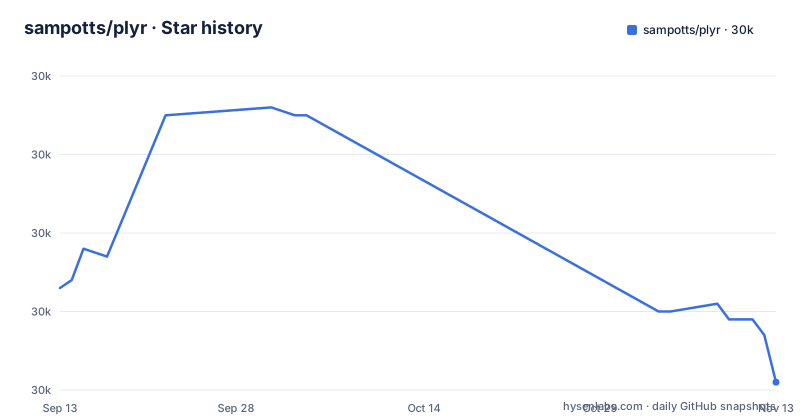
Star history
- sampotts/plyr29,981 ★ · -12
| Repository | 2026-09-13 | 2026-11-13 |
|---|---|---|
| sampotts/plyr | 30k | 30k |
-12 Stars in the last 61 days, measured from the daily GitHub snapshot. Compare with other projects
Editorial analysis
The first block of the README is a deprecation notice
Before Plyr describes anything about itself, it announces its own ending. The people behind Plyr, Vidstack and Media Chrome have joined forces to build the latest version of Video.js, described as one modern, accessible player with the best of all three. The line that matters: Plyr is now deprecated and receives security updates only, and Video.js 10 is the recommendation for new projects.
Two links sit under that notice, one to try Video.js and one headed Migrate from Plyr, which points into Video.js documentation rather than into a Plyr page.
That reframes everything below it. The markup patterns, the standardized events, the accessible controls, all of it is a body of work with an end date attached, and anyone reading this in 2026 is reading a maintenance notice for a library in the last part of its life. What follows describes what you are adopting, and what you will have to port.
v3.8.4 shipped in January, and commits kept landing in September
The recent release record is v3.8.3 on 2025-08-27, v3.8.4 on 2026-01-03 and v3.8.5 on 2026-10-06.
The repository itself is not archived, and its last push was on 2026-09-29.
package.json agrees on the numbers: version 3.8.5, MIT licensed, authored by Sam Potts, homepage plyr.io.
data-poster exists because poster was fetched twice
For HTML5 video and audio, Plyr extends the standard media element markup, so the markup stays close to what the browser already understands:
<video id="player" playsinline controls data-poster="/path/to/poster.jpg">
  <source src="/path/to/video.mp4" type="video/mp4" />
  <source src="/path/to/video.webm" type="video/webm" />

  <!-- Captions are optional -->
  <track kind="captions" label="English captions" src="/path/to/captions.vtt" srclang="en" default />
</video>
One attribute is deliberately nonstandard. The poster image should be given as data-poster rather than poster, because otherwise the browser fetches the image and the player fetches it again. The README links the issue that tracked this. If you are certain the image will be cached, the plain poster attribute still works and you get true progressive enhancement, meaning the player appears even before the JavaScript loads.
Captions are a track element with kind, label, src, srclang and default, which is how VTT support stays inside the browser's own machinery.
A div with two data attributes replaces the iframe
YouTube and Vimeo are handled differently, by enhancing an embed rather than by wrapping a media element. The recommended route is progressive enhancement: put a real iframe in the page and let Plyr take it over. The non-enhanced route is two data attributes on a div, and it is much shorter:
<div id="player" data-plyr-provider="youtube" data-plyr-embed-id="bTqVqk7FSmY"></div>Vimeo takes the same shape with a different provider name and a numeric id:
<div id="player" data-plyr-provider="vimeo" data-plyr-embed-id="76979871"></div>The embed id accepts either the bare video id or a full URL. Wrapping either version in the plyr__video-embed classname makes the embed a responsive 16:9 box, and a custom ratio config option then applies once Plyr itself takes over.
Query parameters on the iframe URL are lifted into config automatically: autoplay, loop, and, for YouTube only, hl and playsinline. The README also asks you to set origin on the YouTube URL to the domain hosting the embed, or leave it out.
The package exports five entry points for one player
The exports map in package.json is more informative than a typical one. The root entry resolves to four files depending on how you consume it: types from ./src/js/plyr.d.ts, ESM from ./dist/plyr.mjs, CommonJS from ./dist/plyr.js, and a minified browser build from ./dist/plyr.min.js, with ./dist/plyr.js as the default. The stylesheet is reachable both as ./dist/plyr.css and as ./css, and the Sass source is published as ./plyr.scss.
The script-tag route is the third option, and the CDN is provided by Cloudflare in two flavours, one with polyfills and one without. The README also shows a plain script include:
<script src="path/to/plyr.js"></script>As a module it is two lines:
import Plyr from 'plyr';

const player = new Plyr('#player');
One repository detail worth knowing: preinstall runs npx only-allow pnpm, so npm install fails in a clone by design.
Standardized events are the reason to prefer it to a raw iframe
The technical argument for Plyr over embedding YouTube and Vimeo directly is that every source speaks the same language. Events are standardized across formats, so there is no separate Vimeo API or YouTube API to write against, and playback, volume and seeking all go through one API.
The accessibility work is more concrete than the word usually implies. VTT captions are supported, as are screen readers, and the control markup uses the elements a form would use: an input type="range" for volume, a progress element for progress, and button elements for buttons. There are no span elements dressed up as buttons and no a href="#" placeholders.
The rest of the surface is long and unremarkable: keyboard shortcuts, picture-in-picture, playsinline, speed controls, multiple caption tracks, internationalized controls, preview thumbnails, a monetization path for ads, streaming playback through hls.js, Shaka and dash.js, and native fullscreen with a fallback to a full window mode.
Video.js is the destination, not a competitor
This is the rare case where a project names its own successor and links to the migration guide. The README's argument is not that Video.js is better but that the three teams had been solving the same problem and could solve it once. The result is described as one modern, accessible player with the best of all three, which means the case for moving is a claim about shared maintenance rather than about any single feature Plyr lacks today.
What that leaves a reader with is a decision about timing. Plyr is still complete, still MIT licensed, and still installable, and the site at plyr.io remains the reference for its configuration. But the README now says Plyr receives security updates only and recommends Video.js 10 for new projects.
The two things to check before you start a migration are the Plyr-specific ones: the data-poster attribute, and any code that listens for Plyr's normalized events rather than a provider's own.
Editorial conclusion
Adopt Plyr only if you already ship it and want to postpone a migration, not if you are choosing a player today. The repository is not archived and the last push was on 2026-09-29, the newest release is v3.8.5 from 2026-10-06, and the first block of the README tells you where the project is going. Start with the migration guide linked from that notice, then check whether your pages rely on data-poster or on the standardized events, since both are Plyr-specific.
Frequently asked questions
Is Plyr still maintained, and what should I use instead?
The repository is not archived and its last push was on 2026-09-29, and the newest release is v3.8.5 from 2026-10-06. The README's first block says the maintainers behind Plyr, Vidstack and Media Chrome have joined forces on a new version of Video.js, and that Plyr is now deprecated and receives security updates only, with Video.js 10 recommended for new projects.
How do I set a poster image on Plyr without loading it twice?
Use the data-poster attribute rather than poster, which is what prevents the image being downloaded twice. The README notes that the plain poster attribute still works if the image is certain to be cached, which gives progressive enhancement.
Does Plyr need jQuery or a build framework?
No. It is written in vanilla ES6 JavaScript with no jQuery required, and package.json publishes an ESM build, a CommonJS build, a minified browser build, the compiled stylesheet and the Sass source. Sass is there if you want to include it in your build process.
Which video sources can Plyr play?
HTML5 video and audio, YouTube and Vimeo, using the standard media element markup for the first two and progressive enhancement over an iframe for the other two. Streaming playback is supported through hls.js, Shaka Player and dash.js.
Official sources
Add this badge to your README
If you maintain this project, the badge below links readers to this analysis and shows its maintenance status from the daily GitHub snapshot. Paste the markdown into your README; add ?metric=license or ?metric=stars to the image URL for a different field.

[](https://hysenlabs.com/projects/sampotts-plyr)Star history chart for your README
[](https://hysenlabs.com/projects/sampotts-plyr)Was this useful?