Tesseract.js: OCR in the Browser and Node.js, with Limits You Should Know
GitHub describes it as Pure Javascript OCR for more than 100 Languages 📖🎉🖥. The repository metadata lists JavaScript as its primary language. The metadata lists the Apache-2.0 license. This article stays within the project description and details documented in the GitHub repository README.
At a glance
- What is it?
- Tesseract.js brings the Tesseract OCR engine to JavaScript via WebAssembly. It covers over 100 languages and runs in browsers and Node.js, but it does not handle PDFs or improve recognition accuracy.
- Who is it for?
- Adopt Tesseract.js if you need OCR in a browser or Node.js environment, want to support many languages, and can accept that accuracy is tied to the stock Tesseract model. Do not adopt it if you need PDF text extraction, higher accuracy than upstream Tesseract, or fine-grained control over the recognition model.
- Can I use it commercially?
- Yes. Apache-2.0 is a permissive licence: you can use, modify and sell software built on it, as long as you keep its copyright and licence notices.
- Is it still maintained?
- Activity is slowing. The repository last received commits 6 months ago.
- What is it written in?
- Mainly JavaScript, according to GitHub's language statistics.
Answers come from the project's GitHub data, last synced on November 15, 2026, and from our analysis. They are not legal advice.
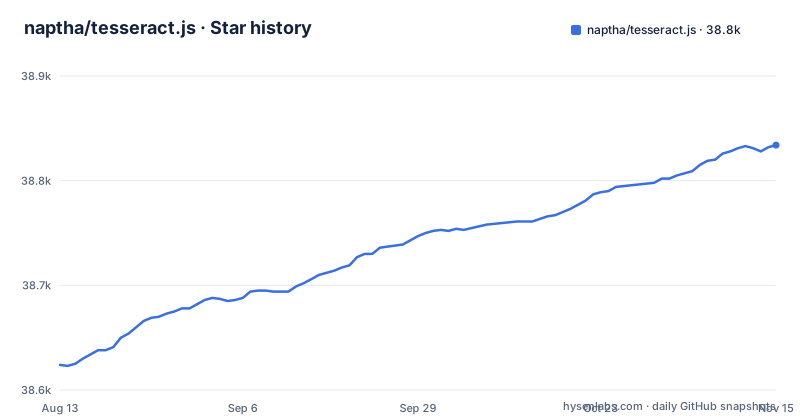
Star history
- naptha/tesseract.js38,834 ★ · +210
| Repository | 2026-08-13 | 2026-11-15 |
|---|---|---|
| naptha/tesseract.js | 38.6k | 38.8k |
210 Stars in the last 94 days, measured from the daily GitHub snapshot. Compare with other projects
Editorial analysis
What Tesseract.js Actually Does
Tesseract.js is a JavaScript library that extracts words from images in over 100 languages. It wraps a WebAssembly port of the Tesseract OCR engine, which is a separate project. The library does not modify core Tesseract features. The README is explicit: it does not support PDF files and does not improve recognition accuracy beyond the stock model. This is a library for image-to-text, not a document processing pipeline. It targets developers building web apps, Electron apps, or Node.js services that need OCR without a native dependency. The demo site, tesseract.projectnaptha.com, demonstrates image recognition, and the README also links a separate video real-time recognition example, but the core library is image-focused.
How It Works: WebAssembly and Workers
The architecture is straightforward. Tesseract.js wraps a WebAssembly port of Tesseract, called tesseract.js-core. The JavaScript library creates a worker, loads a language model, and runs recognition. The README shows a simple flow: createWorker('eng'), recognize an image URL, get ret.data.text, then terminate the worker. For multiple images, the documentation advises creating one worker, running recognize for each image, and terminating once at the end. This avoids the overhead of creating a worker per image. The library also supports schedulers for parallel processing, as mentioned in the docs list. The WebAssembly port is what makes browser execution possible, but it also means the library inherits all of Tesseract's behavior, both strengths and weaknesses.
Installation and First Run
You can install Tesseract.js via npm or yarn. For Node.js, the command is npm install tesseract.js or yarn add tesseract.js. For browsers, you can use a CDN script tag: <script src='https://cdn.jsdelivr.net/npm/tesseract.js@5/dist/tesseract.min.js'></script>. That exposes a global Tesseract variable. There is also an ESM build at tesseract.esm.min.js. A minimal usage example from the README is: import { createWorker } from 'tesseract.js'; then createWorker('eng'), recognize an image, and terminate. Note that createWorker is async since v4. The language code is passed to createWorker, and you can also pass an OEM mode as a second argument, like createWorker('chi_sim', 1). The v5 changes moved language and OEM settings into createWorker, so older patterns like worker.initialize are gone.
Version 6 and 7: Breaking Changes and Improvements
Version 6, released in January 2025, fixed a memory leak and reduced runtime and memory usage. But it introduced breaking changes. All output formats other than text are disabled by default. To get hocr output, you must set it explicitly: worker.recognize(image, {}, { hocr: true }). The structure of the blocks object also changed. Version 7, released in December 2025, requires Node.js v16 or newer, whereas v6 required v14. If you are upgrading from v2, the README points to a migration guide. The takeaway is that this library is not shy about breaking API changes. You should pin a version and read the release notes before upgrading.
The PDF and Accuracy Gap
The most significant limitation is that Tesseract.js does not support PDF files. If your input is a PDF, you must extract images first, which means adding another library to your stack. Also, the library does not modify the Tesseract recognition model to improve accuracy. This is a deliberate scope decision, but it means you cannot expect better accuracy than the upstream Tesseract engine. For documents with unusual fonts, low contrast, or complex layouts, accuracy may be insufficient. The README points to Scribe.js as an alternative that includes recognition model improvements and PDF support. If your project needs those features, Tesseract.js is the wrong tool.
Alternatives: Scribe.js and the Trade-off
The README explicitly names Scribe.js as an alternative. Scribe.js is a separate library that includes improvements to the recognition model and supports extracting text from PDF documents. The key difference is scope: Tesseract.js stays close to upstream Tesseract, while Scribe.js adds features that are commonly requested. If you choose Tesseract.js, you get a smaller, more predictable library, but you must handle PDFs and accuracy issues yourself. If you choose Scribe.js, you get more features but a different API and potentially different maintenance dynamics. The decision comes down to whether you need PDF support and model improvements out of the box.
Maintenance, License, and Community
Tesseract.js is licensed under Apache-2.0, which is permissive for commercial use. The project is actively maintained, with the latest release v7.0.0 pushed on December 15, 2025. The repository includes a docs folder with guides on workers vs schedulers, image formats, API, and local installation. There are community projects listed, such as Scribe OCR and an Electron example, which suggests a healthy ecosystem. However, the README also notes that community examples should be well documented and actively maintained, implying that not all are. For maintenance cost, be prepared for breaking changes between major versions, as seen in v4, v5, and v6. The memory leak fix in v6 is a positive sign, but you should still test memory usage in your own environment, especially for long-running Node.js processes.
Editorial conclusion
Adopt Tesseract.js if you need OCR in a browser or Node.js environment, want to support many languages, and can accept that accuracy is tied to the stock Tesseract model. Do not adopt it if you need PDF text extraction, higher accuracy than upstream Tesseract, or fine-grained control over the recognition model. Before committing, verify the language data files you need are available, check the v6 breaking changes around output formats, and test the memory behavior on your target devices, since past versions had a known memory leak that v6 claims to fix.
Frequently asked questions
What is Tesseract.js used for?
It gets words out of images in almost any language, running in the browser or on Node.js. The library wraps a WebAssembly port of the Tesseract OCR engine, which is a separate project, and it does not modify core Tesseract features.
Is Tesseract.js available on NPM?
Yes, as tesseract.js, installed with npm install tesseract.js or yarn add tesseract.js, and the current release is v7.0.0. There is also a CDN route through jsdelivr and unpkg, and the manifest points those fields at dist/tesseract.min.js.
Is Tesseract OCR free?
The library is released under the Apache-2.0 licence, declared in package.json and shipped as LICENSE.md. It depends on Tesseract itself, which is a separate project, and on a WebAssembly port of that engine kept in its own repository.
How accurate is Tesseract.js?
The project states that it does not modify the Tesseract recognition model to improve accuracy. The accuracy feature inside its scope is preprocessing: v4 added rotation options including auto-rotate, and made the rotated, grayscale and binary processed images retrievable.
Is there a better OCR than Tesseract?
The README names Scribe.js as an alternative; it includes improvements to the Tesseract recognition model and supports extracting text from PDF documents, features the Tesseract.js project scope excludes. A comparison document between the two is linked from the README.
How do I install tesseract js?
Three routes are given: a script tag via a local copy or a CDN, npm through webpack in the browser, and npm or yarn on Node.js. Tesseract.js v7 requires Node.js v16 or newer, where v6 required v14 or newer, and the documented CDN script tag points at tesseract.js@5 rather than the current release.
Official sources
Where developers are discussing it
Posts on Hacker News, dev.to and Lobsters that link to this repository, found by our scan of those communities. 0 in the last 30 days; newest first.
- Running OCR entirely in the browser (and making scanned PDFs editable)dev.to · Oct 13, 2026 · 2 points · 6 comments
Add this badge to your README
If you maintain this project, the badge below links readers to this analysis and shows its maintenance status from the daily GitHub snapshot. Paste the markdown into your README; add ?metric=license or ?metric=stars to the image URL for a different field.

[](https://hysenlabs.com/projects/naptha-tesseract-js)Star history chart for your README
[](https://hysenlabs.com/projects/naptha-tesseract-js)Was this useful?