ModSecurity-nginx: Connecting libmodsecurity to Nginx
ModSecurity v3 Nginx Connector
At a glance
- What is it?
- ModSecurity-nginx is an Nginx module that connects the Nginx request path to libmodsecurity, also called ModSecurity v3. It is intended for operators who need WAF rules integrated into Nginx configuration rather than a standalone Nginx package or the older ModSecurity 2.9 connector.
- Who is it for?
- Operators already running libmodsecurity and compiling Nginx from source should evaluate this connector when they need rules in the Nginx configuration hierarchy. Projects that need a prebuilt distribution package, documented container workflow or maintenance history beyond the dated releases should check those requirements first.
- Can I use it commercially?
- Yes. Apache-2.0 is a permissive licence: you can use, modify and sell software built on it, as long as you keep its copyright and licence notices.
- Is it still maintained?
- Yes. The repository last received commits 14 days ago.
- What is it written in?
- Mainly Perl, according to GitHub's language statistics.
Answers come from the project's GitHub data, last synced on November 7, 2026, and from our analysis. They are not legal advice.
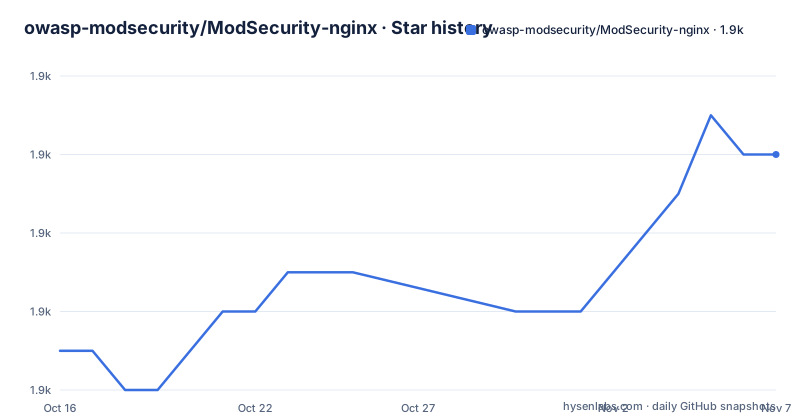
Star history
- owasp-modsecurity/ModSecurity-nginx1,864 ★ · +5
| Repository | 2026-10-16 | 2026-11-07 |
|---|---|---|
| owasp-modsecurity/ModSecurity-nginx | 1.9k | 1.9k |
5 Stars in the last 22 days, measured from the daily GitHub snapshot. Compare with other projects
Editorial analysis
Why ModSecurity-nginx Exists for Nginx
ModSecurity-nginx solves a narrow integration problem: libmodsecurity contains the ModSecurity v3 engine, but Nginx needs a module that exposes that engine through its configuration and request-processing environment. The README describes this project as the required connection point between Nginx and libmodsecurity. It is therefore not a general-purpose Web Application Firewall policy set and not a standalone security scanner. The rules, rule language and request inspection behavior originate in libmodsecurity, while this repository provides the Nginx-side layer.
The intended users are Nginx operators who want to apply ModSecurity configuration in `http`, `server` or `location` contexts. That hierarchy matters because a deployment can load a base rules file and then customize selected routes with directives such as `SecRuleRemoveById`. The module also supports enabling or disabling inspection, selecting a local rules file, downloading a rules file from a remote URL and passing a transaction identifier into ModSecurity processing.
This connector targets ModSecurity v3 through libmodsecurity. It explicitly does not support the former ModSecurity add-on based on ModSecurity 2.9 or earlier. That boundary matters during upgrades or migrations: an existing Nginx configuration written for the old connector cannot be assumed to work unchanged with this project. The rule policy and the connector must be evaluated as separate pieces.
The README compares this design with the older Nginx add-on. It says the old implementation wrapped Apache internals, while the current connector consumes libmodsecurity, which is no longer dependent on Apache. According to the README, that change reduces dependencies and avoids the old Apache-oriented integration layer. The same section claims fewer bugs and faster operation, but it provides no measurements or test conditions, so those comparative claims should not be treated as benchmark evidence.
The Nginx and libmodsecurity Request Path
The architecture is intentionally thin. Nginx loads the connector as a module, while libmodsecurity performs the ModSecurity work. Based on the repository layout and README, the `src` directory contains the connector implementation and the `config` file participates in Nginx module configuration. The project also includes tests, release automation and Windows-related files, although the README does not explain how those pieces relate to every supported platform.
The Nginx configuration is the main control surface. `modsecurity on` enables the module at `http`, `server` or `location` scope. The default is `off`. Importantly, the README says this directive no longer represents the `SecRule` state. It is only an Nginx flag, so operators should not treat `modsecurity on` as a substitute for enabling the rule engine inside the selected ModSecurity configuration.
Rules can enter through `modsecurity_rules_file`, `modsecurity_rules_remote` or direct `modsecurity_rules` directives. A local file points the connector at a configuration such as `/etc/my_modsecurity_rules.conf`. Direct rules allow a location-specific block to contain settings such as `SecRuleEngine On`, a debug log configuration and `SecRuleRemoveById 10`. This supports a global or server-level policy with selected path exceptions, although the README does not document the exact merge order of every rule source.
Two logging controls refine that flow. `modsecurity_transaction_id` can substitute an Nginx-derived string for the identifier otherwise generated by libmodsecurity. The documented value combines a server prefix with `$request_id`, allowing Nginx access logs and ModSecurity-related logs to share a correlation identifier. `modsecurity_use_error_log` controls whether ModSecurity error logging is enabled and defaults to `on`. The README does not define identifier collision handling, remote-rule refresh timing or behavior after a remote download fails.
Compiling the Connector Against an Existing libmodsecurity
Installation begins outside this repository because libmodsecurity must already be installed. The README directs users to the ModSecurity repository for its compilation and installation documentation. It does not provide dependency commands, platform package names or version constraints for that prerequisite, so an installation recipe must come from the libmodsecurity project and the target Nginx environment.
From the Nginx source directory, configure a static build with the module path. This command registers the connector as an additional module during Nginx configuration:
./configure --add-module=/path/to/ModSecurity-nginxFor a dynamic module, use the dynamic-module option and compatibility support:
./configure --add-dynamic-module=/path/to/ModSecurity-nginx --with-compatThe README warns that the Nginx source version must match the Nginx version being compiled when building the dynamic module. That is the first version check an operator should make. The README stops after `configure`; it does not provide the subsequent build, installation, module-loading or Nginx validation commands. Those steps must be taken from the relevant Nginx build and third-party module documentation rather than guessed from this README.
The compile-time dependency on libmodsecurity is mandatory. ModSecurity 2.9 does not satisfy it. There is also no stated list of supported Nginx releases, compilers or operating systems in the README. The presence of `win32` files indicates Windows-related repository content, but the README does not provide a Windows build tutorial, so it would be incorrect to treat that directory alone as proof of a documented supported workflow.
Enabling Rules for a First Nginx Location
After obtaining a built connector through the documented Nginx module process, the first real configuration can load a local rules file for one location. The following example comes directly from the README. It enables the module, serves `/var/www/html` and names `/etc/my_modsecurity_rules.conf` as the ModSecurity configuration:
server {
    modsecurity on;
    location / {
        root /var/www/html;
        modsecurity_rules_file /etc/my_modsecurity_rules.conf;
    }
}
This block alone does not prove that requests are blocked. `modsecurity on` enables the Nginx module, but the README explicitly separates that flag from the `SecRule` state. The selected rules file must therefore contain the appropriate ModSecurity configuration. The README does not document startup checks, rule compilation errors or a command for verifying that a named file loaded successfully.
A second location can add direct configuration after the base file has been loaded. In the README example, the `/ops` location removes rule ID `10`, enables the rule engine and sets debug logging:
location /ops {
    root /var/www/html/opts;
    modsecurity_rules '
      SecRuleEngine On
      SecDebugLog /tmp/modsec_debug.log
      SecDebugLogLevel 9
      SecRuleRemoveById 10
    ';
}
The example demonstrates location-specific customization, but the README does not explicitly state whether rule evaluation is additive across all applicable locations. An operator should verify this behavior against the intended rules file before relying on an exception. The repository includes a `tests` directory, yet the README does not link individual tests or describe a supported smoke-test command.
If rules are hosted remotely, the documented syntax takes an authentication key and URL:
modsecurity_rules_remote my-server-key https://my-own-server/rules/download;The README does not state the authentication scheme, HTTP behavior, refresh schedule, cache policy, TLS handling or failure mode. These omissions make remote loading less suitable as the first configuration path unless the operator already understands the external service and connector behavior.
Transaction Logging and the Remote Rule Boundary
The `modsecurity_transaction_id` directive addresses a concrete operational problem: correlating an Nginx access-log record with a ModSecurity transaction. The documented configuration creates server-specific identifiers by combining a literal host name with Nginx's `$request_id`:
log_format extended '$remote_addr - $remote_user [$time_local] '
                '"$request" $status $body_bytes_sent '
                '"$http_referer" "$http_user_agent" $request_id';
A server can then pass that value into ModSecurity:
server {
    server_name host1;
    modsecurity on;
    modsecurity_transaction_id "host1-$request_id";
    access_log logs/host1-access.log extended;
    error_log logs/host1-error.log;
    location / {
        ...
    }
}
The README says the string may contain variables and that shared identifiers help find related access-log and error-log entries. It does not state whether an empty `$request_id`, a literal supplied value or a duplicate value is accepted, and it gives no retention guidance for either log type. The example also contains an ellipsis inside its placeholder location body. It illustrates configuration placement rather than a complete deployable server.
Remote rule loading offers a different boundary. `modsecurity_rules_remote <key> <URL to rules>` places retrieval policy outside the Nginx configuration file, introducing dependence on a server and a key. That can reduce manual file distribution, but this repository's README does not document when the file is fetched or whether Nginx reloads and restarts trigger retrieval. It also does not describe authentication beyond accepting a key. For a first deployment, a local `modsecurity_rules_file` has the smaller documented surface.
There is also a documentation inconsistency. The usage introduction says the module adds four directives, but the sections that follow describe six: `modsecurity`, `modsecurity_rules_file`, `modsecurity_rules_remote`, `modsecurity_rules`, `modsecurity_transaction_id` and `modsecurity_use_error_log`. Operators should use the individually documented directive definitions rather than relying on that count.
Release History, Licensing and Connector Alternatives
The repository is not archived, and its last push was on 2026-09-26. That date shows recent repository activity, but it does not by itself establish a release cadence. The listed releases are `v1.0.4` on 2025-05-21, `v1.0.3` on 2022-05-20 and `v1.0.2` on 2021-06-07. The gap between the two earlier releases and the gap preceding `v1.0.4` mean that operators should inspect each upgrade rather than assume automatic compatibility across Nginx or libmodsecurity versions.
The repository identifies its license as Apache-2.0 and includes a `LICENSE` file. That identifies the project's stated licensing terms, but the README does not summarize notices, patent terms or obligations for a particular Nginx deployment. Distribution and compliance questions require reviewing the repository license and the relevant component licenses. No legal interpretation can be drawn from the project name or module architecture.
The clearest alternative is the old ModSecurity Nginx add-on based on standalone ModSecurity 2.9 or earlier. According to the README, that implementation links ModSecurity through a wrapper for Apache internals. ModSecurity-nginx instead links Nginx to libmodsecurity, removing the connector's dependency on Apache internals and using the ModSecurity v3 library interface. The trade-off is explicit: this repository is for the v3 architecture, while the old add-on belongs to a different rule-engine generation and should not be selected merely because its name also includes ModSecurity and Nginx.
A second practical alternative is keeping the module outside Nginx entirely. The README does not document such deployment with ModSecurity-nginx, so it should not be described as a supported feature. The relevant comparison remains between this v3 connector and the old add-on. For current adoption, verify that the intended policy is authored for libmodsecurity, that the Nginx source version matches the chosen dynamic-module build, and that the selected rules are loaded from a location you can inspect and control.
Editorial conclusion
Operators already running libmodsecurity and compiling Nginx from source should evaluate this connector when they need rules in the Nginx configuration hierarchy. Projects that need a prebuilt distribution package, documented container workflow or maintenance history beyond the dated releases should check those requirements first. The specific judgement is that this repository fits source-built ModSecurity v3 deployments, but its configuration documentation leaves remote rule loading and upgrade behavior insufficiently specified.
Frequently asked questions
What does ModSecurity-nginx require before it can be compiled?
It requires libmodsecurity, meaning ModSecurity v3, to be installed first. The README points to the ModSecurity repository for that prerequisite's build instructions.
How do you build ModSecurity-nginx as an Nginx dynamic module?
Run the documented `./configure` command with `--add-dynamic-module` and `--with-compat` from the Nginx source directory. The Nginx source version must match the version being compiled.
Does `modsecurity on` enable the ModSecurity rule engine?
No. The README says `modsecurity on` is only an Nginx flag that enables or disables the module and is no longer related to the `SecRule` state.
Can ModSecurity-nginx use the old ModSecurity 2.9 connector configuration?
The repository explicitly depends on libmodsecurity rather than ModSecurity 2.9 or earlier. The README does not provide a compatibility or migration procedure for the old add-on configuration.
Official sources
Add this badge to your README
If you maintain this project, the badge below links readers to this analysis and shows its maintenance status from the daily GitHub snapshot. Paste the markdown into your README; add ?metric=license or ?metric=stars to the image URL for a different field.

[](https://hysenlabs.com/projects/owasp-modsecurity-modsecurity-nginx)Star history chart for your README
[](https://hysenlabs.com/projects/owasp-modsecurity-modsecurity-nginx)Was this useful?