NeoForge: a Minecraft modding API that lives in its own patch stack
A modding API for Minecraft: Java Edition, based on Forge
At a glance
- What is it?
- NeoForge is the community modding API for Minecraft built on Forge, installed by running an installer that drops into your vanilla launcher profile. The repository is the interesting part: a Gradle multi-project build whose source is a patch stack, complete with a committed reject file from a 26.3 snapshot.
- Who is it for?
- Adopt NeoForge if you are writing Minecraft Java Edition mods and want the Forge lineage with a community-run project, since the getting-started material, documentation site and Discord are all in place and the installer handles launcher setup for you.
- Can I use it commercially?
- Yes, with conditions. LGPL-2.1 is a weak copyleft licence: you can use it inside commercial and closed-source software, but if you distribute changes to its own files, you must publish those changes under the same licence.
- Is it still maintained?
- Yes. The repository last received commits 2 days ago.
- What is it written in?
- Mainly Java, according to GitHub's language statistics.
Answers come from the project's GitHub data, last synced on October 23, 2026, and from our analysis. They are not legal advice.
Star history
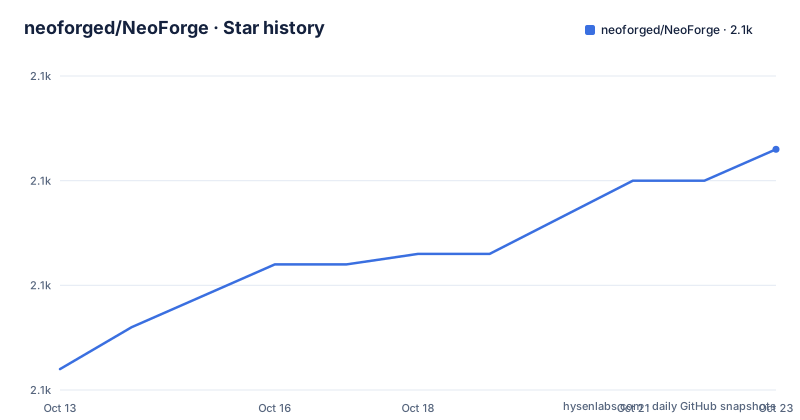
- neoforged/NeoForge2,113 ★ · +21
| Repository | 2026-10-13 | 2026-10-23 |
|---|---|---|
| neoforged/NeoForge | 2.1k | 2.1k |
21 Stars in the last 10 days, measured from the daily GitHub snapshot. Compare with other projects
Editorial analysis
What it is, and what installing actually does
NeoForge describes itself as a free, open-source, community-oriented modding API for Minecraft. It is the successor line to Forge, and the repository description says so directly: a modding API for Minecraft Java Edition, based on Forge.
The install path is deliberately non-technical. Go to the download page, select the Minecraft version and the installer, and run it. The README says the installer will attempt to install NeoForge into your vanilla launcher environment, and that you can then create a new profile using that version and play.
That design choice has a consequence worth stating. There is no library you add to a Gradle file to begin; there is a modified game installation that the launcher picks up as another profile. For players that is one double-click, and for mod authors it means the mod you build targets an installed NeoForge environment rather than a jar on a classpath.
The word attempt is also in the README. The installer attempts to install into the existing launcher environment, which is the phrasing of software that has to modify something outside its own directory and can fail to do so.
For writing mods, the README does not describe the API at all. It points at the Getting Started section of the NeoForged documentation, which means the repository you are looking at is not where you learn the API.
The tree tells you this is a patch stack
The most informative part of the repository is its directory listing, and the top level reads like a patch-application workspace rather than a Java library.
There is a patches/ directory, which in this kind of project holds the diffs that transform upstream sources into the API. There is a coremods/ directory, which is where byte-manipulation transformations live, the approach historically associated with Minecraft mod loaders that rewrite bytecode to inject behaviour into vanilla classes. There is server_files/ for server-side additions, projects/ for the Gradle subprojects, buildSrc/ for custom build logic, and testframework/ plus tests/ for the test harness.
Then there is the entry that stops the eye: rejects_26.3-snapshot-7/, a directory committed at the top level whose name includes a Minecraft snapshot number. A reject file is what a patch tool writes when a hunk does not apply cleanly. Its presence in the repository means a patch application produced rejects against 26.3 snapshot 7, and rather than being treated as a transient artifact it was committed.
That single directory explains most of what you need to know about working on NeoForge. The compiled result is the vanilla game plus applied patches plus transformed bytecode, and at any given commit the applied patch set may not be complete. Reading src/ tells you what the code looks like after patching, not what upstream looks like, and the difference between the two is the project's actual work.
A CREDITS.txt sits alongside this, the usual signal that a project carries attribution requirements for the code it derives from.
Branch naming: the default branch is a version line
The default branch for this repository is 26.3.x, not main or master. That is the whole branch strategy in one string: branches carry the Minecraft version line they target, so 26.3.x is where work for that release happens.
For a contributor this is the first practical fact. There is no stable branch and no long-lived trunk to merge into; there is a version line that advances with the game. A pull request targets a specific Minecraft version, and its value is judged against whether it applies cleanly to that version's sources.
It also interacts with the patch stack. Because the source is patches, a patch that applies to one Minecraft version may not apply to the next, and the branch layout is what keeps that from being everyone's problem at once. The cost is that there is no single place where the API is defined for all versions, so documentation written against one branch may describe behaviour that another branch does not have.
The gradle.properties file at the top level is where a project of this shape records the Minecraft version, the loader identity and related coordinates, and settings.gradle wires the projects/ subprojects together. Reading those two files tells you what the build thinks it is, which is usually more informative than the README for a project like this. The wrapper means a contributor builds through the checked-in script rather than a system Gradle, and gradlew.bat is committed alongside it for Windows. The wrapper means a contributor builds through the checked-in script rather than a system Gradle: On Windows the same build runs through gradlew.bat, which is why both scripts are committed.
The build: Gradle wrapper, buildSrc, multiple projects
The build is Gradle, checked in with the wrapper: gradlew, gradlew.bat and a gradle/ directory, which means a contributor does not need Gradle installed and every build uses the version the project pinned. build.gradle and settings.gradle sit at the top level.
Two directories make this more than a single-project build. buildSrc/ is Gradle's mechanism for build logic that must be compiled before the build itself, and its presence means there is custom task code that a new contributor will meet before they meet the Java. projects/ then holds the actual subprojects, so the daemon, the test framework and the loader-side code can be built and tested as separate units.
There is a testframework/ directory and a tests/ directory, which together mean modding behaviour is verified against a harness rather than only compiled. For a mod loader that is the right investment, since the failure mode you are defending against is a crash in somebody's game, not a failed compile.
The codeformat/ directory and the .idea/ directory are also present. The first is a project-specific formatting setup, which matters in a codebase assembled from patches where a reformat would destroy the correspondence with upstream. The second is committed IDE configuration, which tells you the project expects a specific IDE setup and saves every contributor from arguing about it.
Overall the build is the shape you would expect from a project whose output is a patched game rather than a jar.
Reading the repository when the API is elsewhere
If you evaluate a project by reading its repository, this one rewards a different approach, and knowing which files to open first saves an hour.
Start with gradle.properties, which is where a build of this shape records the Minecraft version it targets, the loader identity and related coordinates. Then settings.gradle, which shows how the projects/ subprojects relate to each other. From there the rejects_26.3-snapshot-7/ directory tells you more about the health of the current patch application than any status badge would.
Two smaller files carry more meaning than their size warrants CREDITS.txt is attribution for code derived from elsewhere, which in a project built by patching and by bytecode transformation is not optional bookkeeping. And .gitattributes, sitting next to .gitignore and the GitHub configuration, is how a project with patches and generated files tells git how to treat line endings, because a whitespace change inside a patch file is a patch change.
The .idea/ directory tells you the project ships its IDE configuration, and codeformat/ tells you formatting is enforced in a way a contributor should not fight. None of this is API documentation, and the README does not pretend otherwise: it links to the documentation site and says to see the Getting Started section there for creating mods.
For a first contact, the ordering that works is properties file, settings file, rejects directory, then the documentation site. The first three tell you what the project thinks it is building, and only the last one tells you what it exposes.
Contributing: a CLA, Crowdin and a Discord
The contributor path is spelled out more concretely than the technical path, which is characteristic of community infrastructure projects.
The first requirement is the project contributor agreement, hosted on the cla-assistant service. Every contributor must acknowledge it there, using a valid email address associated with their GitHub account, and the README notes that a signature given earlier should still stand. That is a separate obligation from the LGPL terms covering the code, and it is the kind of gate that stalls a first-time contributor for a day if they hit it unprepared.
The second is that pull requests should follow the contributing guidelines, which live in the docs directory as CONTRIBUTING.md rather than in the README. The README also points at the contribution workflow for details.
Translation runs through Crowdin, with a crowdin.yml at the top level and the project hosted at crowdin.neoforged.net. For a modding API whose users are global, having translation handled as a service rather than as pull requests to a large repository is a sensible division of labour, and the in-game localisation surface is exactly the kind of thing that benefits from it.
Support runs through a Discord server rather than issue trackers, with the README directing questions and support there. Bugs and feature requests go to the tracker, which is the usual split for a project of this size.
Where NeoForge is the wrong choice
The first limitation is documentation placement. The README contains an installer, four links and a contribution guide. Everything about the API is on an external documentation site, and the getting-started page is the entry point rather than a chapter here. If your evaluation method is to read the repository, this project will look empty, and you would be reading build configuration rather than API surface.
The second is that the source is not the source. With a patch stack and coremods in play, the committed src/ is a post-patch artefact, and any question about why a class behaves a certain way can only be answered by finding the patch that produced it. That is a real cost for anyone who wants to debug against the code, and it is the cost that buys compatibility with a game the project does not own.
The third is the reject directory as a symptom. A committed rejects_26.3-snapshot-7/ tells you patch application against a specific snapshot did not fully succeed at some point in this branch's history. That is a normal artefact of patch-based development, and it is also a signal to check before you rely on a given build.
The fourth is the audience. This is for Minecraft Java Edition mods. Bedrock, other games and server tooling outside that ecosystem are not what it is for, and the branch-per-version model means supporting several game versions at once is a deliberate cost rather than a freebie.
The fifth is the alternative question itself. Forge remains the line this project is built on, and choosing between them for a new mod usually comes down to which documentation and which community your players are already in, since the technical difference for most mod authors is smaller than it looks.
Editorial conclusion
Adopt NeoForge if you are writing Minecraft Java Edition mods and want the Forge lineage with a community-run project, since the getting-started material, documentation site and Discord are all in place and the installer handles launcher setup for you. Do not adopt it as a library you will read to understand the API: the repository's own layout says the source of truth is a patch stack, so the compiled code and the committed source can diverge in ways you will have to trace yourself. Verify four things. Read the default branch name, 26.3.x, and check the tree for a directory such as rejects_26.3-snapshot-7/, which is a patch application artifact rather than designed content and tells you the branch is tracking a specific Minecraft version line. Confirm the Minecraft version and installer you pick on the download page match the branch you intend to build against. Read the contributor agreement requirement before your first pull request, since every contributor has to have signed it and to have a valid email on their GitHub account, which is a different obligation from the LGPL terms covering the code. And expect your first build to be slow, because this is a Gradle build with a wrapper, a buildSrc directory and multiple projects. Start by running the installer and creating a profile in your launcher before you touch the build.
Frequently asked questions
How do I install NeoForge for Minecraft?
Go to the download page, pick the Minecraft version and installer, and run it. The installer installs into your vanilla launcher environment, after which you create a new profile using that version in the launcher.
What is the difference between NeoForge and Forge?
NeoForge is a community-run modding API for Minecraft Java Edition built on Forge. The repository description states it is based on Forge, and the project positions itself as free, open-source and community-oriented.
What are the patches and coremods directories in the NeoForge repository?
They indicate the project builds its API by patching upstream sources and by bytecode transformation rather than by shipping a plain Java library. The tree also contains a rejects_26.3-snapshot-7 directory, which is a patch application artifact committed at the top level.
Do I need to sign anything to contribute to NeoForge?
Yes. The README requires all contributors to acknowledge the project agreement through the cla-assistant service, and asks that you have a valid email address associated with your GitHub account.
How are NeoForge translations handled?
Through Crowdin, with the project hosted at crowdin.neoforged.net and a crowdin.yml file at the top of the repository, rather than through translation pull requests to the main codebase.
Official sources
Add this badge to your README
If you maintain this project, the badge below links readers to this analysis and shows its maintenance status from the daily GitHub snapshot. Paste the markdown into your README; add ?metric=license or ?metric=stars to the image URL for a different field.

[](https://hysenlabs.com/projects/neoforged-neoforge)Star history chart for your README
[](https://hysenlabs.com/projects/neoforged-neoforge)Was this useful?