docs.nestjs.com, the Angular application behind the NestJS documentation
The official documentation https://docs.nestjs.com 📕
At a glance
- What is it?
- This repository is not the NestJS framework, it is the source of the official documentation site, an Angular application that renders markdown from the content directory and compiles API documentation with Dgeni before every build. The interesting details are in the npm scripts, which generate the API pages and an llms.txt file before the site is served.
- Who is it for?
- docs.nestjs.com fits a contributor who wants to correct or extend the official NestJS documentation, since the content is markdown in a content directory and the whole site is one npm install away, and it fits a team that wants to read the framework through its own documentation rather than through blog posts. It does not fit a team looking for the framework's source code, because the packages live in @nestjs/core and this repository only holds the site.
- Can I use it commercially?
- Yes. MIT is a permissive licence: you can use, modify and sell software built on it, as long as you keep its copyright and licence notices.
- Is it still maintained?
- Yes. The repository last received commits 1 day ago.
- What is it written in?
- Mainly TypeScript, according to GitHub's language statistics.
Answers come from the project's GitHub data, last synced on November 6, 2026, and from our analysis. They are not legal advice.
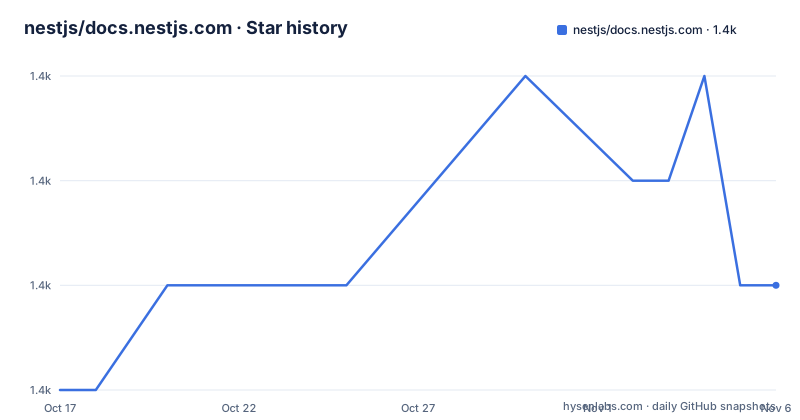
Star history
- nestjs/docs.nestjs.com1,376 ★ · +1
| Repository | 2026-10-17 | 2026-11-06 |
|---|---|---|
| nestjs/docs.nestjs.com | 1.4k | 1.4k |
1 Stars in the last 20 days, measured from the daily GitHub snapshot. Compare with other projects
Editorial analysis
A documentation site, not the framework
The repository description makes the distinction immediately, since it is the official documentation for nestjs.com and the primary language is TypeScript rather than the framework's own code. Nest itself is described in the README as a progressive Node.js framework for building efficient and scalable server-side applications, and this repository holds the site that documents it. The architecture is stated plainly too, that the project is built on top of the Angular CLI and uses the Dgeni documentation generator to compile source documentation in markdown format into the published format. The practical meaning is that there are two kinds of content in one repository. Prose pages are written by hand as markdown and live in the content directory, while the API reference is compiled from the framework's own source comments by Dgeni. A contributor therefore has to work in two different styles, and a change to the site layout has to survive the generator rather than fight it.
Two commands to a local site
The install and start sequence is the short one that documentation projects usually get right.
$ npm install
$ npm run start
The site is then served at http://localhost:4200/, which is the Angular development server default, and every page is written in markdown in the content directory. A production build is npm run build, with the artifacts written to the dist/ directory, and the same command with the watch flag, npm run build:watch, recompiles content changes and rebuilds the site. There is a separate production script, npm run build:prod, which runs the Angular build with the production configuration and AOT compilation. The interesting detail is that neither the start script nor the build script does the documentation generation itself, which is what the next section is about.
The docs and llms steps run before everything else
The npm scripts show a build with a hidden dependency, because the prestart, prebuild and prebuild:prod hooks all run npm run docs before the underlying command. What that script does is two things. The docs-only part runs a Dgeni command line with a custom transform path, tools/transforms/nestjs-package/index, which is where the framework's own API comments become the published API pages. The llms part runs a separate TypeScript script, tools/generate-llms-txt.ts, through ts-node with the tools tsconfig, and that is the step that produces an llms.txt file. The reason to notice this is that the API reference is not stored in the repository, it is compiled from the framework source on every build, and the same build also emits a machine-readable summary intended for language models. A contributor who edits a hand written page and then finds their change missing is looking in the wrong directory, since generated pages are overwritten by the generator every time.
Angular 22, Material, and the usual companion tooling
The dependency list is pinned hard and tells you what the site is made of. The application runs on Angular 22.2.2, with the matching versions of the CLI, the build tooling, the compiler and the devkit, plus Angular Material and the CDK at the same version, the router, forms, animations and the compiler. The rest of the runtime is small, with rxjs, Prism for syntax highlighting and tslib. The developer tooling is the conventional Angular set plus the parts a documentation project needs, with angular-eslint and eslint 10 configured through the flat eslint.config.js, commitlint with the Angular configuration, husky for the git hooks, concurrently to run the docs watcher and the dev server together, and Dgeni with dgeni-packages for the generator. The repository also carries the housekeeping files, renovate.json for dependency updates, a .browserslistrc, a lighthouserc.json for the performance budget, an .htaccess for the deployed site, an .nvmrc pinning the Node version, a .prettierrc and a .commitlintrc.json.
What the documentation covers, and who maintains it
The README's support section says that Nest is an MIT licensed open source project and that it can grow thanks to the sponsors and support by the backers, with a link to the Open Collective page for people who want to join them. The rest of the project presence is described in the same place, with the author named as Kamil Myśliwiec, the website at nestjs.com, a Twitter account, a Discord server badge and a dev.to blog badge. The topic list on the repository carries the framework's own ecosystem vocabulary, including angular, nodejs and typescript. For a reader, the practical value of this repository is that it shows how a framework documents itself at scale, with a hand written narrative layer and a generated API layer, and it is the place to look if you want to contribute a correction to the official documentation rather than a third party tutorial.
The limits of a docs repository as a reference
Two limits are worth stating plainly, because both follow from what this repository is. The first is that the content is a snapshot of one moment in the framework's life. The Angular packages are pinned at 22.2.2 and the framework's own packages are whatever the generator reads at build time, so the documentation describes a particular generation of the API rather than every version a reader might be running, and the site cannot tell you what changed between releases. The second is that reading a documentation site is not the same as running the framework. The examples here are correct with respect to the documentation, but nothing in this repository exercises them. The llms.txt generation step is a small signal of where documentation is going, since it makes a prose site consumable by a model, and it is the piece of this build most likely to be extended in the next year. For an evaluator, the honest summary is that this repository is a well-tooled documentation pipeline, and a team deciding whether to adopt NestJS should read the site and then read the framework's own repository.
Editorial conclusion
docs.nestjs.com fits a contributor who wants to correct or extend the official NestJS documentation, since the content is markdown in a content directory and the whole site is one npm install away, and it fits a team that wants to read the framework through its own documentation rather than through blog posts. It does not fit a team looking for the framework's source code, because the packages live in @nestjs/core and this repository only holds the site. Verify three things first: that the documentation generation step runs on your machine, since the prestart and prebuild hooks both invoke the Dgeni transform and the llms.txt generator before anything is served, that the Node version in .nvmrc matches your setup, and whether a change you make to a markdown page is the kind of change the maintainers take, since the site follows the Angular contribution conventions with commitlint and husky hooks.
Frequently asked questions
What is the docs.nestjs.com repository?
It contains the source code of the official NestJS documentation site, an Angular application built on the Angular CLI that uses the Dgeni documentation generator to compile source documentation in markdown into the published format. The hand written pages are markdown files in the content directory.
How do I run the NestJS documentation site locally?
Run npm install and then npm run start, and the site is served at http://localhost:4200/. The build output goes to the dist/ directory with npm run build, and npm run build:watch recompiles content changes as you edit them.
What do the prestart and prebuild hooks do?
Both run npm run docs first, which runs the Dgeni command with the transform at tools/transforms/nestjs-package/index to generate the API pages, and a separate script, tools/generate-llms-txt.ts, that produces the llms.txt file. The API reference is therefore compiled from the framework source on every build rather than stored in the repository.
Is NestJS itself MIT licensed?
Yes. The README states that Nest is an MIT licensed open source project and that it is supported by sponsors and backers through Open Collective, with the author listed as Kamil Myśliwiec.
Official sources
Add this badge to your README
If you maintain this project, the badge below links readers to this analysis and shows its maintenance status from the daily GitHub snapshot. Paste the markdown into your README; add ?metric=license or ?metric=stars to the image URL for a different field.

[](https://hysenlabs.com/projects/nestjs-docs-nestjs-com)Star history chart for your README
[](https://hysenlabs.com/projects/nestjs-docs-nestjs-com)Was this useful?