Netty 4.2: The Java networking framework that still sets the baseline
Netty project - an event-driven asynchronous network application framework.
At a glance
- What is it?
- Netty is an asynchronous, event-driven network application framework for Java. This review covers what it does, how to run it, and where its 4.2 branch matters.
- Who is it for?
- Adopt Netty 4.2 if you need a mature, Apache-2.0 licensed framework for building protocol servers or clients in Java and you can commit to the learning curve of its event loop model. Do not use it if you want a higher-level abstraction like Spring WebFlux or if your team has no experience with asynchronous programming.
- Can I use it commercially?
- Yes. Apache-2.0 is a permissive licence: you can use, modify and sell software built on it, as long as you keep its copyright and licence notices.
- Is it still maintained?
- Yes. The repository received new commits within the last day.
- What is it written in?
- Mainly Java, according to GitHub's language statistics.
Answers come from the project's GitHub data, last synced on November 13, 2026, and from our analysis. They are not legal advice.
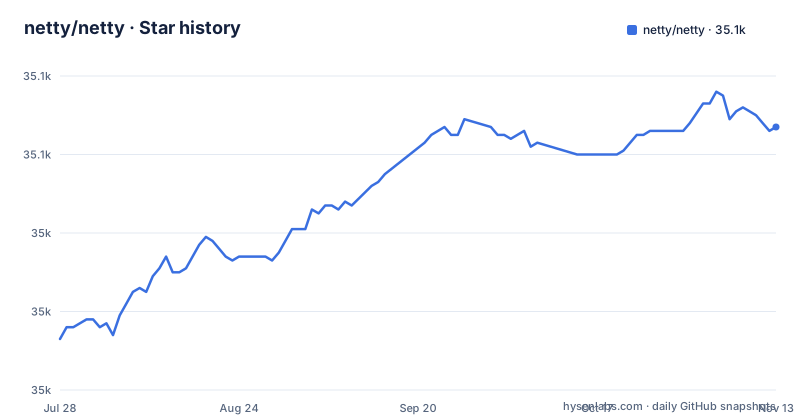
Star history
- netty/netty35,067 ★ · +54
| Repository | 2026-07-28 | 2026-11-13 |
|---|---|---|
| netty/netty | 35k | 35.1k |
54 Stars in the last 108 days, measured from the daily GitHub snapshot. Compare with other projects
Editorial analysis
The problem Netty solves: raw sockets done right
Netty exists because Java's built-in socket APIs are low-level and awkward for building real protocols. You handle threads, buffers, and non-blocking I/O yourself, and the result is often buggy and hard to maintain. Netty provides an event-driven, asynchronous model where you define handlers that react to bytes arriving or connections opening. It is for engineers who need to build custom protocol servers, like an in-house RPC system or a game server, without starting from zero. The README describes it as 'an asynchronous event-driven network application framework for rapid development of maintainable high performance protocol servers & clients.'
How Netty's event loop architecture works
At the core of Netty is the event loop, a thread that processes I/O events for many connections. Instead of one thread per connection, which wastes memory and causes context switching, Netty uses a small pool of event loop threads. Each connection is assigned to one event loop, and all I/O for that connection happens on that thread. Your code runs as handlers in a pipeline, each handler responding to events like channelRead or channelActive. This model is not new, but Netty has refined it over a decade. The pipeline is the key data flow: inbound events travel from the first handler to the last, outbound events travel in reverse. You can add, remove, or replace handlers at runtime, which is useful for protocols that change state, like HTTP upgrading to WebSocket. The trade-off of this design is that you must never block the event loop, or you stall every connection on that thread.
Getting Netty running: dependencies and build commands
Netty is a library, not a standalone application, so you add it as a dependency. The README gives the system requirements: Netty 4.2 requires Java 8 or newer, and the optional io_uring native transport requires Java 9 or newer. To build Netty from source, you need the latest stable OpenJDK 8 and Apache Maven. On Linux or macOS, you also need additional development packages because the build compiles native transports. The README points to the developer guide for build details and lists the requirements (OpenJDK 8, Apache Maven). For users, the simpler path is to grab the pre-built jars from the downloads page. The repository contains separate modules for each transport, such as transport-native-io_uring, so you can include only what you need. The modular Netty guide in testsuite-jpms/README.md explains how to use Netty with the Java Platform Module System, which is relevant if you run on JDK 9 or later.
The 4.2 branch: what it changes and why it matters
The default branch is 4.2, and the latest release in that line is netty-4.2.20.Final (2026-11-02). The 4.1 branch is still actively maintained, with netty-4.1.140.Final released the same day. This dual maintenance is worth noting. The README mentions an optional io_uring native transport, which requires Java 9 or newer. If you are starting a new project, 4.2 is a reasonable choice, but if you maintain an existing Netty application, you need to check the upgrade notes. The 4.1 branch remains the safer bet for stability, given its long track record.
Limitations and failure modes: where Netty is the wrong tool
Netty is not a beginner-friendly framework. The event loop model demands that you understand asynchronous programming, and a common mistake is blocking the event loop with a slow database query or a Thread.sleep. That single mistake can degrade performance for all connections on that loop, not just the one you blocked. Another limitation is the learning curve for the pipeline API: you have to think in terms of inbound and outbound events, buffer lifecycle, and reference counting. Netty ships codec modules for protocols such as HTTP, HTTP/2, MQTT and Redis, but it is a framework rather than a ready-made application server. If you need a simple HTTP server, you are better off with a higher-level tool. Finally, the native transports add complexity to deployment. The io_uring transport requires a Linux kernel that supports it, and you must ship the correct native library for your platform. The README warns that building from source on Linux or macOS requires extra packages, which is a hurdle for developers who just want to try it.
Alternatives: comparing Netty to Java's built-in and higher-level options
The most direct alternative to Netty is Java's own NIO.2, which offers non-blocking sockets but requires you to manage the selector loop and buffer handling. Netty wraps that complexity into a clean API, so the comparison is not about features but about productivity and reliability. A different alternative is Project Loom's virtual threads, which let you write blocking code that scales. With virtual threads, you do not need an event loop at all, and the code looks like ordinary synchronous I/O. That is a fundamentally different approach: Netty forces you to structure code around callbacks or futures, while Loom keeps the imperative style. For many teams, Loom might be easier to adopt. However, Loom is relatively new, and Netty is a long-established framework. There is also the option of using a higher-level framework like Spring WebFlux, which sits on top of Netty and provides a reactive programming model. That is a valid choice if you want annotations and auto-configuration, but it adds a layer of abstraction. The right alternative depends on whether you want control or convenience.
Maintenance and licensing: what you need to know before adopting
Netty is licensed under Apache-2.0, which allows commercial use, modification, and distribution without imposing copyleft obligations. That is a permissive license, and it is one reason Netty is so widely embedded in other projects. The maintenance picture is strong: the repository shows regular releases on both 4.1 and 4.2 branches, with netty-4.1.140.Final and netty-4.2.20.Final both published on 2026-11-02. However, you should be aware of the upgrade cost when moving between minor versions such as 4.1 to 4.2: the README has no migration guide, so check the documentation and release notes before upgrading. The native transports require you to track platform-specific updates, such as new kernel versions for io_uring. You should budget time for testing when you upgrade.
Editorial conclusion
Adopt Netty 4.2 if you need a mature, Apache-2.0 licensed framework for building protocol servers or clients in Java and you can commit to the learning curve of its event loop model. Do not use it if you want a higher-level abstraction like Spring WebFlux or if your team has no experience with asynchronous programming. Before adopting, verify which native transport you need: the standard NIO transport works on Java 8, but the io_uring transport requires Java 9 or newer and a Linux kernel that supports it. Also check the current status of the 4.2 branch, since 4.1 is still maintained and received netty-4.1.140.Final on the same day as netty-4.2.20.Final.
Frequently asked questions
What is Netty used for?
Netty describes itself as an asynchronous event-driven network application framework for building protocol servers and clients. Its repository is organised as protocol codec modules such as codec-http, codec-http2, codec-mqtt and codec-redis, on top of buffer, handler and transport modules.
Is Netty better than Tomcat?
The README does not compare Netty with Tomcat or any other server. The difference in approach is that Tomcat is a servlet container with its own request and response API, while Netty exposes channels, buffers and pipelines, and no servlet module appears among the top-level directories.
What is Netty in Java terms, and which version should a new project take?
It is a Java network framework whose development happens in branches named <majorVersion>.<minorVersion>, and the default branch is 4.2. The release list shows netty-4.2.20.Final and netty-4.1.140.Final both published on 2026-11-02, so 4.1 is still a maintained line rather than a dead branch.
Is Netty a web server?
The project calls itself an asynchronous event-driven network application framework for protocol servers and clients, not a web server. HTTP support exists as modules, codec-http, codec-http2 and codec-http3, and the repository has no application server entry point of its own.
Official sources
Add this badge to your README
If you maintain this project, the badge below links readers to this analysis and shows its maintenance status from the daily GitHub snapshot. Paste the markdown into your README; add ?metric=license or ?metric=stars to the image URL for a different field.

[](https://hysenlabs.com/projects/netty-netty)Star history chart for your README
[](https://hysenlabs.com/projects/netty-netty)Was this useful?