Better Posters: A Jellyfin Plugin That Replaces Primary Artwork with btttr.cc Images
Better Posters is an unofficial Jellyfin plugin that lets you replace standard movie and show posters with customizable posters from btttr.cc.
At a glance
- What is it?
- Better Posters is an unofficial Jellyfin plugin that swaps standard movie and show posters for customizable images from btttr.cc. It works as a remote image provider, supports scheduled replacement, and requires Jellyfin 10.11.10 or newer.
- Who is it for?
- Adopt Better Posters if you run Jellyfin 10.11.10 or newer, want automated poster replacement, and are comfortable relying on btttr.cc as the image source. Do not use it if you need posters for items lacking an IMDb ID, require support for older Jellyfin versions, or want full control over image generation.
- Can I use it commercially?
- Yes, with conditions. GPL-3.0 is a copyleft licence: if you distribute software that includes it, you must release that software's source code under the same licence. Running it internally without distributing it does not trigger that obligation.
- Is it still maintained?
- No. The owners have archived the repository on GitHub, so it is read-only and no longer receives changes.
- What is it written in?
- Mainly C#, according to GitHub's language statistics.
Answers come from the project's GitHub data, last synced on October 22, 2026, and from our analysis. They are not legal advice.
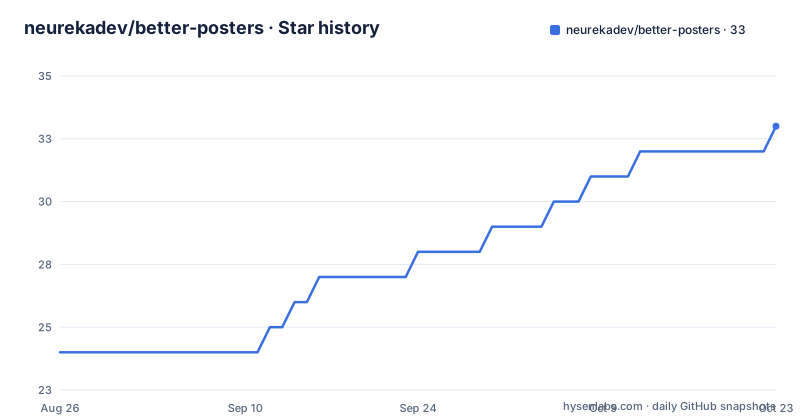
Star history
- neurekadev/better-posters32 ★ · +8
| Repository | 2026-08-26 | 2026-10-22 |
|---|---|---|
| neurekadev/better-posters | 24 | 32 |
8 Stars in the last 57 days, measured from the daily GitHub snapshot. Compare with other projects
Editorial analysis
What Better Posters Solves and Who It Is For
Jellyfin's default poster handling works, but many users want artwork that reflects personal taste or includes extra metadata like ratings and genre tags. Better Posters addresses that by acting as a remote image provider that pulls posters from btttr.cc, a third-party service. The plugin targets Jellyfin administrators who want a consistent, customizable poster style across their movie and show libraries without manually editing images. It is not for casual users who rarely touch library settings. The README makes clear it is unofficial, so it sits outside the official Jellyfin plugin ecosystem and depends on an external service that could change or disappear.
How the Plugin Works: Remote Provider and Scheduled Task
Better Posters registers as a remote primary image provider for movies and series. When Jellyfin requests images, the plugin builds a URL to btttr.cc using the item's IMDb ID. That ID is a hard requirement; the README states the plugin intentionally uses IMDb IDs for btttr.cc URLs. The plugin then returns the generated poster as the primary image. For existing items, it offers a scheduled task called Update Better Posters that replaces current primary posters based on the configured settings. This task is unscheduled by default, so you must enable it manually. The flow is simple: Jellyfin asks for a remote image, the plugin constructs a btttr.cc URL from the IMDb ID, and the resulting image is applied. There is no local image processing or caching logic described in the material.
Installation: Repository, Manual Zip, or Source Build
The README gives three installation paths. The easiest is adding the repository URL https://raw.githubusercontent.com/neurekadev/better-posters/master/manifest.json under Dashboard -> Plugins -> Repositories, then installing from the Catalog. Manual installation involves downloading the better-posters_*.zip from the releases page, stopping Jellyfin, extracting the zip into a plugin folder, and restarting. Building from source requires a .NET SDK that can build net9.0 projects, then running dotnet publish BetterPosters/BetterPosters.csproj -c Release and copying the resulting BetterPosters.dll into a plugin folder. All paths end with a restart and a check under Dashboard -> Plugins -> My Plugins. The minimum Jellyfin version is 10.11.10, and the plugin may not load on older versions, so that is a hard boundary.
Configuration Options and Defaults
Configuration happens under Dashboard -> Plugins -> My Plugins -> Better Posters. Defaults are trend tags enabled, quality tags disabled, genre enabled, ratings enabled, age rating disabled, and language set to English. The ratings source defaults to Average, which uses btttr.cc's own average rating. You can switch to IMDb, TMDB, Rotten Tomatoes, Metacritic, Trakt, Letterboxd, or Roger Ebert. Language options cover English, Spanish, French, German, Portuguese, Italian, Dutch, Polish, Russian, Turkish, Arabic, Japanese, Korean, Chinese, Hindi, Swedish, and Czech. These settings apply globally to all items when the plugin generates a poster. There is no per-item override described in the material, which means a single configuration governs the entire library. That is a trade-off: consistency versus flexibility.
Applying Posters: Three Ways, One Dependency
You can apply posters manually per item, during a library scan, or automatically via the scheduled task. For a single movie or show, open Edit Images, search remote images, and pick the Better Posters primary image. For a library-wide refresh, go to Dashboard -> Libraries, open a Movies or Shows library, select Scan Library, and choose metadata refresh options that replace existing images. For automation, schedule the Update Better Posters task under Dashboard -> Scheduled Tasks. All three methods depend on the item having an IMDb ID. If an item lacks one, no Better Posters image will appear. That is a concrete limitation, not a minor edge case. Many library items, especially obscure films or TV episodes, may not have an IMDb ID, so the plugin will silently skip them.
Known Failure Modes and Troubleshooting
The README lists three troubleshooting scenarios. If no Better Posters image appears, check that the item has an IMDb ID. If the plugin does not load, confirm the server is Jellyfin 10.11.10 or newer in the 10.11 line and restart after copying the DLL. If a poster does not change after selection, clear the browser cache or check another client because Jellyfin and browsers cache images aggressively. These are practical but reveal a deeper issue: the plugin has no fallback when btttr.cc is unreachable or returns an error. The material does not mention error handling, retries, or fallback to the original poster. If btttr.cc goes down, the plugin likely fails silently or returns nothing, leaving the default Jellyfin poster in place. That is a risk you must accept.
Maintenance, Upgrade Cost, and License Implications
The repository was last pushed on 2026-08-26 with release 1.0.5, and there is a migration note from 2026-08-25 saying the project moved from GitLab to GitHub. Existing users must remove the old repository URL and add the new one, then reinstall. That is a real upgrade cost: every installation from the old GitLab repo needs manual intervention. The plugin is GPL-3.0, so if you modify it and distribute the changes, you must share the source under the same license. Using it as-is for personal or internal Jellyfin servers does not trigger that obligation, but any redistribution does. The README does not describe an update mechanism beyond the repository-based install, so you rely on Jellyfin's plugin update flow or manual zip replacement. There is no documented way to roll back to a previous version if a new release breaks something.
Alternatives and When to Choose Something Else
The obvious alternative is Jellyfin's built-in image providers, which fetch posters from TMDB or other sources without a plugin. The difference is approach: built-in providers offer standard artwork with no customization, while Better Posters gives you configurable overlays and rating badges. Another alternative is manually editing posters with a tool like Jellyfin's image editor, which gives full control but no automation. If you want automation and customization, Better Posters is the only option in the material. If you need posters for items without IMDb IDs, or you want to keep your setup independent of a third-party service, the built-in providers are safer. The trade-off is clear: convenience and customization versus reliability and control.
Editorial conclusion
Adopt Better Posters if you run Jellyfin 10.11.10 or newer, want automated poster replacement, and are comfortable relying on btttr.cc as the image source. Do not use it if you need posters for items lacking an IMDb ID, require support for older Jellyfin versions, or want full control over image generation. Before installing, verify your Jellyfin version meets the minimum, confirm every target item has an IMDb ID, and test the plugin on a single library item before enabling the scheduled task.
Frequently asked questions
How do I get better posters in Jellyfin with Better Posters?
Add the plugin repository manifest URL in Dashboard, Plugins, Repositories, install Better Posters from the catalog, restart Jellyfin, then open an item, choose Edit Images and search remote images. Or run a library scan with metadata refresh options that replace existing images, or schedule the Update Better Posters task.
What are the trending posters for 2026, according to Better Posters?
The plugin does not publish a list. It has a Trend Tags overlay that is enabled by default, and the poster artwork and generated image output are provided by btttr.cc. The overlay can be combined with quality badges, genre, rating and age rating toggles and seventeen language choices.
Which rating source should I pick when configuring Better Posters?
The default is the btttr.cc average. The plugin can instead use IMDb, TMDB, Rotten Tomatoes, Metacritic, Trakt, Letterboxd or Roger Ebert. Ratings are enabled by default while age rating and quality badges are disabled, and the whole overlay set is changed under Dashboard, Plugins, My Plugins, Better Posters.
Does Better Posters make its own poster artwork?
No. The poster artwork and generated image output are provided by btttr.cc, and the plugin is described as an unofficial Jellyfin plugin that replaces standard posters with those. It registers as a remote primary image provider, so it selects and overlays images rather than creating them, and it requires each item to have an IMDb ID.
Official sources
Add this badge to your README
If you maintain this project, the badge below links readers to this analysis and shows its maintenance status from the daily GitHub snapshot. Paste the markdown into your README; add ?metric=license or ?metric=stars to the image URL for a different field.

[](https://hysenlabs.com/projects/neurekadev-better-posters)Star history chart for your README
[](https://hysenlabs.com/projects/neurekadev-better-posters)