lazyrsync: a ratatui front end that puts --delete behind a gate
🦀 A friendly terminal UI for rsync, written in Rust. Reusable profiles, an honest dry-run diff, and live progress, even over SSH.
At a glance
- What is it?
- lazyrsync is a Rust terminal UI for rsync that treats the destructive flags as the real problem: you save transfers as profiles, preview any run as a structured diff before it happens, and enabling --delete makes the tool refuse until you confirm. The second thing worth knowing before you install it is that macOS 15.4 ships openrsync at /usr/bin, which lacks the flags the preview and the progress bar depend on.
- Who is it for?
- lazyrsync fits anyone running rsync on a schedule who has been burned by a wrong flag, especially over SSH where a desktop file manager is not an option, and whose backups include snapshots that cron cannot express. It does not fit a macOS user who will not install a real rsync, since the system one at /usr/bin on 15.4 and later silently lacks the flags the preview, the progress bar and the hardlinks depend on.
- Can I use it commercially?
- Yes. MIT is a permissive licence: you can use, modify and sell software built on it, as long as you keep its copyright and licence notices.
- Is it still maintained?
- Yes. The repository last received commits 34 days ago.
- What is it written in?
- Mainly Rust, according to GitHub's language statistics.
Answers come from the project's GitHub data, last synced on November 25, 2026, and from our analysis. They are not legal advice.
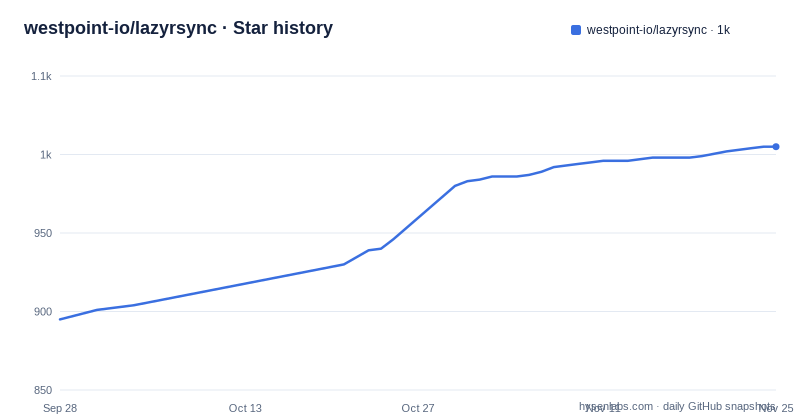
Star history
- westpoint-io/lazyrsync1,005 ★ · +110
| Repository | 2026-09-28 | 2026-11-25 |
|---|---|---|
| westpoint-io/lazyrsync | 895 | 1k |
110 Stars in the last 58 days, measured from the daily GitHub snapshot. Compare with other projects
Editorial analysis
The argument is about --delete, not about convenience
The pitch starts from a specific failure mode: rsync is the right tool for backups and syncs, but its flags are easy to get wrong and a single mistake can delete data.
So the design puts the dangerous parts behind gates rather than behind documentation. Options are toggles rather than typed flags, and flipping on `--delete` makes the tool ask for confirmation before anything can be removed. The preview is the other gate: press `p` and the transfer resolves into a `+`/`~`/`-` diff with stats, and nothing is written until you say so.
The rest follows the same pattern of removing decisions from the moment of running. A source and destination pair is saved once and rerun with a keystroke, a live run fills a progress bar with byte and file counts, and `c` stops a transfer mid-flight.
What the tool does not do is hide rsync. A task is a Source and a Destination, the same two arguments the rsync command line takes, and the headless mode prints the resolved rsync command so you can read exactly what would run.
macOS 15.4 ships openrsync, and it is missing the flags
The install section has one warning that deserves its own attention. On macOS 15.4 and later, `/usr/bin/rsync` is openrsync, which has no `--itemize-changes` and no `--info` at all, and accepts `--link-dest` without reliably hardlinking.
That breaks three features at once, because each one depends on a specific flag. The dry-run preview needs `--itemize-changes`. The progress bar needs `--info=progress2`, which was added in rsync 3.1.0. Snapshots need `--link-dest`. On openrsync you get none of them.
The fix is to install a real rsync with `brew install rsync` and then either put it ahead of `/usr/bin` on `$PATH` or set `rsync_path`. The version floor is rsync 3.1 or later on your `$PATH`, and lazyrsync warns at startup when the rsync it finds is older than 3.1.
There is a packaging detail here that catches people out. The Homebrew and AUR packages pull rsync in for you. `cargo install` and `cargo binstall` do not, so the Rust-only install paths leave you to solve the rsync problem yourself.
A task is Source to Destination, with no push or pull
The TUI has two sub-tabs and five keys to get you through a first task. Press `]` to switch to the Profiles sub-tab and `a` to add a profile. Back on Tasks, press `a` to add a task, which asks for an ID, an Action, a Source and a Destination. The Action is Sync or Snapshot, toggled with the left and right arrows. Then `p` previews and `r` runs, with `c` cancelling from the Runs panel.
The model is deliberately thin. A task is Source to Destination, exactly like the rsync command line, with no push or pull and no separate remote field. Either path may be local or a remote `user@host:/path`, and it runs over SSH, which is the point of a terminal tool for transfers a desktop GUI cannot reach.
One convention is worth memorising because it silently changes what gets copied: a trailing `/` on the Source copies its contents, and without it the folder itself is copied.
Snapshots sit on top of that model as the second action, keeping numbered, hardlinked versions with `--link-dest`, where each run writes the next directory, `1/`, `2/` and onwards.
Why cron cannot run a snapshot on its own
The headless mode exists so the transfer you verified by hand is the exact one your scheduler runs at 2am, and the command surface is small:
lazyrsync list                        # profiles, task ids, resolved rsync commands
lazyrsync run backups                 # every task in the profile
lazyrsync run backups/photos-3f2a     # a single task, by id from `list`
lazyrsync run backups -n              # real dry run, changes nothing
lazyrsync run backups --yes           # required if any task uses --delete
lazyrsync run backups -v              # add rsync's own output for each task
Flags compose freely, so `lazyrsync run backups/photos-3f2a -n --yes` is valid.
The reason the README argues against pointing cron straight at rsync is Snapshot, and the argument is precise. A plain Sync could be a static crontab line. A Snapshot cannot: the numbered destination directory and the `--link-dest` chain are computed at run time by scanning the destination, so the command differs on every run, with `1/` linking against nothing and `2/` linking against `1/`. No static crontab line expresses that, and `lazyrsync run` resolves it fresh each time.
Exit code 1 means nothing ran, and rsync's codes overlap
The exit table is designed for a scheduler to read:
| Exit | Meaning | |------|---------| | 0 | every task succeeded, or the profile has no tasks, which says so on stderr | | 1 | refused: a task uses `--delete` and `--yes` was absent; nothing ran | | 2 | no such profile or task id, or the config is missing or failed to load | | 3 | a task could not be started, or was killed by a signal | | _n_ | the first failing task's own rsync exit code |
Two details matter more than the table. rsync's exit 24, meaning source files vanished mid-transfer, counts as success. And rsync's own exits 1, 2 and 3 collide with these, so the status alone is not always conclusive and the message has to be read. A refusal always says `nothing ran` explicitly, and a task that never started ends its line with `exit 3`.
Failure is also not fail-fast. A failing task does not stop the rest: every task gets its turn, then you get a summary and a non-zero exit code, so one broken source leaves less data unprotected than aborting the batch would.
Success goes to stdout and failure goes to stderr
Stream separation is what makes cron mail-on-output usable:
lazyrsync run backups >/dev/nullis completely silent when every task succeeds, and produces output only when something needs attention. Successful task lines and the success summary go to stdout, while failed task lines and the summary-when-something-failed go to stderr.
A real run passes rsync `-q`, so you get one line per task and nothing else, with rsync's errors still printed since those are the only chatter worth mailing. `-v` or `--verbose` opts back into the full log per task. A dry run is never quiet, because the itemized diff is the whole point of `-n`, so `-n` shows it with or without `-v`.
Each task gets one styled line with a counter and a tick or cross. Two flags get dropped in headless mode for the same reason: `list` prints the command with the TUI's `--info=progress2` while a headless run omits it, since there is no progress bar to feed, and a headless `-n` also drops `--stats`, which only the TUI's preview parser reads.
Task order comes from recency, not from profiles.toml
There is one scheduling trap that is worth knowing before you automate anything: tasks run in the order `lazyrsync list` shows them, which is not the order they appear in `profiles.toml`, because the loader sorts by recency. The instruction is to check `list` before scheduling anything that assumes an order.
That is a consequence of treating the config as a store rather than a script. The tool loads it, sorts it and presents its own view, which is friendlier for the TUI and worse for reproducibility.
The rest of the project is small and conventional. `Cargo.toml` declares edition 2021 with ratatui 0.29 and crossterm 0.28 for the interface, clap 4 for arguments, serde and toml for the config, and `toml_edit` with parse and display features, which is what lets the tool edit the profile file rather than only read it. The release profile strips symbols, enables LTO, sets codegen units to 1 and uses `panic = "abort"`, so a panic ends the process instead of unwinding. A separate `profiling` profile inherits it with stripping off and line tables for dhat heap profiling.
The release assets are conventional too, named `lazyrsync-<target>.tar.gz` with the binary at the archive root, and `rust-toolchain.toml` plus a `RELEASING.md` pin the toolchain and the process. Version 0.3.0 shipped on 2026-08-10, after 0.2.0 and 0.1.1, and that tag is also the last push to `main`.
Editorial conclusion
lazyrsync fits anyone running rsync on a schedule who has been burned by a wrong flag, especially over SSH where a desktop file manager is not an option, and whose backups include snapshots that cron cannot express. It does not fit a macOS user who will not install a real rsync, since the system one at /usr/bin on 15.4 and later silently lacks the flags the preview, the progress bar and the hardlinks depend on. Check three things before you schedule it: that `rsync --version` reports 3.1 or later on your `PATH`, or that `rsync_path` points at a brew-installed copy; that you read `lazyrsync list` once and accept its ordering, because the loader sorts by recency rather than following the file; and that your first unattended run includes `-n`, since a snapshot destination is computed at run time and the only way to see it is to look at the resolved command. Exit code 1 with the words nothing ran means the safety gate stopped you, not that rsync failed.
Frequently asked questions
What is rsync used for?
lazyrsync's own framing is that rsync is the right tool for backups and syncs, but its flags are easy to get wrong and a single mistake can delete data. The tool wraps it with reusable profiles, a dry-run preview rendered as a structured diff, and a confirmation gate on --delete.
Which rsync version does lazyrsync need?
rsync 3.1 or later on your PATH, because the preview needs --itemize-changes, the progress bar needs --info=progress2 which arrived in 3.1.0, and snapshots need --link-dest. The Homebrew and AUR packages pull rsync in, while cargo install and cargo binstall do not. lazyrsync warns at startup when the rsync it finds is older than 3.1.
How do I install lazyrsync?
Four documented routes: cargo install lazyrsync from crates.io, cargo binstall lazyrsync for the prebuilt release binary, brew install lazyrsync, or yay -S lazyrsync on Arch. From a checkout it is cargo install --path . Note that the Cargo routes do not install rsync for you, which matters on macOS 15.4 and later where /usr/bin/rsync is openrsync and lacks --itemize-changes and --info.
Can I run lazyrsync from cron?
Yes, every profile you build in the TUI also runs headless, so lazyrsync run <profile> is what a scheduler calls. A plain Sync could go straight into crontab, but a Snapshot cannot, because the numbered destination directory and the --link-dest chain are computed at run time by scanning the destination. Two cautions: tasks run in the order lazyrsync list shows, which is recency-sorted rather than file order, and any profile containing a --delete task needs --yes.
What do lazyrsync's exit codes mean?
Zero means every task succeeded, or the profile has no tasks, which is reported on stderr. One means refused, because a task uses --delete and --yes was absent, so nothing ran. Two means no such profile or task id, or the config failed to load. Three means a task could not start or was killed by a signal. Anything else is the first failing task's own rsync exit code, and rsync's 24 for vanished source files counts as success.
Official sources
Add this badge to your README
If you maintain this project, the badge below links readers to this analysis and shows its maintenance status from the daily GitHub snapshot. Paste the markdown into your README; add ?metric=license or ?metric=stars to the image URL for a different field.

[](https://hysenlabs.com/projects/westpoint-io-lazyrsync)Star history chart for your README
[](https://hysenlabs.com/projects/westpoint-io-lazyrsync)Was this useful?