Calibre-Web-NextGen: A Community Fork That Ships Upstream Fixes Faster
Community continuation of Calibre-Web-Automated. Attempting to maintain with rapid iteration. Please feel free to help out by filing Issues, Feature Requests, PRs, and chatting in our Discussion.
At a glance
- What is it?
- Calibre-Web-NextGen is a community continuation of Calibre-Web-Automated, packaging upstream bug fixes and new features into frequent releases. It is a drop-in Docker image swap that preserves your library, settings, and sync state.
- Who is it for?
- Adopt Calibre-Web-NextGen if you run Calibre-Web-Automated and want bug fixes and features that upstream hasn't released yet, especially if you use Kobo or KOReader sync or need Safari support. Do not adopt it if you require a conservative, slowly-changing base or if you cannot tolerate a community-maintained project with a rapid release cadence.
- Can I use it commercially?
- Yes, with conditions. GPL-3.0 is a copyleft licence: if you distribute software that includes it, you must release that software's source code under the same licence. Running it internally without distributing it does not trigger that obligation.
- Is it still maintained?
- Yes. The repository received new commits within the last day.
- What is it written in?
- Mainly Python, according to GitHub's language statistics.
Answers come from the project's GitHub data, last synced on October 23, 2026, and from our analysis. They are not legal advice.
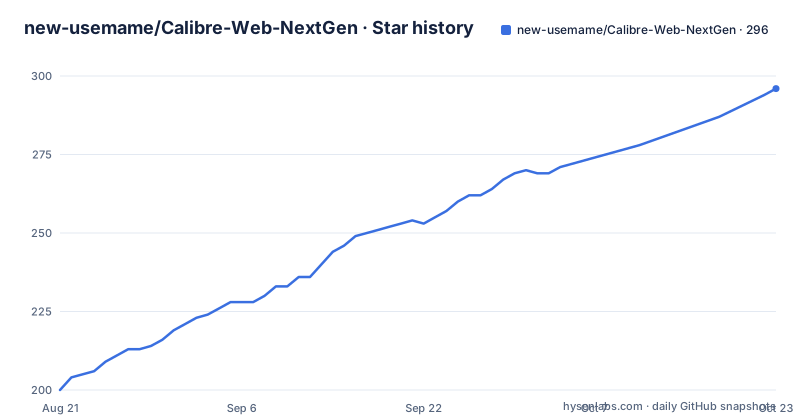
Star history
- new-usemame/Calibre-Web-NextGen296 ★ · +96
| Repository | 2026-08-21 | 2026-10-23 |
|---|---|---|
| new-usemame/Calibre-Web-NextGen | 200 | 296 |
96 Stars in the last 63 days, measured from the daily GitHub snapshot. Compare with other projects
Editorial analysis
Why This Fork Exists and Who It Is For
Calibre-Web-NextGen exists because Calibre-Web-Automated (CWA) has a queue of community-submitted bug fixes that never made it into the latest published image. The fork picks the safe ones, ships them in regular releases, and adds its own fixes for high-impact bugs that lack an upstream PR. This makes it a practical choice for self-hosters who run CWA and want fixes without waiting for the upstream maintainer. It is also for users who need specific features like Kobo auth token generation or Safari compatibility that are broken in the upstream release. The project is not for people who want a stable, slow-moving base; it iterates rapidly, with three releases in the last week of August 2026 alone.
Drop-In Replacement: The One-Line Image Swap
The core promise is that switching from upstream CWA is a one-line change in your Docker Compose file. You replace `image: crocodilestick/calibre-web-automated:latest` with `image: ghcr.io/new-usemame/calibre-web-nextgen:latest`, then run `docker compose pull && docker compose up -d`. The README states that library, settings, users, OAuth tokens, and KOReader sync state are preserved. Switching back is the reverse one-line change. This is possible because the data format and configuration are byte-compatible with upstream. That compatibility is the project's strongest selling point: it removes the migration risk that usually comes with forking a complex application. If you use a NAS or GUI, the README links to step-by-step guides for Synology, Unraid, Portainer, and TrueNAS SCALE.
What's Included: A Slice of Fixes and Features
The project includes everything CWA has, plus a list of patches documented in `CHANGES-vs-upstream.md`. The README gives a representative slice: cover saves from Hardcover, Google Books, iTunes, and Open Library were broken since 4.0.6 and are fixed; metadata search and the book-delete button now work on Safari; Kobo Auth Token generation no longer returns a blank page; Kobo bookmark sync no longer crashes when the client omits `Location`. There are also security fixes: an auth check was added to 14 admin routes that previously didn't require admin, and a cover-enforcer shell-injection vulnerability on filenames containing quotes was fixed. For e-reader users, higher-resolution covers from Google Books and Amazon are included, with an iTunes-backed fallback for high-DPI devices like the Libra Color. Translation PRs for Japanese, French, Czech, Hungarian, and both Chinese variants have been merged.
Quick Start: Commands and Config Keys
The quick start assumes Docker and Docker Compose. You create a folder structure with `mkdir -p ~/calibre-web/{config,library,ingest}` and `cd ~/calibre-web`. Then you save a `docker-compose.yml` with the image, container name, environment variables `PUID=1000`, `PGID=1000`, and `TZ=America/New_York`, plus three volumes: `./config:/config`, `./library:/calibre-library`, and `./ingest:/cwa-book-ingest`. The port mapping is `8083:8083`. After `docker compose up -d`, you open `http://localhost:8083` and log in with `admin` / `admin123`. Dropping an `.epub` into `./ingest/` will import it within seconds. The README warns that files in library and ingest folders should be owned by your `PUID:PGID` user, not root; if you copied books as root, run `sudo chown -R 1000:1000 ~/calibre-web` once.
Migration Paths Beyond the One-Line Swap
The README covers migrating from upstream CWA and from stock Calibre-Web. For CWA, the swap is the migration. For stock Calibre-Web, the process is not described in the snippet, but the table of contents suggests a dedicated section. The project also pairs with Shelfmark, a separate tool, and includes common configurations for network shares (NFS, SMB, ZFS), Calibre desktop coexistence, and Calibre plugins like DeDRM. There is a section on reverse proxy with a prefix, which is relevant because the project fixed user-profile saves to honor the path prefix. If you run behind a reverse proxy, you should verify that your prefix configuration matches the project's expectations.
Genuine Limitations and Wrong-Tool Cases
The project is a community continuation, which means its long-term viability depends on the maintainer's availability and interest. The rapid release cadence can be a double-edged sword: you get fixes fast, but you also get frequent changes that might introduce new regressions. The README does not mention a stable branch or LTS release, so if you need a predictable environment, this fork may not be the right tool. Another limitation is that the project relies on a single primary maintainer, as indicated by the sponsor link and the 'community continuation' framing. If that maintainer steps away, the project could stall. Also, the project is GPL-3.0 licensed, which means if you modify and distribute it, you must share your changes under the same license. That is not a problem for most self-hosters, but it is a constraint for anyone building a commercial product on top of it.
Maintenance and Upgrade Cost
The maintenance cost is low if you stick to the Docker image and follow the release tags. The project publishes releases frequently, so you will need to pull new images and restart the container regularly to get fixes. The README does not mention an automatic update mechanism, so you are responsible for monitoring releases. The `CHANGES-vs-upstream.md` file is the place to check what changed between versions. The license is GPL-3.0, which is a standard copyleft license; it does not impose any obligation on you if you only run the software, but if you redistribute modified versions, you must provide source code. The project also uses AI heavily in development, but the README states that AI is not used in the software you run. That is a transparency point worth noting if you have concerns about AI-generated code.
Alternatives and How They Differ
The obvious alternative is upstream Calibre-Web-Automated, which is the base project. The difference is that CWA publishes images less frequently, and community PRs can sit unreviewed for a long time. Calibre-Web-NextGen picks those PRs and ships them. Another alternative is the original Calibre-Web, which is a different project with a different architecture: it does not include the automated ingestion folder, KOReader sync, or the same metadata providers out of the box. If you need those features, you would have to configure them separately. Calibre-Web-NextGen is closer to CWA in feature set, so the choice is mostly about release cadence and trust in the maintainer. If you want a more conservative approach, stick with upstream CWA and wait for fixes; if you want fixes now, this fork is the faster path.
Editorial conclusion
Adopt Calibre-Web-NextGen if you run Calibre-Web-Automated and want bug fixes and features that upstream hasn't released yet, especially if you use Kobo or KOReader sync or need Safari support. Do not adopt it if you require a conservative, slowly-changing base or if you cannot tolerate a community-maintained project with a rapid release cadence. Before switching, back up your config directory, review the CHANGES-vs-upstream.md file for the full list of patches, and verify that your reverse proxy setup handles the path prefix correctly. The project is byte-compatible with upstream, so you can switch back, but test the switch on a staging instance first if you rely on custom plugins or scripts.
Frequently asked questions
What is Calibre-Web-NextGen?
A community continuation of Calibre-Web-Automated, published as a container image on GitHub's registry. It ships the upstream feature set plus its own patches, and the data format and configuration are byte-compatible with upstream, so swapping the image in either direction needs no migration.
How do I switch from upstream Calibre-Web-Automated?
Change the image line from crocodilestick/calibre-web-automated:latest to ghcr.io/new-usemame/calibre-web-nextgen:latest, then run `docker compose pull && docker compose up -d`. Library, settings, users, OAuth tokens, and KOReader sync state are preserved, and switching back is the reverse one-line change.
What does Calibre-Web-NextGen fix that upstream does not?
Cover saves that returned a not a valid image error since 4.0.6, metadata search and the book-delete button on Safari, a Kobo auth token page that came back blank, Kobo bookmark sync crashing when the client omits a location header, a shell injection in the cover enforcer on filenames containing quotes, and a healthcheck that failed on a redirect.
What are the default login credentials?
The quick start says to open the service on port 8083, log in with admin and the password admin123, and change the password straight away. Files in the library and ingest folders should be owned by the PUID and PGID user, 1000 by default, rather than root.
What does NETWORK_SHARE_MODE do?
It disables WAL and chown to reduce locking and permission issues on a network share, and switches file watching from inotify to polling, which the compose comment describes as more reliable on network mounts. Setting CWA_WATCH_MODE to poll forces polling regardless of the share type.
Is AI used inside the Calibre-Web-NextGen software?
Not in what you run. The README states that AI was used heavily to develop the fork and not at all in the software you run, and it separately ships AI_README.md, a setup guide written for an assistant to follow, verify, and hand back.
Official sources
Add this badge to your README
If you maintain this project, the badge below links readers to this analysis and shows its maintenance status from the daily GitHub snapshot. Paste the markdown into your README; add ?metric=license or ?metric=stars to the image URL for a different field.

[](https://hysenlabs.com/projects/new-usemame-calibre-web-nextgen)Star history chart for your README
[](https://hysenlabs.com/projects/new-usemame-calibre-web-nextgen)Was this useful?