Nextcloud Snap Review: Packaged Server Administration
☁️📦 Nextcloud packaged as a snap
At a glance
- What is it?
- nextcloud-snap packages Nextcloud 34 with Apache, PHP, MySQL, and Redis for Linux systems using Snap. It suits administrators who want an integrated server package, but its interfaces, ports, cron service, and migration workflow require deliberate configuration.
- Who is it for?
- Adopt this snap when you want a single packaged Nextcloud server and are comfortable with Snap interfaces and port configuration. Do not choose it without checking proxy, removable-media, certificate, migration, and upgrade requirements.
- Can I use it commercially?
- Yes, with conditions. GPL-3.0 is a copyleft licence: if you distribute software that includes it, you must release that software's source code under the same licence. Running it internally without distributing it does not trigger that obligation.
- Is it still maintained?
- Yes. The repository last received commits 2 days ago.
- What is it written in?
- Mainly Shell, according to GitHub's language statistics.
Answers come from the project's GitHub data, last synced on October 24, 2026, and from our analysis. They are not legal advice.
Star history
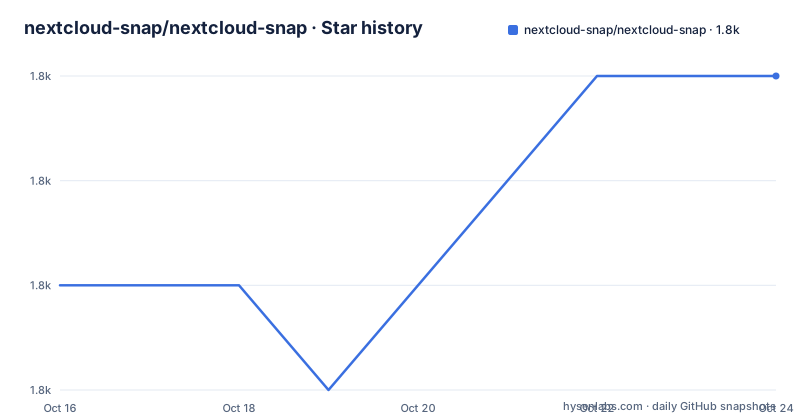
- nextcloud-snap/nextcloud-snap1,845 ★ · +2
| Repository | 2026-10-16 | 2026-10-24 |
|---|---|---|
| nextcloud-snap/nextcloud-snap | 1.8k | 1.8k |
2 Stars in the last 8 days, measured from the daily GitHub snapshot. Compare with other projects
Editorial analysis
What the Nextcloud Snap Includes
This project solves the problem of assembling and administering a Nextcloud server from separately installed components. The package contains Nextcloud 34, Apache 2.4, PHP 8.4, MySQL 8.4, and Redis 8.2, so administrators do not have to arrange the complete server stack independently before opening the web interface. It is aimed at Linux users who install software through Snap and who want the server, database, and supporting services presented as one package. It is not a desktop client and the README does not describe it as one.
The first visit starts a browser-based setup. The administrator supplies an admin username and password, then can create users, install apps, and upload files. A cron service runs `cron.php` every five minutes by default and changes the Nextcloud cron admin setting to Cron. That bundled service reduces the need to configure an external scheduler for routine maintenance tasks. The README identifies the project as community driven, which is relevant context for operators deciding how much local ownership they want over upgrades and incident response.
The package is not only a bare Nextcloud archive. Its README documents Snap-specific controls for ports, PHP memory, cron, compression, debug mode, HTTPS, database dumps, and server migration. Those controls make the package useful for a self-managed server, but they also create a distinction between ordinary Nextcloud administration and administration of this Snap-specific layer.
Snap Installation and First Server Setup
The README directs users to the Snap Store for installation and says that several releases are available, with the newest stable release selected by default. It does not provide a shell installation command in the documented instructions, so this review does not invent one. The first concrete configuration step documented by the project is granting access to removable media when external storage or devices under `/media` or `/mnt` are needed. Use this command exactly as shown in the README:
sudo snap connect nextcloud:removable-mediaThe interface is not connected automatically after installation. If the snap is not allowed to read the relevant devices, external storage features will have a host-level permission problem even if the Nextcloud configuration is otherwise correct.
After opening the installation address, enter the administrator credentials and complete the initial login. The README does not state the address to type because the Snap Store page and deployment context determine it. It also does not document a CLI installation command for creating the first administrator. For unattended setup, the listed `nextcloud.manual-install` utility can install Nextcloud manually and create the admin user through the CLI, but the README does not give its full invocation, so the exact command should be taken from `nextcloud.manual-install -h`.
Ports, HTTPS, and Reverse Proxy Boundaries
The snap listens on port 80 by default. When HTTPS is enabled, it listens on both port 80 and port 443, then redirects HTTP traffic to HTTPS. Administrators can change both values through Snap configuration. For example, the README gives these commands for nonstandard ports:
sudo snap set nextcloud ports.http=81sudo snap set nextcloud ports.https=444The two settings can be applied in one command as well:
sudo snap set nextcloud ports.http=81 ports.https=444That change has an external consequence. With HTTPS enabled, HTTP redirects to the configured HTTPS port, in this example port 444. Let's Encrypt expects Nextcloud to be exposed on ports 80 and 443. If those ports are changed and no proxy forwards ports 80 and 443 for the relevant domain to Nextcloud, certificate ownership verification will fail. This is a clear boundary in the documentation: changing local listening ports can also affect public certificate validation.
Behind a proxy, Nextcloud's automatic hostname detection may produce incorrect redirects. The documented workaround sets `overwritehost`, including the port when needed:
sudo nextcloud.occ config:system:set overwritehost --value="example.com:81"The command requires `sudo`. It is a host-level correction for a proxy deployment, not evidence that every proxy configuration will work automatically.
Resource Settings, Cron, and Diagnostic Access
The package exposes settings that are separate from normal Nextcloud configuration. PHP starts with a 128M memory limit. The README associates insufficient memory with missing image previews and memory exhaustion errors in the Nextcloud log. Raising the limit to 512M uses this command:
sudo snap set nextcloud php.memory-limit=512MA value of `-1` disables the limit, but the README explicitly says that this is not recommended. That advice is unusually concrete because the setting can convert a bounded failure into a process that consumes more host memory.
The bundled cron interval defaults to five minutes. It can be changed to 10 minutes:
sudo snap set nextcloud nextcloud.cron-interval=10mSetting the interval to `-1` disables the cronjob. Re-enabling it requires setting `nextcloud.cron-interval` to a value other than `-1`. The interval is therefore not just a scheduling preference. It controls whether the packaged scheduler service invokes `cron.php`.
HTTP compression is disabled by default and can be toggled with `http.compression=true` or `http.compression=false`. Debug mode is another Snap setting:
sudo snap set nextcloud mode=debugOnly `debug` and `production` are valid modes. Debug mode is intended to expose more Apache and PHP diagnostic information, so it should not be treated as an ordinary performance setting.
Interfaces, Utilities, and Migration Constraints
Snap interfaces restrict access rather than exposing every host capability automatically. The System application needs more access than the snap uses by default, including network hardware monitoring. The documented command for that access is:
sudo snap connect nextcloud:network-observeThis command expands the host permissions available to the snap. It is separate from Nextcloud user permissions and should be evaluated as an operating-system boundary.
The package includes several command-line utilities. `nextcloud.occ` is Nextcloud's configuration tool and requires `sudo`. `nextcloud.mysql-client` is preconfigured for the packaged MySQL server, while `nextcloud.mysqldump` writes a database dump to standard output and should normally be redirected. `nextcloud.enable-https` supports self-signed, Let's Encrypt, and custom certificates, while `nextcloud.disable-https` disables HTTPS without removing certificates. The export and import tools handle migration between Nextcloud Snap instances.
The migration boundary is important. By default, `nextcloud.export` includes the database, configuration, and data, and `nextcloud.import` imports those categories from an exported Snap instance. The README does not claim that these commands are a universal replacement for every Nextcloud installation method, nor does it document a general-purpose external-server migration procedure. An operator changing deployment method should verify the export format and include any data outside those defaults.
Maintenance, Licensing, and Upgrade Boundaries
The repository is not archived, and its last push was on 2026-10-15. The README also contains a `CHANGELOG`, `CONTRIBUTING.md`, tests, and Snap packaging sources, which are repository-level signals of an ongoing project. No GitHub releases are listed in the repository metadata, so the Snap Store's available releases and the channel selected during installation are more concrete upgrade references than a GitHub release page.
The project is licensed under GPL-3.0. That identifier tells you the stated licensing basis, but it does not by itself answer questions about bundling, redistribution, or compliance in a particular deployment. No legal interpretation is needed for the technical decision, yet operators distributing a modified package should review the actual license files and obligations themselves.
Upgrade cost is not limited to installing a newer Snap. Configuration values such as ports, PHP memory, cron interval, compression, and mode are part of the operational surface. Before changing releases, verify whether the selected Snap includes compatible component versions, whether existing configuration remains valid, and whether the migration utilities are needed. The README does not document a rollback procedure, so this snap should not be presented as having a documented, reversible upgrade path.
Editorial conclusion
Adopt this snap when you want a single packaged Nextcloud server and are comfortable with Snap interfaces and port configuration. Do not choose it without checking proxy, removable-media, certificate, migration, and upgrade requirements. The first project-specific checks are the intended Snap release, host exposure, and whether export/import covers the data you need.
Frequently asked questions
How do I install nextcloud-snap/nextcloud-snap?
The README directs users to the Snap Store at snapcraft.io/nextcloud and says the newest stable release is selected by default. It does not include an install command.
How do I enable external storage in the Nextcloud Snap?
Connect the removable-media interface with `sudo snap connect nextcloud:removable-media`. The interface is not connected automatically, and the README associates it with devices under `/media` and `/mnt`.
What happens when HTTPS is enabled in the Nextcloud Snap?
By default, HTTP uses port 80, and enabling HTTPS makes the snap listen on ports 80 and 443 while redirecting HTTP to HTTPS. Nonstandard ports can be set with `snap set`, but Let's Encrypt expects public access on ports 80 and 443 unless a proxy handles those ports.
Official sources
Add this badge to your README
If you maintain this project, the badge below links readers to this analysis and shows its maintenance status from the daily GitHub snapshot. Paste the markdown into your README; add ?metric=license or ?metric=stars to the image URL for a different field.

[](https://hysenlabs.com/projects/nextcloud-snap-nextcloud-snap)Star history chart for your README
[](https://hysenlabs.com/projects/nextcloud-snap-nextcloud-snap)Was this useful?