Splash: A Nextcloud Login Background App with Multiple Image Sources
📸🔀☁️ Random Nextcloud log in background from Unsplash
At a glance
- What is it?
- Splash (nextcloud/unsplash) is a Nextcloud app that rotates login screen backgrounds from Unsplash, WallhavenCC, Wikimedia, and Bing. It is a small, AGPL-licensed utility with a narrow scope and a few operational caveats.
- Who is it for?
- Adopt Splash if you run a Nextcloud instance and want a fresh login background without manual intervention, and you accept the privacy and rate-limit implications of third-party image APIs. Do not adopt it if you need strict control over image content or if your instance is offline, because the app depends on external services.
- Can I use it commercially?
- Yes, with strict conditions. AGPL-3.0 is a network copyleft licence: if people use a modified version over a network, for example as a hosted service, you must offer them its source code under the same licence.
- Is it still maintained?
- Yes. The repository last received commits 2 days ago.
- What is it written in?
- Mainly JavaScript, according to GitHub's language statistics.
Answers come from the project's GitHub data, last synced on November 14, 2026, and from our analysis. They are not legal advice.
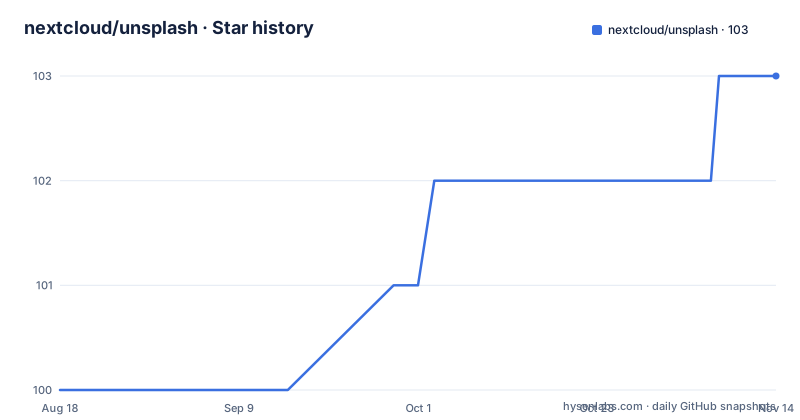
Star history
- nextcloud/unsplash103 ★ · +3
| Repository | 2026-08-18 | 2026-11-14 |
|---|---|---|
| nextcloud/unsplash | 100 | 103 |
3 Stars in the last 88 days, measured from the daily GitHub snapshot. Compare with other projects
Editorial analysis
What Splash Does and Who It Serves
Splash is a Nextcloud app that changes the background image on the login screen. It picks a new image daily, drawing from several providers: Nextcloud's own background, the Unsplash API, WallhavenCC, Wikimedia, Wikimedia's Picture of the Day, and Bing's Wallpaper Picture of the Day. The intended audience is Nextcloud administrators who want a visually varied login page without manually swapping images. It is a cosmetic enhancement, not a security or productivity tool. The project's README is minimal, so the app's actual behavior beyond the feature list is not fully documented.
How the App Pulls Images: Provider Mechanics
The app's core mechanism is a daily fetch from a selected provider. Each provider has a different API or endpoint. Unsplash requires an API key from the Unsplash developers portal, as the README links to that registration page. WallhavenCC and Wikimedia are likely public endpoints, but the README does not specify whether they need authentication. Bing's wallpaper service is a Microsoft endpoint. The app caches or stores the retrieved image to display on the login screen. The README does not describe the exact data flow, but the provider list implies a plugin-style architecture where each provider is a separate module. The daily rotation suggests a scheduled job, likely a cron task in Nextcloud, though the README does not confirm this.
Installation: Linking the App Folder
The README gives a single installation step: link the app directory into your Nextcloud apps folder. It shows the command `ln ./ /var/www/html/nextcloud`, with the note 'Or wherever your cloud is.' This is a symbolic link, not a copy. You must have a Nextcloud installation running first. After linking, you would enable the app in the Nextcloud admin panel, though the README does not state that explicitly. There is no mention of using the Nextcloud app store or `occ` commands. The development section implies the same linking process works for a development environment. The README does not cover configuration beyond the feature table, so settings like choosing a provider or entering an Unsplash API key are not described.
Limitations: External Dependencies and API Keys
The most obvious limitation is that Splash depends on external services. If Unsplash, Wallhaven, or Wikimedia are unreachable, the login background may fail to update. Unsplash specifically requires an API key, which means you must register with Unsplash and manage that key in your Nextcloud configuration. The README does not explain how to store that key. Another limitation is content control: you cannot choose specific images, only a provider. The app fetches a random image, so you might get something inappropriate or low-quality, depending on the provider's curation. The README's feature list does not include filtering or categories. For organizations with strict branding or content policies, this randomness is a risk.
Wrong Tool Scenarios and Privacy Considerations
Splash is the wrong tool if you need a static, branded login background. It is designed for variety, not consistency. It is also unsuitable for air-gapped or heavily firewalled Nextcloud installations, because it requires outbound network access to image providers. Privacy is a concern: when the app fetches an image from an external API, it may send metadata such as your server's IP address and possibly your Nextcloud version to that provider. The README does not address data handling or privacy. If your organization has strict data protection requirements, you should evaluate whether this external call is acceptable. The app's license is AGPL-3.0, which is standard for Nextcloud apps, but it does carry obligations if you modify and redistribute it.
Alternatives: Static Backgrounds vs. Other Apps
The simplest alternative is to set a static background image manually in Nextcloud's theming settings. That gives you full control over the image and no external dependencies. Another alternative is to use Nextcloud's built-in 'Theming' app, which allows you to upload a logo and background, but it does not rotate daily. If you want automatic rotation without an external API, you could write a custom cron script that changes a file in your Nextcloud directory, but that is not a packaged solution. The key difference is that Splash offers multiple providers and daily rotation out of the box, while a static image or custom script requires manual effort or coding. The README does not mention any competing apps, so this comparison is based on general Nextcloud capabilities, not on documented rival projects.
Maintenance, Upgrade Cost, and Licensing
The repository shows active maintenance: the latest release v3.1.0 was pushed on 2025-05-20, and there were maintenance updates in late 2024. The README lists a single maintainer, Felix Nüsse, with conception credits to Jan C. Borchardt and Lukas Reschke. This suggests a small project with limited bus factor. Upgrade cost is likely low, as it is a simple app, but you must track Nextcloud version compatibility. The v3.0.x releases were specifically labeled for Nextcloud 30, so future releases may target newer versions. The app is licensed under AGPL-3.0, which means if you modify it and distribute it, you must offer the source code to users. This is a standard open-source license, but it is not permissive like MIT. The README does not include a changelog, so upgrade specifics are unknown.
Editorial conclusion
Adopt Splash if you run a Nextcloud instance and want a fresh login background without manual intervention, and you accept the privacy and rate-limit implications of third-party image APIs. Do not adopt it if you need strict control over image content or if your instance is offline, because the app depends on external services. Before installing, verify that your Nextcloud version is compatible with the latest release (v3.1.0, pushed May 2025) and check the app's settings for provider selection and API key requirements, especially for Unsplash.
Frequently asked questions
What is Unsplash used for in this Nextcloud app?
It is one of six image sources the app can draw on to set the Nextcloud login screen background, alongside the built-in Nextcloud background set, Wallhaven, Wikimedia Commons, the Wikimedia Picture of the Day and the Bing Wallpaper Picture of the Day. The app shows a new image on the loginscreen every day.
Is Unsplash really free to use for images?
This repository does not say. It is AGPL-3.0 licensed as software, and it links to the Unsplash API developer page as one of its image sources, but it states no licensing terms for Unsplash, Wallhaven, Wikimedia or Bing content, so check each provider separately before publishing a login screen.
How do you use the Unsplash API in React?
This app does not document that, and it is not a React library. It is a Nextcloud app in JavaScript whose front end sits in a js directory and whose npm manifest exists for its Playwright tests, not for distribution as a frontend dependency.
How do you use Unsplash images in HTML?
There is no HTML integration here to copy. The app picks an image server-side and applies it to the Nextcloud login screen, so the markup is generated by the app's templates directory rather than by you embedding an image tag. To get Unsplash images into your own HTML, you would need the Unsplash API directly, which this repository does not document.
Official sources
Add this badge to your README
If you maintain this project, the badge below links readers to this analysis and shows its maintenance status from the daily GitHub snapshot. Paste the markdown into your README; add ?metric=license or ?metric=stars to the image URL for a different field.

[](https://hysenlabs.com/projects/nextcloud-unsplash)Star history chart for your README
[](https://hysenlabs.com/projects/nextcloud-unsplash)Was this useful?