fastp: one C++ binary that does quality control and preprocessing in a single pass over FASTQ
An ultra-fast all-in-one FASTQ preprocessor (QC/adapters/trimming/filtering/splitting/merging...)
At a glance
- What is it?
- A command line preprocessor for short read sequencing data that combines trimming, filtering, adapter detection and reporting, and writes an HTML report while it runs.
- Who is it for?
- fastp is a good fit when you process Illumina short reads every week and want the quality report and the cleaned files to come out of a single command, and a poor fit if your inputs are long reads or if you need a workflow that separates the reporting step from the trimming step. The build needs isa-l, libdeflate and highway, and the Makefile already detects them through pkg-config for conda, brew and system installs.
- Can I use it commercially?
- Yes. MIT is a permissive licence: you can use, modify and sell software built on it, as long as you keep its copyright and licence notices.
- Is it still maintained?
- Yes. The repository last received commits 32 days ago.
- What is it written in?
- Mainly C++, according to GitHub's language statistics.
Answers come from the project's GitHub data, last synced on November 7, 2026, and from our analysis. They are not legal advice.
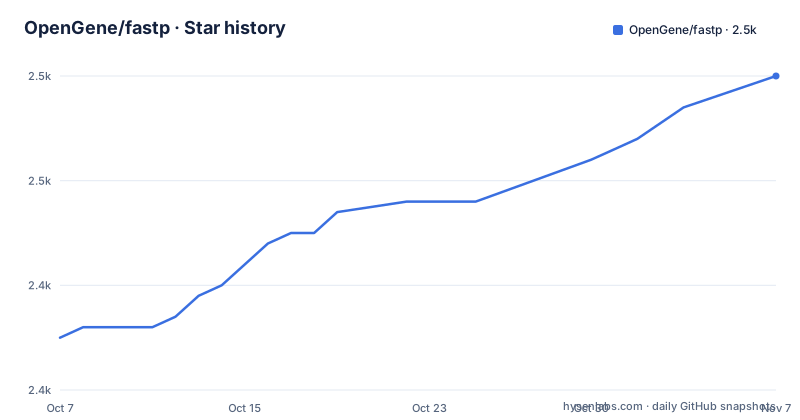
Star history
- OpenGene/fastp2,460 ★ · +25
| Repository | 2026-10-07 | 2026-11-07 |
|---|---|---|
| OpenGene/fastp | 2.4k | 2.5k |
25 Stars in the last 31 days, measured from the daily GitHub snapshot. Compare with other projects
Editorial analysis
Replacing a FASTQC pass and a Trimmomatic pass with one command
The usual Illumina pipeline is two programs and an intermediate: something to look at the data, then something to clean it, then often a second look to confirm the cleaning worked. fastp's claim is that both halves happen in one process. The README compares it to each tool by name in the feature list, describing per-read quality cutting as like Trimmomatic but faster, and the HTML report as like FASTQC but faster and more informative.
That comparison is fair in kind and unverified in degree. What the README actually enumerates is a long list of specific operations rather than a general claim: comprehensive quality profiling before and after filtering, filtering out reads that are too low quality or too short or carry too many N bases, cutting low quality bases at each read's 5' and 3' end by evaluating mean quality over a sliding window, trimming every read at front and tail, cutting adapters, correcting mismatched base pairs in overlapping regions of paired-end reads where one base has high quality and the other ultra low quality, trimming polyG at 3' ends as seen on NovaSeq and NextSeq data, trimming polyX tails such as the polyA tailing in mRNA-Seq data, handling UMI-enabled data by shifting the UMI into the sequence name, reporting results as JSON, rendering an HTML report, splitting output for parallel processing, reading from standard input and writing to standard output, accepting interleaved input, and deduplicating at FASTQ level.
That is a specific list and it is the reason to try the tool. Whether it is faster on your data depends on your data, and the README does not publish a comparison table, so the claim stays a claim.
The project is C++, licensed MIT, and distributed as a single binary. GitHub topics include adapter, illumina, ngs, umi, overlap and qc. The citation the README asks you to use names Shifu Chen and points at an iMeta 4.5 paper from 2025, which tells you the project is cited in the literature rather than only on this page.
Reading the README's own long read contradiction
The README says two things about long reads, and a reader needs both.
The opening paragraph states that the tool is designed for processing short reads, naming Illumina NovaSeq and MGI, and says that if you are looking for tools to process long reads such as Nanopore, PacBio and Cyclone, you should use fastplong, a separate repository linked from the same paragraph.
Further down, item 11 in the feature list states that fastp supports long reads, with data from PacBio and Nanopore devices named as the source.
Both statements are in the README. There is no third statement anywhere that settles which one describes current behaviour, and no version boundary is given for either. The honest reading is that support for long read data has been added to the tool without the opening paragraph being updated to point new users away from it, but that is an inference rather than something the documentation confirms.
This matters because the two readings lead to different first commands. If fastp handles long reads, a Nanopore run has one tool for QC, trimming and reporting. If it does not, the same run needs fastplong and loses the single-pass property. The way to find out is cheap: run it on a small subset of a long read file and check the report for content that only makes sense with variable-length reads. Until someone confirms this against the maintainers, treat the feature list entry as the newer claim and verify it before designing a pipeline around it.
Building from source needs isa-l, libdeflate and highway
The repository is small at the top level: `Makefile`, `README.md`, `src/`, `scripts/`, `testdata/`, `parallel.py`, plus `LICENSE` and `.gitignore`. There is no package manifest and no vendored directory, so a source build is a real build with three external libraries.
The README walks through four steps in that order: install isa-l, install libdeflate, install highway, then download and build fastp. The Makefile confirms why those three are needed, naming them as its link line, and shows how little you have to configure yourself:
TARGET := fastp
BIN_TARGET := ${TARGET}

CXX ?= g++
LIBS := -lisal -ldeflate -lhwy -lpthread
The optimization flags are set in the same file rather than left to you, and every source file in `src/` is picked up by a wildcard, so adding a file needs no Makefile edit:
SRC := $(wildcard ${DIR_SRC}/*.cpp)
OBJ := $(patsubst %.cpp,${DIR_OBJ}/%.o,$(notdir ${SRC}))
CXXFLAGS := -std=c++11 -pthread -g -O3 -MD -MP -I. -I${DIR_INC}
The library paths are discovered through `pkg-config`, with a comment in the file noting that this works with conda, brew and system packages. Install paths default to `/usr/local` and `/usr/local/bin` through the `PREFIX` and `BINDIR` variables, which is the thing to override when installing into a conda environment or a version manager's prefix.
The link logic is the most interesting thing in the file. It searches for static copies of each of the three libraries, and on Linux, if all three are found, it links a fully static binary; if some are missing, as happens under conda, it falls back to linking the static archives directly with a dynamic fallback. On macOS, where static linking behaves differently, that branch does not apply. A fully static Linux binary is a genuine convenience for reproducible pipeline containers, and it happens as a side effect of the library search rather than as an advertised feature.
Batch mode, output splitting, and the parallel processing story
Two features make fastp a good citizen inside a pipeline that runs many samples. The first is batch processing, which the README opens with as a headline capability: fastp supports batch processing of multiple FASTQ files in a folder, with its own section in the documentation.
The second is splitting. The feature list describes splitting output into multiple files named `0001.R1.gz`, `0002.R1.gz` and so on to support parallel processing, with two modes available: limiting the total number of split files, or limiting the number of lines in each file. The distinction between those two is more than cosmetic. Splitting by file count gives you a predictable degree of parallelism, while splitting by line count gives you evenly sized shards at the cost of an unknown shard count.
This pairs with a third capability, since deduplication is at FASTQ level and the tool reads from standard input and writes to standard output. Together they describe a tool built to sit in the middle of a shell pipeline rather than only at the head of one.
The README also lists smaller behaviours that matter more than they sound. You can store unpaired reads for paired-end data, store the reads that fail the filters instead of discarding them, process only part of the data, and refuse to overwrite existing output files. That last one is a small quality of life decision that prevents a rerun from silently destroying the previous result, which is the kind of thing that only matters on the day something goes wrong.
Alongside all of this, the README documents input and output handling for standard input, standard output and interleaved input, plus overrepresented sequence analysis, base correction for paired-end data, global trimming, and a full options listing.
What the recent releases say about stability
Three releases in 2026 give a clear picture of where the work has been going, and it has not been features.
v1.3.7, published on 2026-09-10, is described as bug fixes for some I/O issue, such as BGZF input, plus a change to create `BINDIR` before installing. That second half is a small packaging fix, and it is the kind of thing that tells you people are installing this in environments where the target directory does not exist yet.
v1.3.6, from 2026-06-29, limits the thread number of the worker and the BGZF reader for a performance enhancement. So thread counts are a deliberate knob rather than an accident of the scheduler.
v1.3.5, from 2026-06-21, fixes a possible hang caused by the BGZF reader, and then carries a postscript that deserves quoting because it is unusual in a release note: do not trust codes generated by AI agents like Claude Code, when the code is related to parallelism.
Read together, these three releases describe a project spending its recent effort on the parallel reader and on install-time robustness. BGZF, the blocked compression format used for BAM-adjacent data, shows up in all three. If you are feeding fastp BGZF-compressed input, the versions before 1.3.7 are the ones carrying the known issues.
The maintainers also publish a peer-reviewed citation, which is the sort of thing the FASTQ tool ecosystem does not always bother with, and the repository is not archived with the last push on 2026-09-10. There are no docs in the repository itself; the README's section list is the documentation, so a decision about defaults and thresholds means reading the source or the CLI's own help output.
Editorial conclusion
fastp is a good fit when you process Illumina short reads every week and want the quality report and the cleaned files to come out of a single command, and a poor fit if your inputs are long reads or if you need a workflow that separates the reporting step from the trimming step. The build needs isa-l, libdeflate and highway, and the Makefile already detects them through pkg-config for conda, brew and system installs. Before switching an existing pipeline over, settle the long read question, because the README's opening tells you to use fastplong for Nanopore and PacBio data while its feature list claims fastp supports both. v1.3.7 shipped on 2026-09-10 with I/O fixes for BGZF input, and the last push was on the same day.
Frequently asked questions
What is FastP used for?
It preprocesses FASTQ sequencing data in one pass: quality control reporting, filtering of low quality or too short reads, adapter cutting, quality-based trimming at both ends, polyG and polyX tail trimming, UMI handling, deduplication, merging paired-end reads and splitting output for parallel runs. It writes both an HTML report and a JSON report.
What is the difference between fastp and fastqc?
FastQC only inspects: it produces a quality report and makes no changes to your data. fastp both inspects and modifies, producing the report and the trimmed, filtered output in the same run. The README positions itself as like FASTQC but faster and more informative, while adding the trimming step FASTQC does not do.
How do I install fastp?
The README offers Bioconda and Debian packages, a prebuilt binary for Linux users, and a source build. Building from source needs isa-l, libdeflate and highway installed first, in that order, then a build with the repository Makefile. The package name is fastp.
What is a FASTQ?
FASTQ is the plain text format sequencing machines output. Each record is four lines: a sequence identifier, a description and separator line beginning with a plus, the nucleotide sequence, and a line of per-base quality scores. fastp reads this format, which is why it takes FASTQ input and produces FASTQ output.
Official sources
Add this badge to your README
If you maintain this project, the badge below links readers to this analysis and shows its maintenance status from the daily GitHub snapshot. Paste the markdown into your README; add ?metric=license or ?metric=stars to the image URL for a different field.

[](https://hysenlabs.com/projects/opengene-fastp)Star history chart for your README
[](https://hysenlabs.com/projects/opengene-fastp)Was this useful?