Zerobyte: A Web Frontend for Restic That Automates Self-Hosted Backups
Backup automation for self-hosters. Built on top of restic
At a glance
- What is it?
- Zerobyte wraps restic in a Dockerized web UI with scheduling, retention, and multi-protocol source support. It is early-stage software (0.x) with real operational caveats, but it offers a concrete path for self-hosters who want managed backups without leaving their homelab.
- Who is it for?
- Adopt Zerobyte if you are a self-hoster who wants a web-managed restic layer with scheduling and retention, and you accept the risk of a 0.x project that may change between releases. Do not adopt it if you need production-grade stability, if your backup server is directly exposed to the internet (the README explicitly warns against this), or if you prefer a CLI-only tool like restic itself.
- Can I use it commercially?
- Yes, with strict conditions. AGPL-3.0 is a network copyleft licence: if people use a modified version over a network, for example as a hosted service, you must offer them its source code under the same licence.
- Is it still maintained?
- Yes. The repository received new commits within the last day.
- What is it written in?
- Mainly TypeScript, according to GitHub's language statistics.
Answers come from the project's GitHub data, last synced on November 14, 2026, and from our analysis. They are not legal advice.
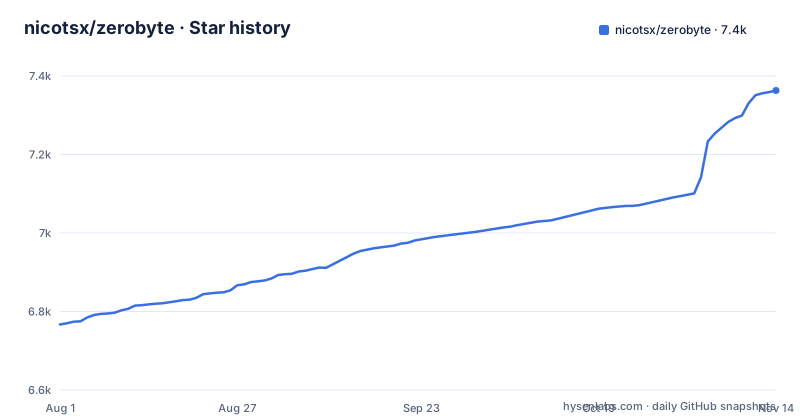
Star history
- nicotsx/zerobyte7,363 ★ · +596
| Repository | 2026-08-01 | 2026-11-14 |
|---|---|---|
| nicotsx/zerobyte | 6.8k | 7.4k |
596 Stars in the last 105 days, measured from the daily GitHub snapshot. Compare with other projects
Editorial analysis
What Zerobyte Solves and Who It Targets
Zerobyte addresses a specific gap for self-hosters: restic is a powerful backup tool, but it is command-line only. Scheduling, retention, and monitoring require cron scripts, shell glue, and manual log inspection. Zerobyte wraps restic with a modern web interface that handles scheduling, retention policies, and backup monitoring. The target user is someone running a home server or a small VPS who wants encrypted, compressed backups to remote storage without writing and maintaining a pile of scripts. The README emphasizes that it is built on top of restic, so you get restic's proven snapshot engine underneath. The project is still in version 0.x, and the README warns that major changes can happen between versions. That is a clear signal that early adopters should expect breaking changes, which is a key consideration for anyone planning to rely on it for irreplaceable data.
How It Works: Restic Under the Hood with a Web Control Plane
The architecture is straightforward: a Docker container runs the Zerobyte web server and API, and it invokes restic processes for actual backup operations. The web interface lets you define backup jobs that point to source locations and destination repositories. Sources can be NFS, SMB, WebDAV, SFTP, or local directories, which covers most self-hosting scenarios. The restic layer handles encryption, compression, and deduplication, and Zerobyte adds scheduling and retention policies on top. The container needs SYS_ADMIN capabilities and access to /dev/fuse, which suggests it mounts remote sources using FUSE; the Dockerfile installs fuse3, sshfs, davfs2 and cifs-utils, and the image also bundles rclone, configured through RCLONE_CONFIG_DIR.
Getting It Running: Docker Compose and Required Environment Variables
Installation is Docker-based. The README provides a compose.yaml example with the image ghcr.io/nicotsx/zerobyte:v0.44. You need to set TZ, BASE_URL, and APP_SECRET. APP_SECRET is required and must be at least 32 characters; generate it with openssl rand -hex 32. The container exposes port 4096, and you should map it to 127.0.0.1:4096 if the server is reachable from the internet, per the README's warning. You also need to mount a persistent volume for /var/lib/zerobyte. The README explicitly warns not to point that volume at a network share, and TrueNAS users are told to use a dedicated ZFS dataset because /var/lib is ephemeral there. After starting with docker compose up -d, you access the web UI at http://<server-ip>:4096. The configuration table lists other variables like RESTIC_HOSTNAME, GOMAXPROCS, TRUST_PROXY, and PROVISIONING_PATH, which allows operator-managed repositories via a JSON file. That is useful for teams that want to predefine backup targets. For performance tuning, the README says to set GOMAXPROCS on the container and restart it if backups use too much CPU.
Limitations and Failure Modes: The 0.x Reality and Network Exposure Risks
The most obvious limitation is the project's maturity. Version 0.44.0 is still 0.x, and the README warns of major changes between versions. That means upgrades could break your configuration or require migration steps. The README also strongly discourages running Zerobyte on a server accessible from the internet. If you do, you must bind to localhost and use a secure tunnel. That is a significant constraint for users who want remote access to their backup dashboard. Another failure mode: the data directory must be on local storage. Pointing /var/lib/zerobyte at a network share causes permission issues and performance degradation, according to the README. You should verify that restic's restore capabilities are exposed in the UI before trusting it for recovery.
Alternatives: Restic Itself and Other Web UIs
The most direct alternative is to use restic directly with your own cron jobs and shell scripts. That gives you full control and no extra layer, but you lose the web UI and centralized scheduling. If you want a web interface but prefer a different backend, you could consider tools like Duplicati, which has its own web UI and supports many storage backends, though it is not built on restic. Another option is to use a hosted backup service, but that defeats the self-hosting purpose. The key difference with Zerobyte is that it delegates the backup engine to restic, which is a mature, battle-tested tool. That is a strong foundation, but the automation layer is still young. If you are comfortable with CLI and cron, the extra abstraction may not be worth the risk. If you want a web UI and are willing to accept the 0.x caveats, Zerobyte is a reasonable choice. Just be aware that you are betting on the project's roadmap.
Maintenance and Upgrade Cost, and License Implications
The project is actively developed: v0.44.0 shipped on 2026-10-31 after two betas the day before, and the last push was on 2026-11-02. That means frequent updates, which is good for bug fixes but also means you need to track releases and test upgrades. The README warns of major changes, so you should read the changelog before updating. The license is AGPL-3.0, which has implications if you modify the code and offer it as a network service: you must share your modifications with users. For most self-hosters, that is not a concern, but if you plan to fork or extend it, you need to comply. The configuration is stored in a database under /var/lib/zerobyte, so backups of that directory are essential. The APP_SECRET encrypts sensitive data in that database, so losing it means losing access to your configuration and possibly your encryption keys. That is a critical operational detail: back up the secret and the data directory together.
Editorial conclusion
Adopt Zerobyte if you are a self-hoster who wants a web-managed restic layer with scheduling and retention, and you accept the risk of a 0.x project that may change between releases. Do not adopt it if you need production-grade stability, if your backup server is directly exposed to the internet (the README explicitly warns against this), or if you prefer a CLI-only tool like restic itself. Before deploying, verify that your storage backends are supported, generate a strong APP_SECRET, and confirm that your data directory is not on an ephemeral filesystem like TrueNAS's /var/lib. Also check the documentation at zerobyte.app for the latest setup details, since the project is evolving rapidly.
Frequently asked questions
What is Zerobyte?
Zerobyte is a backup automation tool for self-hosters, built on top of Restic, that provides a web interface to schedule, manage and monitor encrypted backups of remote storage. It handles encryption, compression and retention policies, supports sources over NFS, SMB, WebDAV, SFTP or local directories, and runs as a Docker Compose service listening on port 4096.
What are some good open source backup tools?
Zerobyte is one of them, licensed AGPL-3.0 and written in TypeScript, with the actual storage work delegated to Restic and rclone. It differs from a bare restic command line by adding a scheduling layer, retention policies and a browser interface for monitoring jobs, at the cost of a container that needs SYS_ADMIN and /dev/fuse.
What is a Zerobyte alternative?
It positions itself as a web interface over Restic, so a different choice means a different restic front end rather than a different storage engine. What the repository does ship is a set of deployment shapes under examples: basic-docker-compose, directory-bind-mount, provisioned-resources, rclone-config-mount, simplified-docker-compose and tailscale-sidecar.
Official sources
Add this badge to your README
If you maintain this project, the badge below links readers to this analysis and shows its maintenance status from the daily GitHub snapshot. Paste the markdown into your README; add ?metric=license or ?metric=stars to the image URL for a different field.

[](https://hysenlabs.com/projects/nicotsx-zerobyte)Star history chart for your README
[](https://hysenlabs.com/projects/nicotsx-zerobyte)Was this useful?