massCode: A Local-First Developer Workspace That Replaces Several Browser Tabs
Project brief: A free, open-source developer workspace. Snippets, notes, HTTP requests, calculations, and dev tools in one local-first app.
At a glance
- What is it?
- massCode bundles snippets, notes, HTTP requests, calculations, and drawings into one desktop app where data lives as plain Markdown files. It is a real alternative to scattered tools, but its breadth comes with trade-offs in focus and depth.
- Who is it for?
- Adopt massCode if you want a single local-first workspace that covers snippets, notes, and HTTP requests, and you value plain Markdown files that you can sync with Git or cloud drives. Skip it if you need deep integration with a specific ecosystem, such as Obsidian plugins or Postman's full API testing suite.
- Can I use it commercially?
- Yes, with strict conditions. AGPL-3.0 is a network copyleft licence: if people use a modified version over a network, for example as a hosted service, you must offer them its source code under the same licence.
- Is it still maintained?
- Yes. The repository last received commits 12 days ago.
- What is it written in?
- Mainly TypeScript, according to GitHub's language statistics.
Answers come from the project's GitHub data, last synced on November 14, 2026, and from our analysis. They are not legal advice.
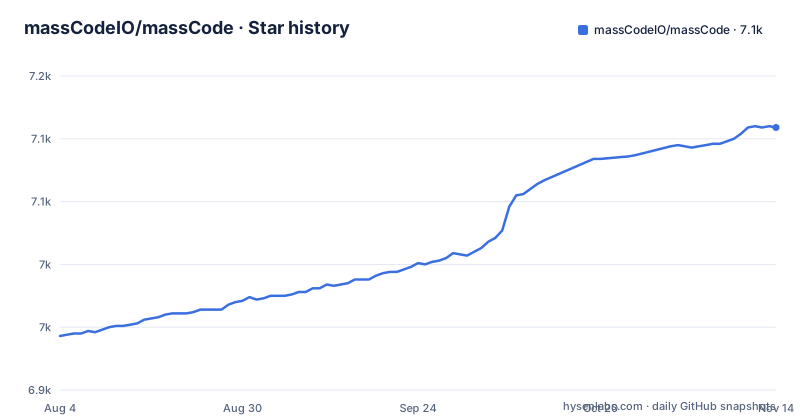
Star history
- massCodeIO/massCode7,109 ★ · +166
| Repository | 2026-08-04 | 2026-11-14 |
|---|---|---|
| massCodeIO/massCode | 6.9k | 7.1k |
166 Stars in the last 102 days, measured from the daily GitHub snapshot. Compare with other projects
Editorial analysis
The Problem: Too Many Tools, Too Many Tabs
A typical developer day involves a snippet manager, a notes app, a separate HTTP client, a calculator, and a drawing tool. Each one has its own data format, its own sync mechanism, and its own shortcuts. massCode tries to collapse that stack into one desktop application. The pitch is simple: keep your code fragments, project documentation, API requests, and quick calculations in one place, and store everything as plain Markdown files on your local disk. That design removes the need to copy data between tools or trust a proprietary database. The intended user is a solo developer or a small team that wants local control and portability, not a cloud-first collaboration suite. massCode does not pretend to replace a full IDE or a dedicated API platform. It targets the everyday tasks that usually send you to a browser tab or a second app.
How the Markdown Vault Works
The core architectural decision is the Markdown vault. Your workspace is stored locally as plain Markdown files, so your data is human-readable outside the app. The documentation also mentions that snippets support fragments, which are reusable pieces within a snippet. That implies a more complex internal structure than a simple flat file, but the on-disk format remains plain Markdown. For users who value data ownership, this is a strong foundation.
Getting It Running: Commands and Config
You can download prebuilt binaries from the GitHub releases page for macOS, Windows, and Linux. The README also provides build instructions for those who prefer to compile from source. package.json requires pnpm 10.0.0 or newer. After cloning the repository, you run pnpm install to fetch dependencies, then pnpm build to build for your current platform. There are platform-specific commands: pnpm build:mac for macOS, pnpm build:win for Windows and pnpm build:linux for Linux. For daily use, you do not need to build from source. The app itself has a command palette opened with Cmd+P on macOS or Ctrl+P on Windows and Linux. You can search across spaces, snippets, notes, and HTTP requests, and use the @ symbol to scope a search to a specific space. The > symbol opens command mode. This keyboard-first approach is a departure from the usual mouse-driven UI, and it is a clear strength for power users.
The Feature Set: Breadth Over Depth
massCode packs a lot of functionality into one window. The snippet manager supports 160+ syntax grammars out of the box, with 600+ more via .tmLanguage files. Prettier integration handles formatting. There is a real-time HTML and CSS preview, a JSON visualizer, and the ability to export snippets as images. The notes section supports task notes with status, priority, due dates, and views for Today, Upcoming, and Completed. It also includes Mermaid diagrams, mind maps, and a presentation mode. The HTTP client offers environments and variables, request code generation for 20 languages and runtimes including cURL, and response inspection. The math notebook handles natural-language calculations, unit conversions, and finance formulas. The drawing canvas is powered by Excalidraw, which is a proven library. Finally, there are developer tools for JSON diff, case conversion, hash generation, and more. This breadth is impressive, but it raises a question: does any single feature match the depth of a dedicated tool? For example, the HTTP client is lightweight compared to Postman, and the notes app is not as plugin-rich as Obsidian. massCode's value is in the integration, not in any one feature.
Import and Export: The Migration Path
Adopting a new tool often fails at the import step. massCode addresses this with preview-first imports. You can import snippets from VS Code, Raycast, SnippetsLab, and public GitHub Gists. For notes, you can import from Obsidian folders. For API collections, you can import from OpenAPI, Postman, and Bruno. The key detail is that the import process shows you a preview of detected items, folders, tags, environments, and warnings before writing anything to your vault. This is a thoughtful design that reduces the risk of a messy migration. However, the README does not specify how well these imports handle edge cases, such as nested folders in Obsidian or environment variables in Postman. The preview is a good start, but you should test it with your own data before committing. The browser clipper is another way to bring content in: it can save selected code as snippets, selected text as notes, and pages or links as HTTP GET requests. It connects through a local Integration API with an API token, which implies a local server that the browser extension talks to.
Limitations and Failure Modes
The most obvious limitation is the AGPL-3.0 license. If you are a company that wants to embed massCode's code into a proprietary product, the copyleft terms will be a problem. For individual developers, it is fine, but you should read the license before building on top of it. Another limitation is the lack of collaboration features. The app is local-first, which is great for privacy, but it means there is no built-in team sharing or real-time collaboration. You can sync via Git or cloud drives, but that is manual and can lead to merge conflicts. Finally, the sheer number of features means a steeper learning curve. You might not need the math notebook or the drawing canvas, but they add UI complexity. For a user who only wants a snippet manager, a simpler tool like SnippetsLab might be easier to navigate.
Alternatives and the Trade-off
The closest alternative is Obsidian, which also stores notes as plain Markdown and supports plugins for snippets and HTTP requests. However, Obsidian is primarily a knowledge base, not a snippet manager or API client. You would need to assemble a plugin stack to replicate massCode's built-in features. That is a different approach: Obsidian gives you a modular base, while massCode gives you an all-in-one package. Another alternative is Postman for HTTP requests, but Postman is a cloud-first tool with a proprietary data format. massCode's local-first model is a deliberate contrast. For snippets alone, tools like SnippetsLab or VS Code's built-in snippet manager are more focused, but they lack the broader workspace. The choice comes down to whether you prefer integration or specialization. massCode tries to be the single home for your dev tasks, and it succeeds if you accept that each feature is functional but not exhaustive.
Maintenance and Upgrade Cost
The repository has recent releases, with v6.3.1 published on 2026-10-15, and the project is not archived. That suggests active maintenance. The changelog is linked in the README, so you can track breaking changes between versions. The upgrade path is straightforward for a desktop app: download the new release and install it. However, because data is stored as Markdown files, you need to be aware that new features may change the structure of existing files. The project is written in TypeScript, which is a plus for maintainability, but the codebase is large given the feature set. For a user who wants to contribute, the build process is documented, but the learning curve is steep. Overall, the maintenance cost is moderate: you need to keep up with releases, but the local-first data model reduces the risk of vendor lock-in.
Editorial conclusion
Adopt massCode if you want a single local-first workspace that covers snippets, notes, and HTTP requests, and you value plain Markdown files that you can sync with Git or cloud drives. Skip it if you need deep integration with a specific ecosystem, such as Obsidian plugins or Postman's full API testing suite. Before switching, verify that the import previews handle your existing collections correctly.
Frequently asked questions
What is massCode?
massCode is a free, open-source desktop workspace that keeps snippets, notes, HTTP requests, math calculations, drawings and small encoders in one local-first app. Your workspace is stored locally as plain Markdown files, and builds are published for macOS, Windows and Linux.
How do I use massCode?
Open the palette with Cmd+P on macOS or Ctrl+P on Windows and Linux, then search across snippets, notes, HTTP requests, spaces and commands. Typing @ scopes the search to a space and > opens command mode, and the palette carries create actions for snippets, notes, HTTP requests and folders.
Is massCode safe?
The workspace is kept locally as plain Markdown files, and the assistant runs on your own AI provider account or a local model instead of a bundled service. The browser clipper authenticates to the local Integration API with an API token.
How does massCode work with VS Code?
A massCode Assistant extension is published in the Visual Studio Marketplace and listed beside the Raycast extension. The other direction runs through import: snippets from VS Code come in through the preview-first import flow, where you review detected items before anything is written.
How does massCode compare with SnippetsLab?
massCode imports SnippetsLab snippet exports through that same preview-first flow, so an existing library can move in. On top of a plain snippet list it adds multi-level folders, tags and fragments, integrated Prettier formatting, 160+ syntax grammars and live HTML and CSS preview. The README never compares the two tools directly.
Official sources
Add this badge to your README
If you maintain this project, the badge below links readers to this analysis and shows its maintenance status from the daily GitHub snapshot. Paste the markdown into your README; add ?metric=license or ?metric=stars to the image URL for a different field.

[](https://hysenlabs.com/projects/masscodeio-masscode)Star history chart for your README
[](https://hysenlabs.com/projects/masscodeio-masscode)Was this useful?