ClawFlows: OpenClaw workflows you can install and reuse
⚡️ Superpowers for your Openclaw. Powerful prebuilt agent workflows.
At a glance
- What is it?
- ClawFlows is a repository of 113 prebuilt, plain-text workflows for OpenClaw, covering schedules, routines, household tasks, and other agent actions. It suits OpenClaw users who want reusable workflow definitions, but its installer follows the main branch and the repository has no published releases.
- Who is it for?
- ClawFlows is a practical starting point for an OpenClaw user who wants inspectable workflow examples and a large catalog to copy or modify. It is a poor fit for deployments that require released artifacts, a documented rollback mechanism, or a known license.
- Can I use it commercially?
- Not without permission. GitHub finds no licence file in the repository, and without a licence all rights are reserved by default: you may read the code but not reuse it. Check the README, or ask the authors, before using it.
- Is it still maintained?
- Yes. The repository last received commits 112 days ago.
- What is it written in?
- Mainly Shell, according to GitHub's language statistics.
Answers come from the project's GitHub data, last synced on November 7, 2026, and from our analysis. They are not legal advice.
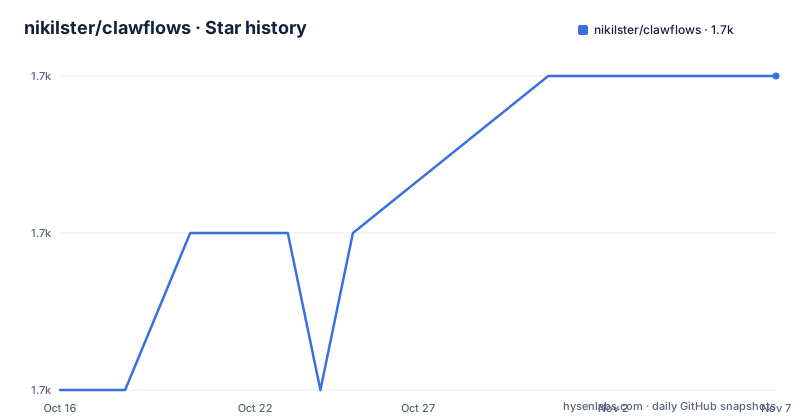
Star history
- nikilster/clawflows1,725 ★ · +2
| Repository | 2026-10-16 | 2026-11-07 |
|---|---|---|
| nikilster/clawflows | 1.7k | 1.7k |
2 Stars in the last 22 days, measured from the daily GitHub snapshot. Compare with other projects
Editorial analysis
What ClawFlows adds to OpenClaw
ClawFlows addresses the problem of assembling repeatable agent behavior from many small instructions. Its README says the project includes 113 prebuilt workflows and presents them as plain text that is easy to create, read, modify, and share. The intended audience is an OpenClaw user who currently has to coordinate prompts, reminders, recurring actions, and service access across separate parts of an agent setup.
The catalog is not restricted to one type of automation. Visible entries include `activate-sleep-mode` for controlling lights, speakers, thermostats, and a bedroom fan; `send-morning-briefing` for weather, calendar, priorities, and urgent items; `check-calendar` for conflicts, travel time, and preparation notes; and `check-medications` for reminders and refill tracking. This makes ClawFlows a workflow library rather than a single-purpose command line utility.
That distinction matters for adoption. The repository does not introduce a separate runtime in the visible README. Its value comes from offering workflow content that an OpenClaw agent can use or adapt. Users still need the corresponding OpenClaw setup and may need access to calendars, email, smart-home devices, location services, or other systems before a listed workflow can perform its task. A catalog entry describes intended behavior, but the README excerpt does not document credential configuration for each integration.
ClawFlows also emphasizes reuse and revision at the workflow level. The README states that workflows can be modified, saved, and rolled back. However, it does not explain the rollback procedure, storage location, or conflict behavior. The repository layout includes a `workflows/` directory and a `docs/updates.md` page, but the README does not document a release process or version migration policy. Workflow reusability is the clearest stated benefit, while operational governance remains underspecified.
How ClawFlows organizes workflow content
The repository layout shows workflow definitions under paths such as `workflows/available/community/activate-sleep-mode/WORKFLOW.md`. Each linked item is a `WORKFLOW.md` file rather than a conventional executable entry point. The README calls the format plain text and presents each workflow as something that can be read, changed, saved, and shared.
This file-oriented approach has a clear benefit for review. An engineer can inspect the text before enabling an automation and keep a local copy of a version that matters to them. It also avoids requiring a separate source-code build for each listed routine. The repository includes `system/` for installation-related files, `tests/` for project checks, and `community-submissions/` alongside the published workflow collection, but the README does not define the execution format or show how OpenClaw discovers an enabled workflow.
The schedules in the catalog are declarative. For example, `activate-sleep-mode` is listed at 10pm, `send-morning-briefing` at 7am, and `check-calendar` at 8am and 6pm. Other workflows are explicitly on demand, such as `activate-away-mode`. This indicates that ClawFlows describes both time-driven and user-triggered behavior. It does not establish whether schedules run locally, through an OpenClaw scheduler, or through an external service.
The same caution applies to data flow. A briefing may need weather and calendar data, while a smart-home mode may need device-control access. The README does not identify the interfaces, authentication methods, data stores, or execution order for those actions. Based on the repository layout, ClawFlows packages definitions, not a separately documented integration layer. Reviewers must open each `WORKFLOW.md` before assuming that its example requires no sensitive data or broad permissions.
Installing ClawFlows and performing a first use
The README offers a direct installation command and calls this the recommended option. It downloads `system/install.sh` from the repository's `main` branch and passes it to `bash`. Because the URL is tied to `main`, it does not select a tagged release. The repository has no GitHub releases, so this command also does not provide a named version that can be recorded before installation.
Run the documented command in the environment where OpenClaw should receive the ClawFlows content. The README does not state whether root privileges are required, where files are placed, or what output indicates success. Check the resulting files before enabling a workflow.
curl -fsSL https://raw.githubusercontent.com/nikilster/clawflows/main/system/install.sh \
  | bash
The second README option asks an OpenClaw agent to install `system/AGENT.md`. The documentation presents it as an alternative to the shell installer, but it does not show the exact response or a post-install verification command. The first practical review step is to open the installed workflow file, such as `workflows/available/community/send-morning-briefing/WORKFLOW.md`, and compare its requested inputs and actions with the services available in the OpenClaw setup.
What schedules and side effects require review
Start with a workflow whose required data and side effects are easy to understand. `send-morning-briefing` is a candidate if the necessary calendar and weather access is already part of the OpenClaw setup. Its stated output combines weather, calendar, priorities, and urgent items, which makes the final result easy for a user to compare with the source systems. A device-control workflow is a different adoption decision because an error can affect physical equipment rather than just produce an incorrect summary.
The schedules are operational policy. A 7am briefing, an 8am medication reminder, and an 8pm medication reminder define when the agent may act without a new request. Reviewing those times, time zones, daylight-saving changes, and delivery destinations belongs before adoption. The README does not state how ClawFlows handles time zones, failed schedules, duplicate delivery, or missing service responses.
There is another boundary between a useful starter and a finished automation. A workflow can state what it intends to do without documenting the account permissions needed to do it. The README does not provide a complete permissions matrix, a dry-run facility, or an audit record format. For that reason, users should not enable a catalog workflow solely because its schedule matches their routine. The workflow text should first show that its inputs, outputs, and external actions fit the user's environment.
Community submission is also part of the repository's design. The `community-submissions/` entry and the stated community workflow sharing feature indicate that contributions are expected. The README does not explain contribution review, dependency declarations, signing, or provenance. A copied workflow should be treated as configuration to inspect, not as a trusted extension merely because it appears in the catalog.
ClawFlows compared with local OpenClaw instructions
The main alternative is to keep a small set of OpenClaw instructions inside an existing local configuration or prompt workflow. That approach gives the operator complete control over file placement and review, but it requires assembling recurring tasks individually. ClawFlows instead supplies 113 starting points and a common directory layout, which is more useful when the goal is to browse examples and adapt several routines.
The trade-off is the source of truth. Local instructions can be tied to an existing configuration process and reviewed with the rest of that configuration. ClawFlows distributes content through a repository and provides an installer that follows `main`. Its plain-text format makes examples approachable, but the README does not explain how updates merge with user modifications. This is a material difference for long-lived installations: copying a workflow may be straightforward, while replacing or updating a modified copy requires a policy that the README does not document.
ClawFlows also differs from a conventional package with semantic versions. There are no GitHub releases in the repository information, and the README directs installation to the `main` branch. Users who require repeatable builds should prefer a copied, reviewed workflow file or an internal fork over assuming that a future installer run will preserve local changes. The repository's stated rollback benefit should not be mistaken for a documented package upgrade contract.
Maintenance, upgrades, and license boundaries
The repository is not archived, and its last push was on 2026-07-19. That is the available maintenance fact; the repository information does not provide a release cadence or a commitment to continued updates. There are no GitHub releases. Consequently, the current installation path tracks the default branch rather than a stable release artifact.
Upgrade cost depends on what the user changes. A workflow copied into a personal system may require reapplying local edits after an upstream update, but the README does not define an update command or merge process. It states that workflows are versioned, reusable, and rollbackable, yet the README does not identify the corresponding command or file format. Installation looks simple, while ongoing upgrade governance remains an unresolved operational question.
The license is listed as unknown. The repository facts do not identify a license file or grant redistribution and modification rights. ClawFlows should not be treated as legally equivalent to a project with a clearly stated open source license until the repository owner or the relevant project file confirms the terms. This is a licensing status observation, not legal advice. Users who need to distribute modified workflows inside an organization should resolve that status before publishing copies.
Editorial conclusion
ClawFlows is a practical starting point for an OpenClaw user who wants inspectable workflow examples and a large catalog to copy or modify. It is a poor fit for deployments that require released artifacts, a documented rollback mechanism, or a known license. Before adopting any workflow, inspect its WORKFLOW.md, verify every integration and schedule it can access, and confirm how the installer updates files on the machine.
Frequently asked questions
How do I install ClawFlows for OpenClaw?
The README provides a direct installer that downloads `system/install.sh` from the repository's `main` branch and runs it with `bash`. It also provides an agent instruction pointing to `system/AGENT.md`.
Does ClawFlows include prebuilt OpenClaw workflows?
Yes. The README states that the repository includes 113 prebuilt workflows, with examples covering smart-home modes, morning briefings, calendar checks, health routines, and household reminders.
Can I modify and roll back a ClawFlows workflow?
The README states that workflows can be modified, saved, and rolled back. It does not document the exact rollback command, storage location, or behavior when an installed workflow has local changes.
Does ClawFlows have a stable release version?
The repository information lists no GitHub releases, and the documented installer points to the `main` branch. The README does not describe a tagged release or version pinning procedure.
What license applies to ClawFlows?
The repository information lists the license as unknown. The README does not identify the license terms, so redistribution or modification rights are not documented there.
Official sources
Add this badge to your README
If you maintain this project, the badge below links readers to this analysis and shows its maintenance status from the daily GitHub snapshot. Paste the markdown into your README; add ?metric=license or ?metric=stars to the image URL for a different field.

[](https://hysenlabs.com/projects/nikilster-clawflows)Star history chart for your README
[](https://hysenlabs.com/projects/nikilster-clawflows)Was this useful?