SrvOS: opinionated NixOS profiles for servers
NixOS profiles for servers [maintainer=@numtide]
At a glance
- What is it?
- SrvOS is a collection of opinionated, shareable NixOS configurations that you add as modules to your own flake, so a server gets a sane baseline without inheriting a whole opinionated operating system. It suits operators who have rewritten the same modules several times and want a tested starting point rather than a finished system.
- Who is it for?
- Adopt SrvOS if you run NixOS servers and keep rewriting the same baseline modules, because the profile gives you a tested set of modules and a nixpkgs version known to work with them. Skip it if you want a complete server image you install and forget, since SrvOS is composed into your own configuration rather than standing on its own, and skip it if you need broad package coverage, because the stated goal is to target certain verticals rather than support everything.
- Can I use it commercially?
- Yes. MIT is a permissive licence: you can use, modify and sell software built on it, as long as you keep its copyright and licence notices.
- Is it still maintained?
- Yes. The repository last received commits 2 days ago.
- What is it written in?
- Mainly Nix, according to GitHub's language statistics.
Answers come from the project's GitHub data, last synced on November 7, 2026, and from our analysis. They are not legal advice.
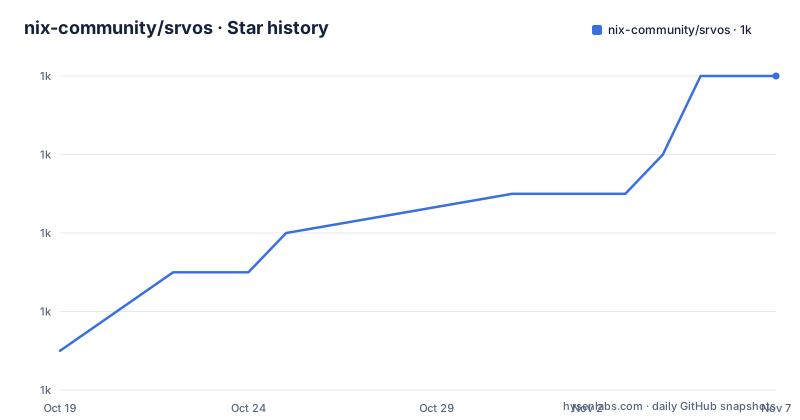
Star history
- nix-community/srvos1,030 ★ · +7
| Repository | 2026-10-19 | 2026-11-07 |
|---|---|---|
| nix-community/srvos | 1k | 1k |
7 Stars in the last 19 days, measured from the daily GitHub snapshot. Compare with other projects
Editorial analysis
What SrvOS actually is
SrvOS is a collection of opinionated and shareable NixOS configurations, and the README explains the reasoning in a way that is worth reading before you install anything. As the maintainers learn more about NixOS in various deployments, they end up rewriting the same modules and configs, and SrvOS is a way to speed that up and share the setups. The line that matters most is the next one: instead of supporting everything, the goal is to target certain verticals and make the support super smooth there. So this is not a general purpose NixOS distribution with a package set and a default configuration. It is a set of modules you compose into your own configuration, and the value is that the opinionated parts are already decided and shared. The project is marked stable, the primary language is Nix, the licence is MIT, the last push was on 2026-10-19, and the repository has no GitHub releases, so the flake input is the interface.
The flake usage, and the nixpkgs pin that makes it work
SrvOS is added to a `flake.nix` to augment your NixOS configuration, and the README's example is a GitHub Action runner on Hetzner:
{
  description = "My machines flakes";
  inputs = {
    srvos.url = "github:nix-community/srvos";
    # Use the version of nixpkgs that has been tested to work with SrvOS
    # Alternatively we also support the latest nixos release and unstable
    nixpkgs.follows = "srvos/nixpkgs";
  };
  outputs = { self, nixpkgs, srvos }: {
    nixosConfigurations.myHost = nixpkgs.lib.nixosSystem {
      system = "x86_64-linux";
      modules = [
        # This machine is a server
        srvos.nixosModules.server
        # Deployed on the AMD Hetzner hardware
        srvos.nixosModules.hardware-hetzner-amd
        # Configured with extra terminfos
        srvos.nixosModules.mixins-terminfo
        # Finally add your configuration here
        ./myHost.nix
      ];
    };
  };
}
The `nixpkgs.follows` line is the part to understand and the one most people get wrong. By following the nixpkgs that SrvOS itself has been tested against, you avoid the case where a module in SrvOS assumes an option or a package that has since moved in nixpkgs master. The comment is candid that the tested version is not the only option, since the latest nixos release and unstable are also supported, but following the pin is what makes the combination reliable.
How the modules compose, and the order they go in
The module list in the example shows the structure of the whole system. There is a role profile, `srvos.nixosModules.server`, which says what kind of machine this is. There is a hardware profile, `srvos.nixosModules.hardware-hetzner-amd`, which knows about the specific provider and its AMD hardware. There is a mixin, `srvos.nixosModules.mixins-terminfo`, which is an opt-in addition for extra terminfo entries. And then your own module, `./myHost.nix`, which is added last. The names encode the design. The profiles answer questions about the machine, the mixins are optional features you opt into, and the ordering reflects a precedence chain where your own configuration has the final say. This is what separates SrvOS from a full NixOS configuration you adopt wholesale. You are not taking their system, you are taking their decisions about the parts they have decided, and everything else stays yours.
The non-flake route, for projects that cannot use flakes
Not every Nix project is a flake, and SrvOS accounts for that. The non-flake usage is two steps. First, pull the repo with your preferred tool, the README naming niv as an example. Second, import the top-level `default.nix` in your code, and you will have access to the same modules as in the flake. The repository root does indeed have a `default.nix`, so the non-flake entry point is a real file rather than a convention. This matters more than it might seem, because the flake approach brings its own operational requirements, and a team running a large existing non-flake configuration would otherwise have to migrate their whole build to flakes just to adopt a set of server modules. The trade is that non-flake users do not get the nixpkgs pinning that the flake's `follows` gives you, so they have to manage the nixpkgs version themselves.
The repository layout, and the Darwin directory
The tree shows a project that is more than a set of Nix modules. There is a `nixos/` directory holding the NixOS modules themselves, a `lib/` directory for the shared library, a `shared/` directory, a `default.nix` for the non-flake entry point, and a `flake.nix` with a `flake.lock` beside it. A `darwin/` directory at the top level is the detail worth a second look, because it suggests the profiles are not purely about Linux servers. There is a `dev/` directory, which is likely where the development shell lives, and a `docs/` directory paired with a `mkdocs.yml` at the root, so the documentation site is built from the repository rather than hosted elsewhere. The `mkdocs.yml` and the docs folder together tell you the documentation is a first-class part of the project and that it lives in version control alongside the modules it documents.
Working on the documentation
The documentation site is at the nix-community GitHub Pages address, and it covers more general usage and how to install SrvOS. To improve it you take a look at the `./docs` folder, and the README gives you a way to preview it without deploying anything:
nix develop .#mkdocs -c mkdocs serveThat command starts a preview server on http://localhost:8000. The form of it is worth noticing, because it is the standard Nix way of pinning a toolchain for a one-off command. The `nix develop` selects the `mkdocs` dev shell from the flake and the `-c` flag runs the `mkdocs serve` command inside it, so you get the same version of mkdocs that CI uses rather than whatever is on your machine. For a project whose whole premise is reproducible configuration, using the pinned toolchain to edit the docs is a small consistency, and it also means a contributor needs nothing installed beyond Nix.
Who maintains it, and what the sponsorship buys
The repository states that the project is supported by Numtide, and the README carries a description of what that means. Numtide describes itself as a team of independent freelancers who love open source, helping customers make their project lifecycles more efficient by providing and supporting useful tools such as this one, building and deploying infrastructure and offering dedicated DevOps support, building in-house Nix skills and integrating Nix with their workflows, developing additional features and tools, and carrying out custom research and development. The maintainer field in the project description names the same organisation. The honest reading of that arrangement is that SrvOS is a tool built by consultants, which is common for infrastructure projects and generally a good sign for the maintenance, since a company that sells Nix and DevOps work has a direct incentive to keep the tool current. The MIT licence and the contributions-welcome note mean the governance itself is open.
Editorial conclusion
Adopt SrvOS if you run NixOS servers and keep rewriting the same baseline modules, because the profile gives you a tested set of modules and a nixpkgs version known to work with them. Skip it if you want a complete server image you install and forget, since SrvOS is composed into your own configuration rather than standing on its own, and skip it if you need broad package coverage, because the stated goal is to target certain verticals rather than support everything. Before you adopt, pin `nixpkgs.follows` to `srvos/nixpkgs` as the example does, and check the module list in the documentation, because the mixins are opt-in and you assemble the profile yourself.
Frequently asked questions
How do I add SrvOS to my NixOS flake?
Add the srvos input with srvos.url = "github:nix-community/srvos", set nixpkgs.follows = "srvos/nixpkgs" to use the tested nixpkgs version, then list the modules you want in the modules array, such as srvos.nixosModules.server, a hardware profile and any mixins, with your own module last.
What is the difference between a profile, a hardware module and a mixin in SrvOS?
The role profile such as srvos.nixosModules.server says what kind of machine it is, the hardware module such as hardware-hetzner-amd targets a specific provider, and the mixins are optional additions such as mixins-terminfo that you opt into.
Can I use SrvOS without flakes?
Yes. Pull the repo with your preferred tool such as niv, then import the top-level default.nix in your code, which gives you the same modules as the flake.
How do I preview the SrvOS documentation locally?
Run `nix develop .#mkdocs -c mkdocs serve` from the top level, which starts a preview server on http://localhost:8000 using the pinned mkdocs dev shell.
Official sources
Add this badge to your README
If you maintain this project, the badge below links readers to this analysis and shows its maintenance status from the daily GitHub snapshot. Paste the markdown into your README; add ?metric=license or ?metric=stars to the image URL for a different field.

[](https://hysenlabs.com/projects/nix-community-srvos)Star history chart for your README
[](https://hysenlabs.com/projects/nix-community-srvos)Was this useful?