Polyscope: one line to a 3D view of whatever your solver produced
A C++ & Python viewer for 3D data like meshes and point clouds
At a glance
- What is it?
- Polyscope is a C++ and Python viewer built around two ideas, structures such as meshes and point clouds and quantities such as scalar and vector fields, and its selling point is that it does not take ownership of your program. Registering data gives you an interactive scene with picking, and the cost is that your data stays in your process.
- Who is it for?
- Adopt Polyscope when the person who needs to see the result is you, during development, and the question is whether a mesh or a field looks right rather than how it renders at scale. That is exactly the gap it fills, and it fills it in a few lines from both C++ and Python.
- Can I use it commercially?
- Yes. MIT is a permissive licence: you can use, modify and sell software built on it, as long as you keep its copyright and licence notices.
- Is it still maintained?
- Yes. The repository last received commits 47 days ago.
- What is it written in?
- Mainly C++, according to GitHub's language statistics.
Answers come from the project's GitHub data, last synced on October 22, 2026, and from our analysis. They are not legal advice.
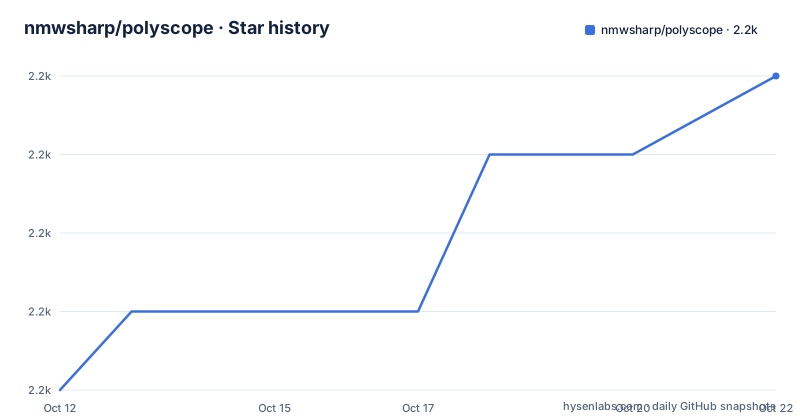
Star history
- nmwsharp/polyscope2,220 ★ · +4
| Repository | 2026-10-12 | 2026-10-22 |
|---|---|---|
| nmwsharp/polyscope | 2.2k | 2.2k |
4 Stars in the last 10 days, measured from the daily GitHub snapshot. Compare with other projects
Editorial analysis
A viewer that refuses to become your application
Polyscope describes itself as a viewer and user interface for 3D data, and then makes a design claim that matters more than the feature list: it does not take ownership over your entire program, and it is easy to integrate with existing codebases and popular libraries.
That sentence is the product. Most 3D frameworks want a scene graph, a lifecycle, a material system and a render loop that your code adapts to. Polyscope instead sits beside your data. You keep your own types, your own containers and your own control flow, and the viewer holds references to what you hand it.
The stated objective is a useful visual interface to your data via a single line of code, and the claim about code volume is specific: fewer than ten lines should be enough to start visualizing. That is a design constraint the API actually keeps, since registration is one call per object and showing the scene is another.
The project is written in C++ with Python bindings, authored by Nicholas Sharp, with development funded in part by NSF Award 1717320 and by gifts from Adobe Research and Autodesk. The build is CMake with a deps/ directory and a git submodule list, and continuous integration runs on Linux, macOS and Windows as three separate workflows.
Structures and quantities: the whole mental model
Two nouns carry the entire design. A structure is a geometric object in the scene, such as a surface mesh or a point cloud. A quantity is data attached to a structure, such as a scalar function or a vector field.
Registration is layered. You add a structure first, then attach quantities to it by retrieving it by name and calling an add method:
ps.get_surface_mesh("my mesh").add_scalar_quantity("my_scalar",
        vertex_scalar, defined_on='vertices', cmap='blues')
ps.get_surface_mesh("my mesh").add_vector_quantity("my_vector",
        face_vectors, defined_on='faces', color=(0.2, 0.5, 0.5))
defined_on is the first real decision, because it states whether a length V array lives on vertices or a length F array lives on faces. Getting that wrong produces a visualization that renders and lies.
Once anything is registered, Polyscope handles the boilerplate the README enumerates: toggling visibility, color-mapping data and adjusting maps, and picking, meaning clicking in the scene to query numerical quantities. Picking is the feature that turns a viewer into an analysis tool, since it lets you ask what the value is at a vertex you just clicked rather than reading it out of an array by index.
The model has a pleasant consequence: quantities are separable from structures, so you can register one mesh and ten fields on it, and the UI handles the rest.
A first look at the Python API
The Python path is the fastest way to see whether the tool fits, and the README's example is complete enough to run after editing the array names:
import polyscope as ps

ps.init()

ps.register_point_cloud("my points", my_points)
ps.register_surface_mesh("my mesh", verts, faces, smooth_shade=True)

ps.show()
Four calls. init sets up the library, register_point_cloud and register_surface_mesh put your data into the scene, and show opens the interface. The inputs are numpy arrays, with verts as Nx3 positions and faces as Fx3 indices, though the README also notes that faces may be given as a nested list.
Names matter, and they are the one piece of API you should design for. Structures and quantities are retrieved by the string you registered, so "my mesh" has to match in get_surface_mesh. Renaming a variable in your solver and not in the viewer is the most common small annoyance here.
smooth_shade=True is passed at registration for meshes, which is a rendering choice rather than a data transformation, which fits the design stance that Polyscope does not take ownership of your arrays.
Installation is not spelled out in the README, which points at polyscope.run for documentation and shows a PyPI badge for a package of the same name. For a Python-only user that is the path; the C++ side is a CMake build of the repository.
The C++ side and its template adaptors
The C++ API mirrors the Python one call for call, and the same example reads as an init, two registrations, two quantity attachments and a show:
polyscope::init();

polyscope::registerPointCloud("my points", points);
polyscope::registerSurfaceMesh("my mesh", meshVerts, meshFaces);

polyscope::getSurfaceMesh("my mesh")->addVertexScalarQuantity("my_scalar", scalarQuantity);
polyscope::getSurfaceMesh("my mesh")->addFaceVectorQuantity("my_vector", vectorQuantity);

polyscope::show();
The difference that matters is in what points, meshVerts and meshFaces can be. The README calls this template magic and says Polyscope accepts the data types you are already using, and links to the data adaptors documentation. In practice an array-like container of Nx3 values is enough, rather than a specific vector class.
Note the naming convention: registerPointCloud, registerSurfaceMesh, addVertexScalarQuantity, addFaceVectorQuantity, all camelCase in C++ and snake_case in Python, with defined_on in Python expressed by which method you call in C++. The Python defined_on='vertices' argument and the choice between the two add methods encode the same fact.
For a C++ codebase this is the main reason to prefer Polyscope over writing your own OpenGL or Vulkan plumbing: the boilerplate is visibility toggles, color maps and picking, none of which is the part of your project that deserves your time.
Building it, and who the documentation is for
Polyscope is a hybrid project: C++ at the core with Python bindings, a CMakeLists.txt at the top level, a deps/ directory for third-party code, and a .gitmodules file, which means a clone without submodule initialisation will not build. The examples directory includes a demo-app, and the repository keeps a .clang-format file, so the C++ side is formatted with a tool rather than by convention.
The documentation is not in the README. It is hosted at polyscope.run, and the README's only other pointers are the contributing instructions on the same site and the data adaptors page. That is a deliberate split: the README shows what the tool looks like, and everything about behaviour lives on the site.
Which matters most for anyone integrating it: the data adaptors page determines whether your data type works without conversion, and the contributing page tells you how the project expects patches. The project publishes to PyPI, judging by the badge in the README, so Python users install a package while C++ users build the repository.
One practical note for C++ teams: the camera, options and backend are set after init, so a program that calls ps.init() at the top of main and show() at the bottom leaves no room to configure anything in between. Both languages allow that; the examples simply do not use it.
Where Polyscope is the wrong tool
It is a development instrument, and treating it as anything else is the mistake.
The first boundary is data scale in your process. The documented flow is to hand the viewer your arrays and let it render them, and nothing in the README describes decimation, streaming or level-of-detail for meshes or clouds too large to hold. If your assets are already a rendering problem, adding an interactive viewer that wants the full dataset in memory does not solve it.
The second is headless use. Everything described is an interactive 3D scene with picking, which means a display. If you need images on a cluster, frames for a paper, or a render from a headless CI worker, this is not the tool, and the README does not promise an offline export path.
The third is users. This is a developer UI: it is designed for you, while you work. There is no scene description file, no embeddable widget and no mention of a scripting layer for animating a view, so a teammate who is not running your program sees nothing.
The fourth is packaging risk, and it is mild but real. The current line is v2.x, with v2.6.1 published on 2026-02-26 and v2.5.0 on 2025-08-19, and the repository has moved on since, with a push on 2026-09-06. A project that builds from a package tag is a stable choice; a project that builds from main is software with a user interface attached.
Alternatives: a plotting library, or your own renderer
The realistic comparison is not another 3D viewer, it is the two things people actually reach for instead.
The first is a general plotting library. For a point cloud you mostly want to look at, a scientific plotting stack will render a scatter or a surface plot with far less machinery and no scene state. What it will not give you is picking, multiple simultaneously registered quantities on one structure, and interactive toggling, so the crossover point is whether you are inspecting a picture or interrogating a model.
The second is writing the viewer yourself against a graphics API, which is what Polyscope is explicitly saving you from. The work is not the triangles; it is the colour maps, the visibility toggles, the picking buffers and the camera controls, none of which are your research contribution. The README's framing of not taking ownership of your program is the argument for the library over the alternative, and the template adaptors are the concrete part of that argument, since they remove the need to convert your solver's containers.
The third option is narrower and sometimes correct: if you only need to look at a mesh once, an offline tool that writes a picture and exits is enough. Polyscope earns its place when the same data will be interrogated repeatedly during development, which is exactly when an interactive window with picking pays for itself.
Editorial conclusion
Adopt Polyscope when the person who needs to see the result is you, during development, and the question is whether a mesh or a field looks right rather than how it renders at scale. That is exactly the gap it fills, and it fills it in a few lines from both C++ and Python. Do not adopt it as a production renderer, as a mesh pipeline that handles hundred-million-element assets, or as a headless tool, because the documented workflow is interactive and in-process, with no mention of offline export or decimation. Verify four things. Try your actual data type first, since the C++ side accepts array-like containers through template adaptors and the Python side takes numpy arrays, and a mismatch here costs more time than everything else combined. Decide which quantities you will register up front, because the structures and quantities split means the interesting part of the work is deciding what a face vector field means, not calling the API. Check your build path, whether that is a PyPI install for a Python project or CMake against the repository, with the documentation hosted at polyscope.run rather than in the README. And pin a version: the newest tag is v2.6.1 from 2026-02-26 while the repository was pushed to on 2026-09-06, so main and the latest packaged release are not the same code. Start with ps.init(), one register_point_cloud call and ps.show().
Frequently asked questions
What is Polyscope used for?
It is a C++ and Python viewer for 3D data such as meshes and point clouds. You register structures and quantities and it handles visibility, colour mapping and picking so you can query values in the scene.
How do I show a point cloud in Polyscope with Python?
Import polyscope, call ps.init(), pass your Nx3 numpy array to ps.register_point_cloud, then call ps.show(). The README states that fewer than ten lines should be enough to start visualizing.
What is the difference between a structure and a quantity in Polyscope?
A structure is a geometric object such as a surface mesh or point cloud, and a quantity is data attached to it such as a scalar or vector field. Quantities are added to a registered structure with methods like add_scalar_quantity.
Does Polyscope need my data in a specific format for C++?
The README describes template magic in which Polyscope can accept the data types you are already using, and points to its data adaptors documentation. Positions are described as Vx3 array-like containers and faces as Fx3 indices.
Where is the Polyscope documentation hosted?
At polyscope.run, which also hosts the contributing instructions. The README itself covers the API examples, and the repository is a CMake project with a deps directory and git submodules.
Official sources
Add this badge to your README
If you maintain this project, the badge below links readers to this analysis and shows its maintenance status from the daily GitHub snapshot. Paste the markdown into your README; add ?metric=license or ?metric=stars to the image URL for a different field.

[](https://hysenlabs.com/projects/nmwsharp-polyscope)Star history chart for your README
[](https://hysenlabs.com/projects/nmwsharp-polyscope)