World for Laravel seeds countries, cities and currencies into your database
A Laravel package which provides a list of the countries, states, cities, currencies, timezones, languages and IP Geolocation.
At a glance
- What is it?
- nnjeim/world is an MIT licensed Laravel package that gives an application a populated set of countries, states, cities, timezones, currencies, languages and IP geolocation, queried through the World facade or through API routes. Version 2.0 changed how the data is refreshed, and the install command asks for a gigabyte of PHP memory.
- Who is it for?
- World for Laravel fits a team that wants dropdown data seeded into its own database, with stable IDs it can reference from user records and API routes a front end can query. It is the wrong choice if you need a live third party country list with no table of your own, or if your PHP memory limit cannot be raised for the import.
- Can I use it commercially?
- Yes. MIT is a permissive licence: you can use, modify and sell software built on it, as long as you keep its copyright and licence notices.
- Is it still maintained?
- Yes. The repository last received commits 29 days ago.
- What is it written in?
- Mainly PHP, according to GitHub's language statistics.
Answers come from the project's GitHub data, last synced on November 7, 2026, and from our analysis. They are not legal advice.
Star history
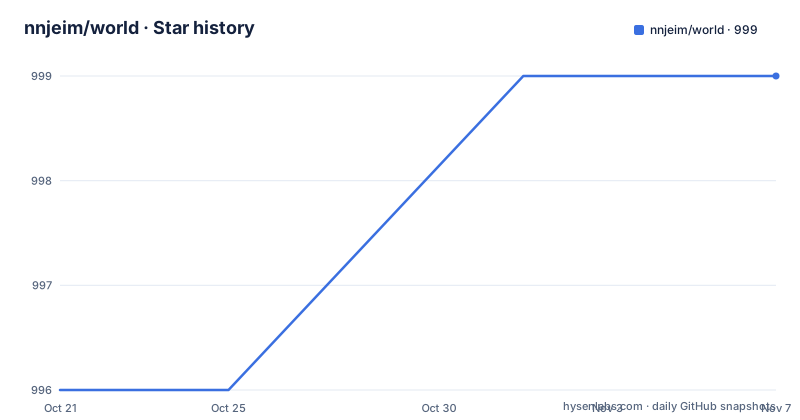
- nnjeim/world999 ★ · +3
| Repository | 2026-10-21 | 2026-11-07 |
|---|---|---|
| nnjeim/world | 996 | 999 |
3 Stars in the last 17 days, measured from the daily GitHub snapshot. Compare with other projects
Editorial analysis
A data set that lands in your own database
World is a Laravel package that provides a list of countries, states, cities, currencies, timezones, languages and IP geolocation. The distinguishing choice is where that data lives. Rather than calling out to a hosted API at request time, World writes the records into your application's database, and your application then queries them like any other table.
That decision shapes everything else about the package. A country picker becomes a query against your own data rather than a third party request, so it does not fail when an external service is slow or rate limited. It also means the data ages, and refreshing it is a maintenance task the package has to own. The 2.0 release notes, as summarised in the README, address exactly that: refresh and seeding preserve tables and existing IDs, with source tracking and dry runs, so a refresh does not renumber everything and break the foreign keys your users already have.
The scope of the data is wide enough to cover most of a sign-up or settings screen. Countries and their subdivisions and cities for address forms, timezones for scheduling, currencies for pricing, languages for localisation, and IP geolocation for guessing a country from a request. The README also states that the examples use the package's own Laravel API routes and do not require another frontend package, which matters if you are trying to avoid adding a JavaScript dependency to a Blade application.
The World facade returns a result object, not a collection
The query interface is a facade called World, and the documented calling convention passes a filters array. The example the README gives filters on the ISO2 code:
use Nnjeim\World\World;

$result = World::countries([
    'filters' => ['iso2' => 'RO'],
]);

if ($result->success) {
    $countries = $result->data;
}
Two details in that snippet set the tone for the whole API. The return value is an object with a success flag and a data property rather than a bare collection, so callers are expected to check the flag before touching the data. And the filter is a nested array, which suggests that the same shape carries more options than one key for other entity types.
The naming convention is worth noting because it changes how you read errors: the filter value is the two letter ISO code, so a query for Romania is written as iso2 with the value RO. Any code that maps a country to a flag, a phone prefix or a currency has to agree with whatever is stored in the table, and the package's own documentation set, including its dataset sources and attribution file, is where that mapping is defined.
The package also exposes API routes so a front end can fetch the same data, and the live selector examples on the project site show a country selector and a dependent country, state and city selector with copy ready Blade, React, Angular and Vue code.
The install command wants 1G of memory and a working cache
Installation is a Composer requirement followed by an Artisan command, and the order matters. The dependency is:
composer require nnjeim/world:^2.0Before the data can be installed, the cache store has to be prepared. The README says that if the application uses Laravel's database cache, you should run php artisan migrate first to create its cache and lock tables, and that the World installation runs only World migrations. In other words, the package takes a dependency on a working cache and lock mechanism, and if that infrastructure is missing the data step will not have what it needs.
The install itself is:
php -d memory_limit=1G artisan world:installThe memory flag is not a suggestion. Importing countries with their states and cities is a large insert, and the command is documented as needing a gigabyte. On a host with a hard PHP memory limit, that is where the run dies, and the fix is to raise the limit for that process rather than permanently.
The upgrade guide is where the operational detail sits. The README points to it for backups, local edits, the limitations of the first import, and the required memory and cache setup. That last item, the limitations of the first import, is the honest warning: the first import is the one with the most edge cases, and it is the one you cannot simply retry later without understanding what it left behind.
World 2.0 changed the data maintenance model
The most important line in the README for anyone with an existing installation is the note on what 2.0 changes. Refresh and seeding now preserve tables and existing IDs, with source tracking and dry runs. A dry run means you can see what a refresh would do before it does it, and source tracking means the package records where the data came from, which is what you need when a data source changes and you need to explain why a row changed.
The version table puts the supported matrix in one place. Version 2.0.1 is the current stable release, and it is the one with the data maintenance changes from 1.x. Version 1.1.39 is the previous stable release, requiring PHP 8.1 and later and Laravel 10 through 13. Version 1.1.38 is a published legacy release with a PHP 7.4 or higher requirement and GeoIP2 v2.
Reading across the table, the older branch and the current branch differ on more than a version number. The 1.1.38 legacy release was built around GeoIP2 v2, while the 2.0 line reorganises how data is maintained, which is the kind of change that touches migrations and refresh logic rather than just class names. The README tells you to read the upgrade guide before changing your Composer constraint, and it keeps the 1.x documentation available at docs/1.x/README.md for projects that stay behind.
Your Composer constraint decides which major version you actually get
This is the part of the upgrade path with teeth. The README shows how to stay on the previous line:
composer require nnjeim/world:^1.1.39and how to pin the exact legacy build:
composer require nnjeim/world:1.1.38The guidance around them is precise. The caret constraints ^1.1 and ^1.1.39 stay below 2.0, and existing lock files retain their selected versions when you run composer install. But a constraint written as *, >=1.1 or dev-master can select a different major version, and the README tells you to review your constraint before updating.
That is a real hazard for a package whose 2.0 line changed how data is maintained, and it is not limited to loose constraints in your own composer.json. A dependency of yours that requires nnjeim/world with a loose constraint can change what composer resolves when you update. The lock file is the protection, and the README points you at the Composer documentation on version constraints for the mechanics.
The versioning scheme also interacts with the release process. The README states that published versions with retained Git tags keep their original code, that removing an old GitHub release page does not remove its Git tag, and that you should use the documentation at your installed tag for its exact behaviour. In other words, a tag is the unit of reproducibility here, not the release page.
What the package does not solve for you
The boundaries are clear once you accept the design. The data is a snapshot, so a country list, a city list or a currency set that changes upstream only changes in your database when someone runs a refresh, and the dry run and source tracking exist to make that operation visible. The README does not describe an automatic refresh schedule, so a production application whose reference data must stay current needs that trigger defined outside the package.
Second, the import is heavy. A gigabyte of PHP memory, a prepared cache store, and the first import's own limitations all point the same way: this is a job you plan, not something you sprinkle into a quick prototype. The data also lands in your database, so its size is your database's size, and if you are running several environments, each of them pays for the import.
Third, the mapping between what a country means to your application and what the package stores is not automatic. The ISO2 filter in the facade example tells you one identifier; a form that also needs a phone prefix, a currency and a language has to join across the package's own entities and keep that join stable as the data is refreshed. The 2.0 promise that refreshes preserve existing IDs is what makes such joins survivable, and it is the feature to lean on when you design those foreign keys.
Choosing between the 1.x line and 2.0
The honest alternative to adopting 2.0 is staying on 1.1.39, and the package supports that deliberately rather than as an accident. The 1.x line has its own documentation, its own stable tag, and a documented requirement set of PHP 8.1 and later with Laravel 10 through 13 for 1.1.39. For a project that is mid-cycle on an older PHP or Laravel version, staying put is cheaper than the migration and the data maintenance change, and the README says the 1.x documentation remains available.
The 2.0 line is worth the move for a different reason: the refresh model. Preserving tables and existing IDs, tracking sources and offering a dry run are the difference between a data set you can refresh confidently and one you are afraid to touch. If your application stores references to country or city records, that difference decides how often you can let the data move under your feet.
The package is MIT licensed, which keeps the licensing question simple for most teams, and the repository is not archived with the last push on 2026-10-10. The release history shows a very recent 2.0 line, with 2.0.0 and 2.0.1 both published on 2026-10-10, preceded by 1.1.39 on 2026-09-22. Two releases of a new major on the same day is worth noting: it means 2.0 is fresh, and the upgrade guide is short on field experience, so reading it and testing the first import on a copy of production data is the sensible order.
Editorial conclusion
World for Laravel fits a team that wants dropdown data seeded into its own database, with stable IDs it can reference from user records and API routes a front end can query. It is the wrong choice if you need a live third party country list with no table of your own, or if your PHP memory limit cannot be raised for the import. Verify first that your cache store is ready, that php -d memory_limit=1G artisan world:install completes on the target environment, and that your Composer constraint pins the major version you intend, because * and dev-master can pull 2.0 into a project written for 1.x.
Frequently asked questions
How do I install the World package in Laravel?
Require it with composer require nnjeim/world:^2.0, prepare your configured cache store, running php artisan migrate first if you use Laravel's database cache, and then run php -d memory_limit=1G artisan world:install. The install runs only the World migrations.
How do I query countries with the World facade?
Call World::countries with a filters array, for example filtering on the two letter ISO code, then check the success flag on the returned object before reading its data property. The same data is also reachable through the package's Laravel API routes.
What changed in World 2.0 compared to 1.x?
2.0 changes data maintenance. Refresh and seeding preserve tables and existing IDs, with source tracking and dry runs, and the upgrade guide covers backups, local edits, the limitations of the first import, and the required memory and cache setup. The 1.x documentation is still available for projects that stay behind.
How do I keep my project on the 1.x line of nnjeim/world?
Use composer require nnjeim/world:^1.1.39, or pin composer require nnjeim/world:1.1.38 for the exact legacy build. The caret constraints stay below 2.0, while constraints such as *, >=1.1 and dev-master can select a different major version, so review the constraint before updating.
Does World need IP geolocation data, and what licence does it use?
The package provides IP geolocation alongside the country, state, city, currency, timezone and language data, and it is MIT licensed. The 1.1.38 legacy release is the one documented as using GeoIP2 v2, and the dataset sources and attribution are documented separately in docs/DATA_SOURCES.md.
Official sources
Add this badge to your README
If you maintain this project, the badge below links readers to this analysis and shows its maintenance status from the daily GitHub snapshot. Paste the markdown into your README; add ?metric=license or ?metric=stars to the image URL for a different field.

[](https://hysenlabs.com/projects/nnjeim-world)Star history chart for your README
[](https://hysenlabs.com/projects/nnjeim-world)Was this useful?