react-mosaic: a tiling window manager for React apps
A React tiling window manager
At a glance
- What is it?
- react-mosaic renders draggable, resizable panels from an n-ary tree, with tabs as a node type. It suits internal tools and IDE-like dashboards, and it is a poor fit if you need free-form canvas placement or a layout that survives without React.
- Who is it for?
- Adopt react-mosaic for internal dashboards, editor shells and log consoles where users rearrange panels and the layout is a tree of splits and tabs. Do not adopt it if panels must be placed at arbitrary x/y coordinates, or if the surrounding app is not React at all.
- Can I use it commercially?
- Check first. The repository uses a licence we do not classify automatically, so read its LICENSE file before any commercial use.
- Is it still maintained?
- Yes. The repository last received commits 55 days ago.
- What is it written in?
- Mainly TypeScript, according to GitHub's language statistics.
Answers come from the project's GitHub data, last synced on November 22, 2026, and from our analysis. They are not legal advice.
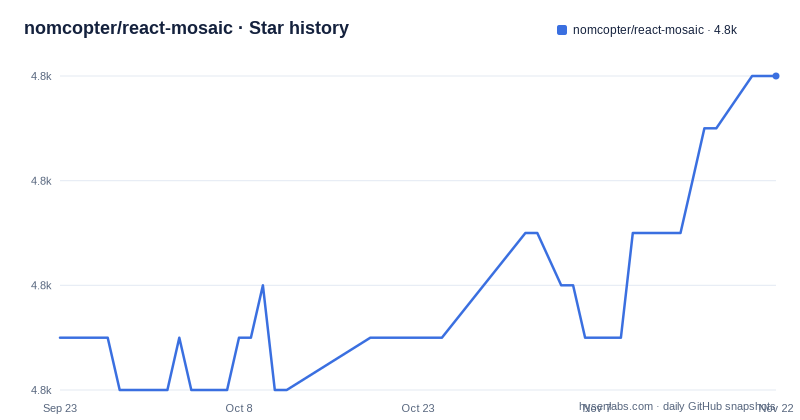
Star history
- nomcopter/react-mosaic4,806 ★ · +5
| Repository | 2026-09-23 | 2026-11-22 |
|---|---|---|
| nomcopter/react-mosaic | 4.8k | 4.8k |
5 Stars in the last 60 days, measured from the daily GitHub snapshot. Compare with other projects
Editorial analysis
What react-mosaic solves, and who ends up using it
Most React dashboards are grids. Panels sit in fixed slots, a column count decides everything, and the user gets to collapse a sidebar at best. react-mosaic targets a different interaction: panels that the user drags to resize, drags by the title bar to rearrange, and closes or splits on demand. The README describes it as a tiling window manager inspired by IDE window management and i3-style tiling, which is a fair summary of the interaction model it implements.
The audience follows from that. This is for teams building an editor shell, an observability console, a trading or ops dashboard, or any internal tool where two users want two different arrangements of the same panels. It is also a reasonable choice when the layout itself is part of the product, such as a query builder where each step is a panel the user can widen while reading a long result.
It is not a general layout library. If your panels never move, a CSS grid is less code and fewer dependencies. The value here is entirely in the rearrangement, and if you do not need it, you are paying for drag-and-drop infrastructure you will never exercise.
The n-ary tree model behind the layout
Older versions of this library modelled a layout as a binary tree: every split had exactly two children. The v7 line moves to an n-ary tree, where a single split node holds any number of children. The README lists this first among the features, and it changes what the data structure looks like in practice. A three-column layout is one split node with three children rather than a nested pair of splits, which makes add, remove and reorder operations on a column simpler to reason about.
Tabs are the second structural change. The README calls tab containers a node type, not a bolted-on convention. That distinction matters when you serialize a layout: a tab group is a node in the tree, so it persists and restores like any other node instead of being reconstructed from panel metadata on load.
The component can own the tree or hand it to you. Passing initialValue lets Mosaic manage the layout internally. Passing value together with onChange makes it controlled, so your state container holds the tree and every drag, split and close flows through your reducer. The README presents both as first-class options; controlled mode is the one to pick when the layout must be saved to a backend or synced across sessions.
Drag-and-drop is built on react-dnd, with HTML5 and touch backends, so pointer and touch input both work. Styling is separate from structure: the README says it works with or without Blueprint and ships a default CSS theme plus CSS variables you can override.
Installing react-mosaic-component and rendering a two-panel layout
The package is published as react-mosaic-component. The README gives the install command with React and ReactDOM as peer installs.
npm install react-mosaic-component react react-domThe stylesheet also has to be imported. Import it once in your app entry point, as the README instructs.
import 'react-mosaic-component/react-mosaic-component.css';A minimal app passes an initialValue tree and a renderTile function. The tree below is the exact example from the README: one row split with two children, 'a' and 'b'. renderTile receives the panel id and its path, and returns a MosaicWindow, which supplies the title bar and the default toolbar buttons.
import { Mosaic, MosaicWindow } from 'react-mosaic-component';
import 'react-mosaic-component/react-mosaic-component.css';

export function App() {
  return (
    <div style={{ height: '100vh' }}>
      <Mosaic<string>
        renderTile={(id, path) => (
          <MosaicWindow<string> path={path} title={`Panel ${id}`}>
            <div style={{ padding: 20 }}>Contents of {id}</div>
          </MosaicWindow>
        )}
        initialValue={{ type: 'split', direction: 'row', children: ['a', 'b'] }}
      />
    </div>
  );
}
What you should see is a full-height area divided into two panels with a draggable divider between them, a title bar on each reading Panel a and Panel b, and the default toolbar buttons. The outer div with height 100vh is doing real work: Mosaic fills its parent, so a parent with no height renders nothing visible. The README explains this directly.
Where react-mosaic is the wrong tool
The layout is a tree, and that is a hard constraint. Panels cannot be placed at arbitrary coordinates, cannot overlap, and cannot float above the tiling area. If your users expect to drop a chart anywhere on a canvas and drag it to a free spot, react-mosaic will fight you; there is no free-form mode in the README or the feature list. A canvas-based dashboard library is the correct starting point there, not this one.
Drag-and-drop depends on react-dnd, which is a dependency you inherit whether or not you use it elsewhere. The README notes both HTML5 and touch backends and says touch drag and drop is built in.
The stylesheet import is global. Importing react-mosaic-component.css applies its theme to the whole document, and while the README says CSS variables can be overridden, class name collisions with an existing design system are a real risk in a large app. The README does not describe a scoping strategy.
Finally, the README documents a migration path from v6 but does not document rollback. If you convert a persisted v6 layout with convertLegacyToNary and the result is wrong, the documentation gives no guidance on reversing it. Keep the original serialized layout until you have verified the converted output.
react-mosaic compared with react-grid-layout
react-grid-layout is the alternative that comes up most often, and the two solve adjacent but different problems. react-grid-layout arranges items on a grid of columns and rows with x, y, width and height per item. Items can be dragged to any free cell and can overlap in intent, then snap into place. That model suits dashboards where users curate a board of widgets and expect gaps and empty cells.
react-mosaic has no grid and no coordinates. Its nodes are splits and tabs, and every rearrangement is a structural edit to the tree: insert a child into a split, move a panel to another split, wrap a panel in a tab group. The result is that no space is ever wasted, because the tree partitions the area completely. That is the tiling behaviour, and it is why the library fits editor shells and consoles where every pixel should show a panel.
The trade-off is expressiveness. You cannot leave a gap, you cannot pin a widget to the bottom right corner independent of the tree, and you cannot express a layout that is not a tree. If your users think in terms of "put this widget here," react-grid-layout matches their mental model. If they think in terms of "give me more room for this panel and less for that one," react-mosaic does.
Maintenance, releases and the licence question
The repository is not archived, and the last push was on 2026-09-28. The most recent release, v7.2.1, is dated 2026-09-28, following v7.2.0 the same day and v7.1.0 on 2026-09-10. That cadence shows a v7 line that is still receiving releases, and the v7 work is recent enough that the migration guide from v6 is worth reading before you pin a version.
Upgrade cost concentrates in the tree model. Moving from a v6 binary tree to the n-ary model changes the shape of serialized layouts, and the README says legacy v6 binary trees are auto-converted at render time, with convertLegacyToNary available for explicit upgrades. Auto-conversion at render time is convenient, but it means your stored layout and your in-memory layout can differ in shape, which is worth knowing before you write code that inspects the tree.
The repository package.json declares Apache-2.0, and the README points to the LICENSE file, which states Apache License 2.0. The repository metadata reports the licence as NOASSERTION, which is a GitHub classification rather than a statement about the terms; the package.json and README agree on Apache-2.0. Apache-2.0 includes a patent grant and requires attribution and notice retention. That is a summary of the licence text, not legal advice; if you redistribute the library in a product, have counsel review the attribution requirements.
The build is an Nx monorepo with tsup for the library bundle and lessc for the stylesheet, so contributing means working inside that workspace rather than patching a single file. The README lists npm install, npm start for the docs site, npm run build:lib, npm test and npm run lint.
Editorial conclusion
Adopt react-mosaic for internal dashboards, editor shells and log consoles where users rearrange panels and the layout is a tree of splits and tabs. Do not adopt it if panels must be placed at arbitrary x/y coordinates, or if the surrounding app is not React at all. Before committing, verify three things on the documentation site: how controlled mode behaves when you reject a change in onChange, how convertLegacyToNary handles a v6 tree you already persist, and whether the default CSS theme collides with your existing stylesheet, since the import is global and unconditional.
Frequently asked questions
What is react-mosaic?
It is a React tiling window manager published as react-mosaic-component. It renders a drag-to-resize, drag-to-rearrange layout of panels, described in the README as inspired by IDE window management and i3-style tiling.
How do I install react-mosaic-component?
The README gives npm install react-mosaic-component react react-dom, followed by importing react-mosaic-component/react-mosaic-component.css in your app entry point. The stylesheet import is required for the default theme.
Does react-mosaic support tabs in a layout?
Yes. The README lists tabs as first-class citizens and states that tab containers are a node type rather than a bolted-on convention, so a tab group is part of the tree you serialize and restore.
Can react-mosaic place panels at specific coordinates?
No. Layouts are n-ary trees of splits and tabs, so panels partition the area and cannot be positioned at arbitrary x/y coordinates or overlap. A grid or canvas layout library fits that requirement instead.
Which React versions does react-mosaic support?
The README does not state a version range in text; its install command lists react and react-dom as packages to install alongside react-mosaic-component, and its entry-file example uses createRoot from react-dom/client.
What licence does react-mosaic use?
The repository package.json declares Apache-2.0 and the README points to the LICENSE file, which states Apache License 2.0. GitHub's metadata reports the licence as NOASSERTION, which is a classification rather than a change in terms.
Official sources
Add this badge to your README
If you maintain this project, the badge below links readers to this analysis and shows its maintenance status from the daily GitHub snapshot. Paste the markdown into your README; add ?metric=license or ?metric=stars to the image URL for a different field.

[](https://hysenlabs.com/projects/nomcopter-react-mosaic)Star history chart for your README
[](https://hysenlabs.com/projects/nomcopter-react-mosaic)Was this useful?