GPT4All: Local LLM Inference for Desktops, with a Python Client and a Vulkan Path
GitHub describes it as GPT4All: Run Local LLMs on Any Device. Open-source and available for commercial use.. The repository metadata lists C++ as its primary language. The metadata lists the MIT license. This article stays within the project description and details documented in the GitHub repository README.
At a glance
- What is it?
- GPT4All is a C++ project that bundles a desktop chat app, a Python client around llama.cpp, and an OpenAI-compatible API server. It targets private, CPU-only inference on everyday hardware, with optional GPU support via Nomic Vulkan.
- Who is it for?
- Adopt GPT4All if you need private, CPU-based LLM inference on a standard desktop or laptop, or if you want a Python client that wraps llama.cpp with minimal setup. Skip it if you require ARM Linux support, need GPU inference beyond the limited Vulkan quantizations, or expect a production-grade API server.
- Can I use it commercially?
- Yes. MIT is a permissive licence: you can use, modify and sell software built on it, as long as you keep its copyright and licence notices.
- Is it still maintained?
- Probably not. The repository last received commits 17 months ago, on May 27, 2025.
- What is it written in?
- Mainly C++, according to GitHub's language statistics.
Answers come from the project's GitHub data, last synced on November 15, 2026, and from our analysis. They are not legal advice.
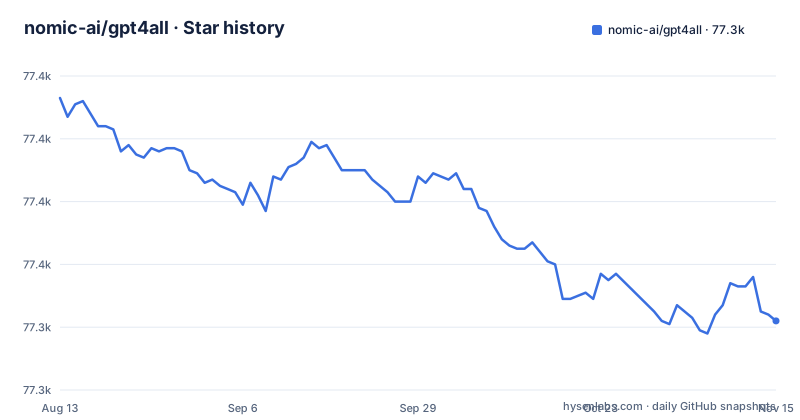
Star history
- nomic-ai/gpt4all77,342 ★ · -71
| Repository | 2026-08-13 | 2026-11-15 |
|---|---|---|
| nomic-ai/gpt4all | 77.4k | 77.3k |
-71 Stars in the last 94 days, measured from the daily GitHub snapshot. Compare with other projects
Editorial analysis
What GPT4All Actually Solves
GPT4All addresses a narrow but real problem: running large language models on machines that have no GPU and no internet connection to an API. The README states plainly that no API calls or GPUs are required, and that the application runs on everyday desktops and laptops. This makes it a fit for privacy-sensitive users, offline environments, or engineers who want a local fallback for prototyping. The project is not a model training framework. It is an inference stack: a desktop chat client, a Python binding, and an optional API server. The primary language is C++, which matters because the heavy lifting happens in native code, not in Python or JavaScript. The target user is someone who wants to download a model once and chat with it locally, or who wants to script local generation from Python without managing llama.cpp directly.
The Architecture: llama.cpp Underneath, Python on Top
The Python client is a wrapper around llama.cpp implementations. The README says the gpt4all package gives access to LLMs with a Python client around llama.cpp. That means the actual inference engine is the same one used by many other local LLM tools, and GPT4All adds its own model loading, chat session management, and download logic. The key architectural detail is the model format: the example uses a .gguf file, specifically Meta-Llama-3-8B-Instruct.Q4_0.gguf, which is a 4-bit quantized GGUF model. So the project depends on the GGUF ecosystem for model availability. The Python API is simple: you instantiate GPT4All with a model name, it downloads the file, then you open a chat session and call generate. The chat_session context manager handles the conversation state, and generate takes a prompt and a max_tokens parameter. This hides the tokenization, sampling, and context management from the user, which is the point.
Getting It Running: Installers and the Python Package
There are two paths to run GPT4All. The first is the desktop application, which ships as installers for Windows (x64 and ARM), macOS, and Linux (Ubuntu). The Linux build is x86-64 only, with no ARM variant. The Windows and Linux builds require at least an Intel Core i3 2nd Gen or AMD Bulldozer, which is a low bar, but it is still a hard minimum. The macOS build needs Monterey 12.6 or newer, and the README says best results come with Apple Silicon M-series processors. The second path is the Python package, installed with pip install gpt4all. The example code shows a two-line setup: create a GPT4All object with a model name, then open a chat session and generate. The model downloads on first use, which means you need enough disk space for a 4.66GB file in the example. There is also a Docker-based API server referenced in the release history, but it is not described in the current README beyond a link to an old commit, so its current status is unclear.
The Vulkan GPU Path and Its Limits
GPU support exists, but it is not the default and it has a specific shape. The release history mentions Nomic Vulkan support for Q4_0 and Q4_1 quantizations in GGUF, launched in October 2023, and earlier Vulkan support for NVIDIA and AMD GPUs. This is not CUDA or ROCm. It is Vulkan, a cross-platform graphics API, which means it can run on a wider range of hardware, but it also means the inference is limited to specific quantizations. The README does not mention any other GPU backends. So if you have an NVIDIA GPU and want to use a Q8 model, you may not get acceleration. The main selling point remains CPU-only operation, which is fine for small models, but for larger models, the lack of a mature GPU path could be a bottleneck. The documentation is thin on performance claims, so you should expect to test your own model and hardware.
LocalDocs and the API Server: Two Features with Different Maturity
LocalDocs is a feature that lets you chat with your local data, described in the release history as stable since July 2023. The README gives no details on how it indexes or retrieves files. The Docker-based API server is a separate component that exposes an OpenAI-compatible HTTP endpoint. The release history links to a specific commit, not the current tree, which suggests the API server may not be maintained as actively as the core client. The README also lists integrations with Langchain, Weaviate, and OpenLIT, which means you can plug GPT4All into a larger vector database or monitoring stack. However, these integrations are third-party, and the README does not describe their maintenance status. If you need a production-grade API server, you should verify that the Docker image is still updated, because the README does not promise that.
System Requirements: Where It Will and Will Not Run
The hardware constraints are explicit. The Windows and Linux builds need a CPU from at least 2011 or so, which covers most machines but excludes very old or low-power devices. The Linux build is x86-64 only, so ARM Linux users are out of luck. The Windows ARM build supports Qualcomm Snapdragon and Microsoft SQ1/SQ2 processors, which is a narrow set. The macOS build requires Monterey 12.6, which is a reasonable baseline, but the README says best results come with Apple Silicon, so Intel Macs may be slower. These requirements matter because the project's promise is to run on any device, but the actual support is platform-specific. If you are on ARM Linux, or an older macOS, you cannot use the official installers. The Flathub package is community maintained, which may cover some gaps, but it is not the official path.
Licensing and Maintenance Cost
The project is MIT licensed, which is permissive and allows commercial use, as the description states. That is a real advantage for companies that want to embed the code or build on it. The most recent release is v3.10.0 from February 2025 and the last push was 2025-05-27, so activity has slowed, and the README mentions support for DeepSeek R1 Distillations, which indicates the project tracks new model families. However, the maintenance cost is on you if you use the Python bindings: you depend on llama.cpp updates, and the README does not specify how quickly GPT4All tracks upstream changes. The desktop app is a separate binary, so you need to update it manually or via the installer. There is no mention of automatic updates. The README's citation entry is dated 2023.
Editorial conclusion
Adopt GPT4All if you need private, CPU-based LLM inference on a standard desktop or laptop, or if you want a Python client that wraps llama.cpp with minimal setup. Skip it if you require ARM Linux support, need GPU inference beyond the limited Vulkan quantizations, or expect a production-grade API server. Before committing, verify the system requirements for your OS, check the model gallery for your target architectures, and test the Python bindings against your exact model format, since the documentation warns about x86-64-only Linux builds and specific CPU minimums.
Frequently asked questions
What is GPT4All for?
It runs large language models privately on everyday desktops and laptops, with no API calls and no GPU required. You download the application for your platform and work with a model on your own machine rather than sending prompts to a hosted endpoint.
Is GPT4All free?
The code is MIT licensed, and the project describes itself as open-source and available for commercial use. The model weights are a separate download: the Python example loads a 4.66GB GGUF file the first time the model object is constructed.
How do I use GPT4All in Python?
Install the client with `pip install gpt4all`, then construct `GPT4All` with a GGUF filename and generate inside a `chat_session()` block. The client wraps llama.cpp implementations, and passing a model name causes the weights to be downloaded on first use.
How do I install GPT4All on Ubuntu?
The download list carries an Ubuntu Installer at `gpt4all-installer-linux.run`, and that build is x86-64 only with no ARM variant. It requires an Intel Core i3 2nd Gen or an AMD Bulldozer, or better, and a Flathub package is offered as a community maintained alternative.
How do I make GPT4All use the GPU?
Nomic Vulkan launched on September 18th, 2023 to support local LLM inference on NVIDIA and AMD GPUs, and GGUF support added Vulkan for the Q4_0 and Q4_1 quantizations in October 2023. The README does not document a command-line flag for enabling it, so the accelerator path has to be confirmed against your build rather than switched on from the documented usage.
Official sources
Where this project is recommended
Add this badge to your README
If you maintain this project, the badge below links readers to this analysis and shows its maintenance status from the daily GitHub snapshot. Paste the markdown into your README; add ?metric=license or ?metric=stars to the image URL for a different field.

[](https://hysenlabs.com/projects/nomic-ai-gpt4all)Star history chart for your README
[](https://hysenlabs.com/projects/nomic-ai-gpt4all)Was this useful?