DnsConf: block and redirect rules for Cloudflare and NextDNS
DNS Block and Redirect configurer for Cloudflare / NextDNS
At a glance
- What is it?
- DnsConf is a Java tool that reads hosts files and pushes the result into your Cloudflare or NextDNS account as block and redirect rules, running from GitHub Actions with a handful of environment variables. It also solves the problem every static hosts list has, which is that the addresses go stale.
- Who is it for?
- Adopt DnsConf if you want to run a large hosts or blocklist through a resolver you control, in a way that survives the list changing every week, and if you are comfortable putting a DNS API token in a GitHub Actions secret.
- Can I use it commercially?
- Not without permission. GitHub finds no licence file in the repository, and without a licence all rights are reserved by default: you may read the code but not reuse it. Check the README, or ask the authors, before using it.
- Is it still maintained?
- Yes. The repository last received commits 8 days ago.
- What is it written in?
- Mainly Java, according to GitHub's language statistics.
Answers come from the project's GitHub data, last synced on November 7, 2026, and from our analysis. They are not legal advice.
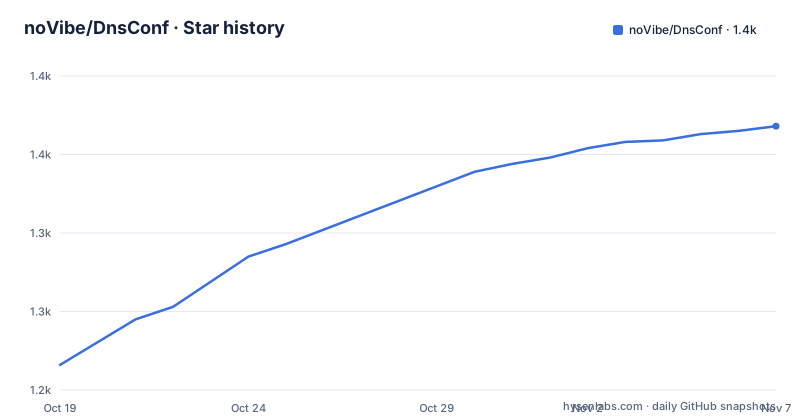
Star history
- noVibe/DnsConf1,368 ★ · +152
| Repository | 2026-10-19 | 2026-11-07 |
|---|---|---|
| noVibe/DnsConf | 1.2k | 1.4k |
152 Stars in the last 19 days, measured from the daily GitHub snapshot. Compare with other projects
Editorial analysis
Hosts files pushed into a resolver account
DnsConf is a DNS Block and Redirect Configurer. It allows you to set redirect and block rules to your Cloudflare and NextDNS accounts, and it is ready to run via GitHub Actions, with a video guide linked from the README.
The mechanism is straightforward once you see it. A blocklist is normally a hosts file, a text file of domain to address mappings, and the usual way to use one is to point your operating system at it. That does not work for a phone, a smart TV, or anything else on your network that you do not administer. A resolver-level blocklist does work for all of them, because the decision is made at the DNS lookup rather than on each device.
So the tool reads one or more hosts files, splits the entries into the two categories the resolver understands, and writes them into your account through that provider's API. The category matters, and it is determined by the address in the hosts file: a real IP address is a redirect to that address, and a null address is a block.
The project is Java, with a pom.xml at the root and the source under src/, and the GitHub Actions workflow badge in the README is the build that produces the artefact you run. There is no GitHub release for the project, the repository is not archived, and the last push was on 2026-10-18. The README is bilingual, with English and Russian versions, and the licence is not stated in the repository metadata.
NextDNS or Cloudflare, and the free plan differences
The comparison table in the README is the part to read before you choose a provider, because the differences are not cosmetic.
On the DNS query limit, NextDNS gives 300,000 per month against Cloudflare's 100,000 per day. Billing information is not required for NextDNS and is required for Cloudflare. The IPv4 restriction is the one that will surprise you: on NextDNS the DNS queries are limited to a single IP address and that can be changed, while on Cloudflare the query source is strictly limited to a single IP address that is assigned automatically and cannot be changed.
DoH, DoT and IPv6 are unlimited on both. The setup API limits differ sharply, with 60 requests per minute on NextDNS against unlimited on Cloudflare, and the setup work this tool does is exactly the kind of work that hits a per-minute API limit.
Then there is the general limitation row, and it is not a technical footnote: Cloudflare infrastructure is blocked by Roskomnadzor, with the availability issues in Russia called out, while NextDNS has none. The advantages row is the mirror image, with NextDNS offering built-in ad and tracker blocking options and Cloudflare offering more reliable and fast infrastructure.
The summary is blunt. If you are located in Russia, NextDNS is your only viable option due to the Roskomnadzor restrictions. If you are in another country and you are fine with a credit card gate, Cloudflare offers more generous limits on the free plan. Separately, tracker and ad blocking can be enabled by providing a domain blocklist in the BLOCK variable, for example the small.oisd.nl domainswild2 list.
The quick setup runs entirely in the browser
The easy setup path is a hosted configurator at dns-conf-ui.vercel.app, used in Quick mode. It automatically configures your DNS profile and performs all the required GitHub setup steps.
What you have to supply is short: sign in with GitHub and provide CLIENT_ID and AUTH_SECRET. The documentation then links to the section on where to find those values, which is the standard setup in detail.
The reason to use the web configurator rather than the standard path is worth understanding. The standard setup is a sequence of steps you do by hand: set up credentials, set up a profile, set up data sources, optionally set up exclude redirects, set up a DNS donor, and set up GitHub Actions. That is six steps, and each of them involves copying an identifier from a provider's dashboard into a GitHub secret. The quick path automates that sequence, which is exactly the kind of thing a hosted tool is good at and exactly the kind of thing you might not want to hand to a third party if you care about the token scope.
Since the configurator handles the GitHub Actions setup, the standard path is the one to read if you want to understand what was done to your repository, or if you are not using GitHub Actions at all.
The environment variables, and how credentials differ per provider
The configuration is a set of environment variables, and the credential mapping is different for the two providers.
For NextDNS, you generate an API KEY from the NextDNS account page and set it as the environment variable AUTH_SECRET. You then open the NextDNS page for your profile, copy the ID from the Endpoints section, and set it as CLIENT_ID.
For Cloudflare, you sign up, navigate to the Zero Trust tab and create an account. You then create a Cloudflare API token with exactly two permissions: Account.Zero Trust with Edit, and Account.Account Firewall Access Rules with Edit. The token goes into AUTH_SECRET, and the Account ID, which you get from the Cloudflare dashboard, goes into CLIENT_ID.
The two permissions are the whole scope of what this tool does to a Cloudflare account, and it is worth reading them as a security statement rather than as configuration. Zero Trust Edit covers the DNS resolver configuration, and Account Firewall Access Rules Edit covers the rules that map domains to addresses, which is the redirect side.
The remaining variables are not credentials. DNS selects the provider, either Cloudflare or NextDNS. REDIRECT and BLOCK take the data sources. EXCLUDE_REDIRECT takes domains to skip. And DONOR_DNS names the resolver used to refresh addresses.
The naming convention is worth noting: the tool uses the same two variable names for both providers, so the difference between NextDNS and Cloudflare is entirely in which values you put in them.
How a hosts file becomes two rule sets
This is the core of the tool and the documentation explains it with worked examples, because the split is what people get wrong when they write their own script.
Each data source must be a link to a hosts file, and you can provide several split by comma. The example given is a GeoHideDNS hosts list. Then the two variables are parsed differently.
REDIRECT keeps the entries that point at a real address, and filters out the ones pointing at 0.0.0.0 or 127.0.0.1. So from
0.0.0.0 domain.to.block 1.2.3.4 domain.to.redirect 127.0.0.1 another.to.block
only the 1.2.3.4 line survives for the redirect processing. Redirect priority follows the order of the sources, and if a domain appears more than once, the first IP is the one applied.
BLOCK does the opposite. It keeps only the entries pointing at 0.0.0.0, 127.0.0.1 or ::1, plus the lines that contain only a domain with no IP. So from
1.2.3.4 domain.to.redirect 0.0.0.0 domain.to.block 127.0.0.1 another.to.block ::1 ipv6.to.block no-ip.just.domain
the tool keeps domain.to.block, another.to.block, no-ip.just.domain and ipv6.to.block for the block processing.
Two provider-specific notes follow. You may want to provide the same source for both BLOCK and REDIRECT on Cloudflare. For NextDNS, the best option might be to set REDIRECT only and then manually choose blocklists in the Privacy tab, since NextDNS has its own blocking list built in.
Exclusions and the donor resolver
Two optional features handle the cases that a static list gets wrong.
The first is EXCLUDE_REDIRECT, a comma separated list of domains such as instagram.com and twitch.com. Those domains and their subdomains are removed from existing redirect rules and are not added with new ones. That is the escape hatch for a service where a redirect breaks something, and the fact that it applies to subdomains as well as the exact domain is what makes it useful rather than annoying.
The second is the DNS donor, and it addresses the flaw in every static hosts file. If the IP addresses of domains are outdated, they can be updated via a donor DNS. You create the DONOR_DNS environment variable and give it a DNS provider to use as the donor, in one of two formats: an IPv4 address such as 111.88.96.50, or a DoH endpoint such as https://xbox-dns.ru/dns-query.
The example makes the transformation clear. If the hosts file supplies 1.2.3.4 for domain-1.to.redirect, 1.2.3.4 for domain-2.to.redirect and 1.2.3.4 for domain-3.to.redirect, then the DONOR_DNS value is called for each domain, fetching new addresses, so the result is 5.6.7.8, 2.3.4.5 and 9.8.7.6 respectively, and those new IPs are the ones used.
That is the difference between this and a hosts file you download by hand. A hosts list published once a week contains addresses that are days out of date, and every consumer of that list is quietly redirected to a server that moved. Asking a resolver for the current address of a domain costs one query per domain and gives you the right answer.
The repository and its maintenance state
The repository is small and the language is Java, with a pom.xml at the root, the source under src/, a.github/ directory holding the Actions workflow the README badge points at, and the two READMEs. That is the whole project, and it is worth naming what that means for a reader: the interesting logic is the parsing and the provider API calls, and everything else is configuration.
The last push was on 2026-10-18, and the repository is not archived. There are no GitHub releases, so the artefact is the workflow run rather than a published binary, which is consistent with the tool being designed to run on a schedule in GitHub Actions rather than on a machine you sit in front of.
The licence is not stated in the repository metadata, and the README does not have a licence section either, so if you plan to fork the tool and run it against accounts you care about, confirm the terms with the maintainers first.
The other thing worth noticing is the vocabulary the project uses. A profile, a donor, a data source, a client id and an auth secret. The naming is consistent with the tool being run repeatedly from a scheduled workflow, where the state lives in the provider account and the configuration lives in the repository secrets, and where the tool is expected to be re-run whenever the lists change rather than to be a one-off configuration push.
Editorial conclusion
Adopt DnsConf if you want to run a large hosts or blocklist through a resolver you control, in a way that survives the list changing every week, and if you are comfortable putting a DNS API token in a GitHub Actions secret. Do not adopt it if your needs are covered by the built-in blocking in NextDNS or Cloudflare, since the documentation itself points at those options, and read the free plan comparison before you commit to a provider, because the IPv4 restriction rules differ and Cloudflare will not let you change the assigned address. Before you start, create the API token with exactly the two permissions the documentation lists, and set the profile and account identifiers as CLIENT_ID and the token as AUTH_SECRET.
Frequently asked questions
What does DnsConf do?
It is a DNS Block and Redirect Configurer that lets you set redirect and block rules on your Cloudflare and NextDNS accounts. It reads one or more hosts files from URLs, splits the entries into the two rule types and writes them into the resolver account through the provider's API, running from GitHub Actions.
Should I use Cloudflare or NextDNS with DnsConf?
The README's comparison says that in Russia NextDNS is the only viable option because Cloudflare infrastructure is blocked by Roskomnadzor, and elsewhere Cloudflare gives more generous free plan limits but requires billing information and assigns a single IPv4 address you cannot change. NextDNS has built-in ad and tracker blocking and a 60 request per minute setup API limit.
Which Cloudflare permissions does the DnsConf token need?
Two, both with Edit: Account.Zero Trust and Account.Account Firewall Access Rules. The token goes into the AUTH_SECRET environment variable, and the Cloudflare Account ID goes into CLIENT_ID. For NextDNS, AUTH_SECRET is an API key from the account page and CLIENT_ID is the profile ID from the Endpoints section.
How does DnsConf decide which hosts file entries are blocks and which are redirects?
REDIRECT keeps the entries with a real address and filters out 0.0.0.0 and 127.0.0.1, with the first IP applied when a domain appears in more than one source. BLOCK keeps the null addresses 0.0.0.0, 127.0.0.1 and ::1 plus the lines with only a domain, so the same hosts file produces two complementary rule sets.
What is the DNS donor in DnsConf and why is it useful?
It is a resolver, given as an IPv4 address or a DoH endpoint in the DONOR_DNS variable, that is queried for each redirected domain to fetch a current address. That fixes the flaw in static hosts files, whose addresses go stale, and EXCLUDE_REDIRECT exists for the domains where a redirect should not be applied.
Official sources
Add this badge to your README
If you maintain this project, the badge below links readers to this analysis and shows its maintenance status from the daily GitHub snapshot. Paste the markdown into your README; add ?metric=license or ?metric=stars to the image URL for a different field.

[](https://hysenlabs.com/projects/novibe-dnsconf)Star history chart for your README
[](https://hysenlabs.com/projects/novibe-dnsconf)Was this useful?