Memacs: your digital life as Org mode files
What did I do on February 14th 2007? Visualize your (digital) life in Org-mode
At a glance
- What is it?
- Memacs is a set of small Python modules that extract metadata from data you already have, file names, emails, photos, browser history, git logs, phone calls, and write it out as Org mode files that Emacs can search and agenda. It is a hub and a set of connectors, and the part that takes work is the schedule you set up around it.
- Who is it for?
- Memacs fits an Emacs and Org mode user who wants a searchable record of what they were doing, built from data they already have rather than from a new service to keep alive, and who is comfortable writing a small script and a cron entry.
- Can I use it commercially?
- Yes, with conditions. GPL-3.0 is a copyleft licence: if you distribute software that includes it, you must release that software's source code under the same licence. Running it internally without distributing it does not trigger that obligation.
- Is it still maintained?
- Yes. The repository last received commits 2 days ago.
- What is it written in?
- Mainly Python, according to GitHub's language statistics.
Answers come from the project's GitHub data, last synced on November 7, 2026, and from our analysis. They are not legal advice.
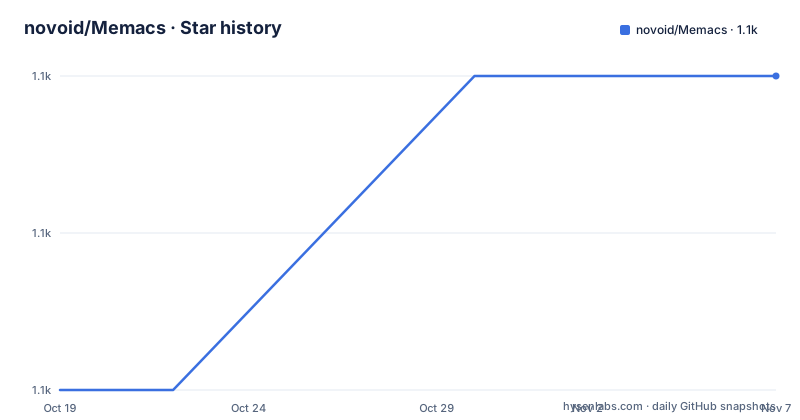
Star history
- novoid/Memacs1,118 ★ · +2
| Repository | 2026-10-19 | 2026-11-07 |
|---|---|---|
| novoid/Memacs | 1.1k | 1.1k |
2 Stars in the last 19 days, measured from the daily GitHub snapshot. Compare with other projects
Editorial analysis
The question it was built to answer
The project opens with a series of questions, and they are the pitch. What were you doing on February 14th of 2007? On which tasks were you working on that very day you met your girl friend? When was the last appointment with your dentist? Who called you on the telephone during that meeting with your customer last month?
And then the observation that most people cannot answer such questions, followed by the promise that with Memacs you can.
The mechanism is metadata extraction. Memacs extracts subjects, timestamps and contact information from many different existing data sources, file names, emails, tweets, bookmarks, and generates files which are readable by GNU Emacs with Org mode.
So it is not a diary application and not a service. It is a set of connectors that turn the traces your operating system and your applications already leave into a format that Emacs can query, and the target group is stated as users of Emacs and Org mode. The README is also honest about the skills required, which are creating or modifying shell script code and creating scheduled tasks, and that tells you the shape of the project before you read a line of it.
The project is written in Python, requires Python 3.9 or newer, and the last push to the repository was on 2026-05-25, which is also the version string in the package manifest, 2026.05.25.
A hub with connectors on both sides
The architecture is drawn as an ASCII diagram in the README, and it is worth reading because it explains the naming.
On the left is your personal data, and it arrives in several shapes: emails through a maildir module, Firefox history, SMS, RSS feeds, bank statements, postings from a forum, git repository logs and Subversion repository logs. In the middle is Memacs itself, described as the central component of the system, a hub for all the connectors that add data from individual data sources, and those connectors are called Memacs modules.
On the right is Org mode. The output side is uniform, which is the point: the modules differ in how they read their source and agree on the format they write.
The list of console scripts in the package manifest shows how many connectors there are in practice, and it is a good sample of what people actually have data for: memacs_arbtt, memacs_battery, memacs_chrome, memacs_csv, memacs_example, memacs_filenametimestamps, memacs_firefox, memacs_git, memacs_gpx, memacs_ical, memacs_imap, memacs_kodi, memacs_lastfm, memacs_mumail, memacs_phonecalls, memacs_phonecalls_superbackup, memacs_photos, memacs_podcastaddict and memacs_rss, among others.
The README also mentions demo data for the modules covering SMS, filenametimestamps, Twitter, RSS, imap, phonecalls and git, and points to a white paper on arXiv for a screenshot of the resulting agenda.
The upstream project data is the second half of the model. The manifest carries a dated version string, so the tool keeps changing while the historical records it writes do not.
Install with uv, and note that the pip extras moved
Project management is handled by uv, and the recommended install for an end user is one command.
uv tool install memacsThat installs all the memacs_* commands globally on your PATH, and module specific dependencies are added with the --with flag, for example uv tool install memacs --with feedparser --with icalendar.
For contributors, or to get everything pre-wired, the route is a clone and a sync.
git clone https://github.com/novoid/Memacs.git
cd Memacs
uv sync --all-groups
uv run memacs_rss --help
The dependency groups defined in pyproject.toml are gps, rss, ical, lastfm, battery, twitter, photos, contacts, podcastaddict and dev, and you can install a subset with uv sync --group rss --group ical.
The pip path is where the interesting warning is. Plain pip install memacs still works and pulls in the core dependencies, but the per-module extras were moved from setup.py's extras_require to PEP 735 dependency-groups in pyproject.toml, which means the old pip install memacs[rss] syntax no longer works. If you install via pip, you install module dependencies yourself, for example pip install feedparser, and for the original install everything experience you use the uv workflow.
That is a real break for anyone following an older tutorial, and it is worth knowing before an afternoon disappears into a resolver error. The runtime dependencies themselves are minimal, orgformat at 2019.11.6.1 or newer, and emoji.
The workflow is four steps and the third one is the job
The getting started section is explicit about the order of operations, and the third step is where the effort goes.
First you choose a module, read its description in the docs folder, and start it manually from the bin folder with the --help argument, for example bin/memacs_csv.py --help, to see the arguments it takes. Each module shares global options but also has its own custom arguments.
Second, you develop and test a script, a .bat or a .sh, that invokes the module.
Third, and this is the step the README spends most of its words on, you set up a periodical invocation so your data gets converted to Org mode regularly, using the operating system method that fits: Task Scheduler on Windows, a cron job or a systemd timer on GNU/Linux, launchd on macOS. You also need to read the FAQ and best practices document, which the README says contains many tips on how to meet your requirements and choose a reasonable setup.
Fourth, you think of another module to try.
There is an optional fifth thing, which is a nice touch. For an update from a running Emacs, independent of the schedule, for example the photo module after you get back from an excursion, you can add a key binding. The README gives the Emacs Lisp for it.
(defun mp-update-memacs-photos ()
  "An extra (i.e., not cron-scheduled) run of Memacs' photo module."
  (interactive)
  (shell-command
   (format "~/org/update-memacs-photos.sh")
  )
 )

(global-set-key (kbd "C-c m p") 'mp-update-memacs-photos)
The script it calls needs the executable bit, and the technique is credited to Mickey Petersen.
Where the output lands, and what Org mode does with it
The workflows section explains the two shapes the output can take, and the choice matters for how you search your own history later.
Either you are generating Org mode files that are within your agenda files, or you are generating archive files whose more or less empty Org mode file stub is within your agenda files. In the first case the entries appear directly in the agenda, which is the view of what you are doing now. In the second case the agenda holds a pointer, and the detail sits in an archive file, which is the shape you want when the volume is large or when the archive is per year.
The rest of the value comes from what Org mode then does with those files: the search, the agenda, the tags, the links between a photo and the day it was taken. That is the whole reason the output format is Org mode rather than JSON or CSV, because a plain text file that Emacs understands becomes queryable without any further tooling.
The Makefile has a target that counts the Org mode entries in your archive directory, which is a small sign of how this is actually used. Somebody is looking at their own archive and asking how many entries it has.
And the Makefile has a target called exec that does something quietly remarkable: it lists the crontab entries, strips the comment and the schedule fields, and pipes what is left into a shell. That is a way of running every scheduled Memacs job immediately, which is exactly what you want when you have just changed a module and do not want to wait for tonight.
The development setup, and the licence to look at twice
The repository is small and well organised for a project of its age. There is a bin/ directory holding the modules, a memacs/ directory with the library and the tests, docs/, a Makefile, an INSTALL.org, a README.org and a README.txt, a pyproject.toml, a uv.lock, an AGENTS.md and a run_all_unit_tests.sh script.
The AGENTS.md is described as the framework overview and the module authoring conventions, which is the modern equivalent of a contributing guide, and the test suite runs with one script.
./run_all_unit_tests.shThe Makefile is described as being for development purposes only, and it shows the habits of the project. It strips trailing whitespace, runs the tests, greps for TODO markers, runs pep8 and pylint, cleans the compiled artefacts, and builds and publishes with uv build and uv publish. There is also a pipcheckouttest target that installs the package into a throwaway virtual environment under /tmp, which is a cheap way to check that the published artefact actually works rather than only the source tree.
The licence is the one detail to check. The project metadata for this repository lists GPL-3.0, while the package manifest declares the licence as GPL-2.0-or-later with the licence file at license.txt. Those are different grants, and GPL-2.0 and GPL-3.0 are not interchangeable in every respect, so read the file if the distinction matters to you. There are no GitHub releases, so the version in the manifest is the version, and it is dated rather than numbered.
Editorial conclusion
Memacs fits an Emacs and Org mode user who wants a searchable record of what they were doing, built from data they already have rather than from a new service to keep alive, and who is comfortable writing a small script and a cron entry. It does not fit someone who wants a turnkey dashboard, since the schedule and the output location are yours to configure, and it does not fit a team that cannot have personal data, email and photo metadata converted into a text format on a machine. Verify three things before you start: which modules have the dependencies you need, because the per-module extras moved to dependency groups and the old pip install with an extra no longer works, where the Org files will be written and what will read them, and whether the privacy trade is acceptable, since these modules read your mail and your photos and write them into plain text files that a search index will happily index.
Frequently asked questions
What is Memacs and who is it for?
It is a hub of Python modules that extract metadata, subjects, timestamps and contact information, from data sources such as emails, file names, photos, browser history, RSS feeds, git logs and phone calls, and write it out as Org mode files. The stated target group is users of Emacs and Org mode, and the stated skills needed are writing shell scripts and creating scheduled tasks.
How do I install Memacs, and why did the pip extras stop working?
The recommended route is uv tool install memacs, which installs all the memacs_* commands on your PATH, with module dependencies added using --with. Plain pip install memacs still works, but the per-module extras moved from setup.py's extras_require to PEP 735 dependency-groups, so the old pip install memacs[rss] syntax no longer works and you install those dependencies yourself.
How do I run a Memacs module?
Start it manually from the bin folder with the --help argument, for example bin/memacs_csv.py --help, to see the shared global options and the module's own arguments. Then wrap the invocation in a .bat or .sh script, and only once that works, schedule it periodically with Task Scheduler, cron, a systemd timer or launchd.
What are the dependency groups Memacs defines?
The groups in pyproject.toml are gps, rss, ical, lastfm, battery, twitter, photos, contacts, podcastaddict and dev. A subset can be installed with uv sync --group rss --group ical, and uv sync --all-groups wires everything for contributors, who then run uv run memacs_rss --help.
How do I run the Memacs test suite?
With the bundled script, ./run_all_unit_tests.sh, which the README says is equivalent to running uv run --group dev pytest --exitfirst over the memacs/tests and memacs/lib/tests directories. The Makefile also has a quiet test target, plus pep8, pylint, whitespace and TODO checks, and a build and upload pair built on uv.
Official sources
Add this badge to your README
If you maintain this project, the badge below links readers to this analysis and shows its maintenance status from the daily GitHub snapshot. Paste the markdown into your README; add ?metric=license or ?metric=stars to the image URL for a different field.

[](https://hysenlabs.com/projects/novoid-memacs)Star history chart for your README
[](https://hysenlabs.com/projects/novoid-memacs)Was this useful?