SubDomainizer for Subdomain and JavaScript Secret Discovery
A tool to find subdomains and interesting things hidden inside, external Javascript files of page, folder, and Github.
At a glance
- What is it?
- SubDomainizer is a Python scanning tool for finding subdomains, cloud-storage URLs, and potential secrets in webpages, external JavaScript files, GitHub content, and local folders. It fits early security discovery, but its beta secret detection requires manual validation.
- Who is it for?
- Adopt SubDomainizer when you need a focused discovery pass over a URL, JavaScript files, GitHub, or a local folder, but do not treat its findings as verified vulnerabilities. Check the current checkout's Python API, confirm that each target is authorized for scanning, and manually validate every secret and cloud-storage result before acting on it.
- Can I use it commercially?
- Yes. MIT is a permissive licence: you can use, modify and sell software built on it, as long as you keep its copyright and licence notices.
- Is it still maintained?
- Yes. The repository last received commits 55 days ago.
- What is it written in?
- Mainly Python, according to GitHub's language statistics.
Answers come from the project's GitHub data, last synced on November 7, 2026, and from our analysis. They are not legal advice.
Star history
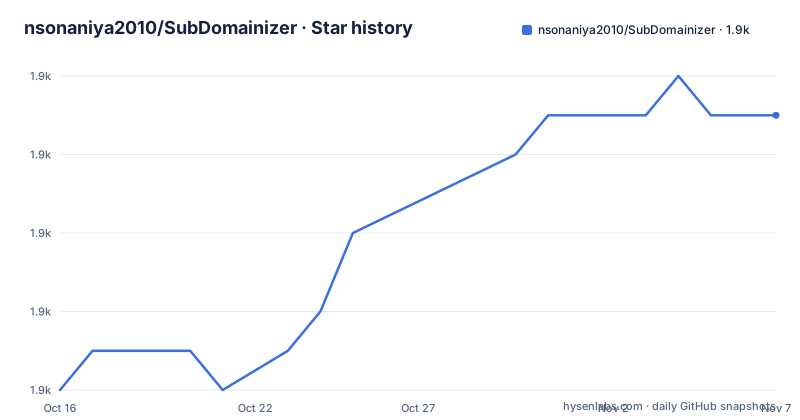
- nsonaniya2010/SubDomainizer1,909 ★ · +7
| Repository | 2026-10-16 | 2026-11-07 |
|---|---|---|
| nsonaniya2010/SubDomainizer | 1.9k | 1.9k |
7 Stars in the last 22 days, measured from the daily GitHub snapshot. Compare with other projects
Editorial analysis
What SubDomainizer Searches
SubDomainizer addresses a specific reconnaissance problem: finding names and exposed references connected with a target that are not visible in its main page or directory listing. Its documented inputs include a single URL, a list of URLs, a local folder, and GitHub content. The README describes it as a tool for finding hidden subdomains and secrets in webpages, external JavaScript files, and GitHub. It also extracts cloud-storage references from JavaScript content.
The supported cloud-storage categories listed in the README are Amazon AWS CloudFront, Amazon S3 buckets, DigitalOcean Spaces, Microsoft Azure, Google Cloud Services, Dreamhost, and RackCDN. These are discovery targets, not proof that a service is misconfigured. A URL found in JavaScript may be public by design, stale, owned by another organization, or associated with a deployment that is no longer active. SubDomainizer therefore fits the collection stage of a security assessment rather than the final validation stage.
The tool is written primarily in Python. Based on the repository layout, the main entry point is `SubDomainizer.py`, while the `subdomain/` directory contains the package. The repository also includes `requirements.txt`, `tests/`, and an MIT `LICENSE` file. The README documents both a command-line interface and a Python API based on `Scanner`, `ScanConfig`, and `ScanResult`.
How SubDomainizer Processes Targets
For a URL scan, the documented workflow is to inspect the page, identify external JavaScript files, retrieve their contents, and search those contents for subdomains, cloud URLs, and potential secrets. The folder option applies a similar collection idea to local files by scanning a directory recursively. That makes the tool relevant to repositories and local web assets, not only live websites.
The README's v3.0 section adds passive subdomain enumeration. It states that scans query crt.sh, the Wayback Machine, and HudsonRock Cavalier automatically, without extra flags. The `ScanResult` object separates several result categories: `subdomains`, `cloud_urls`, `secrets`, and `passive_dns`. The last category is documented as a dictionary mapping a source to subdomains returned by passive enumeration. Separating sources gives an operator a way to review where a name came from instead of treating all discoveries as equivalent.
Secret detection uses keywords, the Shannon Entropy formula, and a false-positive blacklist. The README explicitly calls this feature beta and warns that some results may be false positives. GitHub scanning is controlled with `-g` or `--gitscan`. The CLI table says a GitHub API token is required with `-g`, and `-gop` or `--gitsecretop` can save GitHub secrets separately.
Installing SubDomainizer from Git
The README gives a source-checkout installation procedure. Clone the repository, enter its directory, and install the dependencies listed in `requirements.txt`. The dependency file requests `termcolor`, `beautifulsoup4`, `requests`, `tldextract`, `colorama`, `pytest`, and `responses`.
The first documented check is the help command. It should print the available options without starting a scan.
git clone https://github.com/nsonaniya2010/SubDomainizer.git
cd SubDomainizer
pip3 install -r requirements.txt
The README also documents an update procedure for an existing checkout. A pull updates the tracked files, and the dependency command reinstalls or verifies the current requirements. It does not document a migration command or a formal version compatibility policy.
git pull
pip3 install -r requirements.txt
Because the README lists older releases while also describing v3.0 changes, an update should be reviewed rather than treated as an automatic compatibility guarantee. The current `requirements.txt` and checkout are the best sources for dependency and entry-point details.
First CLI Scan and Output Files
A basic first scan supplies one URL with `-u` or `--url`. The documentation uses `https://www.example.com` as its example target. The scanner should produce its normal terminal output for discovered subdomains, cloud URLs, or candidate secrets. The README does not specify the exact terminal layout, so the help output and the installed checkout are authoritative for that detail.
Subdomains can be written to a file with `-o` or `--output`. The `-j` or `--json` option prints all results as structured JSON to standard output, which is useful when the command is connected to another program. A dedicated secrets file can be requested with `-sop` or `--secretop`. When GitHub scanning is enabled, `-gop` or `--gitsecretop` controls the GitHub secrets output.
python3 SubDomainizer.py -h
python3 SubDomainizer.py -u https://www.example.com
python3 SubDomainizer.py -u https://www.example.com -o output.txt
python3 SubDomainizer.py -u https://www.example.com -j
The `-j` example is appropriate when another tool needs machine-readable results. The file-output example separates the subdomain list from the scanner's terminal display. Neither option documents a schema version, so consumers should inspect the JSON before relying on a particular field shape.
GitHub, Cookies, TLS, and SAN Options
SubDomainizer has separate controls for authenticated and network-specific behavior. The `-c` or `--cookie` option accepts a Cookie header value. The `-g` or `--gitscan` option enables GitHub scanning, and the CLI table says `-gt` or `--gittoken` supplies the required GitHub API token. These features are intended for content that is not available through an ordinary unauthenticated page request, but the README does not define GitHub API scopes or repository-selection rules.
The `-k` or `--nossl` option disables SSL certificate verification. That changes request behavior and should be used only when there is a specific reason, since disabled verification removes an important check on the server certificate. The README does not document a certificate store override or a pinning option.
The `-san` or `--subject_alt_name` option reads Subject Alternative Names from TLS certificates. Its documented values are `all` and `same`. The README describes `all` as collecting all domains and subdomains from certificates, while `same` restricts results to subdomains belonging to the same TLD. The following example uses the documented `all` value.
python3 SubDomainizer.py -u https://www.example.com -san all
python3 SubDomainizer.py -u https://www.example.com -c "test=1; test=2"
Python API, Folder Scans, and Constraints
The package API allows callers to configure request behavior before scanning. The documented `ScanConfig` fields are `cookie`, `ssl_verify`, `github_token`, `custom_domains`, `passive`, and `verbose`. The API supports one URL, multiple URLs with merged results, and recursive folder scanning. `ScanResult.to_json()` serializes the result.
The basic example imports `Scanner` and calls `scan_url`. The advanced example imports `ScanConfig`, passes a cookie and other settings, then scans a URL, several URLs, or a folder. The `custom_domains` value is a comma-separated list such as `example.com,foo.com`. At the CLI level, `-d` or `--domains` selects comma-separated TLDs for subdomain extraction.
The API example below follows the README's documented imports and method names.
from subdomain import Scanner, ScanConfig

config = ScanConfig(
    cookie="session=abc123",
    ssl_verify=True,
    github_token="ghp_...",
    custom_domains="example.com,foo.com",
    passive=True,
    verbose=False,
)

scanner = Scanner(config)
result = scanner.scan_url("https://www.example.com")
print(result.to_json())
The README does not explain the complete subdomain matching algorithm, conflict resolution between passive sources, timeout behavior, or how results are normalized. Those are material constraints for anyone building automated workflows around the package.
Validation Limits and an Alternative Collection Model
The main limitation is the gap between discovery and confirmation. The README states that secret detection is in beta and can produce false positives. Subdomain enumeration can also return names from public or passive sources that are unrelated to the current application. A cloud URL found in JavaScript does not establish that an S3 bucket is open to read or write, and the README does not claim that SubDomainizer performs those permission tests. The tool is therefore closer to a collector than a verifier.
Passive enumeration depends on external services. The documentation names crt.sh, the Wayback Machine, and HudsonRock Cavalier, but it does not document retries, timeouts, rate limits, or the behavior when a service is unavailable. GitHub scanning also introduces an access requirement because the CLI table states that a token is required with `-g`.
A real alternative is to use separate collectors for subdomain enumeration, JavaScript analysis, secret scanning, and GitHub search, then combine their outputs in another system. SubDomainizer's difference is that one CLI and package bring those collection categories together, including cloud-storage URL extraction and a unified `ScanResult`. That convenience does not replace provider-specific permission checks or manual review.
Maintenance, Licensing, and Upgrade Checks
The repository is not archived, and its last push was on 2026-09-14. The listed releases include v2.0 from 2020-10-06, v1.3 beta from 2018-12-13, and v1.2 from 2018-11-26, while the README also describes v3.0 changes. This difference between release history and README content makes version checking part of adoption work rather than an assumption.
The repository declares an MIT license. License obligations still need to be checked against the actual `LICENSE` file and the terms of any dependencies. Upgrading from an older checkout should include comparing CLI flags, package imports, `ScanConfig` fields, and dependency constraints in the current `requirements.txt`. The source update procedure is documented as `git pull` followed by `pip3 install -r requirements.txt`, but no migration policy is provided.
For a first adoption check, use `python3 SubDomainizer.py -h`, confirm the imports shown in the Python API, and compare the current requirements with the target environment. SubDomainizer is a reasonable collection tool for authorized research when those checks match, but its output still requires source-by-source validation.
Editorial conclusion
Adopt SubDomainizer when you need a focused discovery pass over a URL, JavaScript files, GitHub, or a local folder, but do not treat its findings as verified vulnerabilities. Check the current checkout's Python API, confirm that each target is authorized for scanning, and manually validate every secret and cloud-storage result before acting on it.
Frequently asked questions
How do I install SubDomainizer?
Clone the repository with `git clone`, change into `SubDomainizer`, and run `pip3 install -r requirements.txt`. The README documents this source-installation procedure.
What can SubDomainizer find?
It searches webpages, external JavaScript files, GitHub content, and local folders for subdomains, cloud-storage URLs, and potential secrets. The README lists AWS CloudFront, S3, DigitalOcean Spaces, Azure, Google Cloud Services, Dreamhost, and RackCDN among the supported cloud-storage services.
Are SubDomainizer secret results reliable?
No result should be treated as automatically verified. The README calls secret detection beta and states that keyword matching, Shannon entropy, and false-positive filtering can still produce false positives.
Does SubDomainizer require GitHub authentication for GitHub scans?
The CLI table says a GitHub API token is required with `-g` or `--gitscan`. The token is supplied with `-gt` or `--gittoken`.
Official sources
Add this badge to your README
If you maintain this project, the badge below links readers to this analysis and shows its maintenance status from the daily GitHub snapshot. Paste the markdown into your README; add ?metric=license or ?metric=stars to the image URL for a different field.

[](https://hysenlabs.com/projects/nsonaniya2010-subdomainizer)Star history chart for your README
[](https://hysenlabs.com/projects/nsonaniya2010-subdomainizer)Was this useful?