nucleic/enaml: Declarative Python Interfaces with Qt Constraints
Declarative User Interfaces for Python
At a glance
- What is it?
- Enaml is a declarative UI framework for Python applications built around Qt, symbolic layout constraints, and Atom-backed data models. It suits developers who want model updates to reach widgets automatically, while its custom language, Qt bindings, and compiled extensions add setup considerations.
- Who is it for?
- Adopt Enaml when the team wants a declarative Python view layer, symbolic layout, and automatic model-to-widget updates. Do not choose it for a lightweight static interface that only needs conventional Qt widgets.
- Can I use it commercially?
- Check first. The repository uses a licence we do not classify automatically, so read its LICENSE file before any commercial use.
- Is it still maintained?
- Yes. The repository last received commits 10 days ago.
- What is it written in?
- Mainly Python, according to GitHub's language statistics.
Answers come from the project's GitHub data, last synced on October 23, 2026, and from our analysis. They are not legal advice.
Star history
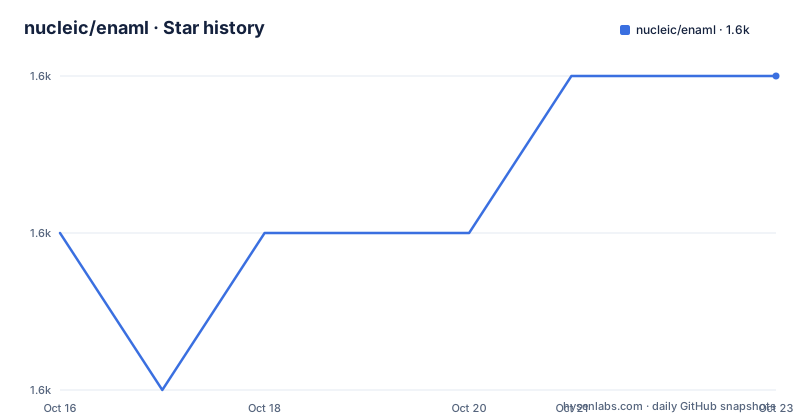
- nucleic/enaml1,579 ★ · +1
| Repository | 2026-10-16 | 2026-10-23 |
|---|---|---|
| nucleic/enaml | 1.6k | 1.6k |
1 Stars in the last 7 days, measured from the daily GitHub snapshot. Compare with other projects
Editorial analysis
What Enaml solves for Python GUI developers
Enaml addresses the part of application development where a Python application needs a desktop interface rather than a command line program. The README describes it as a programming language and framework for creating professional-quality user interfaces with minimal effort. Its target users are Python developers building native GUI applications, including small applications, specialised tools, and interfaces that need to change as the underlying data changes.
The project combines a declarative, Python-flavoured language with a collection of widgets, a constraints-based layout engine, and integration with Atom. This is a different starting point from creating a view by manually positioning controls and writing update code between model values and widgets. Enaml presents the interface structure in a form intended to be read at a glance, while Python can still be incorporated into the view layer.
The intended scope is broader than a single form. The repository includes examples for aliases, dynamic interfaces, functions, layout, styling, templates, widgets, workbenches, and a tutorial. That layout suggests Enaml is aimed at applications whose interface logic may grow beyond a one-window prototype. The README also mentions dockable items, validators, custom widgets, style sheets, and an optional editor that previews results as code is typed. Those features make the framework relevant to teams that want reusable UI structure rather than only a quick prototype.
Enaml is not a general Python web framework, a data-binding library by itself, or an alternative to every interface technology. Its documentation and repository focus on Qt-backed desktop interfaces and the Enaml-specific declarative model.
How Enaml connects declarations, models, constraints, and Qt
The visible architecture has four layers. First, an Enaml view declares widgets and their relationships in a Pythonic declarative language. Second, the widget layer provides ready-made controls built on Qt. Third, Kiwi supplies the constraints-based layout engine. Fourth, Atom supplies the data model integration.
The layout mechanism is symbolic rather than a sequence of pixel assignments. The README says that developers can state layout priorities without counting pixels, and that the engine adapts the interface for different platforms and window sizes. A constraint-based layout is particularly useful when resizing behaviour is part of the design. It also changes the implementation problem: the developer must express valid relationships and priorities, rather than calculating coordinates for each size.
The model-view connection is automatic according to the README. A GUI can detect model updates and refresh widgets without low-level update code. That makes Atom an important part of the practical design, rather than an optional extra unrelated to the DSL. The README also describes a separation between model and view, while allowing Python code directly in the view layer. In other words, Enaml does not require the application to become entirely declarative. It leaves a place for imperative Python when an interaction needs it.
Qt remains the rendering and widget foundation. PyQt and PySide are both supported, with separate optional dependency groups for Qt 5 and Qt 6. The repository therefore supports more than one binding choice, but the application still depends on a Qt backend and the corresponding extra.
Enaml installation and a first interface
The README does not provide a short installation command. It points new users to the Getting Started chapter and its installation instructions. The packaging metadata gives the concrete runtime requirement and optional dependency names, so the first check should be whether the environment satisfies those requirements before following the documentation.
The `pyproject.toml` metadata requires Python 3.11.2 or newer, despite the README describing applications as runnable on any platform supporting Python 3.10+. The packaging file is the more specific source for the current package requirement. It also defines extras for `qt5-pyqt`, `qt5-pyside`, `qt6-pyqt`, and `qt6-pyside`, plus optional integrations such as `matplotlib-qt`, `ipython-qt`, `webview-qt5-pyqt`, `webview-qt6-pyqt`, and `vtk-qt`.
The README sends users to the Employee Tutorial for a first real use. That tutorial is described as showing constraints and validators in an employee-oriented application. A sensible first exercise is to open the tutorial, create its interface declaration, add the model data it uses, and run it through the documented setup. The Button Ring example offers a different first check: it is explicitly presented as a deliberately unusual layout demonstration. If the constraints adapt as expected, the layout system is doing more than reproducing fixed widget coordinates.
The repository also contains examples under `examples/widgets/`, `examples/layout/`, `examples/dynamic/`, and `examples/styling/`. Those directories provide a concrete path for learning one feature at a time. The documentation does not state a universal command for running every example, so use the commands shown by the Getting Started documentation or the relevant example rather than assuming a project-wide runner.
Constraint layout and automatic updates as design trade-offs
Enaml's strongest design choice is the combination of symbolic constraints and model-driven updates. Conventional layout work often requires decisions about margins, sizes, anchors, and resize behaviour. Enaml moves those decisions into a constraint vocabulary and lets the layout engine resolve them. The README specifically claims adaptation across platforms and window sizes. That is useful for interfaces intended to run on Linux, Windows, and MacOSX, although automated testing is documented for those three platforms rather than for every platform named in the support list.
Automatic widget refresh changes the maintenance model. Instead of writing low-level synchronization code after a model value changes, the application can rely on the model integration. The trade-off is that the Atom data model and Enaml's declaration rules become part of the application's design. A developer coming from ordinary Qt code may need to understand how model members, subscriptions, and declarative widgets relate before the automatic update behaviour becomes predictable.
The constraints engine also introduces a debugging responsibility. A layout that cannot satisfy its declared priorities may not fail in the same way as a straightforward coordinate assignment. The README gives no documented diagnostics or recovery procedure for conflicting constraints, so teams should inspect the tutorial and examples for accepted constraint patterns rather than assuming that every layout request has an obvious resolution path.
Qt support, platform coverage, and backend choices
The backend is a significant adoption constraint. Enaml uses Qt, supports PyQt and PySide, and exposes separate dependency groups for Qt 5 and Qt 6. The metadata names `qt5-pyqt`, `qt5-pyside`, `qt6-pyqt`, and `qt6-pyside`; the exact package names and version floors are recorded there. This is better than treating Qt support as an invisible compatibility layer, because the selected binding must match the Qt generation used by the host environment.
The README says applications can run on platforms supporting Python and includes Linux, Windows, MacOSX, Android, and iOS. It also states that automated Enaml testing runs on Linux, Windows, and MacOSX. That distinction matters for production planning. A platform listed as supported by the general description is not the same as a platform covered by the documented automated test scope.
PySide is supported but not tested in CI because of lingering segmentation faults in the CI environment after the test suite completes, according to the README. PyQt is therefore the better documented CI path in the repository, although the project still supports PySide. The backend choice is not merely a packaging preference. Qt bindings, platform packaging, compiled components, and the behaviour of the final application all need to be considered before deployment.
Maintenance, releases, and the cost of adopting the DSL
The repository is not archived, and its last push was on 2026-10-13. The recent release list includes `0.19.0`, followed by `0.19.0-rc1` and `0.19.0-rc2`, all dated in October 2025. These facts indicate recent repository activity, but the repository does not define a long-term release policy or compatibility policy for applications built with Enaml.
Adoption has a language-learning cost. The application team must learn Enaml declarations in addition to Python and the selected Qt binding. It must also understand Kiwi constraints and Atom models when those features are used. Enaml includes compiled C++ extensions in `setup.py`, including modules for weak methods, callable references, signalling, functions, colours, fonts, dynamic scope, aliases, declarative functions, and subscription observers. That repository structure indicates a native build component, so installation environments must provide the build and runtime conditions expected by the package.
The `pyproject.toml` metadata identifies the project as `BSD-3-Clause`, and the README calls it a Modified BSD License, directing users to the `LICENSE` file. That is a license classification and source reference, not legal advice. Teams should read the actual `LICENSE` file and account for the Qt binding and other dependencies separately before redistribution.
When Enaml is the wrong choice
Enaml is a poor fit for a small interface that consists of a few conventional controls and has no need for symbolic layout or automatic model updates. Its declarative language and constraints model add concepts that a direct Qt widget implementation may not require. The README does not provide a benchmark or claim that Enaml is faster, smaller, or simpler for every application. Its stated benefits concern declarative structure, layout adaptation, model separation, and customisation.
It is also a poor match for teams that require every supported platform to have the same documented automated test coverage. The README explicitly limits automated testing to Linux, Windows, and MacOSX, while listing a broader platform range. Projects that need Android or iOS coverage should verify their own packaging and test process rather than relying on the general support statement.
An alternative approach is an imperative Qt interface using standard Qt widgets and explicit resize or layout code. Its advantage is a smaller conceptual surface for a straightforward application. Enaml's difference is that the developer declares widget relationships and model connections, then delegates layout resolution and refresh behaviour to Kiwi and Atom. The choice is between a more declarative application structure and a more direct Qt control flow, not between two interchangeable widget libraries.
Editorial conclusion
Adopt Enaml when the team wants a declarative Python view layer, symbolic layout, and automatic model-to-widget updates. Do not choose it for a lightweight static interface that only needs conventional Qt widgets. Verify first that Python 3.11.2 or newer is available, that the selected PyQt or PySide extra matches the Qt version, and that the project accepts Enaml's DSL and compiled extension modules.
Frequently asked questions
What is nucleic/enaml used for?
nucleic/enaml is used to build Python GUI applications with declarative interfaces, Qt widgets, symbolic layout constraints, and Atom-backed data models. The README presents it as a way to separate models and views while allowing automatic widget updates.
How do I install nucleic/enaml?
The README points users to the Getting Started installation instructions rather than giving one universal install command. The project metadata requires Python 3.11.2 or newer and defines Qt binding extras such as `qt5-pyqt`, `qt5-pyside`, `qt6-pyqt`, and `qt6-pyside`.
Does nucleic/enaml work with PyQt and PySide?
Yes. The README says both PyQt and PySide are supported. It also notes that PySide is not tested in CI because of lingering segmentation faults in the CI environment after the test suite completes.
What Python version does nucleic/enaml require?
The `pyproject.toml` metadata requires Python 3.11.2 or newer. The README describes applications as runnable on platforms supporting Python 3.10+, but the package metadata gives the more specific requirement.
Official sources
Add this badge to your README
If you maintain this project, the badge below links readers to this analysis and shows its maintenance status from the daily GitHub snapshot. Paste the markdown into your README; add ?metric=license or ?metric=stars to the image URL for a different field.

[](https://hysenlabs.com/projects/nucleic-enaml)Star history chart for your README
[](https://hysenlabs.com/projects/nucleic-enaml)Was this useful?