juxtaposejs: a before and after slider with data attributes and a JS API
JuxtaposeJS is a JavaScript library for making before/after image sliders
At a glance
- What is it?
- JuxtaposeJS is a JavaScript library from Knight Lab that turns a wrapper element and two image URLs into a draggable before and after slider, installable from a CDN, from npm, from bower, or from a generator page that needs no code at all. The judgement is that it is a small, understandable library whose one documented sharp edge is the credit string, which is rendered as HTML by design.
- Who is it for?
- juxtaposejs fits a newsroom, a classroom or a small site that needs to show a before and after pair of images with a drag handle, and it fits a team that wants to start from markup rather than from a configuration file. It is the wrong choice if your images must be compared with more than two states, or if you need the credit text to be sanitised for you, since the library renders that string as HTML on purpose and leaves the responsibility with the integrator.
- Can I use it commercially?
- Check first. The repository uses a licence we do not classify automatically, so read its LICENSE file before any commercial use.
- Is it still maintained?
- Yes. The repository last received commits 26 days ago.
- What is it written in?
- Mainly JavaScript, according to GitHub's language statistics.
Answers come from the project's GitHub data, last synced on November 7, 2026, and from our analysis. They are not legal advice.
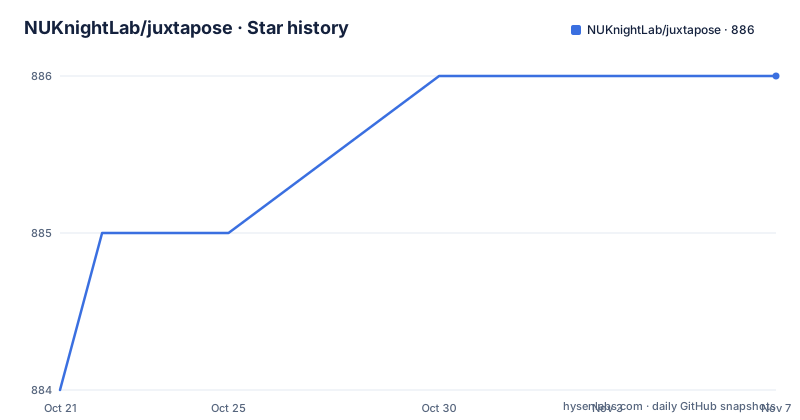
Star history
- NUKnightLab/juxtapose886 ★ · +2
| Repository | 2026-10-21 | 2026-11-07 |
|---|---|---|
| NUKnightLab/juxtapose | 884 | 886 |
2 Stars in the last 17 days, measured from the daily GitHub snapshot. Compare with other projects
Editorial analysis
Two image URLs and a drag handle
JuxtaposeJS is described as a simple, open source tool for creating before and after image sliders, and the promise in the README is that you provide two image URLs and Juxtapose does the rest of the work. It comes from Knight Lab, the Northwestern University lab behind projects such as TimelineJS, and the package metadata gives the contact as [email protected]. The audience is editorial. The typical use is a pair of images of the same scene at different times, a photograph before and after an intervention, or a map at two moments, with a handle the reader drags to reveal one or the other. There is a companion tool at juxtapose.knightlab.com that generates an embeddable snippet for any website and requires no coding knowledge, which is how a great many of the sliders in the wild were probably made, and the README points to it as the easiest way in. The library itself is the path for people who want to control the markup.
Four ways to get the files
Installation covers the range of hosting situations a 2014 era library met, and the options are still valid today. The first is a CDN hosted by Knight Lab, where you add a script and a stylesheet to the head of your page:
<script src="https://cdn.knightlab.com/libs/juxtapose/latest/js/juxtapose.min.js"></script>
<link rel="stylesheet" href="https://cdn.knightlab.com/libs/juxtapose/latest/css/juxtapose.css">
The second and third are the package registries, and the README notes that the two commands save the dependency to your package.json and bower.json requirement files respectively:
npm install --save juxtaposejs
bower install --save juxtapose
Note the two different names, juxtaposejs on npm and juxtapose on bower, which is the kind of detail that costs an hour when you guess wrong. There is also a Meteor package linked from the README, and the repository still carries a bower.json alongside the package.json. The npm manifest names the package juxtaposejs, lists the files it publishes, and gives the keywords image, ui, slider, juxtapose, before and after, with the homepage pointing at juxtapose.knightlab.com.
Markup with data attributes does most of the work
The HTML implementation is the one most people will use. You wrap the two images in a div with the juxtapose class, and the library turns that wrapper into the slider. The images can carry extra attributes, and each one has a purpose. A data-label attribute gives the slider a label on that image, which is how the two moments are titled on screen, and a data-credit attribute gives the credit line shown for that image. The wrapper itself takes options, and the documented set covers starting position, label and credit visibility, animation, and responsiveness. A data-startingposition value lets you focus the reader's attention on the part of the image where the change is most noticeable, and data-showlabels and data-showcredits toggle the two overlays. Setting data-animate to false disables the animated movement of the handle. There is one more worth knowing about, data-makeresponsive, which the README explains exists for people already using a responsive iframe solution such as pym.js who do not want Juxtapose's own built in responsive iframe, described in the README as opinionated. That is a small piece of honesty about where the library's opinions sit.
JXSlider for sliders you build in code
When the markup is not enough, the JXSlider class gives you the same slider under your own control. It takes three arguments, and the README is precise about them. The first is the string ID of the element you want to turn into a slider. The second is an array of two objects, each of which must have src defined and may optionally define label and credit. The third is an options object for the image slider, and the documented options mirror the data attributes, with animate, showLabels, showCredits, startingPosition and makeResponsive. The relationship between the two approaches is worth noting, because the HTML method is the friendly path and the class is the one you reach for when the image URLs are not known until runtime, which is the normal case for a site that stores content in a database.
Reaching a slider after the page has loaded
There is a small bridge between the declarative and the programmatic worlds, and it is one line. If you instantiated your sliders with the HTML method but still want to access one of your sliders programmatically, JuxtaposeJS creates an array of the JXSliders on your page that you can access with juxtapose.sliders. Once you hold a slider you can move the handle with the static updateSlider method, which takes a percentage indicating where you want the handle relative to the left side of the slider, and an animate flag that decides whether the handle animates to the new location. Styling is handled separately, by modifying the CSS, and the README links to the wiki page on styling the slider for the details. The practical result is that a slider can start in the position the markup dictates and then be driven by your own code, such as when a form field changes the image pair.
The credit string is HTML, on purpose
The security section is the most important paragraph in the README, and it is a deliberate design decision rather than an oversight. As part of rendering a juxtapose instance, the library renders a credit as HTML, passing the string directly through from the data-credit attribute or from the credit property of the configuration object. In the strictest sense, the README says, this exposes an XSS vulnerability, but the position taken is that for JuxtaposeJS to exist as a tool in a toolkit, it is both responsible and optimal to leave any HTML sanitising as the responsibility of integrators, who may have their own ideas about what is appropriate. The consequence for you is concrete. If you are providing a service that helps people create juxtapose instances, you should take appropriate responsibility for preventing the injection of malicious code. If you are embedding sliders with a fixed credit that you control, the exposure is theoretical, but if any part of the credit comes from user input, you need to sanitise it before it reaches the library.
Version drift between the tags, npm and the branch
The state of the project is worth reading carefully if you are putting it in front of users. The published GitHub releases are 1.0.5, 1.0.7 and 1.0.9, and all three are dated 2014-12-10, which tells you the tag history stopped there. The npm manifest, on the other hand, carries version 1.2.5, so the package you install from the registry is newer than anything the release page shows. The last push to the master branch was on 2026-10-13 and the repository is not archived, so work is still landing even though the tags are not moving. The tree also shows the shape of the project, with build, deploy, tasks and website directories, a fabfile.py, a requirements.txt holding Flask, boto3, gunicorn and requests, and a setuptools-15.1.zip checked into the repository, which dates the tooling generation. On licensing there is a discrepancy worth flagging, since the package metadata declares MPL-2.0 while the repository licence field is recorded as a custom licence that GitHub cannot classify, so the LICENSE file is the text to read before you ship it.
Editorial conclusion
juxtaposejs fits a newsroom, a classroom or a small site that needs to show a before and after pair of images with a drag handle, and it fits a team that wants to start from markup rather than from a configuration file. It is the wrong choice if your images must be compared with more than two states, or if you need the credit text to be sanitised for you, since the library renders that string as HTML on purpose and leaves the responsibility with the integrator. Before you use it, read the security section of the README, and if you are building a service that generates sliders for other people, treat the credit field as untrusted input.
Frequently asked questions
How do I add JuxtaposeJS to a page?
The CDN route is a script and a stylesheet in the head of your page, pointing at cdn.knightlab.com/libs/juxtapose/latest. The package route is npm install --save juxtaposejs or bower install --save juxtapose, and there is also a Meteor package. If you want no code at all, the generator at juxtapose.knightlab.com produces an embeddable snippet.
Which options can I set on the Juxtapose slider wrapper?
The documented data attributes are data-startingposition to focus attention on the part of the image where the change is clearest, data-showlabels and data-showcredits to toggle the overlays, data-animate to disable the animated handle, and data-makeresponsive to turn off the built in responsive iframe when you already use one.
Is the credit text in JuxtaposeJS safe to render?
The library renders the credit as HTML, passing it straight through from the data-credit attribute or the credit property, and the README calls that an XSS exposure in the strictest sense. It deliberately leaves sanitising to integrators, and warns anyone running a service that generates juxtapose instances to prevent malicious code injection themselves.
Official sources
Add this badge to your README
If you maintain this project, the badge below links readers to this analysis and shows its maintenance status from the daily GitHub snapshot. Paste the markdown into your README; add ?metric=license or ?metric=stars to the image URL for a different field.

[](https://hysenlabs.com/projects/nuknightlab-juxtapose)Star history chart for your README
[](https://hysenlabs.com/projects/nuknightlab-juxtapose)Was this useful?