NumPy 2.5: The Array Backbone That Every Python Project Builds On
GitHub describes it as The fundamental package for scientific computing with Python.. The repository metadata lists Python as its primary language. The metadata lists the NOASSERTION license. This article stays within the project description and details documented in the GitHub repository README.
At a glance
- What is it?
- NumPy is the foundational array library for Python scientific computing. This review covers what it does, how it works, how to run it, and the trade-offs of depending on it.
- Who is it for?
- Adopt NumPy if you need a stable, community-backed array foundation for scientific or numerical Python work, especially if you rely on the broader ecosystem that assumes it. Skip it only if your project is purely string or web-centric with no numeric core, or if you require strict zero-dependency control and are willing to build your own array layer.
- Can I use it commercially?
- Check first. The repository uses a licence we do not classify automatically, so read its LICENSE file before any commercial use.
- Is it still maintained?
- Yes. The repository received new commits within the last day.
- What is it written in?
- Mainly Python, according to GitHub's language statistics.
Answers come from the project's GitHub data, last synced on November 23, 2026, and from our analysis. They are not legal advice.
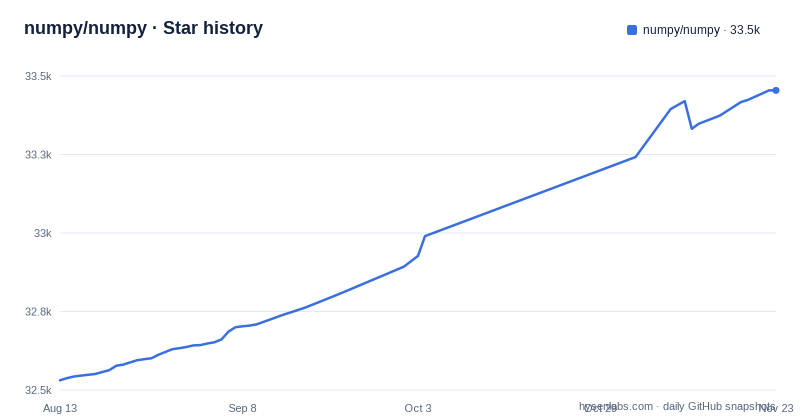
Star history
- numpy/numpy33,454 ★ · +923
| Repository | 2026-08-13 | 2026-11-23 |
|---|---|---|
| numpy/numpy | 32.5k | 33.5k |
923 Stars in the last 102 days, measured from the daily GitHub snapshot. Compare with other projects
Editorial analysis
Why NumPy Exists and Who Needs It
NumPy solves a specific problem: Python's native lists are slow and memory-hungry for numerical work. The package provides a powerful N-dimensional array object that stores homogeneous data in contiguous memory, which makes vectorized operations possible. It is the base layer for most of the scientific Python stack, including pandas, SciPy, scikit-learn, and many others. If you are an engineer building data pipelines, doing numerical simulation, or integrating C/C++ or Fortran code, NumPy is likely the floor your project stands on. If you only write web apps or string processing, you may never touch it directly, but you will still depend on it transitively through other packages.
The Core Mechanism: Arrays, Broadcasting, and Foreign Code
The heart of NumPy is the N-dimensional array object. Unlike Python lists, this array stores elements of a single type in a block of memory, which allows fast element-wise operations. The sophisticated broadcasting functions are what let you operate on arrays of different shapes without explicit loops. For example, you can add a scalar to a 2D array, and NumPy applies the operation across all elements. The package also provides tools for integrating C/C++ and Fortran code. This is not just a convenience: it means you can write performance-critical sections in a compiled language and call them from Python with a NumPy array as the data interface.
Getting It Running: Install and Test Commands
NumPy is distributed on PyPI and conda-forge. The README points to both as installation sources. After installation, you can verify your setup with a single Python command: python -c "import numpy, sys; sys.exit(numpy.test() is False)". This runs numpy.test(), which requires pytest. There are also optional test dependencies: Meson for testing the NumPy C API, Cython for testing the Cython API, and Hypothesis for property-based tests. The presence of these optional hooks matters if you plan to contribute or if you need to validate that your build works with the C API. The command is short, but it is a real gate: if it exits with a non-zero code, your installation is broken.
A Genuine Limitation: It Is a Dependency, Not a Solution
NumPy is not a full numerical computing environment. It gives you arrays, linear algebra, Fourier transforms, and random number capabilities, but it does not provide high-level statistical models, machine learning algorithms, or plotting. That is by design, but it means you will almost always need additional packages. A more concrete limitation is that the array object is homogeneous: every element must be the same type. If your data is mixed-type, you have to use structured arrays or fall back to object arrays, both of which sacrifice performance. Also, upgrading from 1.x to 2.x may break code that relied on deprecated behavior. You need to plan for migration, not assume drop-in compatibility.
The Real Alternative: Python Lists or Specialized Libraries
The obvious alternative is to avoid NumPy and use plain Python lists. For small data or occasional numeric operations, that is often fine. Lists are flexible, allow mixed types, and require no dependency. The trade-off is speed and memory: vectorized NumPy operations run in C loops, while list comprehensions run in Python, so for large arrays the difference is orders of magnitude. Another alternative is to use a specialized library like JAX or PyTorch, which offer GPU acceleration and automatic differentiation. Those libraries are heavier and have their own learning curves, but they build on NumPy-like APIs. If you know you need deep learning, skip NumPy and go straight to one of those. If you only need basic numeric work, NumPy's balance of simplicity and performance is hard to beat.
Maintenance and Upgrade Cost
NumPy is a mature project with a release cadence that is visible in recent versions: v2.5.4 in October 2026, v2.5.3 in September 2026, and v2.5.2 in August 2026. That is roughly one release per month, which is active maintenance. The README invites contributions and lists many ways to help beyond code, including reviewing pull requests, triaging issues, and writing documentation. The project is part of the Linux Foundation and NumFOCUS, which signals organizational backing. The license is listed as NOASSERTION in the repository metadata, which is unusual; the actual license is BSD-3-Clause, but you should verify that on the official website before relying on it. Upgrade cost is real: because NumPy is so foundational, a major version change can ripple through your entire dependency tree. You should always read the release notes before upgrading.
Editorial conclusion
Adopt NumPy if you need a stable, community-backed array foundation for scientific or numerical Python work, especially if you rely on the broader ecosystem that assumes it. Skip it only if your project is purely string or web-centric with no numeric core, or if you require strict zero-dependency control and are willing to build your own array layer. Before committing, verify the current release notes for any API changes that affect your code, and confirm that your other libraries are compatible with the 2.x series.
Frequently asked questions
What is NumPy in Python used for?
The readme lists what it provides: an N-dimensional array object, broadcasting functions, tools for integrating C/C++ and Fortran code, and linear algebra, Fourier transform and random number capabilities. The project describes itself as the fundamental package for scientific computing with Python.
Is NumPy written in C or C++?
The classifiers in pyproject.toml list only Programming Language :: C (not C++) alongside Programming Language :: Python, the build backend is mesonpy with Cython>=3.1.0, and the readme names tools for integrating C/C++ and Fortran code.
Can I pip install NumPy?
The readme gives no install command at all. It points to the PyPI project page and to the conda-forge channel as the distribution points, so which installer you use is a choice the documentation leaves open.
how to use numpy arrays
The N-dimensional array object is the first of the four things the readme says NumPy provides, with broadcasting functions listed alongside it. No usage example is given in the readme itself; examples live in the documentation at numpy.org/doc.
how to install numpy
Installation from source is not a one-line instruction in the readme. Building means the mesonpy backend, meson-python>=0.20.0 and Cython>=3.1.0, with the procedure in building_with_meson.md or INSTALL.rst, and the project also links PyPI and the conda-forge channel for prebuilt packages.
Official sources
Add this badge to your README
If you maintain this project, the badge below links readers to this analysis and shows its maintenance status from the daily GitHub snapshot. Paste the markdown into your README; add ?metric=license or ?metric=stars to the image URL for a different field.

[](https://hysenlabs.com/projects/numpy-numpy)Star history chart for your README
[](https://hysenlabs.com/projects/numpy-numpy)Was this useful?