Slim drops the closing tag and lets indentation hold the structure
Slim is a template language whose goal is to reduce the syntax to the essential parts without becoming cryptic.
At a glance
- What is it?
- Slim is a Ruby template language that removes angle brackets and closing tags in favour of indentation, then hands the same syntax to Rails 5, Sinatra and plain Rack through Temple and Tilt. The cost is that whitespace becomes part of the program, so editor and formatter settings decide whether a template still renders.
- Who is it for?
- Adopt Slim when the team already reads indentation based templates and wants to drop closing tags without changing frameworks, and keep the current engine when views are edited by people who think in plain HTML or when the view layer must stay free of plugins. Before switching, read CHANGES across the jump from v5.2.1 to v5.2.2 and decide whether the gem version comes from a tag or from main, because that two and a half year gap decides whether pinning is enough.
- Can I use it commercially?
- Yes. MIT is a permissive licence: you can use, modify and sell software built on it, as long as you keep its copyright and licence notices.
- Is it still maintained?
- Yes. The repository last received commits 20 days ago.
- What is it written in?
- Mainly Ruby, according to GitHub's language statistics.
Answers come from the project's GitHub data, last synced on November 13, 2026, and from our analysis. They are not legal advice.
Star history
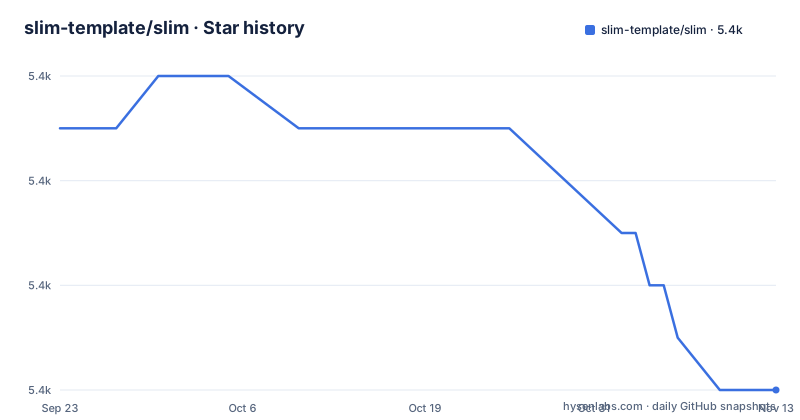
- slim-template/slim5,370 ★ · -5
| Repository | 2026-09-23 | 2026-11-13 |
|---|---|---|
| slim-template/slim | 5.4k | 5.4k |
-5 Stars in the last 51 days, measured from the daily GitHub snapshot. Compare with other projects
Editorial analysis
Slim drops the closing tag and keeps the angle bracket optional
The starting bet was subtraction. The README says Slim began as an exercise to see how much could be removed from a standard html template, and the removals listed are the angle brackets and the closing tags. What remains is one line per tag, with nesting expressed by where the line sits: one extra space of indentation is enough to open a block, and the depth itself is free, so a file may start at two spaces and switch to five further down without changing the output. Shortcuts absorb the common cases. `#` stands for `<div id="...">` and `.` stands for `<div class="...">` in the default configuration, which is how `#content` becomes a div carrying an id. Writing real HTML back is allowed too. A leading `<` behaves as an implicit verbatim marker, and an HTML style mode that keeps closing tags is part of the feature set, so a file can mix both shapes. Here is the shape of a first template.
Install the gem and name the view .slim
Installation is one command. There is no plugin to register and no initializer to write; the `.slim` extension is what selects the engine.
gem install slimInside an application the gem goes into the `Gemfile` instead, or it is required directly when you are running on plain Rack.
gem 'slim'What you should see is that nothing else changes in the application: the framework still resolves views the way it always did, and a file ending in `.slim` is compiled on demand. For a first template the smallest useful thing is a verbatim block, which is where the line indicators stop being abstract.
body
  p
    | This line is on the left margin.
       This line will have one space in front of it.
That example comes straight from the syntax walkthrough, and the parsing result is a `p` element carrying the text with the extra space intact.
Four characters decide whether a line is copied, escaped or executed
Line prefixes are the whole control vocabulary. `|` copies the line and every line indented further beneath it, escaping all processing, with the left margin set at the pipe plus one space and any additional spaces carried over. `|<`, `|>` and `|<>` add leading, trailing or both whitespace around that verbatim text, which is the mechanism for getting a deliberate space into output. The single quote does something narrower: it copies the line like `|` and guarantees one trailing space. A leading `<` is an implicit `|`, so raw markup can sit inside Slim structure without breaking it. `-` marks control code, the place for loops and conditionals, and two rules there catch people out. `end` is forbidden behind `-`, because blocks are closed by indentation and nothing else. A Ruby statement spread over several lines needs a trailing backslash on each line that continues. The consequence for a reader is that a Slim file cannot be skimmed like HTML; the prefixes have to be read on every line or the structure is invisible.
Temple parses, Tilt loads, and one engine serves Rails, Sinatra and Rack
The syntax is the visible half. Parsing and compilation go through Temple, and Slim is integrated into Tilt, which is what lets the same engine sit under Sinatra or plain Rack while Rails 5 and later are supported. The architectural claim in the README is that Temple allows the parsing and compilation process to be extended without monkey-patching, and the plugins listed are evidence of that route: logic-less mode, includes, and a translator plugin that provides I18n. Against ERB the difference is the one Slim started from, since an ERB template keeps the html as written with its brackets and closing tags while Slim's default style drops all three. Against Haml the difference is smaller because both are indentation based, and Jade arrived from the JavaScript side; the README states that syntax additions were influenced by how people use both, which is an admission that the language accreted rather than was designed once. Logic-less mode, described as similar to Mustache, is the escape hatch for teams who want the syntax but no Ruby in templates.
Output is escaped by default and html_safe? is the documented way out
Automatic HTML escaping is on, so an interpolated value is not a way to inject markup by accident. Rails' `html_safe?` is the documented way to declare that a value has been vetted, and the pairing matters in a language that invites interpolation in attribute position, as the syntax example does with `content=author` and `content=file_path("favicon.png")`. Tags and attributes have full Unicode support, so non-ASCII names are not the obstacle they would be in a hand-rolled lexer. What sits outside that guarantee is embedded markup: the verbatim examples in the README put raw `<tr>` and `<td>` tags straight into a line, which means the escaping boundary is drawn wherever somebody chooses a `|` line instead of `=`. Security review of a Slim view therefore has to read the line prefixes, not just the interpolations. The feature list also claims streaming support in Rails and speed comparable to ERB and Erubis, but the numbers are deliberately absent and the reader is pointed at a benchmark rake task instead.
Trailing whitespace is syntax, so formatters decide what your templates mean
The single quote indicator exists because one trailing space is easy to lose, which tells you how the language treats source whitespace in general. Indentation depth is chosen by the author rather than fixed, one space of extra depth is enough to open a block, and every line indented under a `|` is copied with its own leading spaces preserved. The cost lands on tooling rather than on the template. A formatter or editor that normalises whitespace, strips trailing spaces, or re-indents to a fixed width can change a template's structure or its output, and a stray extra space inside a control line can reparent markup without producing a syntax error. Nothing in the repository pins those settings: there is no linter configuration and no editor configuration at the top level, and the rake task the README names is a benchmark, which is an invitation to measure rather than a style checker. A team adopting Slim has to settle tab width and trailing whitespace in its own editor config, because Slim will not.
The repository ships code, tests and docs, and no editor integration
The top level of the repository is `.github/`, `.gitignore`, `.yardopts`, `CHANGES`, `Gemfile`, `LICENSE`, `README.jp.md`, `README.md`, `Rakefile`, `bin/`, `doc/`, `lib/`, `slim.gemspec` and `test/`. Read as a delivery, that is a library with tests, a documentation directory and a gemspec. Read as a day to day answer for a new contributor, something is missing: no file there configures an editor, so highlighting for `.slim` files and the indentation width a newcomer should use are decided per machine, outside the project. With an indentation sensitive language that is a real gap rather than a cosmetic one. The feature list calls Slim highly configurable and names the `#` and `.` shortcut tags as defaults; the API documentation on rubydoc.info covers the rest. Continuous integration is referenced through GitHub actions and the `.github/` directory,.
Release tags and commit pushes run on two different clocks
Two gaps sit in this history and they point in opposite directions. v5.2.0 shipped on 2023-11-11 and v5.2.1 followed on 2024-01-20, so that pair moved in about two months. The next jump runs from 2024-01-20 to 2026-07-24 for v5.2.2, which is two and a half years with no tagged release in between. The last push was on 2026-10-25, about thirteen weeks after that tag, and the repository is not archived. For an adopting team the split matters: commits land on `main` faster than releases are cut, so a `Gemfile` pointing at `main` gets changes that no packaged gem carries, and a `Gemfile` pinned to a tag waits for the next one. `CHANGES` at the top level is the file to read before an upgrade. `.yardopts` plus the rubydoc.info frames the README links are where the API surface is documented, `README.jp.md` means upstream documentation changes reach two languages, and the licence is MIT.
Editorial conclusion
Adopt Slim when the team already reads indentation based templates and wants to drop closing tags without changing frameworks, and keep the current engine when views are edited by people who think in plain HTML or when the view layer must stay free of plugins. Before switching, read CHANGES across the jump from v5.2.1 to v5.2.2 and decide whether the gem version comes from a tag or from main, because that two and a half year gap decides whether pinning is enough.
Frequently asked questions
How slim is Slim?
Slim is a template language, not a web framework or a web server. It removes the angle brackets and closing tags from a standard html template and expresses nesting through indentation instead, then runs inside Rails 5 and later, Sinatra, or plain Rack.
What does "slim" mean in Slim the template language?
The name describes what the syntax does to a template: it is a trimming exercise. The README says the project started as an attempt to see how much could be removed from a standard html template, and the result keeps one line per tag with no closing tag.
How do you install Slim and which file extension does it use?
Run `gem install slim`, or add `gem 'slim'` to the `Gemfile`, or require it with `require 'slim'`. After that the `.slim` file extension is all that is needed, with no initializer to write.
Can Slim render templates outside Rails?
Yes. Slim is integrated into Tilt, so it works with Sinatra and with plain Rack, and the README states support for Rails 5 and later.
Does Slim escape HTML automatically?
Automatic HTML escaping is on by default, and Rails' `html_safe?` is the supported way to mark a value as safe. Markup written directly on a verbatim line is not escaped, because that line is copied as it stands.
Official sources
Add this badge to your README
If you maintain this project, the badge below links readers to this analysis and shows its maintenance status from the daily GitHub snapshot. Paste the markdown into your README; add ?metric=license or ?metric=stars to the image URL for a different field.

[](https://hysenlabs.com/projects/slim-template-slim)Star history chart for your README
[](https://hysenlabs.com/projects/slim-template-slim)Was this useful?